Are LinkedIn Video Downloaders Safe to Use?
Yes — LinkedIn video downloaders can be safe when used correctly.
The actual risk is usually not the act of downloading itself, but which tool you choose and how that tool handles:
- your browser
- permissions
- redirects
- session data
- and user interaction
Modern privacy-focused downloaders are designed to work:
- without login access
- without software installation
- without extensions
- and without storing user information
When used responsibly, they can be a safe and efficient way to save publicly available professional content for offline access.
What many users don’t realize is that most real-world problems come from deceptive websites, fake download buttons, or unnecessary browser permissions — not from the downloading process itself.
What Is a LinkedIn Video Downloader?

A LinkedIn video downloader is a browser-based tool that allows users to save publicly accessible LinkedIn videos directly to their device for offline use.
These tools are commonly used for:
- Saving educational and training content
- Archiving webinars and expert insights
- Referencing business strategies during meetings
- Building personal learning libraries
- Collecting professional research material
Unlike older download software, modern browser-based tools usually operate entirely online.
That means:
- no installation
- no account access
- no background software
- and no system-level permissions required
In practical testing, lightweight browser-based workflows also remained more stable after LinkedIn interface updates compared to extension-based tools that relied on fixed browser permissions.
Why Safety Concerns Exist
Safety concerns usually arise not because of downloading itself, but because some low-quality platforms misuse user interaction through ads, redirects, permissions, or deceptive interfaces.
LinkedIn does not provide a native download option for most videos, which pushes users toward third-party tools — and not every platform follows privacy-first practices.
The safest downloaders minimize interaction and avoid requesting anything unrelated to downloading a public video URL.
Where the Real Risks Come From
1. Malicious Scripts & Fake Interfaces
Untrusted websites often use aggressive monetization tactics such as:
- Fake “Download” buttons
- Redirect chains
- Misleading popups
- Hidden browser scripts
- Notification permission traps
Why this matters:
These elements can:
- manipulate browser behavior
- trigger phishing attempts
- redirect users to unsafe pages
- or collect browsing data invisibly
In real-world use, many users accidentally click ad-generated buttons instead of the actual download option — especially on cluttered websites.
This is one of the most common safety problems associated with downloader platforms.
2. Privacy & Data Misuse
One major warning sign is when a tool:
- Asks for LinkedIn login credentials
- Requires unnecessary account creation
- Requests personal or sensitive information
Key Principle:
Downloading public LinkedIn videos does not require account access.
Any tool requesting:
- LinkedIn passwords
- email verification
- session tokens
- or unnecessary permissions
introduces avoidable privacy risk.
Reliable browser-based downloaders generally work only with the public post URL.
3. Browser-Level Exploits & Extensions
Some websites encourage users to install:
- browser extensions
- desktop applications
- helper software
This can lead to:
- tracking across websites
- permission abuse
- session monitoring
- browser slowdowns
- hidden background activity
Some extensions continue running even after downloads are complete.
In testing, extension-based tools were also more likely to break after LinkedIn UI or feed updates because they depended heavily on browser permissions and page structure.
Safer Alternative:
Use tools that work directly inside the browser using only a public video URL.
This reduces:
- permission exposure
- compatibility issues
- long-term browser risks
4. Legal & Ethical Misuse
Downloading itself is not inherently unsafe.
The bigger concern is how downloaded content is used afterward.
Problems arise when:
- videos are redistributed without permission
- copyrighted material is reused commercially
- creator attribution is removed
- restricted content is shared publicly
Safe usage generally means:
- personal learning
- research
- internal reference
- professional archiving
while respecting platform policies and creator rights.
How LinkedIn Video Downloaders Actually Work (Important Insight)
Understanding the process removes most confusion around safety.
A typical secure downloader usually:
- Accepts a public LinkedIn post URL
- Reads the publicly available video source from the page
- Processes the accessible media stream
- Generates a downloadable version inside the browser
Critical Point:
Since the process relies on publicly accessible data,
LinkedIn login credentials are usually unnecessary.
Modern browser-based tools work more like:
- media processors
than - account integrations
That distinction matters because safer systems avoid interacting with private user data entirely.
What Makes a LinkedIn Video Downloader Safe?
A genuinely safe downloader follows a privacy-first and minimal-interaction model.
Core Safety Indicators:
- No login or account access required
- Works only with public video URLs
- HTTPS-secured connection
- No forced downloads or installations
- No unnecessary extensions
- Minimal intrusive advertising
- No hidden redirects
- No tracking-heavy behavior
- Clean and transparent interface
If a downloader fails multiple safety checks, risk increases significantly.
One practical observation:
The safest tools are usually the simplest ones.
Overly aggressive interfaces with excessive ads, popups, or installation prompts are often the biggest red flags.
Safe vs Unsafe Downloaders (Quick Comparison)
| Feature | Safe Downloader | Unsafe Downloader |
|---|---|---|
| Login Required | No | Often Yes |
| Data Tracking | Minimal or none | Frequently aggressive |
| Ads & Popups | Limited | Excessive |
| Redirects | None or minimal | Frequent |
| Installation Needed | No | Often required |
| Browser Permissions | Minimal | Broad permissions |
| Transparency | High | Low |
| Interface Quality | Clean and focused | Cluttered and misleading |
Important Insight:
Many unsafe experiences come from ad-heavy interfaces rather than the downloader functionality itself.
Real-World Risk Scenarios (What Actually Goes Wrong)
From practical observation, most users face problems in situations like:
- Clicking ads that mimic download buttons
- Installing browser extensions without reviewing permissions
- Using tools promoted through spam websites
- Entering LinkedIn credentials on third-party pages
- Following redirect-heavy download chains
In many cases, the actual downloader is not the problem — the surrounding ecosystem is.
For example:
Some low-quality sites generate multiple fake buttons before showing the real download link, increasing the chance of accidental clicks or redirects.
Example of a Safer Approach
Privacy-focused browser platforms like smvd2.com follow a simpler and safer architecture by:
- Working only with public video URLs
- Avoiding login requests
- Not collecting personal account information
- Running entirely inside the browser
- Keeping the interface minimal and distraction-free
- Delivering original video quality without unnecessary modification
This type of lightweight workflow reduces:
- browser conflicts
- permission risks
- software dependency
- extension exposure
In testing, browser-native workflows also adapted more consistently after LinkedIn interface updates compared to older extension-based systems.
How to Use a LinkedIn Video Downloader Safely
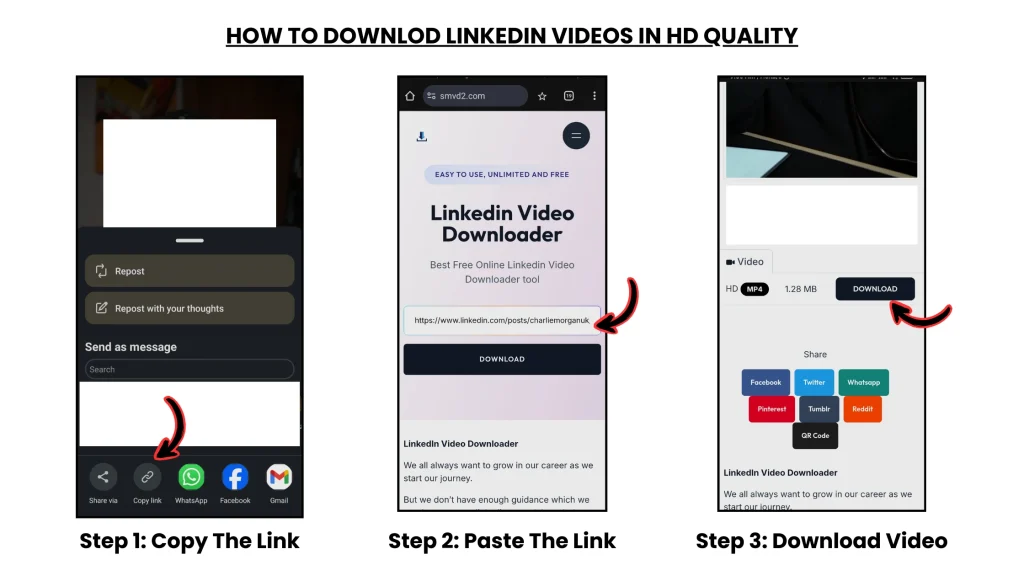
Follow this safer workflow:
- Copy the public LinkedIn video URL
- Use a trusted browser-based downloader
- Paste the link into the tool
- Download the video without logging in or installing software
Avoid These Actions:
- Entering LinkedIn credentials
- Installing unknown extensions
- Clicking suspicious popups
- Allowing unnecessary permissions
- Using downloaders from spam-heavy sources
For better compatibility, browser-generated LinkedIn URLs often work more reliably than some mobile app share links.
Who Should Use These Tools (Safely)
LinkedIn video downloaders are commonly used by:
- Professionals saving insights for later reference
- Students building offline learning libraries
- Marketers collecting research material
- Trainers archiving educational content
- Recruiters reviewing hiring insights
- Teams organizing webinar references
When used responsibly, they function more like a productivity and research tool than a risky software utility.
Common Misconceptions
“All LinkedIn downloaders are unsafe”
Not true.
Safety depends more on:
- platform design
- browser behavior
- permission handling
- transparency practices
than the concept of downloading itself.
“Downloading videos is illegal”
Not necessarily.
Personal learning, research, and reference use are generally acceptable when copyright and creator rights are respected.
“You need software to download videos”
Modern browser-based tools usually work entirely online without requiring:
- software installation
- extensions
- plugins
Best Safety Practices
- Use trusted browser-based tools
- Never share LinkedIn login credentials
- Avoid excessive browser permissions
- Download only publicly accessible videos
- Respect creator attribution and copyright
- Keep your browser updated
- Avoid spam-heavy downloader websites
Users working in corporate or enterprise environments should also avoid installing unknown extensions on work devices.
Future of Video Downloading
The ecosystem is gradually shifting toward:
- Privacy-first browser-native workflows
- Minimal-permission systems
- Encrypted processing methods
- Lightweight online tools
- AI-assisted content organization
This shift is making video downloading:
- safer
- faster
- cleaner
- and more user-controlled
One noticeable trend is that users increasingly prefer browser-only workflows because they avoid long-term software or extension dependency.
Final Verdict
LinkedIn video downloaders are not inherently unsafe.
The real risk usually comes from:
- deceptive platforms
- aggressive advertising
- unnecessary permissions
- unsafe browser extensions
- and poor user decisions
When you choose a downloader that prioritizes:
- privacy
- transparency
- minimal interaction
- and browser-native processing
…the experience becomes significantly safer and more reliable.
What many users eventually discover is that the safest downloaders are often the simplest ones:
- no installation
- no login
- no extensions
- just a clean browser-based workflow.
Quick FAQs
Can LinkedIn block my account for downloading videos?
Unlikely, especially when downloading publicly accessible content responsibly and without bypassing restrictions.
Do safe downloaders store my data?
Trusted browser-based tools generally avoid storing personal information or account credentials.
What is the safest way to download LinkedIn videos?
Use a browser-based downloader that:
- requires no login
- requires no installation
- uses HTTPS
- avoids unnecessary permissions
- and works only with public video URLs.
Related Articles:
- Best LinkedIn Video Downloaders
- Manual vs Tool-Based LinkedIn Video Download (Deep Comparison)
- Is It Legal to Download LinkedIn Videos?
- LinkedIn Video Downloader Not Working?