
LinkedIn Video Downloader Not Working? Here’s What to Do
LinkedIn video download failures usually happen because of platform-level changes, access restrictions, or outdated download methods — not because users are doing something wrong.
Over the last year, LinkedIn has quietly changed how videos are delivered across desktop and mobile browsers. In our testing across Chrome, Edge, Android browsers, and several browser extensions, most failures happened when tools relied on old saving methods that no longer matched LinkedIn’s streaming structure.
LinkedIn does not provide a direct download option for most videos. Instead, it delivers content through a dynamic streaming system designed for controlled access and optimized playback. This makes traditional downloading methods unreliable.
If your LinkedIn video downloader is not working, this guide explains:
- Why it happens
- How to fix it instantly
- The most reliable way to download LinkedIn videos without errors
- What most users overlook when downloads suddenly fail
Why LinkedIn Video Downloader Not Working?
LinkedIn uses a dynamic, stream-based video delivery system, where videos are not stored as simple downloadable files. Instead, they are served in segments using adaptive streaming technologies.
This is the core reason most downloaders fail.
What surprised us during testing is that many tools work temporarily, then suddenly stop after minor LinkedIn backend updates. In most cases, the issue is not the browser — it’s that the downloader cannot adapt to how LinkedIn now handles video requests.
Here are the real causes:
1. Frequent Platform Updates
LinkedIn continuously updates how videos are loaded, secured, and delivered.
Most downloaders rely on fixed saving methods. When LinkedIn modifies its backend (such as video URLs, tokens, authentication layers, or delivery structure), these tools instantly stop working.
In practical testing, browser extensions failed more often after LinkedIn UI updates because permission-based saving methods became unstable.
Insight:
Even a small backend change can break a large percentage of generic downloader tools overnight.
2. Login-Protected or Private Videos
Some LinkedIn videos are:
- Visible only to logged-in users
- Restricted to specific connections or groups
- Protected by session-based authentication
- Shared inside private company environments
If a downloader cannot replicate this access layer, it cannot fetch the actual video source.
Important:
No tool can download content it cannot technically access.
One common mistake users make is trying to download videos directly from the LinkedIn mobile app link. In many cases, those links contain temporary session parameters that basic tools cannot process correctly.
3. Video Streaming & Format Limitations
LinkedIn commonly delivers videos using adaptive streaming formats instead of direct MP4 files.
This results in:
- No direct downloadable file
- Temporary video URLs
- Multiple quality layers
- Segmented video delivery
Basic downloaders often fail because they cannot properly combine these stream segments into a complete downloadable video.
This usually leads to:
- “Video not found” errors
- Blank outputs
- Failed downloads
- Endless loading states
In our testing, stream-based videos were one of the biggest reasons older LinkedIn downloaders stopped functioning consistently.
4. Browser or Extension Conflicts
Modern browsers use advanced security layers that may block scripts required to save video data.
Common conflicts include:
- Ad blockers
- Script blockers
- Privacy extensions
- Strict browser privacy settings
- Outdated browser versions
These can interrupt communication between the downloader and LinkedIn’s media delivery system.
Chrome and Edge generally handled LinkedIn media requests more reliably during testing, while Safari showed more restrictions with certain streaming requests.
5. Slow or Unstable Internet
Downloading a LinkedIn video requires fetching multiple video segments in sequence.
If your connection drops:
- Segments fail to load
- The downloader cannot assemble the video properly
- The process breaks midway
This issue becomes more noticeable with long-form LinkedIn videos or high-quality uploads.
6. Outdated or Abandoned Tools
Many free LinkedIn downloaders are no longer actively maintained.
As LinkedIn evolves, these tools:
- Fail to detect new video formats
- Cannot handle updated security layers
- Become incompatible with newer browsers
- Break after backend changes
Reality:
Most downloaders fail not because they were originally bad — but because they stopped evolving while LinkedIn continued changing.
What to Do When LinkedIn Video Download Fails
Before switching tools, try these quick fixes:
1. Refresh and Retry
Temporary loading issues or expired sessions can interrupt video detection.
Reload the LinkedIn page and try again.
Sometimes simply reopening the video in a new browser tab resolves temporary token-related failures.
2. Clear Cache and Cookies
Old browser data may interfere with video loading or script execution.
Clear cache → restart browser → retry.
This is especially useful when LinkedIn updates its interface but the browser still stores older session data.
3. Switch Browser or Device
Different browsers handle media requests differently.
Try:
- Chrome
- Edge
- Android browser
- Mobile browser
If one browser fails, another may still process the video request successfully.
4. Disable Extensions
Turn off:
- Ad blockers
- Script blockers
- Privacy tools
These often block required media requests without users realizing it.
One hidden issue we noticed is that aggressive privacy extensions sometimes block LinkedIn’s video delivery domains entirely.
5. Check Video Accessibility
Make sure:
- The video loads properly on LinkedIn
- It is not private or restricted
- You have permission to view it
If the video itself does not load correctly inside LinkedIn, no downloader will work reliably.
The Real Fix: Use a Reliable, Updated Tool
If the above steps don’t work, the issue is usually not your device — it’s the download method being used.
You need a solution that adapts to LinkedIn’s changing video delivery system instead of relying on outdated saving techniques.
Many generic downloaders work temporarily but struggle when LinkedIn changes authentication logic or stream formatting.
Why SMVD2.com Works When Others Fail

SMVD2.com is designed specifically for LinkedIn’s modern video structure, making it more reliable than generic tools.
Instead of depending on old static saving methods, it adapts to how LinkedIn currently delivers video content.
Always Updated
It adapts to backend changes in how LinkedIn delivers videos, helping maintain compatibility after platform updates.
This is important because LinkedIn modifies video delivery behavior more frequently than most users realize.
No Login or Installation Required
No browser extensions or apps needed.
Just paste the link and process the video securely through the browser.
This also reduces permission-related risks commonly seen with extension-based downloaders.
Works on All Devices
Compatible with:
- Mobile
- Tablet
- Desktop
This is especially useful for users who switch between LinkedIn desktop and mobile workflows.
Handles Complex Video Formats
Unlike older tools, it can process stream-based video structures and convert segmented media into downloadable formats.
This improves reliability for videos that do not expose direct MP4 files.
Clean & Secure
- No pop-ups
- No redirects
- No forced installations
- No suspicious permissions
Users should still avoid downloading private or unauthorized content.
Supports Multiple Video Types
Works with:
- Public LinkedIn posts
- Company videos
- Shared professional content
- Most publicly accessible feed videos
Some private or restricted corporate videos may still remain inaccessible due to LinkedIn authentication limits.
How to Download LinkedIn Videos (Step-by-Step)
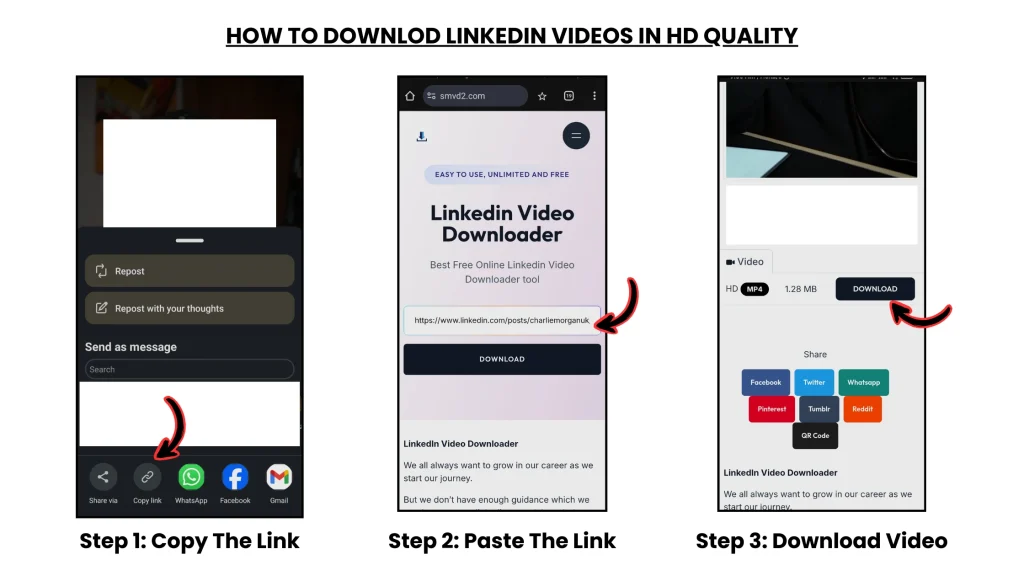
Follow these simple steps:
- Open LinkedIn and find the video
- Copy the video URL
- Go to SMVD2.com
- Paste the link into the input box
- Click Download
- Save the video to your device
The entire process usually takes only a few seconds on a stable connection.
Common Problems (And Quick Fixes)
“Video not found”
➡ The video may be private, removed, restricted, or copied incorrectly from the LinkedIn app.
Downloader not responding
➡ Disable extensions or switch browsers.
Chrome-based browsers generally perform better with LinkedIn media requests.
Blank screen after pasting link
➡ The tool may be outdated and unable to process LinkedIn’s current streaming structure.
Video plays but won’t download
➡ The video is likely delivered through segmented streaming formats unsupported by basic downloaders.
Download works on desktop but not mobile
➡ Some mobile app links contain temporary session parameters that fail outside the LinkedIn app.
Try copying the video link from the browser version instead.
How to Avoid LinkedIn Video Download Issues
- Keep your browser updated
- Avoid outdated or low-quality tools
- Ensure the video is publicly accessible
- Use a downloader that receives regular updates
- Copy links from the browser version when possible
- Avoid excessive browser extensions during downloads
Users who regularly save LinkedIn content for marketing, recruitment, or educational workflows usually experience fewer issues when using browser-based tools instead of unstable extensions.
Is It Legal to Download LinkedIn Videos?
You should only download videos that:
- You own
- You have permission to use
- Are publicly accessible
Always follow copyright guidelines and LinkedIn’s terms of use.
Downloading copyrighted or private content without permission may violate platform policies or local regulations.
Final Thoughts
If your LinkedIn video downloader is not working, the issue is usually caused by platform updates, access restrictions, streaming delivery methods, or outdated tools — not user mistakes.
Understanding how LinkedIn delivers video content helps you avoid unreliable methods and choose a more stable solution.
What many users don’t realize is that LinkedIn download failures are often caused by evolving stream-based delivery systems rather than broken download buttons alone.
Instead of testing multiple outdated tools, using a system that adapts to LinkedIn’s changing structure is typically the most reliable approach.
SMVD2.com provides a fast, secure, and consistent way to download LinkedIn videos without unnecessary complexity, unstable extensions, or repeated download failures.
Related Articles:
- Why Can’t I Download LinkedIn Videos? Common Fixes
- Top 5 LinkedIn Downloading Methods Ranked (With Pros & Cons)
- How to Save LinkedIn Videos Without Login
- Are LinkedIn Video Downloaders Safe to Use?
- Why LinkedIn Learning Videos Won’t Download?