A LinkedIn video downloader lets you save publicly available LinkedIn videos so you can watch them whenever you need them without depending on your feed, notifications, or LinkedIn‘s recommendation system.
At first glance, it may seem like you’re simply downloading a video. In reality, you’re preserving valuable professional knowledge that could otherwise disappear beneath a constant stream of new content.
Whether it’s a marketing strategy, a hiring framework, or a founder sharing real business lessons, saving important videos gives you the freedom to revisit them when they’re actually useful, not just when the algorithm happens to show them again.
The Reality: LinkedIn Is Built for Discovery, Not Long-Term Knowledge Retention
LinkedIn has evolved from just being a professional networking platform to a content based platform. Today, it’s one of the largest places where professionals openly share practical experience through video.
Every day, you’ll find content covering topics such as:
- Growth strategies
- Hiring insights
- Marketing campaigns
- Sales frameworks
- Business case studies
- Leadership lessons
- Product development
- Entrepreneurship
Instead of lengthy blog posts, many creators now explain their ideas through short, practical videos.
- Founders document how they build companies.
- Marketers break down successful campaigns.
- Recruiters discuss hiring trends and interview techniques.
- Sales professionals explain outreach strategies.
- Operators share systems that improve business performance.
This shift has made LinkedIn an increasingly valuable learning platform for professionals across almost every industry.
However, the platform is designed with a different goal in mind.
LinkedIn is optimized to help users discover fresh content every day.
It encourages:
- Content discovery
- Engagement
- Scrolling
- Conversations
- Continuous activity
It is not designed to help users build a long-term library of knowledge.
That distinction matters.
Finding useful information is easy.
Finding that same video several months later, when you’re ready to apply the idea is often much harder.
The Real Problem Most Professionals Face
Think about how this usually happens.
You come across an insightful LinkedIn video.
It contains a framework you want to try, a hiring strategy you plan to revisit, or a marketing lesson that could help with a future project.
You decide to watch it later.
A few days pass.
The post disappears beneath hundreds of newer updates.
You remember the idea but not the creator.
You search LinkedIn again.
Instead of finding the original video, you’re presented with entirely different content.
Even bookmarks don’t always solve the problem. As they accumulate over time, they become another list that’s difficult to organize and revisit.
The result is something many professionals experience without realizing it:
- Valuable insights get buried.
- Good ideas are forgotten.
- Learning becomes fragmented.
- Useful content stays inside the feed instead of becoming a lasting resource.
The challenge isn’t discovering knowledge.
The challenge is keeping it accessible when you actually need it.
The Gap
Most professionals don’t struggle because there isn’t enough information available.
They struggle because important information isn’t easy to retrieve once it disappears from the feed.
Over time, this creates a gap between consuming knowledge and applying knowledge.
Videos that could have helped solve a problem later are often forgotten simply because they weren’t preserved in an organized way.
A LinkedIn video downloader helps close that gap by giving you a practical way to save publicly available educational content for future reference.
Why LinkedIn Doesn’t Allow Direct Downloads
Many people assume the lack of a download button is a technical limitation.
It isn’t.
Like most social platforms, LinkedIn is designed to keep content within its own ecosystem.
This approach supports several goals:
- Encouraging users to return to the platform
- Maintaining engagement and watch time
- Protecting creators and their content
- Managing how content is distributed
- Preserving platform analytics and performance metrics
If every public video could be downloaded directly from LinkedIn, users would have fewer reasons to revisit the platform, and creators would have less visibility into how their content performs.
That’s why LinkedIn doesn’t provide a universal download option for public videos.
For users, this means something important.
You can easily discover valuable professional content.
But your long-term access to that content still depends on whether the post remains available, whether you can find it again, and whether the platform surfaces it when you search.
Saving publicly available videos responsibly allows you to maintain access to educational resources without relying entirely on the feed or recommendation algorithm.
Real-World Impact (What This Actually Costs You)
At first, not being able to save a LinkedIn video may seem like a minor inconvenience.
In practice, the impact becomes much more noticeable over time—especially if you regularly rely on LinkedIn for learning, research, or professional development.
Consider a few common situations:
- A marketer finds an excellent campaign breakdown but can’t locate it when planning the next campaign.
- A student watches a tutorial that solves a specific problem but struggles to find it again before an assignment or interview.
- A founder remembers a useful business framework but can’t recall who shared it.
- A recruiter wants to share a hiring strategy with the team but the original post has disappeared from the feed.
- A job seeker remembers interview advice but spends valuable time searching instead of preparing.
Individually, these situations may seem insignificant.
Together, they create recurring challenges that reduce productivity.
Long-Term Effects
Over time, relying only on the LinkedIn feed can lead to:
- Repeated searches for the same information
- Lost productivity
- Fragmented learning
- Missed implementation opportunities
- Difficulty building a personal knowledge base
One pattern many professionals recognize is that discovering useful content is rarely the problem.
The real challenge begins weeks or months later—when they know the information exists but can’t find it when they actually need it.
The Smarter Solution: Build Your Own Knowledge Library
This is where a LinkedIn video downloader becomes genuinely useful.
Its value isn’t simply in downloading videos.
Its real value lies in helping you create a personal library of professional knowledge that remains accessible whenever you need it.
Instead of relying entirely on algorithms or bookmarks, you can organize valuable content into categories that match your work, learning goals, or projects.
The objective isn’t to collect hundreds of random videos.
It’s to preserve the ones that continue providing value long after they disappear from your feed.
What a Good Downloader Actually Enables
A reliable LinkedIn video downloader should help you:
- Save publicly available videos in seconds
- Watch content offline whenever convenient
- Organize videos into meaningful categories
- Build a searchable personal learning library
- Spend less time searching for previously viewed content
- Revisit important ideas when they’re relevant to your work
When used thoughtfully, downloaded videos become reference material rather than forgotten content.
Real Insight
One practical approach many professionals follow is treating valuable LinkedIn videos the same way they would treat important documents or research notes.
Instead of relying on bookmarks alone, they create organized folders based on topics such as:
- Growth Marketing
- Paid Advertising
- Sales
- Recruitment
- Business Operations
- Leadership
- Product Management
This simple habit makes it easier to revisit information during real projects instead of searching for it from scratch every time.
The biggest advantage isn’t having more content.
It’s being able to retrieve the right content at exactly the right moment.
Key Insight
Knowledge becomes significantly more useful when it’s organized and easy to access.
Information that remains available is far more likely to be applied than information that’s buried inside an endless social feed.
How an Online LinkedIn Video Downloader Works
Although every tool works a little differently, most browser-based LinkedIn video downloaders follow a straightforward process.
- A public LinkedIn video URL is provided.
- The tool retrieves the publicly accessible video source.
- The video is processed.
- A downloadable file typically in MP4 format is generated.
The entire process is usually completed within a few moments, depending on your internet connection and the availability of the original video.
Why This Matters
A browser-based downloader offers several practical advantages:
- No software installation required
- No browser extensions necessary
- Works across multiple devices
- No need to share your LinkedIn password
- Quick access to publicly available content
For users who only need occasional downloads, this approach is often simpler than installing additional software.
Downloader vs Alternatives (Real Comparison)
There are several ways people try to save LinkedIn videos.
Each method has its own advantages and limitations.
| Method | Main Limitation |
| Screen Recording | May reduce video quality and often requires manual trimming or editing |
| Bookmarking | Saved posts can become difficult to organize and relocate over time |
| Searching Again | Time-consuming and dependent on LinkedIn’s search and recommendation systems |
| Browser-Based LinkedIn Video Downloader | Provides direct access to publicly available videos for offline reference |
The Key Difference
Bookmarks still depend on the platform.
Downloaded videos give you independent access to educational content whenever you need it.
For professionals who regularly revisit frameworks, tutorials, or case studies, that difference can save both time and effort.
What Most People Get Wrong
One common assumption is:
“I’ll remember where I saw this.”
In reality, that rarely happens.
Professional feeds change quickly.
New posts replace older ones.
Creators publish fresh content every day.
Even if you remember the idea itself, remembering exactly where it came from is much more difficult.
Another common mistake is saving everything without any organization.
A folder containing hundreds of unrelated videos isn’t much more useful than an overflowing bookmark list.
A better approach is to be selective.
Save only the content you’re genuinely likely to revisit, organize it into meaningful categories, and review it when it’s relevant to your work or learning goals.
The value doesn’t come from downloading more videos.
It comes from making valuable knowledge easier to find and easier to apply.
What Makes a Reliable LinkedIn Video Downloader?

Not every LinkedIn video downloader offers the same experience.
While most tools claim to provide fast downloads, the features that actually matter are the ones that make the process simple, reliable, and secure.
When choosing a downloader, professionals typically look for:
- No LinkedIn login requirement
- Fast processing
- Original video quality
- No added watermark
- Support for multiple devices
- Privacy-focused operation
- Simple browser-based access
A good downloader should remove unnecessary complexity rather than add it.
A Practical Observation
One of the easiest ways to evaluate a downloader is by looking at what it asks from you.
If a tool requires your LinkedIn username or password just to download a public video, that’s usually an unnecessary risk.
For publicly available content, a browser-based downloader that works directly from the video URL is often the safer and more convenient option.
What Types of Videos Can You Save?
A LinkedIn video downloader is designed for publicly accessible videos.
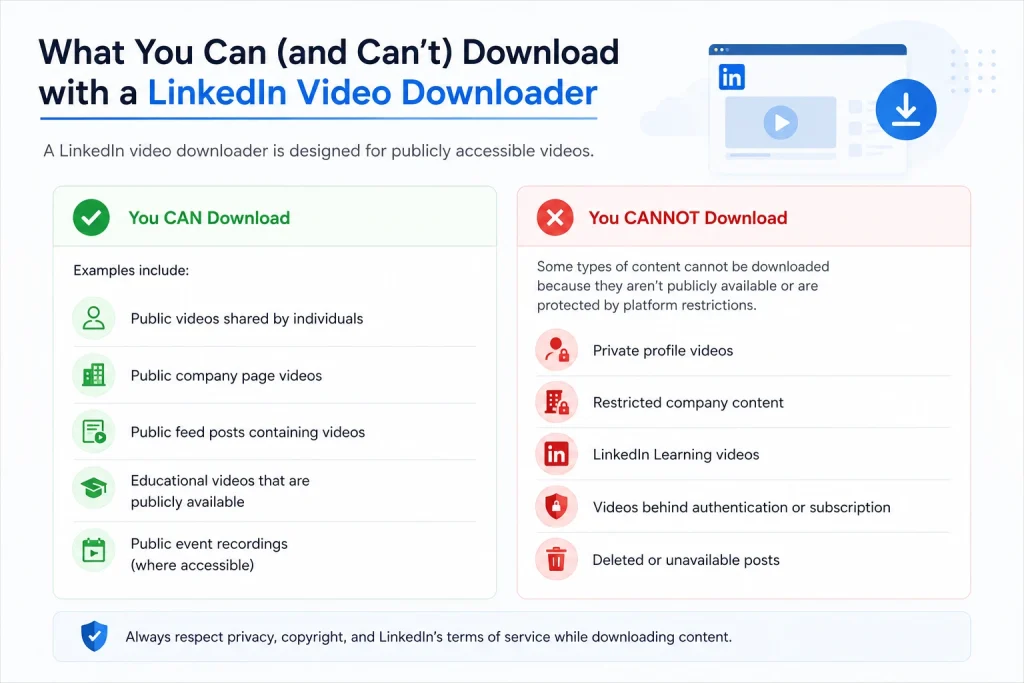
Examples include:
- Public videos shared by individuals
- Public company page videos
- Public feed posts containing videos
- Educational videos that are publicly available
- Public event recordings (where accessible)
Some types of content cannot be downloaded because they aren’t publicly available or are protected by platform restrictions.
These commonly include:
- Private profile videos
- Restricted company content
- LinkedIn Learning videos
- Videos behind authentication or subscription
- Deleted or unavailable posts
Quick Reference
| Video Type | Generally Supported |
| Public Feed Videos | ✓ |
| Public Company Posts | ✓ |
| Public Profile Videos | ✓ |
| LinkedIn Learning Videos | ✗ |
| Private or Restricted Videos | ✗ |
| Deleted Posts | ✗ |
Knowing these limitations helps set realistic expectations and avoids unnecessary troubleshooting.
Step-by-Step: How to Download LinkedIn Videos
Downloading a public LinkedIn video is usually straightforward.
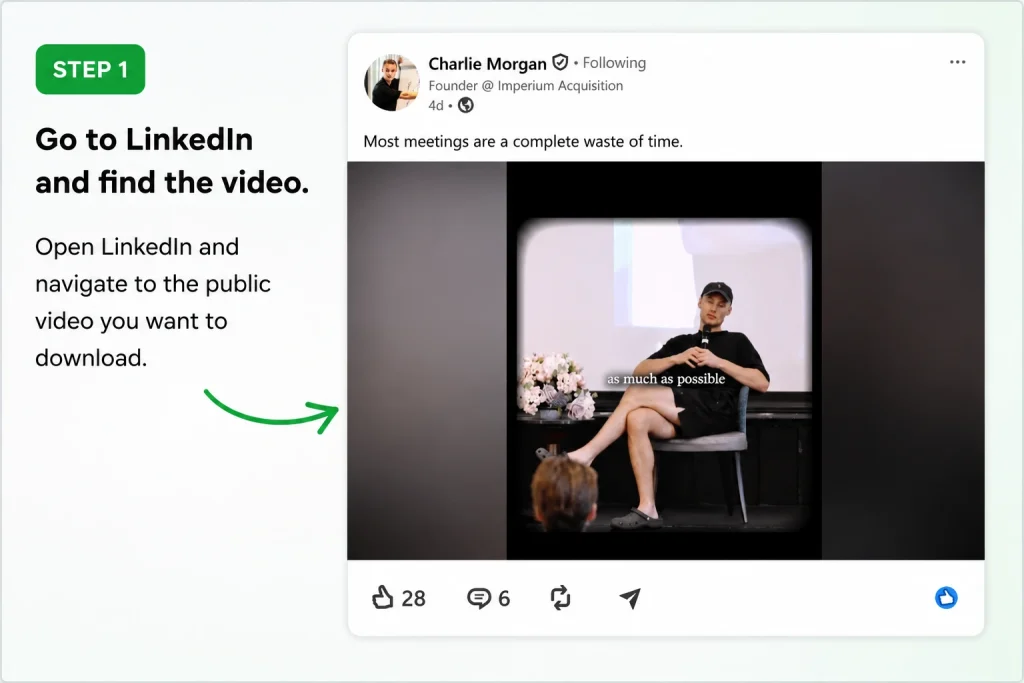
Step 1: Go to Linkedin and find the video that you wanted to save.
Step 2: Copy the Video URL
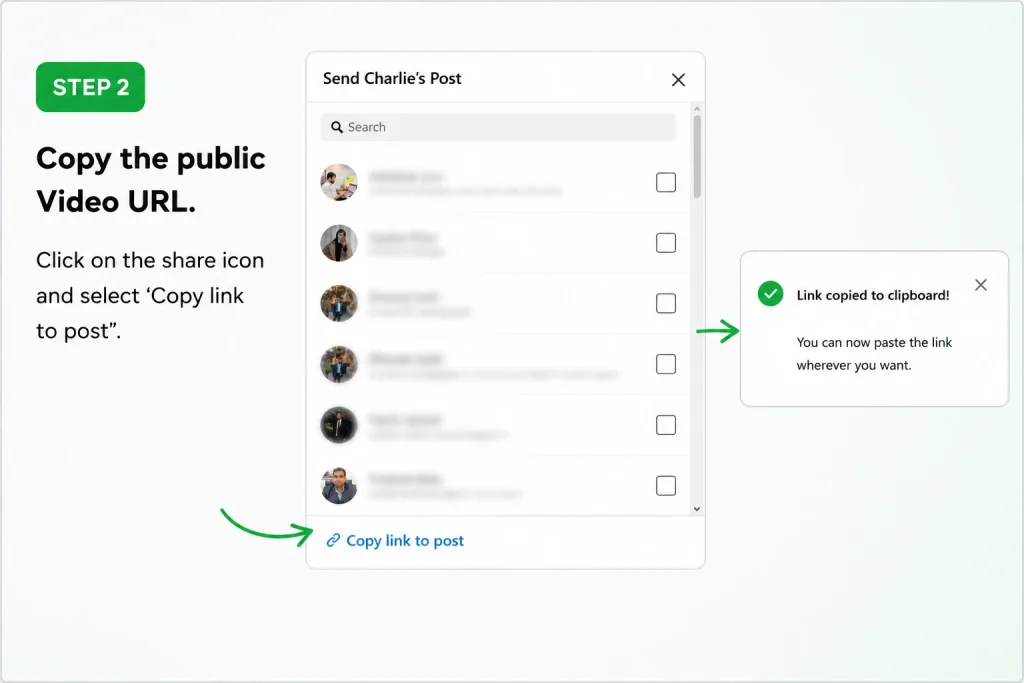
Open the LinkedIn post that contains the public video and copy its URL.
Step 2: Paste the Link
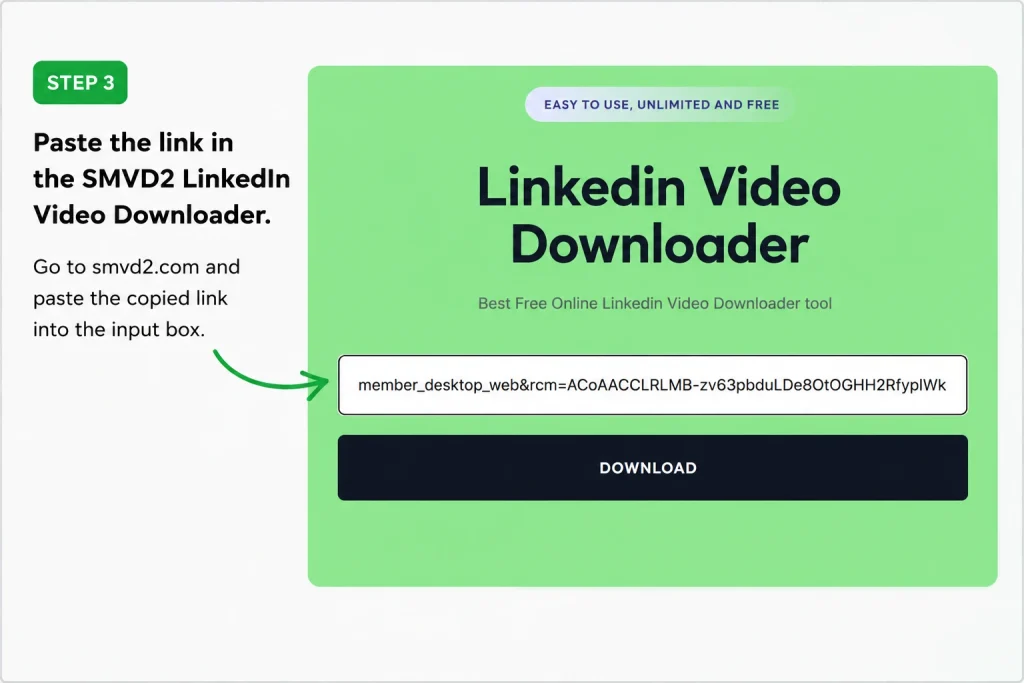
Open your preferred LinkedIn video downloader and paste the copied link into the input field.
Step 3: Download the Video
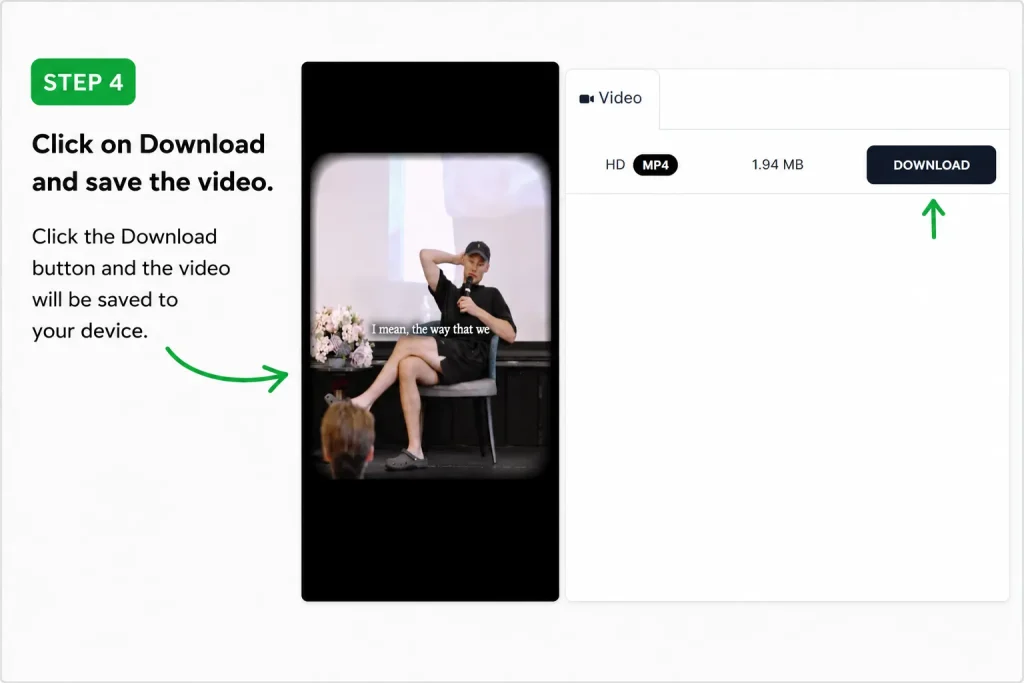
After the video has been processed, download it in MP4 format.
The total time typically depends on your internet connection and the availability of the original video.
Device & Browser Compatibility
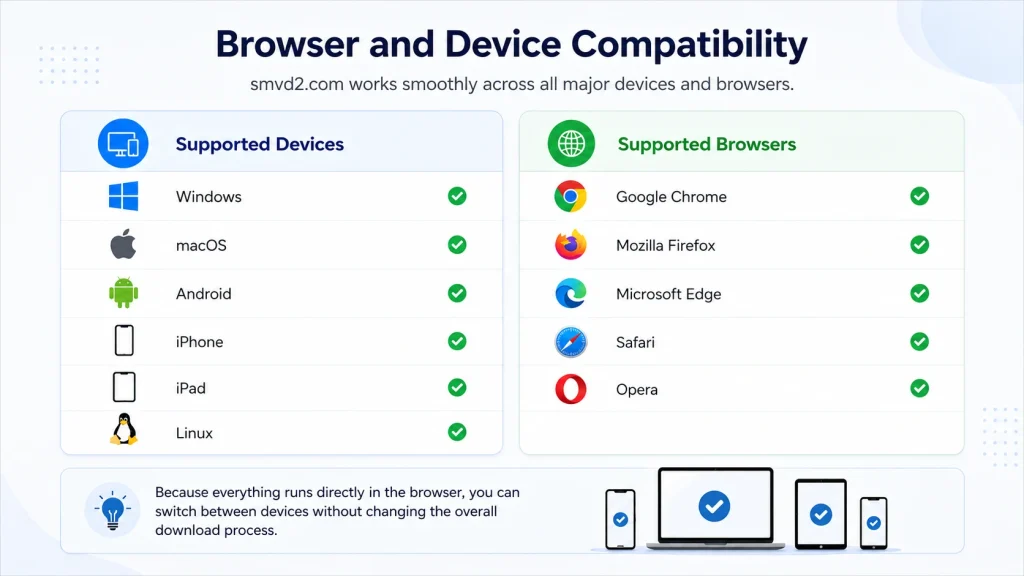
Most modern browser-based LinkedIn video downloaders work across a wide range of devices without requiring additional software.
Supported Devices
- Windows
- macOS
- Android
- iPhone
- iPad
- Linux
Supported Browsers
- Google Chrome
- Mozilla Firefox
- Microsoft Edge
- Safari
- Opera
Because everything runs directly in the browser, you can usually switch between devices without changing the overall download process.
Key Features That Actually Matter
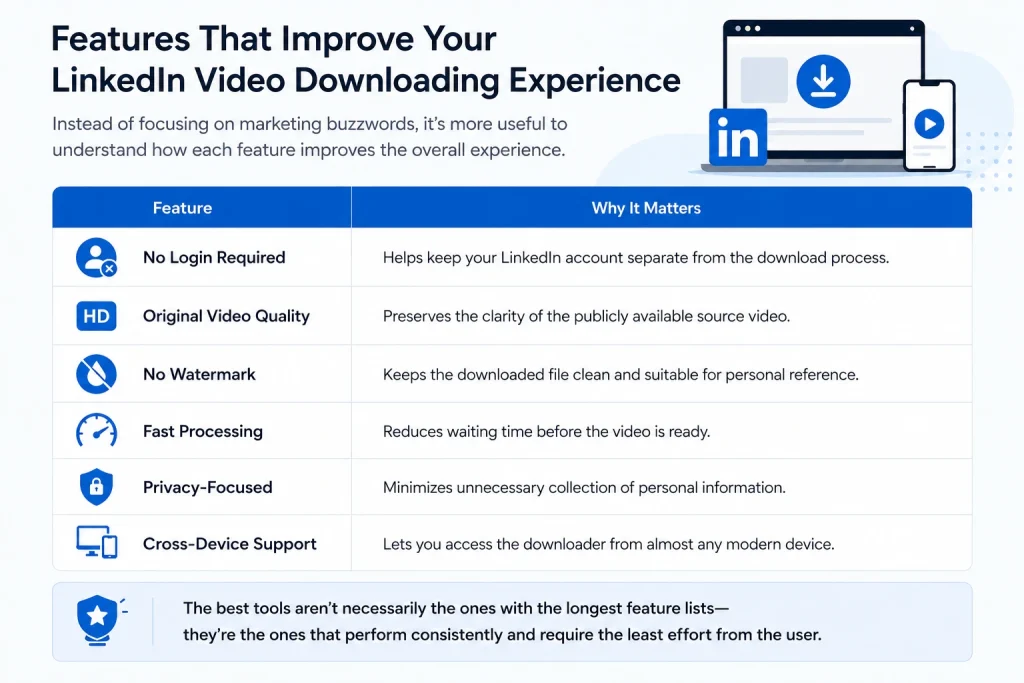
Instead of focusing on marketing buzzwords, it’s more useful to understand how each feature improves the overall experience.
| Feature | Why It Matters |
| No Login Required | Helps keep your LinkedIn account separate from the download process. |
| Original Video Quality | Preserves the clarity of the publicly available source video. |
| No Watermark | Keeps the downloaded file clean and suitable for personal reference. |
| Fast Processing | Reduces waiting time before the video is ready. |
| Privacy-Focused | Minimizes unnecessary collection of personal information. |
| Cross-Device Support | Lets you access the downloader from almost any modern device. |
The best tools aren’t necessarily the ones with the longest feature lists—they’re the ones that perform consistently and require the least effort from the user.
Real Use Cases (Practical Applications)
People use LinkedIn video downloaders for many different reasons beyond simply saving a video.
Learning & Professional Development
- Save educational tutorials
- Build a personal learning library
- Revisit industry insights during future projects
Marketing & Business
- Archive campaign breakdowns
- Save publicly shared case studies
- Reference marketing frameworks during planning sessions
Offline Productivity
- Watch videos while travelling
- Continue learning without a stable internet connection
- Review content during downtime
Internal Reference
Where appropriate and with respect for the creator’s rights, organizations may use publicly shared educational material as a reference during internal discussions, presentations, or training sessions.
The objective isn’t to collect content.
It’s to make valuable information easier to revisit when it becomes relevant.
Common Mistakes (Very Important)
Downloading a video is only one part of the process.
The way you manage the content afterward is just as important.
Some of the most common mistakes include:
- Using tools that request unnecessary account credentials
- Downloading videos without checking whether they’re publicly available
- Saving every video instead of selecting the most useful ones
- Keeping all downloads in a single folder with no organization
- Ignoring copyright and creator permissions when sharing content
A Better Approach
To get the most value from saved videos:
- Download only content you’ll genuinely revisit.
- Organize videos into clearly labelled folders.
- Rename important files so they’re easy to search later.
- Respect the creator’s rights and intended use of the content.
- Regularly review and remove videos that are no longer useful.
A well-organized collection of fifty valuable videos is often far more useful than hundreds of files that are difficult to find or remember.
Ethical Use & Best Practices
Downloading publicly available content should always be done responsibly.
Good practice includes:
- Respecting the original creator’s work.
- Avoiding unauthorized redistribution.
- Using videos for learning, research, or personal reference whenever appropriate.
- Providing attribution when sharing ideas or referencing someone’s work.
- Following LinkedIn’s policies and applicable copyright laws.
Responsible use benefits everyone.
Creators retain credit for their work, users gain long-term access to valuable educational content, and professional knowledge continues to be shared in a respectful way.
Frequently Asked Questions
Can I download LinkedIn videos without a watermark?
Yes, if the video is publicly accessible and the downloader preserves the original file, it is generally downloaded without adding a watermark. The output is typically the same publicly available video rather than a modified version.
Do I need to log in to LinkedIn?
Most browser-based LinkedIn video downloaders only require the URL of a public video. They do not require your LinkedIn username or password.
As a general best practice, avoid tools that request your login credentials unless there is a legitimate reason and you fully understand how your information will be used.
Can I download private LinkedIn videos?
No.
Videos that are private, restricted, or available only to specific users cannot normally be downloaded using a public video downloader.
The tool is intended for publicly accessible content only.
Why does a download sometimes fail?
There are several possible reasons:
- The video is private or restricted.
- The original post has been deleted.
- The copied URL is incorrect or incomplete.
- LinkedIn has temporarily changed how the video is served.
- Your internet connection is unstable.
If a download fails, verify that you’re using the correct public video URL before trying again.
Is it safe to use a LinkedIn video downloader?
It depends on the tool you choose.
A trustworthy downloader should:
- Work without requiring your LinkedIn password.
- Use a secure HTTPS connection.
- Avoid unnecessary permissions.
- Be transparent about its privacy practices.
Before using any online tool, it’s always a good idea to review its privacy policy and understand how it handles user data.
What format will the downloaded video be in?
Most LinkedIn video downloaders provide videos in MP4, one of the most widely supported video formats.
MP4 works across virtually all modern operating systems, smartphones, tablets, media players, and editing software, making it a practical choice for offline viewing and future reference.
Can I use a LinkedIn video downloader on my phone?
Yes.
Most browser-based downloaders are compatible with:
- Android
- iPhone
- iPad
Since everything runs through a web browser, you typically don’t need to install a dedicated application.
Can I save videos for offline learning?
Yes, provided the videos are publicly available and you use them responsibly.
Many professionals save educational videos so they can review tutorials, business case studies, interviews, and industry discussions without relying on an internet connection.
Future Insight (What’s Coming Next)
Professional learning is becoming increasingly video-first.
Every year, more founders, marketers, recruiters, consultants, and business leaders choose short-form videos over long written posts to explain ideas, share experience, and document real-world execution.
At the same time, recommendation algorithms continue evolving.
They become better at helping users discover new content—but not necessarily at helping them relocate something they watched months ago.
As content production accelerates, professionals are likely to face a different challenge.
It won’t be finding information.
It will be managing it.
Building a personal system for organizing valuable educational resources—whether through notes, bookmarks, saved documents, or responsibly downloaded public videos—can make learning more intentional and easier to apply over time.
The people who consistently benefit from professional content are often those who create reliable systems for finding it again when it matters.
Final Thoughts
LinkedIn has become one of the world’s most valuable platforms for professional learning.
Every day, experts share practical advice on marketing, hiring, sales, leadership, entrepreneurship, product development, and countless other topics.
Discovering that knowledge is easier than ever.
Keeping it organized for future use is a different challenge.
A LinkedIn video downloader doesn’t replace the platform.
Instead, it complements it by helping you preserve publicly available educational content that you may want to revisit later.
When used responsibly, downloaded videos can become part of a well-organized personal knowledge library that supports continuous learning and better implementation.
The Real Advantage
The greatest benefit isn’t simply having videos stored on your device.
It’s having important ideas available exactly when you need them.
Whether you’re preparing for a presentation, planning a campaign, researching a new topic, or reviewing an industry framework, organized knowledge is far more valuable than information you’ve forgotten how to find.
Professional growth isn’t driven only by consuming more content.
It’s driven by consistently applying the right knowledge at the right time.
Final Line
The professionals who grow the fastest aren’t always the ones who watch the most videos.
They’re often the ones who build systems that help them retain, organize, revisit, and apply what they learn.
A LinkedIn video downloader is simply one tool that can support that process by making valuable public knowledge easier to access whenever it’s needed.
Related Topics:
- How to Download LinkedIn Videos by URL or Link
- Can You Download Live LinkedIn Videos?
- Manual vs Tool-Based LinkedIn Video Download (Deep Comparison)
- How to Download LinkedIn Videos in Low Internet Speed
- Why Downloaded LinkedIn Videos Lose Quality (Explained)
- Difference Between LinkedIn Posts, Reels, Stories & Learning Videos
- How to Convert LinkedIn Videos to MP4 (Step-by-Step)
- Why LinkedIn Learning Videos Won’t Download?
- How to Archive Company Videos from LinkedIn for Case Studies
- How Marketers Use LinkedIn Videos for Content Repurposing
- How to Save LinkedIn Videos from Messages (DMs)
- How to Download LinkedIn Videos for Social Media Reposting
- How to Download LinkedIn Videos in MP4 or HD Format
- How to Save Client or Employer Videos from LinkedIn
- Browser Based vs App Based LinkedIn Downloaders: Which Option Is Better?
- Free vs Premium LinkedIn Video Downloaders: Which One Should You Choose?
- Top 5 Best No-Watermark LinkedIn Video Downloader Tools
- Best Online LinkedIn Downloader Without Registration
- How to Download LinkedIn Videos Without Browser Extensions
- How to Download LinkedIn Videos Without Installing Software
- How to Download LinkedIn Videos on Android
- How to Download LinkedIn Videos on iPhone
- How to Download LinkedIn Videos on Windows
- How To Download LinkedIn Videos on iPad
- How to Download LinkedIn Videos on Mac
- Are LinkedIn Videos Public or Private?
- Types of LinkedIn Videos You Can Download
- Why People Download LinkedIn Videos
- How Does a LinkedIn Video Downloader Work?
- What Is a LinkedIn Video Downloader?
- Why Are LinkedIn Videos Downloading in Low Quality?
- LinkedIn Video Downloader Not Working?
- Are LinkedIn Video Downloaders Safe to Use?
- Is It Legal to Download LinkedIn Videos?
- Why Choose a Dedicated LinkedIn Video Downloader Over Universal Tools?
- How to Download LinkedIn Videos Without Third-Party Apps
- How to Download LinkedIn Videos Without Watermark
- LinkedIn Video Downloader vs Generic Social Media Downloaders
- LinkedIn Story or Post Expired? Can You Still Save It?
- LinkedIn Messaging Why Can’t I Download LinkedIn Videos?
- LinkedIn Video Downloader vs Screen Recorder – Which is Better?
- LinkedIn Video Downloader vs Chrome Extensions – Pros & Cons
- How to Download LinkedIn Reels and Short Videos
- LinkedIn News Feed Explained: How It Works & Why It Matters
- Top 5 LinkedIn Downloading Methods Ranked (With Pros & Cons)
- LinkedIn Search And Discovery: A Complete Guide
- How to Download LinkedIn Videos Without Losing Quality
- How to Save LinkedIn Videos on Mobile and Desktop Devices
- How to Download LinkedIn Videos from Posts or Feeds
- LinkedIn Guide
- LinkedIn Sponsored Content
- Best LinkedIn Video Downloaders
- How to Save LinkedIn Videos Without Login