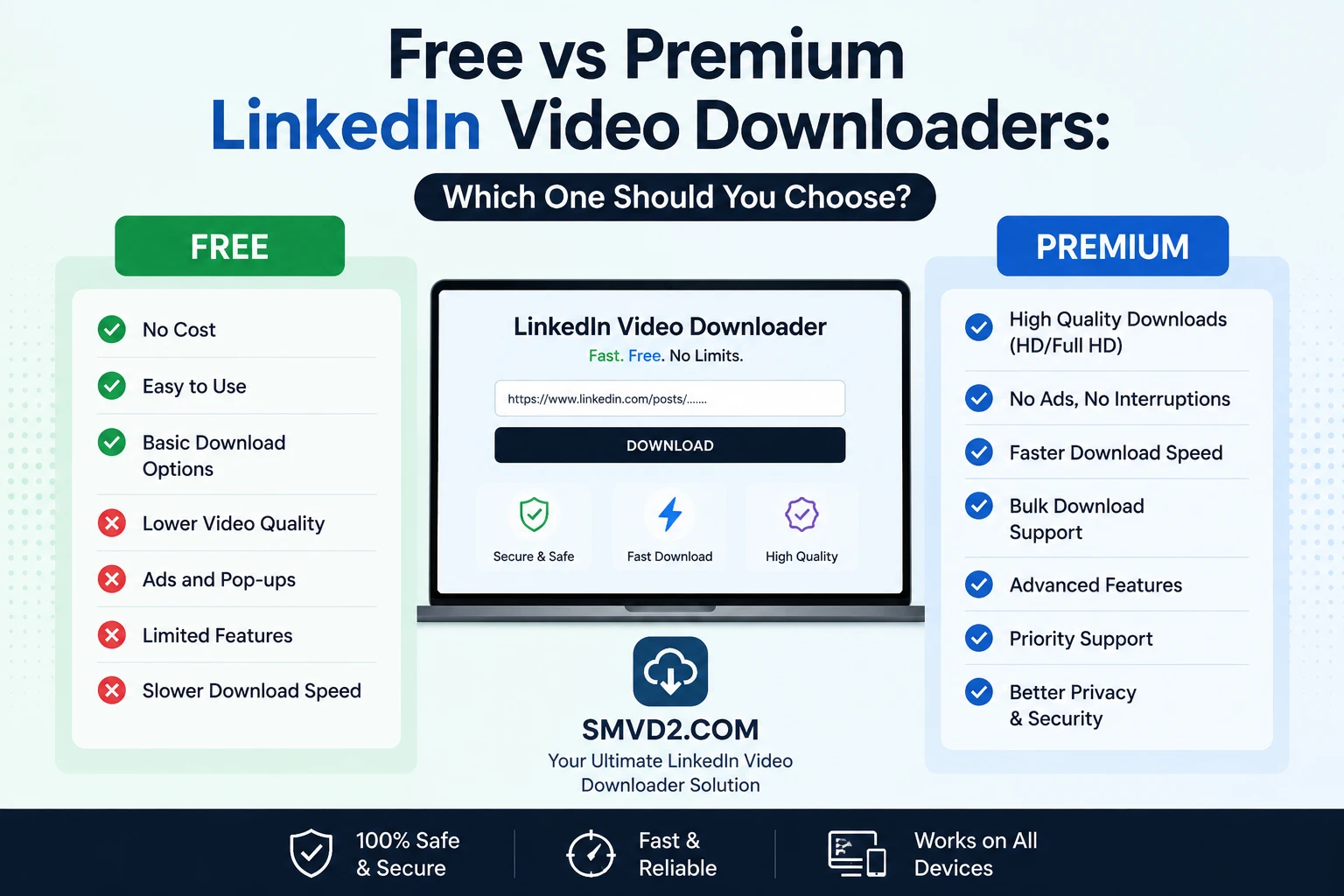
Free vs Premium LinkedIn Video Downloaders: Which One Should You Choose?
LinkedIn has evolved from just a professional networking platform to a content based platform. Today, it has become a major source of educational content, industry insights, webinars, recruitment campaigns, thought leadership videos, product demonstrations, and professional training resources.
As video content continues to grow on LinkedIn, many users want a convenient way to save videos for offline viewing, future reference, team training, or content research. This has created a growing demand for LinkedIn video downloaders.
However, one question comes up repeatedly:
Should you use a free LinkedIn video downloader or invest in a premium solution?
The answer depends on how often you download videos, the features you need, and your workflow requirements.
In this guide, we’ll compare free and premium LinkedIn video downloaders, explain the advantages and limitations of each, and share practical insights from real-world usage scenarios. We’ll also explore why SMVD2.com has become a preferred choice for professionals who want a fast, reliable, and straightforward way to save LinkedIn videos without unnecessary complexity.
Why People Download LinkedIn Videos?
There are many legitimate reasons professionals choose to download LinkedIn videos.
Some users want to watch content later without relying on an internet connection. Others save educational videos, marketing examples, recruitment campaigns, or industry presentations for research purposes.
Common use cases include:
- Watching videos during travel or commutes
- Saving educational content for future learning
- Building an internal training library
- Archiving your own LinkedIn video posts
- Collecting marketing inspiration
- Studying competitor campaigns
- Creating research repositories
- Preserving valuable content before it gets deleted
For example, a recruiter may save employer branding videos to analyze hiring strategies, while a marketer might build a swipe file of successful video campaigns posted by industry leaders.
One thing we’ve noticed is that most people don’t download LinkedIn videos every day. Instead, they typically save specific videos they find valuable and want to revisit later. This is one reason browser-based downloaders have become increasingly popular—they provide quick access without requiring software installation or subscriptions.
Most modern LinkedIn video downloaders work by saving the publicly available video file from a LinkedIn post and converting it into a downloadable MP4 format that can be stored on your device.
What Is a Free LinkedIn Video Downloader?
A free LinkedIn video downloader is a web-based tool that allows users to save publicly accessible LinkedIn videos without paying a subscription fee.
In most cases, the process is simple:
- Copy the LinkedIn post URL.
- Paste it into the downloader.
- Click the download button.
- Save the video to your device.
Most free downloaders work directly inside a web browser, making them accessible from:
- Windows PCs
- Mac computers
- Android smartphones
- iPhones and iPads
- Tablets
Unlike desktop software, browser-based downloaders do not usually require installation, account creation, or additional extensions.
For casual users, this simplicity is often the biggest advantage.
Advantages of Free LinkedIn Video Downloaders
1. No Cost
The most obvious benefit is that free downloaders allow users to save LinkedIn videos without paying monthly or annual subscription fees.
For students, job seekers, recruiters, and casual users, paying for advanced video management features often isn’t necessary.
If you only download a handful of videos each month, a free solution is usually more than sufficient.
2. Instant Access
Many free LinkedIn video downloaders work immediately.
There is no need to:
- Install software
- Configure settings
- Create accounts
- Verify email addresses
- Purchase subscriptions
Simply paste the URL and start the download process.
This convenience makes browser-based tools particularly attractive for users who value speed and simplicity.
3. Easy to Use
One reason free downloaders remain popular is their straightforward user experience.
In our observation, most users don’t want to learn complicated dashboards or navigate feature-heavy interfaces. They simply want to save a video quickly and continue with their work.
A good free downloader reduces the process to a few clicks.
This is especially useful for:
- Students saving educational content
- Recruiters collecting hiring examples
- Sales professionals researching outreach strategies
- Marketers studying video campaigns
4. Cross-Platform Compatibility
Most modern LinkedIn downloaders work across multiple devices and operating systems.
Whether you’re using:
- Google Chrome
- Mozilla Firefox
- Microsoft Edge
- Safari
or accessing LinkedIn from:
- Android devices
- iPhones
- Windows laptops
- MacBooks
you can usually download videos without compatibility issues.
This flexibility allows users to switch devices without changing their workflow.
5. Great for Casual Users
A free LinkedIn video downloader is often the ideal choice for occasional users.
For example:
- A student saving a tutorial once a week
- A recruiter collecting a few employer branding videos
- A business owner archiving their own LinkedIn content
- A marketer researching competitor campaigns
These users typically don’t need advanced features like bulk downloading, content management systems, analytics, or team collaboration tools.
In practical usage, we’ve found that many people initially assume they need premium software, only to discover that a simple browser-based downloader meets all of their requirements.
For this audience, free tools often provide the best balance between convenience and functionality.
Limitations of Free LinkedIn Video Downloaders
While free LinkedIn video downloaders can be incredibly useful, they are not perfect. Understanding their limitations helps users choose the right solution for their needs.
One thing we’ve noticed when reviewing various download tools is that the experience can vary significantly from one platform to another. Some offer a smooth workflow, while others create unnecessary friction through ads, restrictions, or inconsistent performance.
Let’s look at the most common limitations.
Download Limits
Some free downloaders impose daily or monthly download limits.
For occasional users, this may never become a problem. However, marketers, recruiters, trainers, and researchers who frequently save LinkedIn videos may quickly encounter restrictions.
This is one of the primary reasons professional users eventually explore premium alternatives.
Advertisements
Many free tools rely on advertising to support their operations.
While occasional ads are understandable, excessive popups, redirects, and intrusive banners can negatively impact the user experience.
In practical usage, users often value a clean and distraction-free interface more than they realize. Saving a video should take seconds—not require closing multiple popups before reaching the download button.
This is one area where tool quality varies considerably.
Slower Processing Speeds
Free services often handle large volumes of traffic.
As a result, download processing can sometimes slow down during peak usage periods.
For users downloading a single video occasionally, this may not be a major concern. However, professionals working under deadlines often prioritize reliability and speed over saving a few seconds.
Feature Restrictions
Most free LinkedIn video downloaders focus on one task: downloading videos.
Advanced functionality is usually reserved for premium platforms.
Common premium-only features may include:
- Bulk video downloading
- Content organization tools
- Team collaboration features
- Workflow automation
- Cloud integrations
- Video libraries
- Analytics dashboards
The good news is that most casual users don’t actually need these features.
In many cases, people pay for capabilities they rarely use.
Inconsistent Reliability
LinkedIn regularly updates its platform infrastructure and user interface.
When this happens, some downloaders stop functioning correctly until developers update their systems.
One thing we’ve observed is that browser extensions are often affected more frequently by platform changes than web-based tools. Extension permissions, browser updates, and compatibility issues can sometimes create download failures even when the video itself remains publicly accessible.
This is why many users increasingly prefer browser-based downloaders that focus on simplicity and regular maintenance.
Limited Support
Most free tools provide little or no direct customer support.
If a download fails, users are often left to troubleshoot the issue themselves.
This may not matter for occasional use, but businesses and teams often prefer solutions that offer assistance when problems arise.
What Is a Premium LinkedIn Video Downloader?
A premium LinkedIn video downloader is a paid solution that offers advanced features beyond simple video downloading.
These tools are typically designed for users who work with content regularly and require additional workflow capabilities.
Premium solutions are commonly used by:
- Digital marketers
- Content creators
- Recruitment teams
- Learning and development departments
- Sales organizations
- Research professionals
- Agencies managing multiple accounts
Unlike basic downloaders, premium platforms often position themselves as content management systems rather than simple download utilities.
Their goal is to help users organize, manage, analyze, and distribute content more efficiently.
For organizations handling hundreds of videos each month, these capabilities can provide meaningful operational benefits.
Advantages of Premium LinkedIn Video Downloaders
1. Unlimited Downloads
One of the biggest benefits of premium platforms is the removal of download restrictions.
Users can typically save as many videos as needed without worrying about daily limits or usage caps.
This is particularly valuable for:
- Content researchers
- Marketing teams
- Corporate trainers
- Recruitment agencies
For these users, uninterrupted access can improve productivity.
2. Faster Performance
Premium services often prioritize paying customers through dedicated infrastructure and optimized processing systems.
This usually results in:
- Faster downloads
- Reduced waiting times
- Better server availability
- More consistent performance
For businesses managing large content workflows, even small time savings can accumulate significantly over time.
3. Better Customer Support
Support is often one of the most overlooked benefits of premium software.
When issues arise, premium users typically have access to:
- Email support
- Live chat support
- Technical assistance
- Priority troubleshooting
This can be particularly valuable when download workflows are tied to business operations or client deliverables.
4. Advanced Features
Premium platforms frequently provide capabilities that go beyond downloading videos.
Depending on the service, these may include:
- Bulk downloading
- Video categorization
- Content libraries
- Team access controls
- Workflow automation
- Export options
- Cloud storage integration
For organizations managing hundreds or thousands of assets, these tools can simplify content management significantly.
However, it’s important to evaluate whether you genuinely need these capabilities before paying for them.
A common mistake is purchasing a premium plan because it offers more features—even when most of those features will never be used.
5. Professional Workflow Benefits
Premium solutions are often designed with professional workflows in mind.
For example:
A recruitment agency may need to archive employer branding videos across multiple clients.
A corporate training team may maintain a library of educational resources.
A marketing department may collect competitor video campaigns for ongoing analysis.
In these situations, advanced organization and management features can justify the subscription cost.
For individual users, however, the equation is often different.
One observation that consistently appears across user reviews is that many people simply want a fast and reliable way to save a LinkedIn video occasionally. For those users, a lightweight browser-based downloader often delivers everything they need without introducing complexity.
Limitations of Premium LinkedIn Video Downloaders
Premium LinkedIn video downloaders offer additional functionality, but they are not necessarily the best solution for every user.
In fact, one of the biggest misconceptions in this space is that paid automatically means better. While premium platforms can be valuable for certain workflows, they also come with trade-offs that many users don’t consider before subscribing.
Subscription Costs
The most obvious drawback is the recurring cost.
Many premium platforms operate on monthly or annual subscription models, which can become expensive over time.
For businesses managing large amounts of content, the investment may be justified. However, for casual users, students, recruiters, job seekers, and small business owners, the return on investment is often questionable.
A common scenario looks like this:
- User needs to save 5–10 videos per month
- Purchases a premium plan
- Uses only 10–20% of available features
- Continues paying for unused functionality
This is one reason many users eventually switch back to simpler browser-based solutions.
Feature Overload
Premium software often includes a long list of advanced capabilities.
While these features sound impressive on a sales page, they can introduce unnecessary complexity.
Examples include:
- Content management dashboards
- Team permissions
- Analytics reporting
- Cloud synchronization
- Workflow automation
- Asset tagging systems
For organizations, these features can be beneficial.
For individual users, however, they often create a more complicated experience than necessary.
One thing we’ve noticed is that most users simply want to download a video and move on. They don’t necessarily want to learn an entire content management platform just to save an MP4 file.
Learning Curve
With additional features comes additional complexity.
Premium tools often require:
- Account setup
- User onboarding
- Configuration settings
- Feature familiarization
- Workflow adjustments
For new users, this can create friction.
In contrast, browser-based downloaders usually require nothing more than copying and pasting a LinkedIn URL.
The difference may seem small, but convenience is often the deciding factor for many users.
Dependence on Ongoing Subscription
Another consideration is access continuity.
If you cancel your subscription:
- Certain features may become unavailable
- Stored content may be restricted
- Team workflows may be disrupted
- Historical data may become inaccessible
For businesses, this creates vendor dependency that should be considered before adopting any premium platform.
Paying for Features You May Never Use
Perhaps the most overlooked limitation is paying for capabilities that provide little practical value to your workflow.
For example:
A student downloading interview preparation videos doesn’t need enterprise content management.
A recruiter saving employer branding examples doesn’t necessarily need advanced analytics.
A marketer researching competitor content may never use team collaboration tools.
In practical terms, the ideal solution is not the one with the most features—it’s the one that solves your specific problem efficiently.
Free vs Premium LinkedIn Video Downloaders: Side-by-Side Comparison
| Feature | Free Downloaders | Premium Downloaders |
|---|---|---|
| Cost | Free | Monthly or Annual Subscription |
| Registration | Usually Not Required | Usually Required |
| Ease of Use | Very Simple | Can Be More Complex |
| Setup Time | Immediate | Often Requires Account Setup |
| Download Speed | Good for Most Users | Often Faster |
| Download Limits | May Exist | Usually Unlimited |
| Advertisements | Sometimes Present | Typically Ad-Free |
| Customer Support | Limited | Dedicated Support |
| Bulk Downloads | Rare | Common |
| Team Collaboration | Not Available | Often Included |
| Analytics | Not Available | Frequently Included |
| Learning Curve | Minimal | Moderate |
| Best For | Casual Users | Professional Teams |
| Maintenance | Simple | More Feature Management |
| Value for Occasional Use | Excellent | Often Excessive |
Quick Takeaway
If your goal is simply to save LinkedIn videos occasionally, a free downloader often provides the best value.
If you’re managing large-scale content workflows involving teams, archives, automation, and collaboration, premium tools may justify their cost.
The key is matching the solution to the actual problem rather than assuming more features automatically mean a better experience.
Which Option Is Right for You?
The right choice depends largely on how frequently you download LinkedIn videos and how those videos fit into your workflow.
Let’s break it down by user type.
Choose a Free Downloader If:
A free LinkedIn video downloader is usually the best option if:
- You download videos occasionally
- You want a quick and simple process
- You prefer not to create accounts
- You don’t need advanced workflow features
- You want to avoid recurring subscription costs
- You mainly save videos for personal learning or research
Examples include:
Students
Students often save:
- Career advice videos
- Industry insights
- Interview preparation content
- Professional development resources
Most don’t require premium functionality.
Job Seekers
Job seekers commonly save:
- Resume tips
- Hiring advice
- Networking strategies
- Personal branding content
A simple browser-based downloader is typically sufficient.
Recruiters
Recruiters frequently archive:
- Employer branding campaigns
- Recruitment advertisements
- Talent acquisition examples
For moderate usage, free tools often meet their needs effectively.
Small Business Owners
Business owners may occasionally save:
- Marketing examples
- Industry trends
- Competitor content
- Educational webinars
Again, simplicity is often more valuable than advanced functionality.
Choose a Premium Downloader If:
Premium solutions become more attractive when downloading videos is part of a larger operational workflow.
You may benefit from premium tools if:
- You download videos daily
- You manage large content libraries
- Multiple team members need access
- You require workflow automation
- You need advanced organization features
- You depend heavily on archived content
Examples include:
Marketing Agencies
Agencies often maintain extensive content libraries for:
- Competitive analysis
- Campaign inspiration
- Client research
- Industry monitoring
Advanced management features can save time at scale.
Learning & Development Teams
Corporate training departments frequently archive educational materials and may benefit from structured content management systems.
Enterprise Recruitment Teams
Organizations recruiting at scale often collect and organize large volumes of employer branding content.
Premium tools may streamline these workflows.
The Decision Most Users Eventually Reach
After comparing free and premium options, many users arrive at a surprisingly simple conclusion:
They don’t actually need enterprise-level features.
They simply need:
- Reliable downloads
- Good video quality
- Browser compatibility
- Fast processing
- Minimal setup
That’s why browser-based tools continue to gain popularity despite the growth of premium platforms.
For most professionals, convenience often outweighs complexity.
Why More Users Are Choosing SMVD2.com
The market is filled with LinkedIn video downloaders. Some focus on advanced workflow management, while others prioritize speed and simplicity.
Over time, we’ve noticed a clear trend among users:
Most people are not looking for dozens of features.
They are looking for a downloader that works reliably, saves videos quickly, and doesn’t force them to create accounts, install software, or navigate complicated dashboards.
This is where SMVD2.com stands out.
Rather than overwhelming users with unnecessary complexity, SMVD2 focuses on providing a streamlined downloading experience that solves the core problem efficiently.
Simple and Fast
One of the first things users notice about SMVD2 is its simplicity.
The workflow is straightforward:
- Copy the LinkedIn video URL.
- Paste it into SMVD2.
- Click download.
- Save the video.
There are no lengthy setup processes, software installations, or complicated configurations.
For professionals who simply want access to content quickly, this can make a significant difference.
From a usability perspective, reducing friction often matters more than adding features.
A tool that saves users a few minutes every time they need a video can become far more valuable than one packed with advanced capabilities that rarely get used.
No Software Installation Required
Many users hesitate when a tool requires:
- Desktop software downloads
- Browser extensions
- Additional permissions
- System-level access
These requirements can create security concerns and compatibility issues.
One thing we’ve observed across various download methods is that browser extensions often stop working after major browser or platform updates.
Web-based tools avoid many of these issues because they work directly within the browser.
SMVD2 operates entirely online, allowing users to access it from virtually any modern device without installing additional software.
This approach keeps the experience simple while reducing maintenance headaches.
Works Across Devices
Modern professionals rarely use a single device.
A recruiter may discover a video on a smartphone and later access it on a laptop.
A marketer might research content on a tablet while traveling and continue working from a desktop computer.
Because SMVD2 is browser-based, it supports a wide range of devices, including:
- Windows PCs
- Mac computers
- Android smartphones
- iPhones
- Tablets
It also works across popular browsers such as:
- Google Chrome
- Safari
- Mozilla Firefox
- Microsoft Edge
This flexibility allows users to download videos wherever they happen to be working.
High-Quality Video Downloads
Video quality matters more than many users initially realize.
Poor-quality downloads can make educational presentations, product demonstrations, and training videos difficult to watch.
One misconception is that all downloaders produce identical results.
In reality, the quality of the final file often depends on how effectively the downloader retrieves the original source video.
SMVD2 focuses on preserving video quality so users can enjoy a better viewing experience when accessing content offline.
This is particularly important for:
- Training materials
- Webinars
- Marketing presentations
- Educational content
- Professional demonstrations
Built for Real-World Users
Many downloader platforms are designed primarily around feature lists.
SMVD2 appears to be designed around actual user behavior.
When examining how most people interact with LinkedIn content, a consistent pattern emerges:
Users want to:
- Save a useful video
- Access it later
- Share it internally
- Learn from it offline
They generally do not want to spend time learning complicated software.
This focus on practical usability makes SMVD2 appealing to a wide audience.
Suitable for Multiple User Types
Students
Students frequently save:
- Career advice
- Industry insights
- Interview preparation content
- Professional development videos
A quick browser-based downloader often provides everything they need.
Recruiters
Recruiters commonly archive:
- Employer branding campaigns
- Recruitment marketing examples
- Hiring strategy videos
Fast access to downloaded content can improve research efficiency.
Marketers
Marketers often collect:
- Competitor campaigns
- Thought leadership content
- Video advertising examples
- Industry trends
SMVD2 helps simplify this process without requiring enterprise-level software.
Business Owners
Business owners regularly save:
- Training content
- Webinars
- Marketing examples
- Professional development resources
For many of these users, simplicity and reliability are more important than advanced workflow features.
What We Noticed While Comparing Download Options
While evaluating different approaches to downloading LinkedIn videos, several patterns became clear.
Most Users Never Need Premium Features
Many premium platforms include:
- Team collaboration
- Analytics
- Asset management
- Workflow automation
These capabilities can be valuable for organizations, but individual users often pay for features they never use.
Convenience Often Wins
Users consistently prefer solutions that:
- Require fewer steps
- Avoid software installation
- Work across devices
- Deliver quick results
The easier the workflow, the more likely users are to continue using the tool.
Reliability Matters More Than Feature Count
A downloader with 20 advanced features is not helpful if users struggle to complete a simple download.
Many users prioritize:
- Stability
- Speed
- Compatibility
- Ease of use
above everything else.
Why SMVD2.com Offers the Best Balance
The real decision isn’t simply:
Free vs Premium
It’s:
Complexity vs Practicality
For enterprise organizations with large-scale content management requirements, premium platforms may provide value.
For the majority of professionals, however, the ideal solution is often the one that delivers reliable downloads without introducing unnecessary complexity.
SMVD2 sits in that sweet spot.
It provides:
- Fast downloads
- Browser-based access
- Cross-device compatibility
- High-quality video saving
- Beginner-friendly usability
- No software installation
- Minimal learning curve
Rather than trying to be an all-in-one enterprise content platform, SMVD2 focuses on doing one job well: helping users download LinkedIn videos quickly and efficiently.
For many users, that’s exactly what makes it the better choice.
How to Download LinkedIn Videos Using SMVD2.com
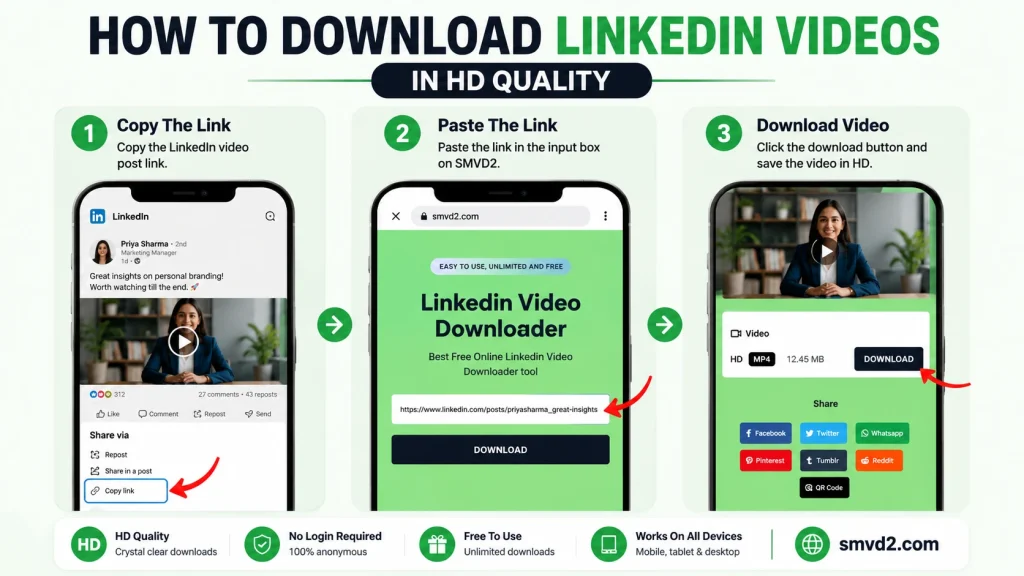
One of the biggest reasons users choose browser-based downloaders is convenience.
The process should be quick, intuitive, and accessible from virtually any device. Whether you’re saving a webinar, an educational video, a recruitment campaign, or a thought leadership post, SMVD2 keeps the workflow straightforward.
Here’s how it works.
Step 1: Find the LinkedIn Video
Open LinkedIn and navigate to the post containing the video you want to save.
This could be:
- An educational video
- A professional webinar
- A recruitment campaign
- A product demonstration
- An industry insight video
- Your own LinkedIn content
Before proceeding, ensure the video is publicly accessible and that you have permission to download and use the content appropriately.
Step 2: Copy the LinkedIn Post URL
Click the sharing options associated with the LinkedIn post and copy the post link.
Most LinkedIn posts provide a direct option to copy the URL.
The copied link serves as the source that SMVD2 uses to locate the video.
Step 3: Visit SMVD2.com
Open your preferred browser and go to SMVD2.com.
Because the platform is web-based, you can access it from:
- Windows
- Mac
- Android
- iPhone
- Tablets
No software installation is required.
No browser extensions are required.
No account creation is required.
Step 4: Paste the URL
Paste the LinkedIn post URL into the input field provided on the homepage.
Before clicking download, double-check that:
- The URL is complete
- The post is publicly accessible
- The video still exists
Many download issues originate from incorrect or incomplete URLs rather than problems with the downloader itself.
Step 5: Start the Download
Click the download button.
SMVD2 will process the link and generate a downloadable version of the video.
Depending on your internet connection and the original file size, the process typically takes only a few moments.
Step 6: Save the Video
Once the video is ready, save it to your preferred location.
Many users organize downloaded content into folders such as:
- Marketing Research
- Recruitment Examples
- Training Materials
- Professional Development
- Industry Insights
Creating a structured library makes future access significantly easier.
Common Mistakes Users Make When Downloading LinkedIn Videos
During our review of downloader workflows, several recurring mistakes appeared repeatedly.
Avoiding these issues can save time and frustration.
Using the Wrong Link
One of the most common mistakes is copying a profile URL instead of the actual post URL.
The downloader needs the direct post link containing the video.
If the wrong URL is used, the download may fail even though the tool is functioning correctly.
Attempting to Download Private Content
Most LinkedIn downloaders work with publicly accessible content.
Private videos, restricted content, or posts hidden behind specific permissions may not be available for download.
This is often mistaken as a tool failure when the real limitation is content accessibility.
Expecting Higher Quality Than the Original Upload
A downloader cannot create quality that doesn’t exist in the source video.
If the original LinkedIn upload was compressed or lower resolution, the downloaded version will reflect those limitations.
The downloader preserves quality—it doesn’t artificially enhance it.
Ignoring Copyright and Usage Rights
Downloading a video does not automatically grant ownership rights.
Users should:
- Respect copyright laws
- Follow creator permissions
- Avoid unauthorized commercial use
- Give credit when appropriate
Responsible usage protects both creators and users.
Choosing Features Over Simplicity
Many users initially assume that more features automatically create a better experience.
In reality, complexity often creates unnecessary friction.
A simple downloader that consistently works can provide more value than a feature-rich platform that requires extensive setup and management.
Hidden Limitations Most LinkedIn Downloader Reviews Don’t Mention
Many comparison articles focus only on features while ignoring practical limitations.
Here are several realities users should understand before choosing any downloader.
Not Every Download Failure Is the Tool’s Fault
A common misconception is that failed downloads always indicate a problem with the downloader.
In practice, failures are often caused by:
- Private posts
- Deleted content
- Incorrect URLs
- Platform restrictions
- Temporary LinkedIn changes
Understanding this distinction helps users troubleshoot more effectively.
Browser Extensions Aren’t Always More Reliable
Some users assume browser extensions provide a better experience.
However, extensions often face challenges such as:
- Browser updates
- Permission conflicts
- Security restrictions
- Compatibility issues
Web-based tools frequently avoid many of these problems because they operate independently of browser-specific permissions.
Most Users Don’t Need Enterprise Features
Premium platforms often advertise:
- Team collaboration
- Content management
- Workflow automation
- Analytics dashboards
These features can be valuable for organizations.
However, individual users often discover they only need a quick and reliable way to save videos for offline viewing.
This is why lightweight browser-based tools continue to remain popular despite the growth of premium alternatives.
Best Practices When Downloading LinkedIn Videos
Following a few simple best practices can improve both the downloading experience and long-term content organization.
Download Only Content You Need
Instead of saving every interesting video you encounter, focus on content that provides long-term value.
This keeps your content library organized and easier to manage.
Organize Videos by Category
Creating folders for specific purposes can improve productivity.
Examples include:
- Marketing Inspiration
- Sales Training
- Recruitment Strategies
- Leadership Content
- Industry Research
A structured system makes future retrieval significantly faster.
Verify Video Accessibility
Before attempting a download, confirm that:
- The post remains active
- The video loads correctly
- The content is publicly accessible
This reduces unnecessary troubleshooting.
Respect Content Creators
Always remember that downloaded content belongs to its original creator.
Use videos ethically and responsibly.
When sharing content internally or referencing it professionally, provide proper attribution whenever possible.
Use a Reliable Browser-Based Solution
For most users, the ideal downloader should offer:
- Fast processing
- Device compatibility
- Minimal setup
- Consistent performance
- High-quality downloads
This is precisely why many professionals prefer browser-based solutions such as SMVD2.
They remove unnecessary barriers while delivering the functionality users actually need.
The Practical Reality
After comparing countless free and premium options, one conclusion becomes increasingly clear:
Most users are not searching for the platform with the longest feature list.
They are searching for the platform that helps them accomplish their goal quickly and efficiently.
For occasional downloads, educational content, professional research, recruitment examples, and marketing inspiration, simplicity often wins.
SMVD2 embraces that philosophy by providing a straightforward way to save LinkedIn videos without introducing unnecessary complexity into the process.
Frequently Asked Questions (FAQ)
Is it legal to download LinkedIn videos?
Downloading LinkedIn videos is generally legal for personal use, research, training, or offline viewing when done in accordance with applicable copyright laws and platform policies.
However, downloading a video does not transfer ownership rights. Users should avoid republishing, distributing, or commercially using someone else’s content without proper authorization.
A good rule of thumb is simple:
If you didn’t create the content, always respect the creator’s rights and intended usage.
Can I Download Private LinkedIn Videos?
In most cases, no.
LinkedIn video downloaders typically work with publicly accessible posts.
If a video is:
- Private
- Restricted to a specific audience
- Protected by account permissions
- Available only within closed groups
This limitation exists across most downloading tools and is not unique to SMVD2.
Does SMVD2 Require Registration?
No.
One of the advantages of SMVD2 is that users can download LinkedIn videos without creating an account or completing a registration process.
This makes the experience faster and more convenient for users who only need occasional downloads.
Does It Work on Mobile Devices?
Yes.
SMVD2 is designed to work across multiple devices, including:
- Android smartphones
- iPhones
- Tablets
- Windows PCs
- Mac computers
As long as you have access to a modern web browser, the downloading process remains largely the same.
Can I Download My Own LinkedIn Videos?
Absolutely.
Many users use downloaders to archive their own LinkedIn content.
This can be useful for:
- Content backups
- Repurposing videos for other platforms
- Internal training resources
- Marketing archives
Saving your own content ensures you maintain access to valuable assets over time.
Why Does a LinkedIn Video Download Sometimes Fail?
Download failures usually occur because of:
- Incorrect URLs
- Deleted posts
- Private content restrictions
- Temporary platform changes
- Network connectivity issues
In our experience, the majority of failed downloads are caused by content accessibility limitations rather than problems with the downloader itself.
Will LinkedIn Notify Someone If I Download Their Video?
No.
LinkedIn does not typically notify users when someone downloads a publicly accessible video using an external downloader.
However, users should always respect privacy, intellectual property, and ethical usage guidelines.
What Video Format Are Downloads Usually Saved In?
Most LinkedIn video downloaders provide videos in MP4 format.
MP4 remains one of the most widely supported video formats and works across:
- Smartphones
- Tablets
- Desktop computers
- Video editing software
- Media players
Its compatibility makes it ideal for offline viewing and content organization.
Is a Premium Downloader Worth Paying For?
It depends on your needs.
Premium solutions can provide value if you:
- Download videos daily
- Manage large content libraries
- Need team collaboration
- Require workflow automation
However, many users discover that a simple browser-based downloader provides everything they need without the additional cost.
What Makes SMVD2 Different?
SMVD2 focuses on delivering:
- Fast downloads
- Browser-based accessibility
- Cross-device compatibility
- High-quality video saving
- Minimal setup requirements
Instead of overwhelming users with unnecessary complexity, it focuses on solving the core problem efficiently.
Future Trends in LinkedIn Video Downloading
The way professionals consume and manage video content continues to evolve.
Several trends are likely to shape the future of LinkedIn video downloading.
Growing Demand for Offline Learning
LinkedIn has become a significant source of professional education.
As more users consume:
- Career development content
- Industry insights
- Training materials
- Leadership lessons
the demand for offline access is expected to continue growing.
Mobile-First Content Consumption
Many professionals now discover and consume content primarily through smartphones.
As a result, downloaders that provide seamless mobile experiences will likely become increasingly important.
Browser-based solutions are particularly well-positioned for this shift because they eliminate device-specific installation requirements.
Simpler User Experiences
The software industry has gradually moved toward simplicity.
Users increasingly prefer tools that:
- Work immediately
- Require fewer steps
- Avoid unnecessary features
- Deliver predictable results
This trend favors lightweight solutions that focus on usability rather than feature overload.
Increased Focus on Content Ownership
As creators invest more heavily in video content, awareness around copyright, licensing, and content ownership will continue to grow.
Responsible downloading practices will become increasingly important for both creators and users.
AI-Powered Content Organization
Future platforms may help users automatically:
- Categorize videos
- Create searchable libraries
- Generate summaries
- Save key insights
While downloading remains the core function, content management capabilities may become more intelligent over time.
Final Verdict
When comparing free and premium LinkedIn video downloaders, there is no universal answer that fits every user.
The right choice depends on how often you download videos, how you use them, and whether advanced workflow features genuinely add value to your process.
Free Downloaders Are Best For:
- Students
- Job seekers
- Recruiters
- Small business owners
- Casual users
- Professionals who download videos occasionally
They offer simplicity, convenience, and immediate access without recurring costs.
Premium Downloaders Are Best For:
- Marketing agencies
- Enterprise teams
- Corporate training departments
- High-volume content managers
- Organizations requiring collaboration and automation
Their advanced features can improve efficiency when managing large-scale content operations.
The Reality Most Users Discover
After evaluating both options, many professionals realize they don’t need enterprise-level functionality.
They simply need a downloader that is:
- Fast
- Reliable
- Easy to use
- Accessible across devices
- Capable of delivering quality downloads
That’s where SMVD2.com stands out.
Rather than focusing on feature overload, SMVD2 focuses on practicality.
It provides a streamlined way to save LinkedIn videos without software installations, complicated workflows, or unnecessary subscriptions.
Whether you’re building a research library, saving educational content, archiving your own videos, studying marketing campaigns, or collecting recruitment examples, SMVD2.com offers the balance of simplicity, speed, and reliability that most users actually need.
Bottom Line
If your goal is simply to download LinkedIn videos quickly and efficiently, SMVD2.com provides one of the most practical solutions available.
In a world filled with increasingly complex software, sometimes the best tool is the one that helps you accomplish your goal with the fewest obstacles.
And for many LinkedIn users, that’s exactly what SMVD2 delivers.
Related Articles:
- Best LinkedIn Video Downloaders
- Top 5 Best No-Watermark LinkedIn Video Downloader Tools
- Browser Based vs App Based LinkedIn Downloaders