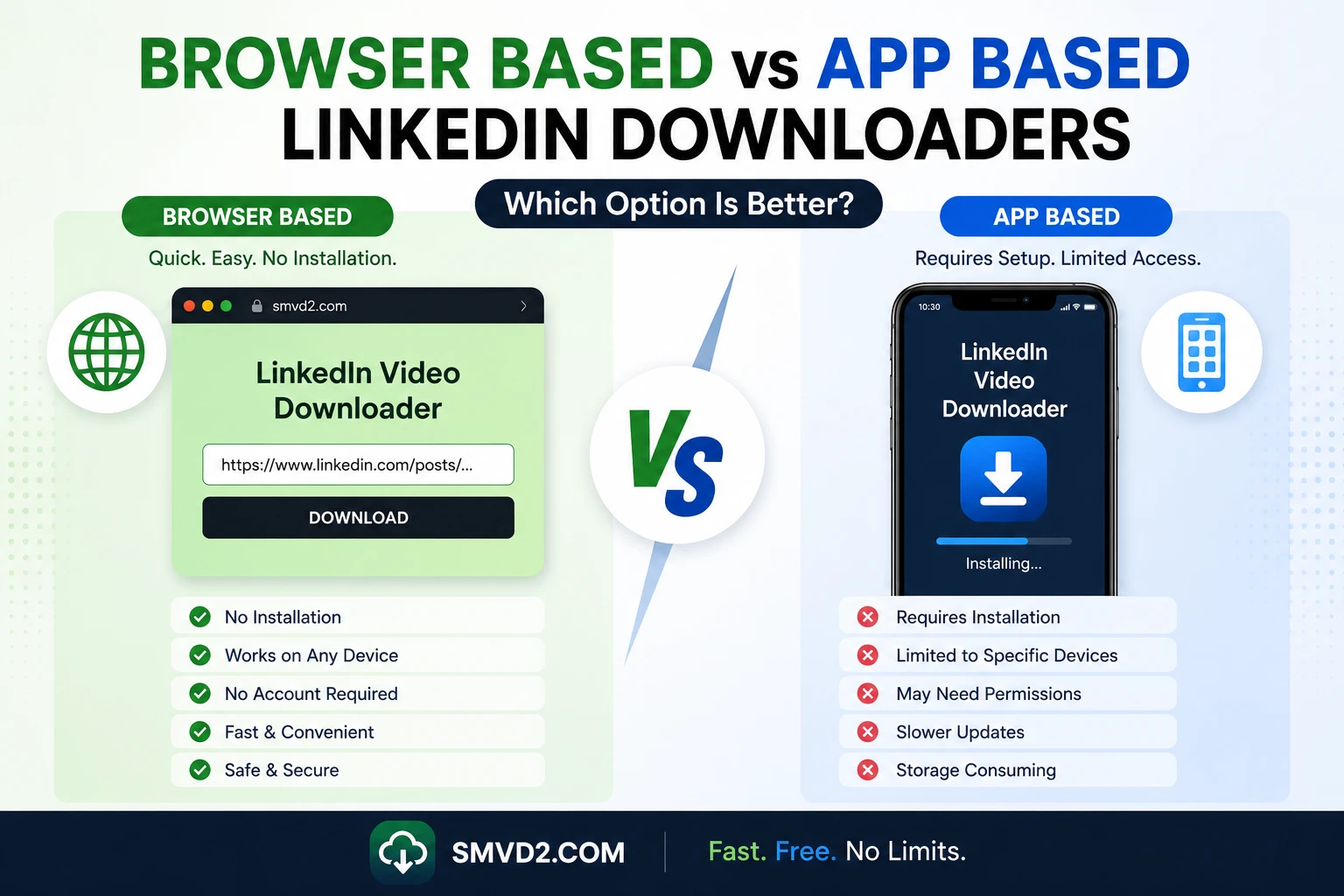
Browser Based vs App Based LinkedIn Downloaders: Which Option Is Better?
LinkedIn has evolved from a networking platform to a content based platform. Today, it’s a hub for educational videos, industry insights, recruitment campaigns, product demonstrations, marketing strategies, leadership content, and professional development resources.
As video content continues to grow across LinkedIn, many users want a reliable way to save videos for offline viewing, future reference, team training, or research purposes.
This often leads to a common question:
Should you use a browser-based LinkedIn downloader or install an app-based downloader?
While both options can help you save LinkedIn videos, they offer very different experiences in terms of convenience, accessibility, maintenance, storage requirements, and usability.
In this guide, we’ll compare browser-based and app-based LinkedIn downloaders, explore their strengths and limitations, and explain why many professionals are increasingly choosing SMVD2.com as a practical solution for downloading LinkedIn videos.
One thing we’ve consistently noticed is that most users aren’t looking for the downloader with the longest feature list. They’re looking for the downloader that helps them save a video quickly and move on with their day. That difference becomes important when comparing browser-based and app-based solutions.
Why People Download LinkedIn Videos?
Professionals download LinkedIn videos for many different reasons.
Some users want offline access to educational content, while others build collections of industry insights, recruitment campaigns, webinars, or marketing examples.
Common reasons include:
- Watching videos without an internet connection
- Saving educational resources for future learning
- Archiving personal LinkedIn content
- Building internal training libraries
- Researching competitor strategies
- Collecting marketing inspiration
- Preserving valuable professional insights
- Studying recruitment and employer branding campaigns
For example:
A recruiter may save employer branding videos to analyze hiring strategies.
A marketer may collect successful video campaigns to study messaging techniques.
A business owner may archive leadership webinars for team training.
A student may save career advice videos for interview preparation.
In practical usage, we’ve observed that most users don’t download LinkedIn videos every day. Instead, they save specific videos they find valuable and want to revisit later.
This is one reason simplicity matters so much.
When downloading is an occasional task rather than a daily workflow, users typically prefer solutions that require fewer steps and less maintenance.
What Is a Browser-Based LinkedIn Downloader?
A browser-based LinkedIn downloader is an online tool that works directly through a web browser.
Users simply:
- Copy a LinkedIn video URL
- Visit the downloader website
- Paste the URL
- Download the video
No installation is required.
No software setup is required.
No device configuration is required.
Because browser-based tools operate online, they typically work across multiple devices and operating systems.
This includes:
- Windows
- Mac
- Android
- iPhone
- Tablets
And popular browsers such as:
- Google Chrome
- Safari
- Mozilla Firefox
- Microsoft Edge
One of the biggest advantages of browser-based downloaders is accessibility.
You can switch from a laptop to a smartphone and continue using the same workflow without installing additional software.
From a usability perspective, this eliminates a major source of friction.
Many users appreciate being able to access a downloader instantly without worrying about updates, permissions, storage limitations, or compatibility issues.
Another observation we’ve made is that browser-based solutions tend to appeal most to:
- Students
- Recruiters
- Marketers
- Business owners
- Casual users
because they prioritize convenience over advanced workflow features.
What Is an App-Based LinkedIn Downloader?
An app-based LinkedIn downloader is software that must be installed on a device before it can be used.
These solutions may exist as:
- Desktop applications
- Mobile apps
- Browser extensions
- Hybrid software platforms
Unlike browser-based tools, app-based downloaders generally require:
- Installation
- Device permissions
- Software updates
- Local storage space
Depending on the application, users may also need to:
- Create accounts
- Configure settings
- Manage downloads
- Maintain software updates
App-based downloaders often include advanced capabilities beyond simple video downloading.
Examples may include:
- Download management
- Batch downloading
- File organization
- Offline media libraries
- Content categorization
- Advanced workflow controls
These features can be valuable for users who regularly manage large collections of content.
For example:
A marketing agency maintaining hundreds of competitor videos may benefit from advanced organization tools.
A corporate training department may need extensive media management features.
However, one thing we’ve consistently noticed is that many individual users end up paying the complexity cost of these features without actually using them.
This doesn’t mean app-based downloaders are bad.
It simply means they’re often designed for different use cases.
The ideal choice depends less on which option has more features and more on which option aligns with the user’s actual workflow.
A Quick Observation Before We Continue
One pattern repeatedly appears when comparing browser-based and app-based downloaders:
The more frequently someone downloads videos, the more likely they are to appreciate advanced app features.
The less frequently someone downloads videos, the more likely they are to prioritize convenience and speed.
This makes it much easier to choose the right solution.
Advantages of Browser-Based LinkedIn Downloaders
Browser-based LinkedIn downloaders have become increasingly popular because they focus on what most users actually need: fast access, minimal setup, and straightforward downloading.
While app-based solutions often emphasize advanced functionality, browser-based tools prioritize convenience and accessibility.
For many professionals, that difference is significant.
1. No Installation Required
One of the most obvious advantages of browser-based downloaders is that they work immediately.
Users don’t need to:
- Download software
- Install applications
- Configure settings
- Grant extensive permissions
- Manage software updates
Instead, the process usually involves:
- Copying the LinkedIn URL
- Visiting the downloader
- Pasting the link
- Saving the video
This simplicity removes many of the barriers that discourage users from downloading content.
In our observation, users are far more likely to use a tool consistently when it requires fewer steps.
2. Works Across Multiple Devices
A recruiter may discover a video on an iPhone and later review it on a Windows laptop.
A marketer may conduct research on a tablet while traveling and continue working from a desktop computer.
Browser-based downloaders support this flexibility because they work across:
- Windows
- Mac
- Android
- iPhone
- Tablets
And through popular browsers such as:
- Google Chrome
- Safari
- Mozilla Firefox
- Microsoft Edge
This means users don’t have to install separate applications on every device they use.
3. Automatic Updates Without User Effort
One hidden advantage that many users overlook is maintenance.
With browser-based tools, updates happen behind the scenes.
Users don’t need to:
- Download patches
- Install updates
- Monitor version compatibility
- Troubleshoot outdated software
This is particularly important because platforms like LinkedIn periodically update their infrastructure.
A browser-based service can adapt centrally without requiring action from individual users.
For casual users, this creates a smoother long-term experience.
4. Minimal Device Storage Usage
Storage space is becoming increasingly valuable, especially on mobile devices.
Installed applications consume:
- Storage
- Cache files
- System resources
- Background processes
Browser-based downloaders avoid these issues because they operate online.
Users can access the functionality they need without dedicating additional storage to software they may only use occasionally.
5. Faster for Occasional Users
One thing we’ve consistently noticed is that most LinkedIn users are not downloading videos every day.
They may save:
- A webinar
- An industry insight
- A recruitment campaign
- A training video
- A marketing example
once every few days or weeks.
For these users, opening a website is often significantly faster than launching dedicated software.
The fewer steps required, the more practical the solution becomes.
6. Fewer Compatibility Issues
Installed software often encounters challenges such as:
- Operating system updates
- Browser updates
- Permission conflicts
- Hardware compatibility issues
Browser-based tools generally reduce these problems because they function within standardized web environments.
One observation we’ve made is that users frequently blame downloaders when issues arise, but many problems actually originate from software compatibility conflicts.
Browser-based solutions eliminate many of these variables.
7. Better for Quick Research Workflows
Professionals often download LinkedIn videos as part of research activities.
Examples include:
Recruiters
Saving employer branding campaigns.
Marketers
Collecting competitor content.
Business Owners
Archiving educational resources.
Students
Saving interview preparation content.
For these workflows, speed and accessibility are usually more important than advanced management features.
Advantages of App-Based LinkedIn Downloaders
While browser-based solutions excel in convenience, app-based downloaders offer benefits that can be valuable for specific user groups.
Particularly for high-volume users, additional functionality may justify the added complexity.
1. Advanced Feature Sets
Many app-based downloaders include capabilities beyond simple downloading.
Examples include:
- Download scheduling
- Batch processing
- Media organization
- Advanced file management
- Download history
- Automated workflows
For users managing large content libraries, these features can improve efficiency.
However, it’s important to consider whether these capabilities will actually be used.
A common pattern we see is users purchasing feature-rich software and utilizing only a small percentage of its functionality.
2. Better for High-Volume Downloading
Organizations that regularly archive large amounts of content may benefit from app-based solutions.
Examples include:
Marketing Agencies
Tracking industry campaigns.
Corporate Training Teams
Managing educational resources.
Research Departments
Maintaining content libraries.
Recruitment Organizations
Archiving employer branding assets.
For these users, advanced download management features can save time.
3. Offline Content Management
Many applications provide local media libraries that allow users to organize downloaded content directly within the software.
This may include:
- Categories
- Collections
- Playlists
- Tags
- Search functionality
For large-scale content management, these tools can be useful.
4. Batch Downloading Capabilities
Some app-based platforms allow users to process multiple downloads simultaneously.
This is particularly valuable when:
- Researching multiple competitors
- Building training libraries
- Managing extensive content collections
For occasional users, batch downloading may not matter.
For teams handling hundreds of videos, it can become a meaningful productivity feature.
5. Enhanced Workflow Automation
Premium applications often integrate workflow tools such as:
- Download queues
- Scheduled tasks
- Automated categorization
- File management systems
These capabilities are designed primarily for power users and organizations.
One thing we’ve noticed is that workflow automation becomes more valuable as download volume increases.
The average LinkedIn user may never need it.
A content team managing hundreds of assets each month might rely on it heavily.
6. Greater Control Over Local Storage
Some users prefer keeping all downloaded content directly on their devices through dedicated applications.
This approach provides:
- Direct file access
- Local organization
- Offline management
- Reduced reliance on web interfaces
For users who frequently work without internet access, this can be advantageous.
7. Better for Specialized Use Cases
App-based solutions often make the most sense for users with specialized requirements.
Examples include:
- Content archivists
- Enterprise marketing teams
- Large recruitment agencies
- Corporate learning departments
In these environments, advanced management capabilities may provide significant operational value.
What We Noticed During Comparison
One insight became increasingly clear while comparing both approaches:
Browser-based downloaders optimize for convenience.
App-based downloaders optimize for control.
Neither approach is inherently better.
The right choice depends on how often you download videos and how much complexity you’re willing to manage.
For occasional and moderate users, convenience often wins.
For large-scale content operations, additional control can justify the extra effort.
Understanding this trade-off is one of the most important factors when deciding between browser-based and app-based LinkedIn downloaders.
Limitations of Browser-Based LinkedIn Downloaders
Browser-based LinkedIn downloaders offer convenience and accessibility, but they are not perfect.
Understanding their limitations is important because it helps users choose the right solution based on their actual needs rather than marketing claims.
One thing we’ve noticed while comparing different download methods is that users often focus heavily on advantages while overlooking the trade-offs. Every solution has limitations, and browser-based tools are no exception.
1. Dependence on an Internet Connection
Most browser-based downloaders require an active internet connection.
Since the entire process happens online, users generally need internet access to:
- Access the downloader
- Process the LinkedIn URL
- Generate the downloadable file
For professionals working in locations with unstable connectivity, this can occasionally create challenges.
However, it’s worth noting that LinkedIn itself also requires internet access, so this limitation affects only a small percentage of use cases.
2. Fewer Advanced Workflow Features
Browser-based tools are typically designed around simplicity.
As a result, they often offer fewer advanced features than dedicated applications.
Examples may include:
- Limited download scheduling
- Fewer automation capabilities
- Reduced content management tools
- Minimal workflow customization
For most users, this isn’t a major issue.
However, organizations managing thousands of content assets may prefer more advanced systems.
3. Limited Bulk Downloading Options
Some browser-based tools focus primarily on individual video downloads.
Teams that regularly archive large volumes of content may occasionally find dedicated software more suitable for extensive batch processing.
That said, one observation we’ve made is that most LinkedIn users download individual videos rather than hundreds of files at once.
As a result, this limitation often matters less than people initially assume.
4. Less Local Content Management
Many browser-based downloaders focus on the downloading process itself.
They don’t always provide:
- Content libraries
- File categorization
- Media management dashboards
- Advanced search functionality
Users who want extensive organization tools may need to manage downloaded files manually.
5. Performance Depends on the Browser Environment
Because browser-based tools operate within web browsers, performance can occasionally be influenced by factors such as:
- Browser version
- Extensions
- Device memory
- Network conditions
While modern browsers are highly capable, performance can still vary from one device to another.
Limitations of App-Based LinkedIn Downloaders
App-based downloaders provide additional functionality, but they introduce their own set of challenges.
In many cases, the limitations of app-based solutions become more noticeable over time than during initial installation.
1. Installation Creates Additional Friction
Before downloading a single LinkedIn video, users typically need to:
- Download the software
- Install the application
- Configure settings
- Accept permissions
This process may only take a few minutes, but it creates additional steps that browser-based tools eliminate entirely.
One thing we’ve consistently observed is that every additional step reduces user adoption.
Convenience often plays a larger role than users expect.
2. Ongoing Software Maintenance
Applications require maintenance.
This may include:
- Software updates
- Compatibility fixes
- Security patches
- Bug fixes
Many users install a downloader and forget about it until an update becomes necessary.
When that happens, interruptions can occur.
Browser-based tools generally avoid this issue because updates happen centrally.
3. Device Storage Consumption
Every installed application occupies storage space.
Over time, this can include:
- Application files
- Download histories
- Cache data
- Temporary files
- System resources
For users with limited storage capacity, this can become increasingly noticeable.
This is particularly true on mobile devices.
4. Permission and Privacy Concerns
Many applications request access to:
- Device storage
- Browser activity
- Local files
- System permissions
While legitimate software often requires certain permissions to function properly, some users prefer minimizing access requests whenever possible.
Browser-based tools frequently appeal to users who prioritize simplicity and reduced permission requirements.
5. Compatibility Issues Can Develop
App-based downloaders can occasionally encounter:
- Operating system updates
- Browser changes
- Security restrictions
- Hardware compatibility challenges
One hidden reality is that many download failures are not caused by LinkedIn itself—they occur because software and operating systems evolve independently.
Keeping everything compatible requires ongoing maintenance.
6. Feature Overload
A surprising limitation of many app-based solutions is having too many features.
This may sound counterintuitive, but feature overload often creates:
- More complexity
- Longer learning curves
- Increased setup time
- Additional troubleshooting
One pattern we’ve noticed repeatedly is that users frequently purchase advanced software for one feature and end up navigating dozens of tools they never intended to use.
Hidden Limitations Most Reviews Never Mention
Many comparison articles discuss obvious pros and cons but ignore practical realities that users discover only after using downloaders for some time.
These insights often have a greater impact on user satisfaction than feature lists.
Most Users Never Use Advanced Features
Many premium applications advertise:
- Automation
- Team collaboration
- Download scheduling
- Asset management
- Analytics
These capabilities sound valuable.
However, in practical use, most individuals simply want to:
- Save a video
- Watch it later
- Reference it when needed
The majority of advanced features often remain unused.
This is one reason browser-based tools continue to grow in popularity.
Browser Extensions Break More Often Than People Realize
A common assumption is that browser extensions are more convenient than web-based tools.
However, browser extensions frequently encounter issues after:
- Browser updates
- Security changes
- Permission updates
- Platform modifications
During our comparison, one recurring observation was that web-based solutions often require less troubleshooting over time.
Download Failures Are Usually Not the Downloader’s Fault
Many users assume that every failed download indicates a poor-quality tool.
In reality, failures are often caused by:
- Incorrect URLs
- Deleted content
- Private LinkedIn posts
- Restricted permissions
- Temporary platform changes
Understanding this distinction can save significant troubleshooting time.
Simplicity Often Creates Better Long-Term Experiences
The software industry frequently promotes feature-rich solutions.
Yet many users ultimately prefer tools that:
- Work immediately
- Require minimal maintenance
- Remain accessible across devices
- Deliver consistent results
One lesson that repeatedly emerged during our analysis is that convenience often has more long-term value than complexity.
What We Learned While Comparing Both Approaches
After reviewing browser-based and app-based downloaders from a practical user perspective, a clear pattern emerged:
Users rarely regret having fewer features.
They frequently regret dealing with unnecessary complexity.
The best downloader isn’t necessarily the one with the longest feature list.
It’s the one that fits the user’s workflow while minimizing friction.
For many LinkedIn users, that realization becomes the deciding factor when choosing between browser-based and app-based solutions.
Browser-Based vs App-Based LinkedIn Downloaders: Side-by-Side Comparison
After examining both approaches, it’s clear that neither option is universally better.
The ideal choice depends on:
- How often you download LinkedIn videos
- The devices you use
- Whether you need advanced management features
- Your tolerance for setup and maintenance
- The complexity of your workflow
The comparison below highlights the practical differences most users experience.
| Feature | Browser-Based Downloaders | App-Based Downloaders |
|---|---|---|
| Installation Required | No | Yes |
| Initial Setup Time | Immediate | Moderate |
| Device Storage Usage | Minimal | Higher |
| Software Updates | Automatic | User Managed |
| Cross-Device Access | Excellent | More Limited |
| Accessibility | Any Modern Browser | Installed Devices Only |
| Learning Curve | Very Low | Moderate to High |
| Download Speed | Fast for Most Users | Fast |
| Advanced Automation | Limited | Extensive |
| Content Management | Basic | Advanced |
| Batch Downloading | Varies | Often Available |
| Maintenance Effort | Very Low | Ongoing |
| Compatibility Issues | Rare | More Common |
| Permission Requirements | Minimal | Often Higher |
| Best For | Most Users | Power Users & Teams |
Which Option Is Better?
One mistake many comparison articles make is assuming all users have the same needs.
In reality, a student’s workflow looks very different from that of a marketing agency or recruitment team.
Let’s examine which solution tends to work best for different user groups.
Students and Learners
Students frequently save:
- Career guidance videos
- Interview preparation content
- Industry insights
- Professional development resources
- Educational webinars
What they usually need:
- Simplicity
- Quick downloads
- Mobile accessibility
- No recurring costs
What they rarely need:
- Workflow automation
- Team collaboration
- Enterprise content management
For this audience, browser-based downloaders are often the more practical option.
Job Seekers
Job seekers often download:
- Resume advice
- LinkedIn growth tips
- Networking strategies
- Hiring insights
- Interview guidance
Most job seekers simply want to access content later without worrying about software installation or maintenance.
A browser-based solution usually provides everything they need.
Recruiters
Recruiters frequently save:
- Employer branding campaigns
- Hiring advertisements
- Recruitment strategies
- Talent acquisition examples
For occasional and moderate usage, browser-based downloaders typically offer the best balance of speed and convenience.
However, large recruitment organizations maintaining extensive content libraries may benefit from advanced app-based systems.
Marketers
Marketers often collect:
- Competitor campaigns
- Video advertising examples
- Thought leadership content
- Industry trends
- Creative inspiration
One observation we’ve consistently made is that marketers often begin with browser-based tools and only transition to advanced systems when content volume becomes substantial.
For many marketers, convenience remains the priority.
Business Owners
Business owners commonly save:
- Training content
- Marketing strategies
- Leadership insights
- Industry updates
- Educational resources
Most business owners value efficiency over complexity.
A straightforward browser-based workflow often aligns better with their daily responsibilities.
Agencies and Enterprise Teams
Large organizations may need:
- Batch downloading
- Team collaboration
- Content libraries
- Workflow automation
- Asset management
In these situations, app-based solutions can provide meaningful advantages.
The key difference is scale.
What feels unnecessary for an individual user may become essential for a large team.
What We Noticed While Comparing Both Approaches
After evaluating browser-based and app-based downloaders from a practical perspective, several interesting patterns emerged.
These observations often reveal more about real-world usability than feature lists alone.
Most Users Initially Overestimate Their Needs
Many users assume they need:
- Automation
- Advanced file management
- Enterprise features
- Workflow integrations
But after using downloaders for several weeks, they often discover they primarily need:
- Reliable downloads
- Fast access
- Device flexibility
- Minimal setup
This realization frequently shifts preference toward simpler solutions.
Convenience Consistently Influences Adoption
One of the strongest patterns we observed is that convenience directly impacts whether people continue using a tool.
Users are more likely to return to a downloader when it:
- Opens instantly
- Requires no installation
- Works across devices
- Has a minimal learning curve
The fewer obstacles involved, the more likely the tool becomes part of a regular workflow.
Feature Count Doesn’t Equal User Satisfaction
Many software companies compete by adding more features.
However, user satisfaction often comes from:
- Reliability
- Simplicity
- Accessibility
- Consistency
One recurring observation is that people rarely praise a downloader because it has 50 features.
They praise it because it works when they need it.
Maintenance Becomes More Important Over Time
During initial setup, maintenance doesn’t seem significant.
Several months later, however, users begin noticing:
- Software updates
- Compatibility issues
- Storage consumption
- Permission management
Browser-based tools often reduce these ongoing responsibilities.
This becomes increasingly valuable over time.
Most LinkedIn Video Downloads Are Occasional
This was perhaps the most important insight.
Many users download:
- A webinar this week
- A marketing example next month
- A recruitment campaign later
They are not managing thousands of videos.
Because of this, many people naturally gravitate toward solutions that emphasize convenience rather than extensive management capabilities.
The Key Trade-Off
After comparing both approaches, the decision can be simplified to a single question:
Do you value convenience or control more?
Browser-Based Downloaders Optimize For:
- Simplicity
- Accessibility
- Speed
- Low maintenance
- Cross-device compatibility
App-Based Downloaders Optimize For:
- Advanced functionality
- Automation
- Content management
- Enterprise workflows
- Greater customization
Neither approach is wrong.
The best choice depends entirely on how you use LinkedIn videos.
A Practical Reality
For individual professionals, students, recruiters, marketers, and business owners, convenience often outweighs advanced functionality.
For large organizations managing extensive content operations, advanced control can justify additional complexity.
Understanding this distinction helps users avoid paying for features they don’t need while ensuring they have access to the capabilities that genuinely improve their workflow.
Why More Users Are Choosing SMVD2.com
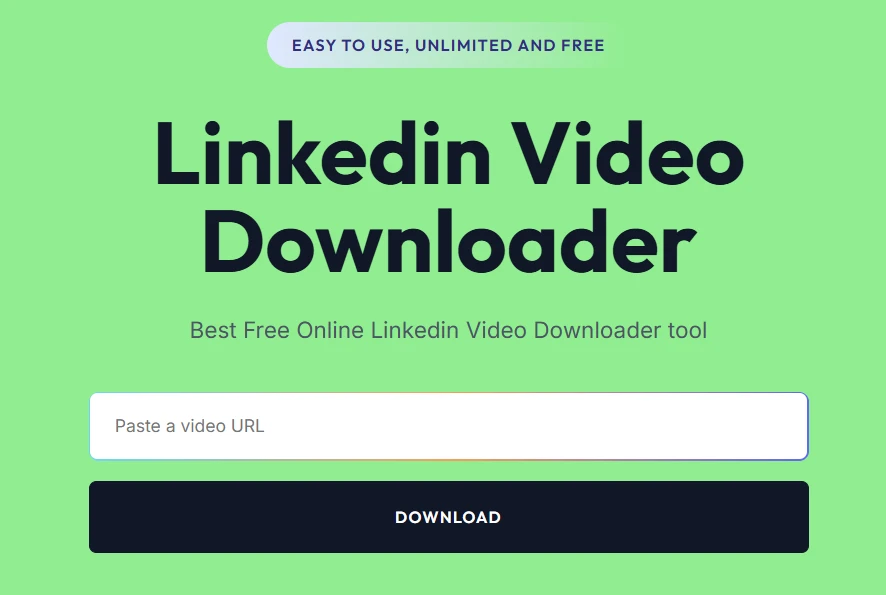
When comparing browser-based and app-based LinkedIn downloaders, many users eventually reach a practical conclusion:
They don’t necessarily want the downloader with the most features.
They want the downloader that helps them save a LinkedIn video quickly, reliably, and with as little effort as possible.
This shift in user behavior is one reason browser-based platforms such as SMVD2.com continue to gain popularity among professionals.
Instead of focusing on complexity, SMVD2 focuses on solving the core problem efficiently.
Built Around Real User Behavior
One of the most interesting observations we made while comparing downloader solutions is that user behavior often differs from what software companies assume.
Many platforms are designed around advanced capabilities such as:
- Workflow automation
- Content libraries
- Analytics dashboards
- Team collaboration
- Download scheduling
While these features can be valuable for certain organizations, most LinkedIn users simply want to:
- Save a useful video
- Watch it later
- Reference it when needed
- Store it for future learning
SMVD2 aligns closely with these real-world usage patterns.
Instead of forcing users through complex workflows, it keeps the process straightforward.
No Installation Required
One of the biggest reasons professionals prefer browser-based downloaders is the elimination of software installation.
With SMVD2:
- No applications to download
- No software setup
- No storage consumption from the downloader itself
- No installation permissions
- No compatibility concerns
The entire process happens directly through a web browser.
This significantly reduces friction and allows users to start downloading immediately.
Cross-Device Accessibility
Modern professionals work across multiple devices.
A recruiter may discover content on a smartphone.
A marketer may conduct research on a laptop.
A business owner may review content from a tablet while traveling.
Because SMVD2 is browser-based, users can access it across:
- Windows PCs
- Mac computers
- Android devices
- iPhones
- Tablets
This flexibility eliminates the need to install separate applications on every device.
Faster Access for Occasional Downloads
One reality that many reviews overlook is that most LinkedIn users download videos occasionally rather than constantly.
For example:
- A recruiter saves a hiring campaign.
- A marketer archives a competitor advertisement.
- A student stores an interview preparation video.
- A business owner saves a webinar.
In these situations, launching a website is often faster than opening dedicated software.
The fewer steps required, the more likely users are to complete the task efficiently.
Reduced Maintenance Over Time
Maintenance is one of the most underestimated aspects of software.
When users first install an application, they rarely think about:
- Updates
- Compatibility issues
- Permission changes
- Storage management
Several months later, however, these factors often become noticeable.
Because SMVD2 operates through the browser, updates happen automatically behind the scenes.
Users always access the latest version without needing to install patches or troubleshoot outdated software.
Designed for Simplicity Without Sacrificing Functionality
One misconception in the downloader market is that simplicity means limited capability.
In reality, simplicity often improves usability.
A well-designed tool removes unnecessary complexity while preserving the functionality users actually need.
SMVD2 focuses on:
- Fast processing
- Easy access
- Reliable downloads
- Device flexibility
- Minimal learning curve
This balance is one of the reasons many professionals find browser-based solutions more appealing than feature-heavy alternatives.
Real-World Use Cases Where SMVD2 Excels
Different professionals use LinkedIn videos in different ways.
Let’s examine a few common scenarios.
Recruiters
Recruiters frequently save:
- Employer branding videos
- Hiring campaigns
- Recruitment advertisements
- Talent acquisition strategies
In most cases, they need quick access to content rather than advanced content management systems.
SMVD2 allows them to save videos quickly and continue with their research.
Marketers
Marketers often build collections of:
- Competitor campaigns
- Thought leadership videos
- Creative inspiration
- Industry trends
One thing we’ve noticed is that marketers value speed because research often happens across multiple platforms and devices.
Browser-based accessibility becomes particularly useful in these workflows.
Students and Job Seekers
Students commonly save:
- Career guidance videos
- Interview preparation content
- Professional development resources
- Networking advice
For these users, simplicity and cost-effectiveness are usually more important than advanced workflow tools.
Business Owners
Business owners often archive:
- Training resources
- Industry webinars
- Leadership insights
- Marketing examples
Most don’t need enterprise software.
They need a dependable way to save valuable content for future reference.
What Makes SMVD2 Different From Many Alternatives?
After reviewing multiple download approaches, several differentiators stand out.
Browser-First Philosophy
Many solutions start with software and then attempt to simplify it.
SMVD2 takes the opposite approach.
It starts with simplicity and adds only what users genuinely need.
This browser-first philosophy reduces barriers to entry and improves accessibility.
Focus on Practical Functionality
Rather than competing based on feature count, SMVD2 focuses on practical usability.
The goal is not to provide hundreds of tools.
The goal is to make downloading LinkedIn videos easy.
This distinction matters because usability often has a greater impact on satisfaction than feature quantity.
Low Learning Curve
One recurring frustration users experience with advanced software is the time required to learn it.
With SMVD2:
- No onboarding process
- No technical expertise required
- No workflow training required
Most users understand the process within seconds.
Consistency Across Devices
Consistency is one of the most important aspects of user experience.
Whether you’re using:
- Chrome
- Firefox
- Safari
- Edge
or switching between desktop and mobile devices, the workflow remains familiar.
This consistency reduces confusion and improves efficiency.
What We Learned From Comparing User Preferences
Perhaps the most surprising observation was how often users prioritize convenience over advanced functionality.
Many users initially believe they need:
- Automation
- Batch processing
- Advanced management systems
Yet after evaluating their actual behavior, they discover they mainly need:
- Fast downloads
- Reliable performance
- Easy accessibility
- Minimal maintenance
This realization explains why browser-based solutions continue gaining traction despite the availability of more feature-rich alternatives.
Why SMVD2 Offers the Best Balance
The browser-based vs app-based debate often creates a false assumption that users must choose between convenience and capability.
In reality, the best solution is often the one that balances both.
SMVD2 achieves this balance by providing:
- Browser-based accessibility
- Fast video downloads
- Cross-device compatibility
- Minimal setup requirements
- Reduced maintenance
- Beginner-friendly usability
- Reliable performance
For the majority of LinkedIn users, these benefits align closely with their actual needs.
A Practical Observation
After comparing both approaches, one conclusion repeatedly surfaced:
The best downloader isn’t the one with the most features.
It’s the one users continue using because it fits naturally into their workflow.
For many professionals, recruiters, marketers, students, and business owners, SMVD2 delivers exactly that experience.
How to Download LinkedIn Videos Using SMVD2
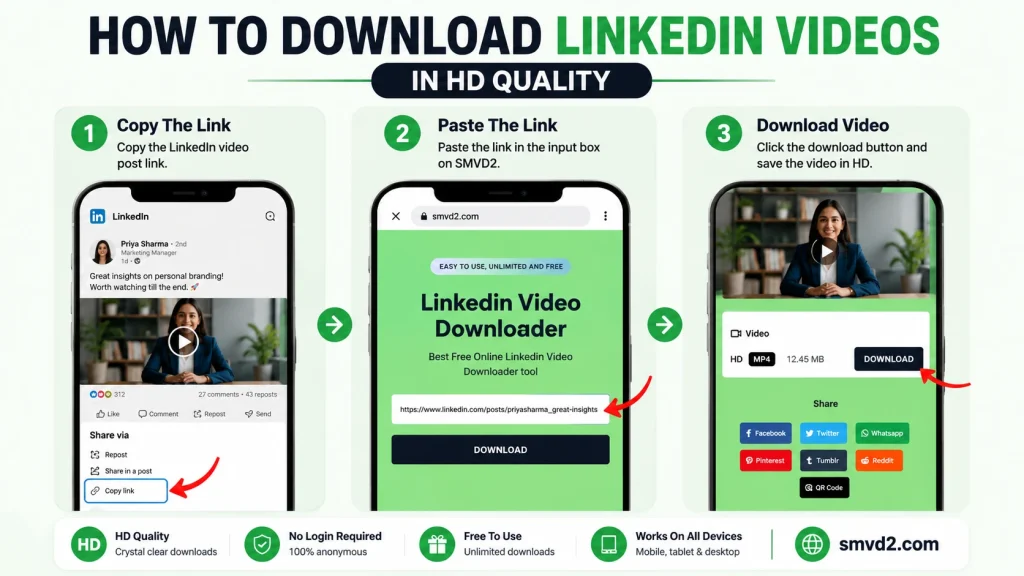
One of the biggest advantages of browser-based downloaders is simplicity.
Many users don’t want to install software, configure settings, manage updates, or learn a new platform just to save a LinkedIn video.
That’s why the downloading process on SMVD2 is intentionally straightforward.
Whether you’re a recruiter saving employer branding content, a marketer collecting campaign inspiration, or a student archiving educational videos, the process remains virtually the same.
Step 1: Find the LinkedIn Video
Open LinkedIn and locate the video you want to save.
This may include:
- Industry insights
- Recruitment campaigns
- Marketing examples
- Leadership content
- Training resources
- Educational webinars
Before downloading, make sure the content is publicly accessible and that you are using it responsibly.
Step 2: Copy the LinkedIn Post URL
Navigate to the LinkedIn post containing the video and copy the post link.
This URL serves as the source that SMVD2 uses to locate the video.
One common mistake users make is copying:
- Profile URLs
- Company page URLs
- Feed URLs
instead of the actual post URL.
Always ensure you’re copying the specific video post link.
Step 3: Visit SMVD2.com
Open your preferred browser and visit SMVD2.com.
Because the platform is browser-based, it works across:
- Windows
- Mac
- Android
- iPhone
- Tablets
No software installation is required.
No extensions are required.
No account registration is required.
Step 4: Paste the URL
Paste the copied LinkedIn URL into the designated field.
Before continuing, quickly verify that:
- The link is complete
- The post is still active
- The video is publicly accessible
A surprising number of download issues are caused by incorrect URLs rather than downloader problems.
Step 5: Generate the Download
Click the download button.
SMVD2 processes the link and prepares the downloadable version of the video.
Depending on:
- Video size
- Network speed
- Server response time
the process usually takes only a few moments.
Step 6: Save the Video
Once the video is ready, save it to your device.
Many professionals organize videos into folders such as:
- Recruitment Research
- Marketing Inspiration
- Training Resources
- Industry Insights
- Professional Development
Maintaining an organized structure makes future access significantly easier.
Common Mistakes Users Make When Downloading LinkedIn Videos
While downloading LinkedIn videos is generally straightforward, several recurring mistakes create unnecessary frustration.
Understanding these issues can save considerable time.
Using the Wrong URL
This is by far the most common problem.
Users often copy:
- A profile link
- A company page link
- A LinkedIn feed URL
instead of the direct post URL.
Without the correct post link, the downloader cannot identify the video properly.
Trying to Download Private Content
Many people assume all LinkedIn videos can be downloaded.
In reality, downloaders generally work best with publicly accessible content.
Private posts, restricted content, and permission-based videos may not be accessible.
When a download fails, this is often the reason.
Assuming Every Failure Is a Tool Problem
One observation that consistently appears across user experiences is that people often blame the downloader first.
However, failures are frequently caused by:
- Deleted posts
- Incorrect URLs
- Restricted content
- Temporary platform changes
Understanding this distinction helps users troubleshoot more effectively.
Expecting Better Quality Than the Original Upload
A downloader cannot improve the quality of the source video.
If the original LinkedIn upload is compressed or lower resolution, the downloaded version will reflect those limitations.
The downloader preserves quality—it doesn’t create new quality.
Downloading Content Without Considering Usage Rights
Saving a video and owning a video are two different things.
Users should always:
- Respect copyright laws
- Follow creator permissions
- Avoid unauthorized commercial use
- Provide attribution when appropriate
Responsible use benefits everyone involved.
What Most LinkedIn Downloader Reviews Don’t Tell You
Many comparison articles focus heavily on feature lists while overlooking practical realities.
These observations often have a greater impact on long-term satisfaction than technical specifications.
Most Users Never Need Advanced Features
Many premium platforms advertise:
- Automation
- Analytics
- Collaboration
- Asset management
- Workflow systems
These features sound impressive.
Yet most professionals simply want to:
- Save a useful video
- Watch it later
- Reference it when needed
One thing we’ve repeatedly noticed is that convenience often provides more value than complexity.
Browser Extensions Often Create More Problems Than They Solve
A common assumption is that browser extensions are the easiest option.
However, extensions frequently experience issues after:
- Browser updates
- Security changes
- Permission modifications
- Platform updates
Browser-based solutions often avoid many of these challenges because they don’t depend on extension-specific permissions.
Maintenance Matters More Than People Realize
When choosing a downloader, most users focus on features.
Very few think about:
- Updates
- Storage consumption
- Compatibility issues
- Software maintenance
Months later, these factors often become far more important.
This is one reason browser-based tools continue to gain popularity among professionals.
Best Practices When Downloading LinkedIn Videos
Following a few simple best practices can improve both your downloading experience and content organization.
Download Purposefully
Instead of saving every interesting video, focus on content that provides long-term value.
This reduces clutter and improves organization.
Organize Content by Category
Creating dedicated folders can significantly improve efficiency.
Examples include:
- Leadership Content
- Marketing Research
- Recruitment Examples
- Training Materials
- Industry Insights
A well-organized library becomes increasingly valuable over time.
Verify Content Accessibility First
Before attempting a download, confirm that:
- The post still exists
- The video loads properly
- The content is publicly available
This simple step eliminates many avoidable issues.
Respect Creators
Professional content creators invest significant time and effort into producing valuable content.
Whenever appropriate:
- Credit original creators
- Respect copyright guidelines
- Use content responsibly
Ethical usage strengthens the professional ecosystem for everyone.
Choose a Solution That Matches Your Workflow
One of the biggest mistakes users make is choosing tools based on feature quantity rather than actual needs.
Ask yourself:
- How often do I download videos?
- Do I really need advanced automation?
- Am I managing hundreds of videos or just a few each month?
For many users, a browser-based solution provides the ideal balance of convenience and functionality.
A Practical Observation
After comparing browser-based and app-based approaches, one lesson repeatedly emerged:
The most valuable downloader isn’t necessarily the most advanced one.
It’s the one that fits naturally into your workflow and removes friction from the process.
For professionals who prioritize speed, accessibility, and simplicity, browser-based solutions like SMVD2 often provide exactly what they need without introducing unnecessary complexity.
Frequently Asked Questions (FAQ)
Is a Browser-Based LinkedIn Downloader Safer Than an App-Based Downloader?
In many situations, browser-based downloaders can feel safer because they do not require software installation, system permissions, or ongoing access to device resources.
With browser-based tools such as SMVD2, users typically avoid:
- Installing software
- Granting extensive permissions
- Managing application updates
- Consuming additional device resources
However, regardless of the download method you choose, it is always important to use reputable tools and follow good security practices.
Which Is Faster: Browser-Based or App-Based Downloaders?
The answer depends on the specific tool and workflow.
For occasional downloads, browser-based solutions are often faster because users can:
- Open the website
- Paste the URL
- Download the video
without launching software or navigating additional menus.
For high-volume downloading involving hundreds of files, specialized applications may offer workflow advantages through automation and batch processing.
For most LinkedIn users, the difference is usually measured more in convenience than download speed.
Can Browser-Based Downloaders Save Private LinkedIn Videos?
Generally, no.
Most LinkedIn downloaders work with publicly accessible content.
Private videos, restricted posts, and permission-protected content are often unavailable regardless of whether the downloader is browser-based or app-based.
This limitation exists because access permissions are controlled by LinkedIn itself.
Do Browser-Based Downloaders Work on iPhone and Android?
Yes.
One of the biggest advantages of browser-based tools is cross-device compatibility.
SMVD2 works across:
- Android devices
- iPhones
- Windows computers
- Mac computers
- Tablets
As long as a modern browser is available, users can typically access the downloader without installing additional software.
Do I Need to Create an Account to Use SMVD2?
No.
SMVD2 is designed to provide a straightforward experience without requiring account creation for basic downloading functionality.
This reduces friction and allows users to access the tool immediately.
Which Option Is Better for Students and Job Seekers?
For most students and job seekers, browser-based downloaders are usually the better option.
These users typically prioritize:
- Simplicity
- Accessibility
- Speed
- Cost-effectiveness
They rarely require enterprise-level features such as workflow automation or content management systems.
Which Option Is Better for Agencies and Enterprise Teams?
Organizations managing large content libraries may benefit from app-based solutions when they require:
- Batch downloading
- Team collaboration
- Asset management
- Workflow automation
- Advanced organization features
The decision largely depends on content volume and operational complexity.
Why Do Many Professionals Prefer Browser-Based Downloaders?
After evaluating user behavior, several reasons consistently appear:
- Faster access
- No installation
- Minimal maintenance
- Cross-device compatibility
- Lower learning curve
For many professionals, these advantages outweigh the benefits of advanced software features.
Can I Download My Own LinkedIn Videos?
Yes.
Many users download their own content for:
- Backups
- Repurposing content
- Internal training
- Marketing archives
This is one of the most common legitimate uses of LinkedIn downloaders.
What Makes SMVD2 Different?
SMVD2 focuses on practical usability.
Instead of overwhelming users with unnecessary complexity, it prioritizes:
- Fast downloads
- Browser accessibility
- Device flexibility
- Ease of use
- Minimal setup
This aligns closely with how most professionals actually use LinkedIn video downloaders.
Future Trends in LinkedIn Video Downloading
The way professionals consume and manage video content is evolving rapidly.
Several emerging trends are likely to influence the future of LinkedIn video downloading.
Increased Demand for Offline Learning
LinkedIn has become a major source of:
- Professional education
- Career development
- Industry expertise
- Leadership insights
As more professionals rely on video-based learning, demand for offline access will continue growing.
Mobile-First Consumption
A growing percentage of LinkedIn users discover content through mobile devices.
This shift favors solutions that work seamlessly across:
- Smartphones
- Tablets
- Laptops
- Desktop computers
Browser-based platforms are particularly well-positioned to support this trend.
Simplification Over Complexity
One trend we’ve consistently observed across software categories is the movement toward simpler user experiences.
Users increasingly prefer tools that:
- Require fewer steps
- Eliminate unnecessary setup
- Reduce maintenance
- Deliver predictable results
This trend strongly supports browser-based workflows.
Greater Focus on Privacy and Permissions
Users are becoming more conscious of:
- Data privacy
- Application permissions
- Device security
As a result, solutions that minimize access requirements may become increasingly attractive.
AI-Powered Content Management
Future downloading platforms may include intelligent capabilities such as:
- Automatic categorization
- Smart tagging
- Content summaries
- Searchable knowledge libraries
- AI-generated insights
While downloading remains the primary function today, content organization may become significantly more intelligent in the future.
Cross-Device Continuity Will Become Standard
Professionals increasingly work across multiple devices throughout the day.
The ability to move seamlessly between:
- Mobile
- Tablet
- Desktop
without disrupting workflows will continue becoming more important.
Browser-based solutions naturally align with this direction.
Final Verdict
When comparing browser-based and app-based LinkedIn downloaders, there is no one-size-fits-all answer.
The right choice depends on your workflow, download frequency, and content management requirements.
Browser-Based Downloaders Are Best For:
- Students
- Job seekers
- Recruiters
- Marketers
- Business owners
- Casual and moderate users
They offer:
- Fast access
- No installation
- Minimal maintenance
- Cross-device compatibility
- Lower learning curve
App-Based Downloaders Are Best For:
- Enterprise teams
- Large agencies
- High-volume content managers
- Organizations requiring automation
They offer:
- Advanced workflows
- Batch downloading
- Asset management
- Automation capabilities
- Greater organizational control
The Most Important Insight
After comparing both approaches from a practical user perspective, one conclusion repeatedly emerged:
Most users do not need more features.
They need fewer obstacles.
This distinction is what often determines long-term satisfaction.
A downloader that works quickly and consistently is frequently more valuable than one packed with features that rarely get used.
Why SMVD2.com Stands Out
SMVD2 embraces the strengths that matter most to modern professionals.
It provides:
- Browser-based accessibility
- Fast downloading
- Cross-device compatibility
- Minimal setup
- Low maintenance
- Beginner-friendly usability
Instead of forcing users into complex workflows, it focuses on helping them accomplish their goal efficiently.
Bottom Line
If you’re managing large-scale content operations with extensive automation requirements, an app-based solution may offer additional value.
However, for the vast majority of LinkedIn users—including recruiters, marketers, students, job seekers, entrepreneurs, and business professionals—a browser-based downloader provides the ideal combination of convenience and functionality.
That’s why SMVD2.com continues to be a compelling choice.
It delivers what most users actually need:
A simple, reliable, and efficient way to download LinkedIn videos without the complexity of traditional software.
Related Articles:
- LinkedIn Video Downloader vs Chrome Extensions
- Manual vs Tool-Based LinkedIn Video Download
- Free vs Premium LinkedIn Video Downloaders