LinkedIn Guide: How It Works and Why Videos Matter
LinkedIn has evolved into a professional knowledge ecosystem where ideas, insights, opportunities, and expertise are shared through content — especially video.
Today, professionals no longer use LinkedIn only for networking.
They also use it to:
- learn industry strategies
- build professional authority
- hire and get hired
- analyze trends
- share expertise through content
- stay updated with evolving business conversations
As video content becomes central to how professional knowledge is distributed online, many users also look for ways to save, revisit, and organize valuable LinkedIn videos for learning and long-term reference.
Core Insight
LinkedIn is optimized for: content discovery —not long-term content retention.
That is one reason valuable insights often disappear quickly inside the feed, making it difficult to revisit useful content later.
For many professionals, saving educational or strategic videos becomes a practical way to preserve important knowledge.
This Guide Explains
- what LinkedIn is and how it evolved
- how the platform actually works
- why video content dominates LinkedIn
- how professionals use LinkedIn videos
- how to save LinkedIn videos responsibly
- the future of LinkedIn as a professional learning platform
What Is LinkedIn?
LinkedIn is one of the world’s largest professional networking platforms designed to help individuals and businesses:
- connect professionally
- build careers
- share knowledge
- hire talent
- grow business visibility
Unlike entertainment-first social platforms, LinkedIn operates around: professional intent.
Most content on LinkedIn focuses on:
- career development
- industry insights
- business strategy
- professional achievements
- educational content
- thought leadership
A LinkedIn profile acts as a dynamic professional identity that evolves over time through:
- work experience
- skill development
- content creation
- engagement
- network growth
Key Insight
LinkedIn is no longer just a networking website.
It functions more like a real-time professional knowledge graph
where:
- visibility
- authority
- trust
- influence
are increasingly shaped by content and engagement.
History of LinkedIn
Reid Hoffman founded LinkedIn in 2002, and the platform officially launched in 2003 with the goal of creating a trusted digital space for professional networking.
Early Phase
In its early years, LinkedIn focused primarily on:
- digital resumes
- job discovery
- business networking
- recruitment
The platform was mainly used as an online professional directory.
Growth Phase
As the platform expanded, LinkedIn introduced:
- company pages
- recruitment tools
- content feeds
- advertising solutions
- publishing features
- professional learning products
This gradually transformed the platform from a resume database into a content-driven ecosystem.
Major Turning Point
In 2016, Microsoft acquired LinkedIn.
That acquisition accelerated LinkedIn’s evolution into a large-scale professional media and learning platform.
Professionals increasingly began sharing:
- insights
- experiences
- tutorials
- business lessons
- educational videos
through posts and content publishing.
Today
LinkedIn now operates as a global professional media platform where knowledge flows through:
- text posts
- images
- articles
- newsletters
- short-form videos
- long-form educational content
Video content, in particular, has become one of the platform’s strongest engagement formats.
How LinkedIn Works
LinkedIn operates as a hybrid: content + network-driven ecosystem.
Your network influences content distribution, while content quality influences visibility and reach.
1. Building Professional Profiles
Users create profiles showcasing:
- work experience
- achievements
- education
- certifications
- skills
These profiles function as:
- digital portfolios
- credibility indicators
- professional trust signals
2. Creating and Sharing Content
Users can publish:
- text posts
- images
- articles
- polls
- native videos
- documents
- carousels
Important Insight
Video content has become one of the most effective formats on LinkedIn because it:
- holds attention longer
- communicates ideas faster
- builds stronger audience connection
- improves engagement signals
Compared to plain text, video often creates a more personal and memorable experience.
3. Connecting With Professionals
Connections act as a distribution layer for content.
In most cases:
- stronger networks increase visibility
- engagement increases reach
- interaction improves discoverability
Content spreads through a combination of:
- professional relevance
- network proximity
- engagement quality
- watch behavior
4. How the LinkedIn Algorithm Works (Important Insight)
LinkedIn’s algorithm prioritizes: quality engagement
rather than pure engagement volume alone.
Key ranking signals include:
- watch time
- meaningful comments
- saves
- shares
- relevance to professional audiences
- content consistency
Why Video Often Performs Better
Videos typically generate:
- higher retention
- longer watch sessions
- stronger engagement behavior
This is one reason LinkedIn video posts often outperform traditional text posts in reach and visibility.
Real Observation
Educational videos explaining:
- frameworks
- workflows
- case studies
- business systems
often maintain stronger retention compared to short motivational clips.
That’s because practical learning content creates longer viewing sessions and more meaningful engagement.
Why LinkedIn Videos Perform Better Than Other Content
Video content aligns closely with how LinkedIn measures user engagement and content quality.
1. Higher Attention Retention
Most users are more likely to watch a short video than read a long block of text.
Video simplifies information consumption.
2. Better Knowledge Transfer
Complex concepts such as:
- marketing strategies
- leadership systems
- product walkthroughs
- SaaS workflows
- hiring frameworks
are easier to explain visually.
3. Stronger Personal Branding
Seeing someone speak on camera helps build:
- trust
- authority
- familiarity
- authenticity
This strengthens professional credibility over time.
4. Algorithmic Advantage
| Content Type | Engagement | Reach |
|---|---|---|
| Text Posts | Medium | Medium |
| Video Content | High | High |
Key Insight
LinkedIn prioritizes content that keeps users engaged longer on the platform.
Video naturally supports that goal through:
- higher watch time
- stronger retention
- repeat viewing behavior
Types of LinkedIn Videos
LinkedIn videos now serve multiple professional use cases.
Educational Videos
Used to explain:
- systems
- frameworks
- tools
- workflows
- industry skills
Career Advice Videos
Common topics include:
- resume optimization
- interview preparation
- job search strategies
- networking advice
Founder & Leadership Stories
Many business leaders share:
- startup lessons
- growth experiences
- leadership insights
- operational challenges
These videos often perform strongly because they combine expertise with storytelling.
Marketing & Sales Insights
Professionals frequently break down:
- campaigns
- funnels
- experiments
- audience psychology
- growth strategies
Product Demonstrations
Companies and creators use LinkedIn video to showcase:
- product features
- software walkthroughs
- use cases
- implementation examples
Insight
Many LinkedIn videos remain valuable long after publishing.
That’s why professionals often treat them as: reusable educational assets.
Key LinkedIn Features
Professional Profiles
Your credibility and identity layer.
News Feed
LinkedIn’s primary content discovery engine where video engagement continues growing rapidly.
Content Publishing Tools
Allow professionals to distribute expertise at scale.
Messaging
Supports private communication, networking, and collaboration.
Search & Discovery
Helps users discover:
- people
- companies
- opportunities
- content
However, older posts can still become difficult to retrieve later.
This is one reason many users choose to save valuable content.
Why Professionals Save LinkedIn Videos
Unlike entertainment-driven content, LinkedIn videos often contain:
- educational insights
- business strategies
- professional frameworks
- reusable knowledge
Common reasons for saving videos include:
- revisiting career advice
- studying marketing strategies
- training teams
- researching trends
- building personal knowledge libraries
Real Insight
Many professionals now treat LinkedIn videos as: “micro-courses hidden inside the feed.”
That shift explains why content retention is becoming increasingly important.
LinkedIn Video Downloader Explained
A LinkedIn video downloader allows users to save videos directly from LinkedIn post links and store them locally.
How It Works (Simplified)
- each LinkedIn video connects to a post URL
- the downloader processes that link
- the video source is identified
- the media file becomes downloadable
Important Insight
Reliable downloaders retrieve: the original hosted video source —not a screen recording.
That helps preserve:
- clarity
- resolution
- playback quality
How to Save LinkedIn Videos (Step-by-Step)
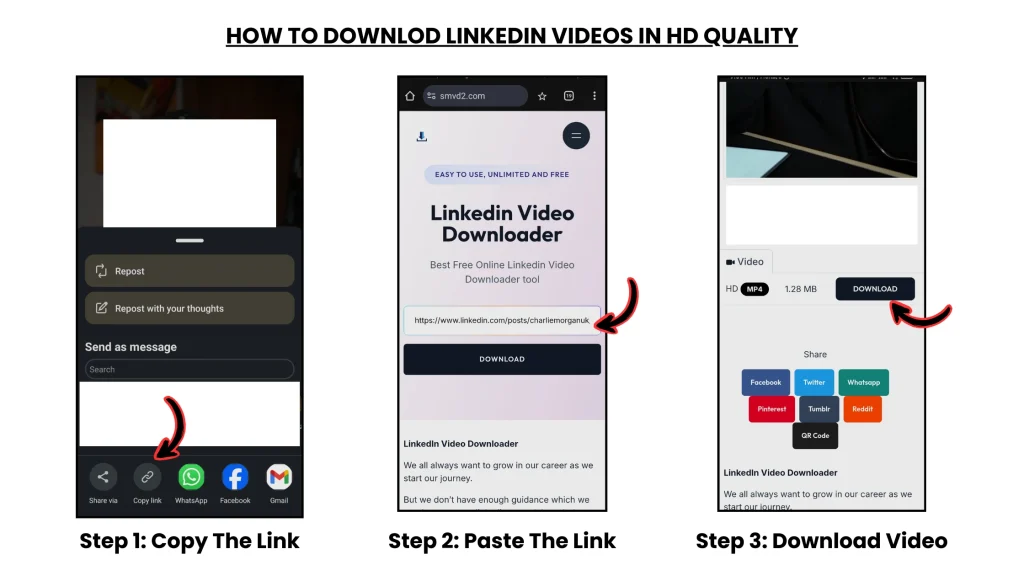
Step 1: Open the LinkedIn Post
Locate the video you want to save.
Step 2: Copy the Post URL
Use the post menu to copy the complete link.
Step 3: Use a Reliable Video Downloader

Paste the link into a trusted browser-based downloader such as SMVD2.
Step 4: Download the Video
Choose your preferred format and save the file for offline access or future reference.
Who Benefits From Saved Videos
Students
Can revisit educational tutorials and learning material.
Job Seekers
Can study:
- interview advice
- resume guidance
- career strategies
Founders & Marketers
Can analyze:
- campaigns
- positioning
- growth frameworks
- business case studies
Sales Professionals
Can improve:
- communication
- persuasion
- outreach strategies
HR Professionals
Can study:
- hiring trends
- employer branding
- recruitment strategies
Ethical Use of LinkedIn Videos
Responsible use is important.
Best practices include:
- respecting original creators
- using content for learning or internal use
- giving proper credit when referencing material
- avoiding unauthorized redistribution
Ethical behavior helps maintain trust within professional ecosystems.
FAQ
Can LinkedIn Videos Be Downloaded Directly?
No.
LinkedIn does not currently provide a built-in video download feature for most posts.
Why Do Professionals Save LinkedIn Videos?
Because many videos contain:
- educational insights
- industry knowledge
- reusable professional learning material
worth revisiting later.
Are LinkedIn Videos Public?
Some videos are public, while others are restricted depending on:
- account visibility
- audience settings
- creator permissions
Are Downloader Tools Safe?
Safety depends on:
- using trusted tools
- avoiding suspicious software
- respecting content rights and privacy
Do LinkedIn Videos Remain Valuable Long-Term?
Yes.
Many videos contain evergreen business, career, and educational insights that remain relevant for years.
The Future of LinkedIn Video
LinkedIn is rapidly evolving into a: video-first professional learning platform.
Key trends include:
- short-form educational video
- creator-led learning
- AI-driven content discovery
- video-based hiring
- professional personal branding
- knowledge-first creator ecosystems
Prediction
Over time, LinkedIn will likely continue evolving into: a global professional learning platform powered heavily by video content.
Conclusion
LinkedIn has transformed from a networking platform into a knowledge-driven professional ecosystem where content — especially video — now shapes:
- visibility
- authority
- learning
- influence
As more professionals share expertise through video, the ability to:
- save
- organize
- revisit
valuable insights becomes increasingly useful.
When used responsibly, preserving LinkedIn videos allows professionals to convert fast-moving feed content into long-term learning assets.
Because some professional insights deserve more than a single scroll.
Related Topics:
- How to Download LinkedIn Videos by URL or Link
- How to Download LinkedIn Videos from Posts or Feeds
- LinkedIn Search And Discovery
- LinkedIn News Feed Explained
- LinkedIn Sponsored Content