LinkedIn News Feed Explained: How It Works & Why It Matters
LinkedIn is no longer just a platform for resumes or job updates. Today, it has evolved into a professional content ecosystem where ideas, expertise, insights, and opportunities are distributed through content — especially through the LinkedIn News Feed.
At the center of this ecosystem is the LinkedIn News Feed — a dynamic stream of curated content that determines:
- what professionals see
- what content gains visibility
- which creators build authority
- which ideas spread across industries
- which posts quietly disappear after publishing
Unlike a simple chronological timeline, the feed operates through a relevance-based ranking system that evaluates:
- content quality
- engagement behavior
- professional relationships
- audience relevance
- topical consistency
- interaction depth
Core Insight
The LinkedIn News Feed is not just a social media feed — it is a professional content distribution engine that decides which conversations gain momentum and which remain invisible.
For professionals, the feed directly influences:
- visibility
- credibility
- networking opportunities
- audience trust
- career growth
For businesses, it affects:
- brand authority
- demand generation
- audience relationships
- lead quality
- market positioning
As video becomes more dominant inside the feed, many professionals also look for ways to save useful LinkedIn videos for learning, competitive analysis, team training, and offline reference.
In many industries today, LinkedIn videos function almost like mini professional learning modules hidden inside the feed.
What Is LinkedIn News Feed?
The LinkedIn News Feed is a personalized stream of professional content that appears when users log in to the platform.
It displays a curated mix of:
- posts from connections
- updates from followed creators and companies
- industry discussions
- professional opinions
- educational content
- career-related insights
Supported content formats include:
- text posts
- images
- native videos
- polls
- articles
- document carousels
Unlike entertainment-first platforms, LinkedIn prioritizes professional relevance and meaningful engagement over pure virality.
Key Insight
Content is not ranked only by popularity. LinkedIn primarily evaluates whether the content creates meaningful professional interaction and keeps users engaged in useful conversations.
That is why a thoughtful industry discussion with fewer reactions can sometimes outperform a highly liked but low-value post.
How the LinkedIn News Feed Algorithm Works (CRITICAL)
LinkedIn uses a multi-stage ranking system to determine how content spreads across the platform.
Many creators assume reach depends mostly on follower count, but in practice, LinkedIn heavily evaluates engagement quality and audience relevance.
The 4-Phase Content Distribution Model
Phase 1: Initial Testing (First 1–2 Hours)
When a post is published, LinkedIn initially shows it to a smaller segment of the creator’s network.
The platform then measures early engagement behavior.
Key Signals:
- comments
- dwell time
- reactions
- watch time (for video)
- profile clicks
- shares and saves
In practical terms, the first hour often plays a major role in determining whether content expands or slows down quickly.
Phase 2: Engagement Evaluation
LinkedIn then evaluates the quality of interactions rather than simply counting engagement numbers.
Important Distinction
| Signal | Impact |
|---|---|
| Likes | Low |
| Comments | High |
| Shares | Very High |
| Watch Time (Video) | Critical |
| Meaningful Discussion | Extremely High |
A post with fewer but more thoughtful comments often performs better than a post with large numbers of passive likes.
This is one of the most misunderstood parts of the LinkedIn algorithm.
Phase 3: Amplification
If early engagement signals remain strong, LinkedIn expands distribution into:
- second-degree networks
- broader professional audiences
- related industry clusters
- interest-based recommendation systems
This is where large visibility growth often happens.
In many cases, creators experience sudden spikes in reach several hours after posting because LinkedIn continues testing audience response quality over time.
Phase 4: Decay
Eventually, content visibility gradually slows down.
However, posts do not instantly “die.”
Reach often declines based on:
- reduced interaction
- lower discussion activity
- weaker relevance signals
- audience fatigue
- newer competing content
Important Insight
Strong LinkedIn posts sometimes continue resurfacing for days or even weeks when conversations remain active.
This is especially common with:
- educational content
- controversial industry opinions
- professional debates
- high-retention videos
The Evolution of LinkedIn News Feed
2006–2010 — Activity Feed Era
LinkedIn originally focused on simple professional updates such as:
- job changes
- work anniversaries
- connection activity
- basic network updates
At this stage, the platform functioned more like a professional directory than a content ecosystem.
2013 — Content Publishing Era
LinkedIn introduced long-form publishing and article creation.
Professionals began sharing:
- business insights
- career advice
- industry opinions
- thought leadership
This marked the beginning of LinkedIn becoming a professional publishing platform.
2017 — Native Video Launch
LinkedIn introduced native video uploads.
This significantly changed feed behavior because videos generated:
- longer dwell time
- higher engagement
- stronger audience retention
- improved storytelling
Video quickly became one of the strongest-performing formats on the platform.
2020+ — Algorithm Refinement Era
LinkedIn increasingly prioritized:
- meaningful conversations
- professional relevance
- educational value
- creator expertise
- topical consistency
- audience interaction depth
Today, LinkedIn operates more like a professional knowledge-distribution network than a traditional social platform.
Key Features of LinkedIn News Feed
1. Personalized Content Algorithm
The LinkedIn feed adapts based on:
- previous engagement behavior
- network interactions
- professional interests
- followed creators
- industry relevance
- viewing patterns
Every user experiences a different feed because LinkedIn personalizes recommendations continuously.
In practice, two professionals following the same creator may still see very different posts depending on their behavior and interests.
2. Multiple Content Formats
LinkedIn supports multiple professional content formats including:
- text-based insights
- visual storytelling
- short-form videos
- educational carousels
- long-form articles
- documents and presentations
Why Video Performs Strongly
Videos often perform better because they support:
- faster communication
- higher attention retention
- easier knowledge delivery
- stronger emotional connection
- improved personal branding
Face, voice, tone, and delivery help creators build trust more quickly than text alone.
3. Engagement-Based Distribution
LinkedIn heavily depends on interaction quality to determine content reach.
Critical Insight
A post with:
- 10 thoughtful comments
can outperform:
- a post with 100 passive likes
because comments signal deeper professional relevance and discussion value.
This is one reason many high-performing LinkedIn creators intentionally write posts that encourage discussion rather than simple reactions.
4. Creator & Company Visibility
LinkedIn allows:
- smaller creators to achieve strong reach
- niche experts to build authority
- businesses to establish trust
- professionals to grow organically without massive followings
Important Observation
On LinkedIn, value and relevance often matter more than follower count.
A highly specialized expert can outperform a much larger creator when the audience match is stronger.
5. Hashtags & Topic Signals
Hashtags help LinkedIn:
- categorize content
- identify topic relevance
- improve discoverability
- connect posts with interested audiences
Examples include:
- #marketing
- #leadership
- #startups
- #b2bmarketing
- #careerdevelopment
Hashtags alone do not guarantee reach, but they provide additional contextual signals for the algorithm.
Why LinkedIn Videos Perform Best
Video aligns extremely well with LinkedIn’s engagement and retention systems.
1. Higher Attention Retention
Videos naturally keep users engaged longer, increasing dwell time and session duration.
Longer watch time often signals stronger content quality to LinkedIn’s algorithm.
2. Better Knowledge Delivery
Complex topics become easier to understand visually.
Professionals often prefer:
- quick explainers
- visual demonstrations
- real examples
- face-to-camera insights
instead of long text-only explanations.
3. Stronger Personal Branding
Video builds stronger trust because audiences can:
- see facial expressions
- hear tone of voice
- evaluate communication style
- connect emotionally with the speaker
This makes authority-building significantly faster.
4. Algorithm Advantage
| Content Type | Reach | Engagement |
|---|---|---|
| Text | Medium | Medium |
| Video | High | High |
Important Insight
LinkedIn generally rewards content that keeps users active on the platform longer.
That is one reason educational and discussion-driven videos consistently perform well.
Benefits of LinkedIn News Feed
1. Increased Professional Visibility
Consistent high-value engagement helps professionals build recognition, credibility, and authority inside their niche.
2. Business Growth & Authority
Brands use the feed to:
- educate audiences
- build trust
- generate demand
- strengthen positioning
- improve audience relationships
3. Continuous Learning
The feed increasingly functions like a real-time professional learning platform.
Professionals use it to:
- study industry trends
- learn frameworks
- monitor competitors
- follow expert opinions
4. Organic Networking
Meaningful conversations often lead to:
- relationships
- collaborations
- partnerships
- hiring opportunities
- business connections
5. Career Opportunities
Recruiters and hiring managers frequently evaluate:
- feed activity
- expertise visibility
- communication quality
- thought leadership
before reaching out to candidates.
Why Professionals Save LinkedIn Videos
LinkedIn videos often contain highly reusable professional knowledge.
Common reasons professionals save videos include:
- rewatching educational insights
- studying frameworks and strategies
- training teams internally
- archiving useful discussions
- researching competitors
- collecting content inspiration
Real Insight
Many professionals now treat LinkedIn videos as:
“micro-courses hidden inside the feed.”
Because feed visibility changes quickly, saving valuable videos helps preserve insights that may later become difficult to rediscover.
How to Save LinkedIn Videos (Conceptual Process)
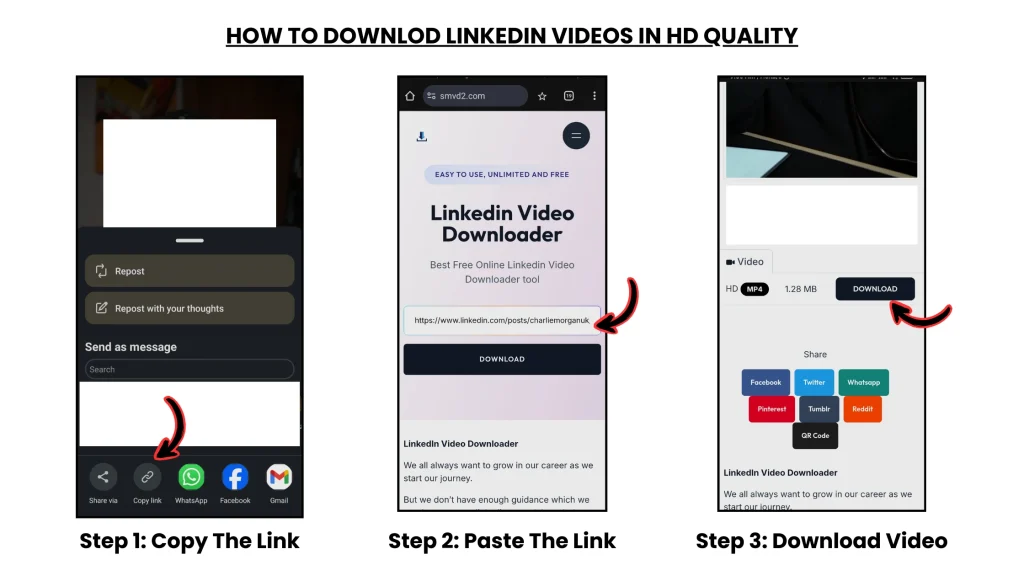
Step 1: Identify Valuable Content
Locate the LinkedIn video post containing useful insights or information.
Step 2: Copy the Post Link
Each LinkedIn video post is attached to a unique URL.
Step 3: Use a Safe Method: SMVD2.COM

Use reliable and secure tools or workflows to save the content safely.
Step 4: Store for Offline Use
Organize videos for:
- future learning
- research
- internal reference
- training
- strategy analysis
Important Insight
Saving valuable videos transforms temporary feed content into long-term professional knowledge assets.
Common Mistakes That Reduce Reach
Posting Without an Engagement Strategy
Publishing without encouraging discussion often leads to weak reach.
No interaction usually means limited distribution.
Focusing Only on Likes
Many creators overvalue likes.
In practice, comments, watch time, saves, and meaningful discussion usually influence LinkedIn visibility more strongly.
Ignoring the First 60 Minutes
Early engagement often shapes how aggressively LinkedIn distributes content.
Weak early activity can slow momentum significantly.
Publishing Low-Value Content
Generic or surface-level posts are frequently ignored because LinkedIn increasingly prioritizes professional usefulness.
Key Rule
LinkedIn rewards conversation and value — not passive consumption.
Ethical Use of Content
Professionals should always:
- respect original creators
- use content responsibly
- avoid unauthorized redistribution
- preserve creator attribution
- follow platform policies
Ethical behavior helps maintain trust inside the professional ecosystem.
FAQ
How does the LinkedIn feed algorithm work?
LinkedIn evaluates:
- engagement quality
- relevance
- professional relationships
- topical alignment
- audience interaction behavior
to determine visibility.
What content performs best?
Educational, experience-driven, insight-focused, and discussion-oriented content usually performs strongest.
How often should you post?
For most professionals, posting 2–4 times per week is generally effective for maintaining visibility without sacrificing quality.
Why do videos perform better?
Videos increase:
- watch time
- engagement
- retention
- emotional connection
which align strongly with LinkedIn’s ranking systems.
Why do professionals save LinkedIn videos?
To preserve valuable insights for:
- future learning
- training
- research
- content inspiration
- strategic analysis
The Future of LinkedIn News Feed
LinkedIn is increasingly moving toward:
- video-first experiences
- AI-driven recommendations
- creator-led education
- semantic content understanding
- real-time professional learning
- deeper audience personalization
Prediction
LinkedIn will continue evolving into a global professional learning and knowledge-distribution platform powered heavily by creators and educational content.
Future visibility will likely depend even more on:
- topical authority
- audience relevance
- engagement depth
- creator consistency
- educational usefulness
Conclusion
The LinkedIn News Feed is no longer just a stream of updates — it has become a professional influence and knowledge-distribution engine.
It determines:
- who gains visibility
- which ideas spread
- how authority is built
- how opportunities emerge
- how professional conversations evolve
By understanding how the feed works, professionals can:
- create stronger content
- build better networks
- improve visibility
- learn more efficiently
- make smarter strategic decisions
And by saving valuable content — especially educational videos — they can transform fast-moving feed insights into long-term professional knowledge assets.
Because in today’s professional ecosystem: attention is temporary, but knowledge compounds.
Related Topics:
- Linkedin Sponsored Content
- Linkedin Search and discovery
- Linkedin Messaging
- How to Download LinkedIn Videos from Posts or Feeds