
How to Download LinkedIn Videos from Posts or Feeds
Over the past few years, LinkedIn has evolved into a major professional video platform where business leaders, recruiters, marketers, educators, and creators regularly share valuable insights through video content.
Today, many professionals use LinkedIn not just for networking, but also for:
- learning industry strategies
- watching educational breakdowns
- following expert opinions
- studying real-world case studies
Because useful videos appear constantly in the feed, many users eventually want a reliable way to save important content for future reference.
However, LinkedIn does not provide a built-in option to directly download videos from posts.
This creates a common frustration: A valuable video appears in your feed once… then becomes difficult to find again later.
And since LinkedIn’s feed is designed primarily for discovery rather than long-term organization, relying on search alone is not always reliable for retrieving specific videos again.
This guide explains:
- how LinkedIn video posts work
- why downloading requires the correct method
- the best way to download LinkedIn videos from posts or feeds
- a step-by-step workflow
- common problems and how to fix them
- best practices for reliable downloads
What Is a LinkedIn Video Downloader?
A LinkedIn video downloader is a method or tool that allows you to save the original video file from a LinkedIn post link.
Instead of depending on the LinkedIn feed to locate the content again later, downloading creates a local copy of the video that can be accessed anytime.
Important Insight
When a video is downloaded correctly, you are not simply recording your screen.
The downloader accesses the actual video source connected to the LinkedIn post and retrieves the media stream directly.
That distinction matters because:
- screen recording reduces quality
- manual recording is time-consuming
- direct video retrieval preserves better clarity and efficiency
Why Professionals Save LinkedIn Videos
Many users save LinkedIn videos for:
- offline viewing during travel or weak internet connectivity
- learning and research
- internal team training
- referencing industry insights later
- archiving valuable professional knowledge
This makes it easier to build a reusable library of educational or industry-specific content.
Why People Download LinkedIn Videos
LinkedIn videos often contain:
- timely insights
- educational tutorials
- webinars
- marketing analysis
- hiring advice
- business strategies
Since feeds update quickly, valuable posts can disappear within hours or days.
That’s one of the main reasons users prefer saving important videos locally.
Watching Videos Offline
Downloaded videos remain accessible without internet access, which is especially useful during:
- flights
- commuting
- travel
- unstable network conditions
Saving Educational Content
Many creators publish:
- tutorials
- presentations
- workshops
- educational explainers
Saving these videos allows users to revisit them later without searching through the feed again.
Referencing Insights Later
LinkedIn’s algorithm constantly refreshes content visibility.
Even highly valuable posts can become difficult to locate later.
Downloading solves that problem by preserving direct access.
Archiving Professional Knowledge
Some professionals maintain personal learning libraries by organizing saved LinkedIn videos into categories such as:
- marketing
- recruitment
- leadership
- SaaS
- sales
- startup growth
This creates long-term access to useful insights.
Key Insight
LinkedIn is optimized for: content discovery —not long-term content storage.
Downloading helps bridge that gap.
How to Download LinkedIn Videos from Posts or Feeds
The process works using the LinkedIn post URL, which contains the video reference needed to retrieve the media source.
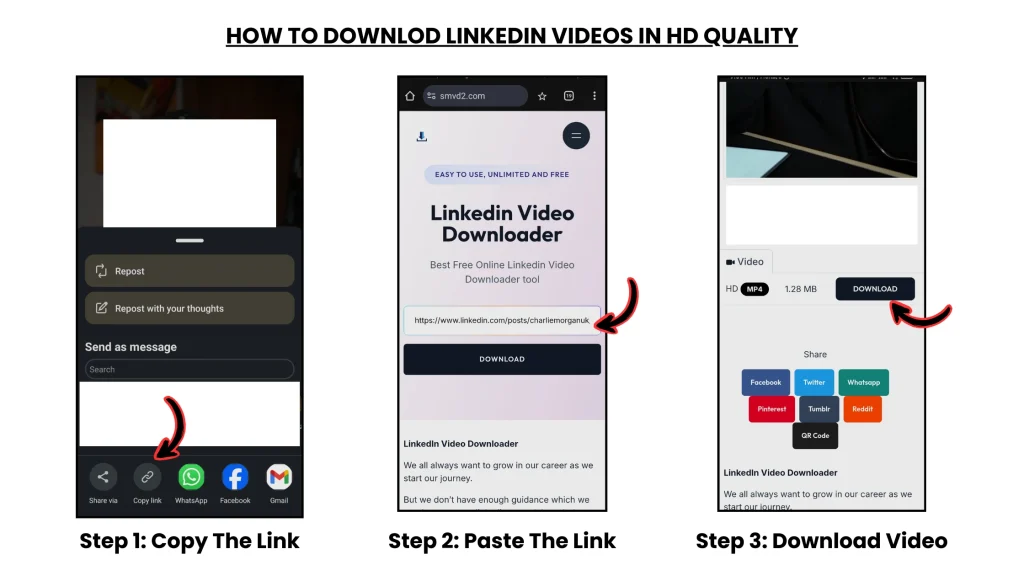
Step 1 — Find the LinkedIn Video Post
Open LinkedIn and locate the post containing the video you want to save.
Videos may appear in:
- your LinkedIn feed
- public profiles
- company pages
- creator posts
- public groups
Before downloading, make sure:
the post is visible and accessible.
Step 2 — Copy the LinkedIn Post Link
Every LinkedIn video is connected to a unique post URL.
On Desktop
- Click the three-dot menu on the post
- Select:
“Copy link to post”
On Mobile
- Tap the Share icon
- Select:
“Copy link”
This URL acts as the reference point used to locate the video source.
Step 3 — Open SMVD2

Open your browser and visit: SMVD2
It is a browser-based LinkedIn video downloader that processes LinkedIn post links directly without requiring:
- software installation
- browser extensions
- account login
Because it works entirely in-browser, it is compatible across:
- desktop devices
- Android phones
- iPhones
- tablets
Step 4 — Paste the Link and Process the Video
On the homepage:
- paste the LinkedIn post URL into the input field
- click the Download button
The tool then:
- reads the LinkedIn post structure
- identifies the attached media source
- retrieves the associated video stream
Important Observation
During testing, native LinkedIn-uploaded videos processed much more reliably than reshared or externally embedded content.
That’s because native uploads are hosted directly on LinkedIn infrastructure.
Step 5 — Download the Video File
After processing finishes, downloadable options appear.
These may include:
- MP4 format
- multiple quality levels
- HD resolutions (if available)
Choose your preferred quality and save the file directly to your device.
Since the original video stream is retrieved directly, the final quality generally remains close to the original upload.
How LinkedIn Video Downloads Actually Work (Important Insight)
Not all LinkedIn posts behave the same way internally.
That’s why some videos download properly while others fail.
1. Native Uploaded Videos
These videos are:
- uploaded directly to LinkedIn
- hosted on LinkedIn servers
- connected to LinkedIn CDN delivery systems
These are typically downloadable using the post URL.
2. External Embedded Videos
Some posts embed content from platforms such as:
- YouTube
- Vimeo
- third-party websites
In these cases:
the LinkedIn post does not contain the original hosted video file.
As a result:
LinkedIn downloaders usually cannot retrieve the media directly.
Key Insight
A downloader works reliably only when:
the video is hosted directly on LinkedIn infrastructure.
Not when the content is externally embedded.
Common Issues and How to Fix Them
Even with the correct process, some issues can still happen.
Issue 1: Video Not Downloading
Cause
Incorrect or incomplete post link
Fix
Copy the complete LinkedIn post URL again and retry.
Issue 2: Private or Restricted Post
Cause
Visibility limitations or access restrictions
Fix
Make sure the post is:
- public
- accessible to your account
- still active
Issue 3: No Video Detected
Cause
The post contains an external embedded video rather than a native LinkedIn upload.
Fix
Confirm the content was uploaded directly to LinkedIn.
Issue 4: Low Quality Output
Cause
The original upload quality was already low.
Fix
Choose the highest available resolution option during download.
Real-World Observation
In testing, longer webinar-style uploads occasionally took slightly more time to process compared to shorter native clips.
This was especially noticeable on slower internet connections or heavily loaded browser sessions.
Tips for the Best Download Results
To improve reliability:
- always copy the complete post URL
- prioritize publicly accessible posts
- verify the video is a native upload
- choose the highest available quality
- avoid low-quality or unreliable downloader tools
These small details significantly improve:
- success rate
- processing stability
- output quality
Frequently Asked Questions
Is Downloading LinkedIn Videos Allowed?
Downloading videos for:
- personal learning
- research
- offline viewing
- internal educational use
is generally acceptable.
However:
redistributing or monetizing content without permission may violate copyright or platform policies.
Always respect creator ownership.
Do I Need to Create an Account?
No.
SMVD2 does not require:
- registration
- login
- software installation
Can I Use It on Mobile Devices?
Yes.
It works across:
- Android smartphones
- iPhones and iPads
- Windows computers
- macOS laptops
- tablets
Why Is My Link Not Working?
Possible reasons include:
- private post
- incomplete URL
- deleted content
- external embedded video source
Can All LinkedIn Videos Be Downloaded?
No.
Only videos hosted directly on LinkedIn servers can usually be retrieved successfully using this method.
Why SMVD2 Is a Reliable LinkedIn Video Downloader
Many users prefer it because it offers:
- direct post-link processing
- stable browser-based access
- cross-device compatibility
- fast processing
- simple workflow
without requiring:
- extensions
- installations
- advanced technical steps
Its biggest advantage is simplicity combined with reliability.
Final Thoughts
LinkedIn has become one of the largest platforms for professional video-based learning and knowledge sharing.
But because the feed moves quickly, valuable content often becomes difficult to revisit later.
By understanding:
- how LinkedIn posts work
- how video hosting behaves
- which content is downloadable
- how proper URL-based downloading works
you can save important videos more reliably and build a reusable professional learning library.
Browser-based tools such as SMVD2 simply streamline that process by converting a LinkedIn post link into a downloadable video file — while maintaining accessibility, convenience, and quality.
Related Articles:
- How to Save LinkedIn Videos Without Login
- How to Save LinkedIn Videos on Mobile and Desktop Devices
- How to Download LinkedIn Videos Without Watermark
- How to Download LinkedIn Reels and Short Videos
- LinkedIn News Feed Explained
- Types of LinkedIn Videos You Can Download