
LinkedIn Video Downloader vs Generic Social Media Downloaders
What Actually Works (And Why It Matters for Professionals)
Video content on LinkedIn has become one of the most trusted sources of professional knowledge online.
From hiring strategies and leadership insights to real-world case studies, webinar highlights, and training sessions — LinkedIn videos are no longer just content.
They often become:
- learning assets
- reference material
- onboarding resources
- internal discussion points
- decision-making inputs
For many professionals, useful LinkedIn videos continue providing value long after they disappear from the public feed.
But there’s one practical limitation:
Once a video disappears from your feed, finding it again can become surprisingly difficult.
And LinkedIn still does not provide a native option for downloading videos for offline access.
This leads to an important practical question:
Should you use a LinkedIn-specific video downloader or a generic social media downloader?
The answer depends heavily on:
- how you use LinkedIn content
- how important video quality is
- whether reliability matters
- how frequently you download videos
- how much you care about privacy and consistency
For casual use, many tools may appear similar.
But in professional workflows, the differences become much more noticeable over time.
Let’s break it down with real-world clarity.
What Is a LinkedIn Video Downloader?

A LinkedIn video downloader is a tool specifically designed to save videos from:
- LinkedIn posts
- company pages
- creator profiles
- public feed content
Unlike platforms such as Instagram, TikTok, or YouTube, LinkedIn uses a more structured and controlled content delivery system.
This means:
- video URLs are not always directly exposed
- playback sessions may refresh dynamically
- some delivery layers change frequently
- certain download methods fail after platform updates
In practical testing, this is one of the biggest reasons generic tools struggle with LinkedIn more than entertainment-focused platforms.
Some tools can detect public LinkedIn videos correctly one day, then fail after a small platform-side delivery update.
That’s why specialized LinkedIn downloaders exist — to handle these platform-specific behaviors more reliably.
Why Professionals Download LinkedIn Videos
Downloading LinkedIn videos is usually intentional, not casual.
Unlike entertainment platforms where users save content for temporary viewing, LinkedIn downloads are often tied to professional workflows.
Common use cases include:
- saving educational content for offline learning
- revisiting expert insights and interviews
- reviewing webinar recordings
- using clips in internal training sessions
- building a personal knowledge library
- analyzing competitor content
- archiving industry case studies
- sharing reference material internally
In many professional environments, useful LinkedIn videos are treated almost like reusable business resources rather than temporary social content.
This is why:
- reliability
- clarity
- file quality
- download consistency
matter significantly more than convenience alone.
What Are Generic Social Media Downloaders?
Generic downloaders are tools designed to support multiple platforms such as:
- TikTok
- X/Twitter
Their goal is broad compatibility across many content ecosystems.
This works reasonably well for entertainment-focused platforms because video structures there are often more standardized and widely targeted by third-party tools.
However, LinkedIn behaves differently.
Its professional content environment, structured delivery systems, and evolving backend handling create challenges that many all-in-one tools are not deeply optimized for.
As a result, generic tools may work inconsistently on LinkedIn even if they perform well elsewhere.
LinkedIn Video Downloader vs Generic Social Media Downloaders (Real Comparison)
1. Platform Compatibility
LinkedIn-Specific Tools
- built specifically for LinkedIn’s delivery structure
- adapt faster to platform-side changes
- handle LinkedIn URLs more consistently
- better support company-page and professional content posts
Generic Tools
- designed for broad multi-platform support
- weaker optimization for LinkedIn workflows
- often depend on generalized scraping logic
- more likely to break after LinkedIn system updates
Real-World Insight
In practical usage, LinkedIn is often one of the least stable platforms inside generic downloaders because its delivery structure changes more frequently than many entertainment-focused platforms.
This is one reason professionals who rely heavily on LinkedIn content usually prefer specialized tools over “all-in-one” downloaders.
2. Video Quality & Accuracy
LinkedIn-Focused Tools
- preserve original resolution when available
- maintain audio-video synchronization
- retrieve cleaner files
- reduce incomplete download issues
Generic Tools
- may compress output
- sometimes produce partial files
- can lose audio during saving
- may reduce clarity after processing
During testing across multiple browsers, generic tools were more likely to struggle with:
- longer webinar-style videos
- high-resolution uploads
- dynamically refreshed playback sessions
For professionals using videos in:
- training
- presentations
- documentation
- onboarding
quality consistency matters far more than simple download speed.
3. Reliability & Consistency
LinkedIn Tools
- more stable across LinkedIn post types
- lower failure rates
- better handling of changing delivery behavior
- more predictable download success
Generic Tools
- inconsistent LinkedIn support
- higher retry frequency
- occasional broken files
- more playback-related failures
Over time, inconsistency becomes a workflow problem.
Professionals downloading educational or business-critical content generally prioritize reliability because repeated failures waste time and interrupt productivity.
4. Ease of Use
Specialized Tools
- simpler interface
- focused LinkedIn workflow
- faster processing
- fewer irrelevant options
Generic Tools
- cluttered interfaces
- multiple unrelated platform settings
- mixed download methods
- inconsistent LinkedIn detection
Many professionals prefer simpler browser-based workflows because they reduce friction and avoid unnecessary setup complexity.
5. Privacy & Safety
LinkedIn-Specific Tools
- usually require no login
- minimal data interaction
- lower permission exposure
- fewer extension-related risks
Generic Tools
- may request browser permissions
- sometimes rely on extensions
- can include aggressive ads or redirects
- may introduce tracking concerns
For professionals and businesses, privacy becomes especially important when downloading work-related content or accessing videos on company-managed devices.
Why “All-in-One” Downloaders Often Struggle with LinkedIn
At a technical level, every platform delivers videos differently.
LinkedIn, in particular:
- uses structured delivery layers
- refreshes playback sessions dynamically
- applies stricter access handling
- changes backend behavior periodically
Generic downloaders typically rely on broad scraping systems designed to support many platforms simultaneously.
That approach works reasonably well for:
- entertainment content
- stable public media systems
- predictable URL structures
But LinkedIn is more sensitive to:
- delivery updates
- session behavior
- platform-side changes
- embedded playback handling
This is why LinkedIn often becomes one of the least reliable platforms inside generic download tools.
In many cases, failures are not caused by the downloader alone — they happen because LinkedIn refreshes or restructures video delivery behavior behind the scenes.
Real-World Observation (What Most Users Experience)
Across multiple tools tested in professional workflows, a consistent pattern appears.
Generic downloaders usually perform adequately on platforms like:
- TikTok
But when used for LinkedIn:
- some links fail completely
- some videos lose audio
- some files become corrupted
- some downloads stop midway
- some company-page videos fail to process
- some browser sessions trigger inconsistent behavior
One especially common issue appears during longer professional videos where playback sessions refresh dynamically while saving is happening.
This creates a clear pattern:
LinkedIn generally requires specialization — not generalization.
That does not mean generic downloaders are useless.
It simply means LinkedIn behaves differently from entertainment-focused platforms.
When Should You Use Each Type of Tool?
Use a LinkedIn-Specific Downloader if:
- LinkedIn is part of your professional workflow
- you frequently save educational content
- you need consistent download quality
- you use videos for training or documentation
- reliability matters more than convenience
- you want a cleaner and more predictable experience
Use a Generic Downloader if:
- you download content casually
- you mainly use entertainment platforms
- LinkedIn is not your primary use case
- occasional download failures are acceptable
- you prefer one tool for multiple social platforms
The right choice depends less on “which tool is best” and more on:
- how critical the content is
- how often you download
- how reliable the workflow needs to be
How to Download LinkedIn Videos (Simple Process)
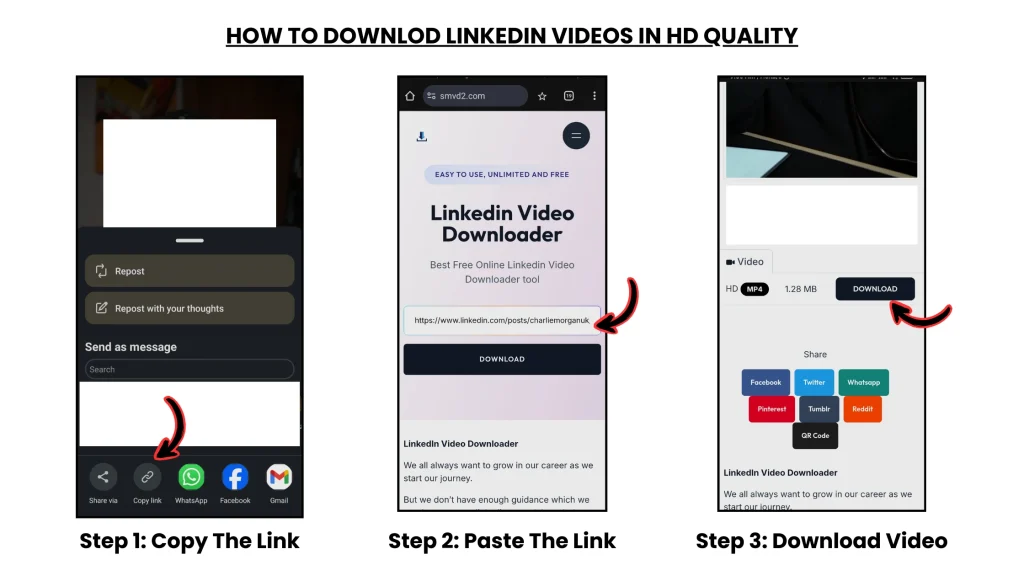
- Copy the LinkedIn video URL
- Open a trusted LinkedIn video downloader
- Paste the video link
- Start the download process
- Save the file to your device
Most browser-based tools work on:
- desktop browsers
- Android devices
- iPhones and iPads
without requiring complicated setup or software installation.
Is It Legal to Download LinkedIn Videos?
Downloading publicly accessible LinkedIn videos is generally acceptable for:
- personal learning
- offline viewing
- educational reference
- internal discussion
However:
- avoid redistributing content without permission
- respect creator ownership
- avoid unauthorized commercial reuse
- do not repost content as your own
Responsible usage matters.
It’s also important to understand that some:
- private posts
- restricted company videos
- login-protected content
may not be accessible through downloader tools due to platform access limitations.
Frequently Asked Questions
Can I download LinkedIn videos in HD?
Yes — if the original upload supports high resolution, specialized LinkedIn tools are usually better at preserving the original quality.
Why do some tools fail on LinkedIn?
Because LinkedIn uses a more structured and dynamically managed delivery system than many entertainment-focused platforms.
Generic tools often struggle to adapt consistently to these platform-side changes.
Why do some downloads lose audio?
In many cases, generic tools fail during media saving or session refresh handling, especially on longer videos or dynamically loaded playback sessions.
Do I need to log in to download LinkedIn videos?
No. Most reliable browser-based tools do not require LinkedIn login access.
Can I use downloaded videos for business purposes?
Only with proper permission from the original creator or rights holder.
Why do browser extensions sometimes stop working?
Extensions often depend heavily on browser permissions and page-structure detection. Small LinkedIn interface or backend updates can sometimes break compatibility temporarily.
Final Verdict
Generic social media downloaders offer convenience — but not always precision.
When it comes to LinkedIn, where content is often:
- educational
- professional
- reused for actual work
- referenced repeatedly
- integrated into workflows
quality, reliability, and consistency become far more important than simple multi-platform support.
That’s why specialized LinkedIn tools are usually the better choice for professionals who regularly depend on LinkedIn content.
Key Takeaway
If your goal is to:
- save valuable professional insights
- build a long-term knowledge library
- preserve training or webinar content
- use videos professionally
- maintain reliable download quality
choose a solution designed specifically for LinkedIn.
Because in professional workflows, how you download content often matters just as much as the content itself.
Related Articles:
- Best LinkedIn Video Downloaders
- Why Choose a Dedicated LinkedIn Video Downloader Over Universal Tools?
- LinkedIn Video Downloader vs Screen Recorder