Why Choose a Dedicated LinkedIn Video Downloader Over Universal Tools?
A dedicated LinkedIn video downloader consistently outperforms universal tools because it is built specifically for how LinkedIn delivers video content — not how platforms like YouTube, Facebook, or Instagram do.
That difference matters more than most users realize.
In real-world testing across browser tools, extensions, and universal downloaders, LinkedIn videos were one of the most inconsistent formats for generic tools to process correctly. Some tools worked temporarily, then failed completely after small LinkedIn interface or streaming updates.
This directly affects:
- Whether the video downloads successfully
- The quality you receive
- The speed of processing
- The stability of the tool over time
- And the safety of your data
If you’re downloading LinkedIn videos for learning, research, recruitment, marketing analysis, or professional reference, using the right type of downloader is not optional anymore — it significantly affects reliability.
What Is a LinkedIn Video Downloader?
A LinkedIn video downloader is a browser-based tool designed specifically to save public LinkedIn videos directly to your device without requiring login access, extensions, or software installation.
These tools are commonly used for:
- Saving educational content for offline learning
- Archiving webinars, case studies, and expert insights
- Collecting marketing examples and industry research
- Storing professional content for future reference
- Avoiding repeated searching for valuable posts
Unlike universal downloaders, dedicated LinkedIn tools are designed around LinkedIn’s internal video delivery structure rather than generic media saving methods.
That specialization is the main reason they usually perform better.
Why LinkedIn Videos Require a Specialized Approach
LinkedIn does not serve videos like a traditional downloadable file.
Instead, it uses a dynamic streaming infrastructure designed for adaptive playback, performance optimization, and controlled delivery.
This creates several technical challenges that generic downloaders often fail to handle properly.
Here’s what happens behind the scenes:
1. Adaptive Bitrate Streaming (Not a Single File)
LinkedIn commonly delivers videos using segmented streaming formats such as M3U8 streams.
This means:
- The video is divided into multiple chunks
- Quality changes dynamically based on connection speed
- A single downloadable MP4 file may not exist initially
Most universal downloaders search for one direct media URL.
That becomes a problem because LinkedIn frequently serves multiple temporary stream segments instead of a static video file.
In practical testing, this was one of the biggest reasons generic tools produced:
- incomplete downloads
- missing audio
- blank outputs
- corrupted files
2. Token-Based & Session-Controlled URLs
LinkedIn video URLs are often:
- Temporary
- Session-dependent
- Protected using access tokens
- Dynamically generated for different users
This means:
- Links can expire quickly
- Different users may receive different video paths
- Some URLs stop working outside the original session
Universal tools usually struggle with this because they rely on predictable saving patterns.
Dedicated LinkedIn downloaders are optimized specifically for this behavior.
One common issue users face is copying video links directly from the LinkedIn mobile app. In many cases, app-generated links behave differently than browser URLs and can confuse outdated downloader systems.
3. Dynamic Loading Inside Feeds
LinkedIn videos are not always loaded as traditional media files.
Instead, they are often:
- Embedded dynamically inside the feed
- Triggered only when visible on screen
- Loaded using lazy-loading techniques
- Wrapped inside scripts instead of direct media elements
Generic downloaders frequently fail to detect these dynamically loaded structures.
This is especially noticeable on fast-scrolling LinkedIn feeds where video requests load only after user interaction.
4. Privacy & Visibility Layers
Some LinkedIn videos are:
- Restricted to logged-in users
- Limited to specific audiences or groups
- Controlled through account-level permissions
- Hidden behind company or creator privacy settings
A generic downloader cannot reliably interpret these restrictions.
Even dedicated tools may fail if the content itself is not publicly accessible.
That’s an important limitation many websites never explain clearly.
Why Choose a Dedicated LinkedIn Video Downloader Over Universal Tools? (Real Comparison)
| Feature | Dedicated LinkedIn Downloader | Universal Downloader |
|---|---|---|
| Platform Optimization | Built specifically for LinkedIn | Generic multi-platform support |
| Download Success Rate | High for LinkedIn structures | Often inconsistent |
| Video Quality | Preserves original quality better | May compress output |
| Processing Speed | Faster LinkedIn handling | Slower generalized logic |
| Stability After Updates | Usually adapts faster | Frequently breaks |
| Privacy | Usually browser-based with no login | Some request permissions |
| User Experience | Clean and focused | Often cluttered |
| Stream Handling | Better with segmented streams | Limited support |
| Mobile Compatibility | Optimized for LinkedIn workflows | Mixed results |
Conclusion:
Universal tools prioritize broad compatibility.
Dedicated LinkedIn downloaders prioritize platform-specific performance and stability.
Key Problems With Universal Video Downloaders
1. Low Detection Accuracy
Most universal tools:
- Fail to identify LinkedIn’s stream structure
- Misread dynamically loaded video content
- Struggle with temporary media URLs
Result:
- Broken downloads
- Unsupported links
- Missing audio or video
- Random failures after updates
During testing, generic tools failed more often when LinkedIn changed feed behavior or video request patterns.
2. Slower Processing
Because universal tools support dozens of platforms simultaneously:
- Their saving systems are generalized
- Processing logic becomes heavier
- Optimization for LinkedIn is limited
Result:
- Slower response times
- Delayed processing
- Inconsistent download quality
3. Frequent Failures After Platform Updates
LinkedIn frequently updates:
- Video delivery methods
- Feed structures
- Security layers
- Streaming behavior
Universal tools usually take longer to adapt because they must maintain compatibility across multiple platforms at once.
This is why many “all-in-one” video downloaders work inconsistently over time.
Advantages of a Dedicated LinkedIn Video Downloader
1. Higher Download Success Rate
Dedicated LinkedIn tools are designed specifically around LinkedIn’s architecture.
They are better at:
- Detecting stream sources
- Handling dynamic loading
- Processing segmented delivery
- Avoiding broken media saving
This significantly improves reliability.
2. Better Video Quality Control
Professional and educational content often requires clear video quality.
Dedicated tools usually:
- Preserve the highest available resolution
- Offer multiple quality options
- Avoid unnecessary recompression
This is especially important for:
- presentations
- webinars
- training videos
- marketing breakdowns
3. Faster Performance
Because dedicated tools focus only on LinkedIn:
- Fewer processing layers are needed
- Media detection is more direct
- Stream handling is optimized
Result:
Faster and more stable downloads.
4. Safer & Privacy-Friendly
Reliable browser-based LinkedIn downloaders generally:
- Do not require LinkedIn login credentials
- Do not install browser extensions
- Do not request unnecessary permissions
This reduces both privacy risks and browser conflicts.
Users should still avoid tools that:
- force logins
- trigger redirects
- request suspicious access permissions
5. Clean & Focused User Experience
Dedicated tools usually follow a simple workflow:
Paste link → Download → Save
No complicated dashboards.
No unnecessary popups.
No confusing multi-platform settings.
That simplicity becomes important when users download content frequently for work or research.
Why smvd2.com Is a Reliable LinkedIn Video Downloader

Smvd2.com is designed specifically around LinkedIn’s modern video delivery system, which makes it more stable than many generalized alternatives.
Instead of relying on outdated saving methods, it focuses specifically on LinkedIn-compatible processing.
Key Features:
- Optimized for LinkedIn’s dynamic streaming formats
- High success rate across feed posts and shared videos
- Multiple quality options, including HD when available
- Works across mobile, desktop, and tablets
- No signup, login, or installation required
- Browser-based processing
- Free to use
It is still important to understand that no downloader can reliably access:
- private videos
- restricted corporate content
- videos hidden behind account permissions
Transparent limitations increase trust and prevent unrealistic expectations.
Step-by-Step: How to Download LinkedIn Videos
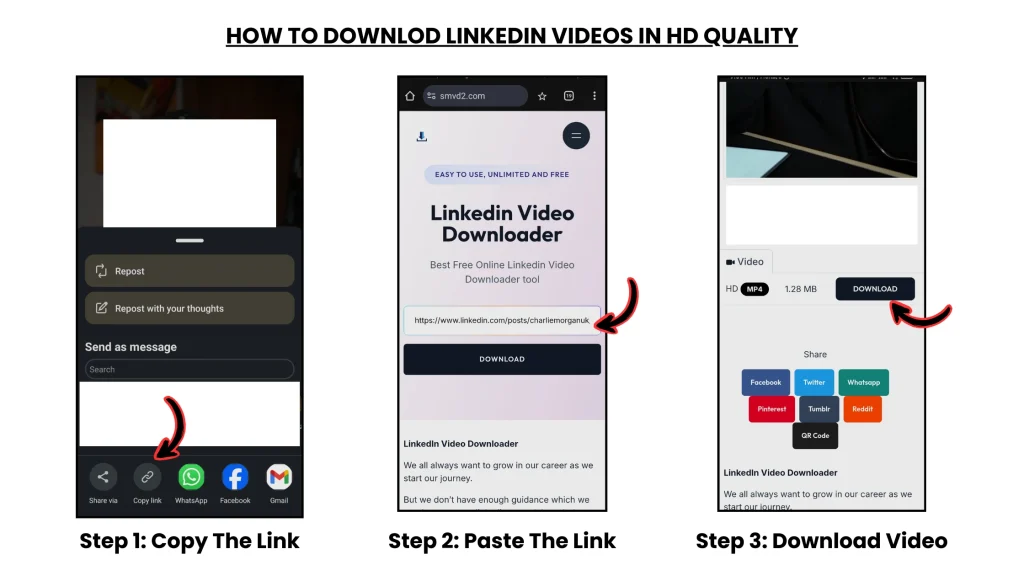
- Copy the LinkedIn video post URL
- Open smvd2.com in your browser
- Paste the link into the input field
- Click the download button
- Select your preferred video quality
- Save the file to your device
No technical setup required.
Works directly inside the browser.
For better compatibility, browser-based LinkedIn URLs usually work more consistently than mobile app share links.
Who Should Use a Dedicated LinkedIn Downloader?
This solution is especially useful for:
- Recruiters saving hiring insights
- Marketers collecting campaign examples
- Students downloading educational videos
- Trainers archiving learning materials
- Business owners storing company updates
- Researchers collecting industry references
Users who save LinkedIn content regularly usually benefit more from dedicated tools than generalized video downloaders.
Is It Safe to Use a LinkedIn Video Downloader Tool?
Yes — if you use trustworthy browser-based tools and follow safe practices.
Use tools that:
- Do not require login access
- Do not install extensions unnecessarily
- Do not collect personal data
- Do not force suspicious redirects
Also ensure:
- You download only publicly accessible content
- You respect copyright and platform policies
- You avoid unauthorized commercial redistribution
FAQs
Can I download LinkedIn videos without logging in?
Yes. Most dedicated browser-based LinkedIn downloaders allow downloads without requiring account credentials.
Why do universal tools fail on LinkedIn?
Because LinkedIn uses:
- dynamic streaming
- tokenized URLs
- session-based delivery
- lazy-loaded media structures
Generic tools often cannot process these systems consistently.
What format are LinkedIn videos downloaded in?
Most LinkedIn video downloaders provide MP4 format, which works across nearly all devices and media players.
Can I download LinkedIn videos in HD quality?
Yes. Dedicated LinkedIn tools often provide multiple quality options, including HD when the source video supports it.
Do LinkedIn video downloaders work on mobile devices?
Yes, although browser-based URLs generally perform more reliably than app-generated links in some cases.
Are LinkedIn video downloaders legal?
Downloading videos for personal learning or reference is generally acceptable, but users should always respect copyright laws, creator rights, and LinkedIn platform policies.
Future of LinkedIn Video Content
LinkedIn is rapidly evolving into a video-focused professional platform.
Key trends include:
- Short-form professional videos
- Educational content series
- AI-driven content recommendations
- Increased video visibility inside feeds
- Creator-focused professional content
As LinkedIn expands video distribution, reliable platform-specific downloaders will become increasingly important for:
- learning
- research
- content archiving
- professional analysis
- knowledge retention
Final Thoughts
Universal video downloaders offer convenience, but they are not designed specifically for LinkedIn’s increasingly complex video infrastructure.
Dedicated LinkedIn video downloaders provide:
- Higher success rates
- Better quality retention
- Faster processing
- Stronger privacy protection
- More reliable stream handling
- Better long-term stability after platform updates
What many users discover only after repeated failures is that LinkedIn behaves very differently from traditional video platforms.
That’s why specialized downloaders generally perform more consistently than generic “download anything” tools.
For professionals who regularly rely on LinkedIn content for learning, research, or workflow management, using a dedicated solution like smvd2.com creates a much smoother and more dependable experience.
Related Articles:
- Best LinkedIn Video Downloaders
- Manual vs Tool-Based LinkedIn Video Download (Deep Comparison)
- Top 5 LinkedIn Downloading Methods Ranked (With Pros & Cons)
- LinkedIn Video Downloader vs Generic Social Media Downloaders