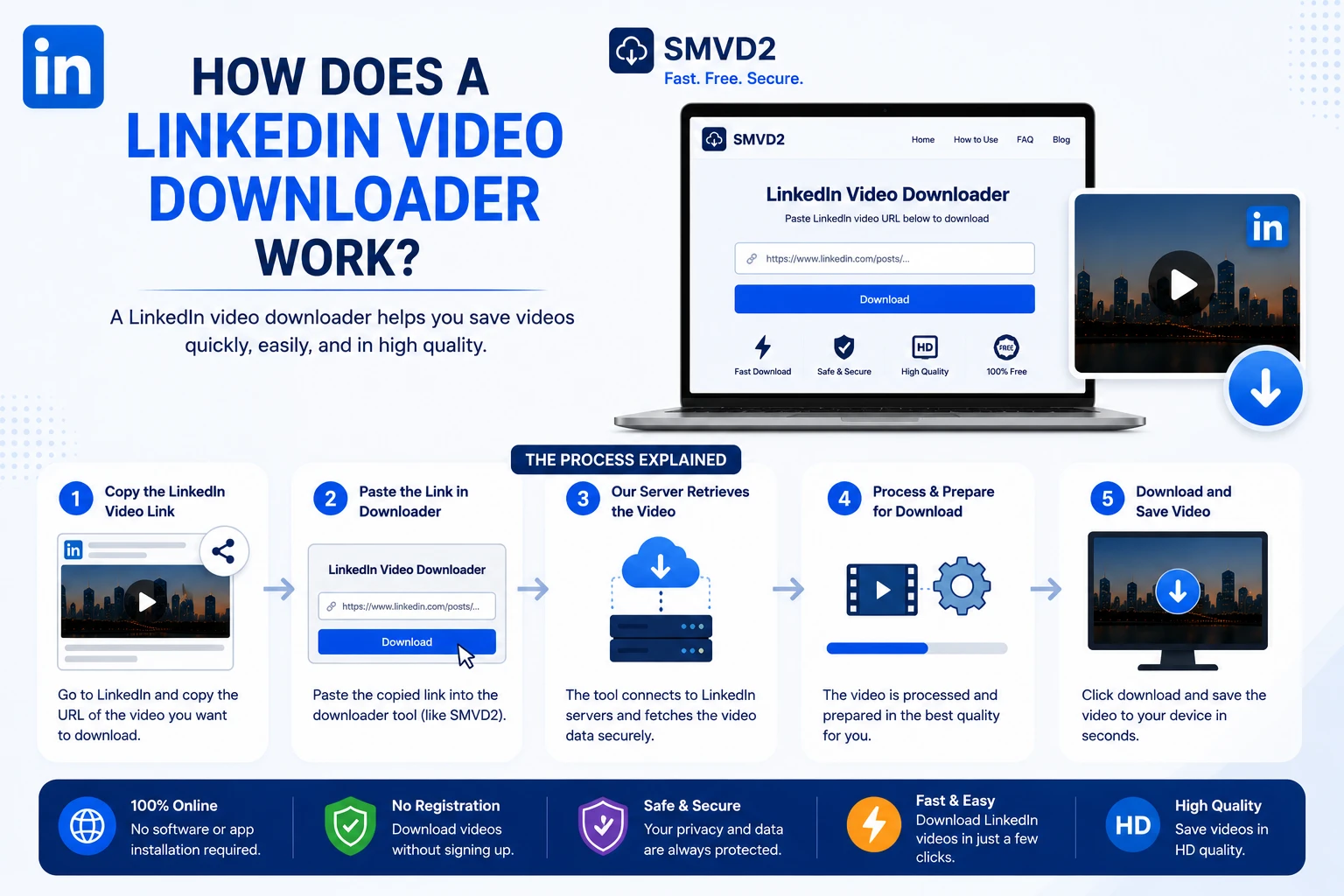
How Does a LinkedIn Video Downloader Work?
LinkedIn has transformed itself from a professional job hunting platform to a content based platform. Today, millions of professionals use it to share educational videos, industry insights, marketing strategies, career advice, leadership lessons, product demonstrations, and business updates.
As video content continues to grow on LinkedIn, many users want a way to save valuable videos for future reference. Whether you’re a marketer researching successful campaigns, a recruiter collecting training materials, or a student building a learning library, relying on LinkedIn’s feed to relocate a specific video can be frustrating.
This is where a LinkedIn video downloader becomes useful.
In simple terms, a LinkedIn video downloader allows you to save publicly accessible LinkedIn videos to your device so you can watch them later without searching through your feed again.
But how does a LinkedIn video downloader actually work behind the scenes?
The answer involves video hosting infrastructure, media streams, browser-based processing, and content delivery systems. Understanding the process can help you download videos more efficiently and choose the right tool for the job.
In this guide, we’ll explain exactly how a LinkedIn video downloader works, what happens after you paste a LinkedIn video URL into a downloader, and why SMVD2.com provides one of the simplest ways to download LinkedIn videos online.
What Is a LinkedIn Video Downloader?
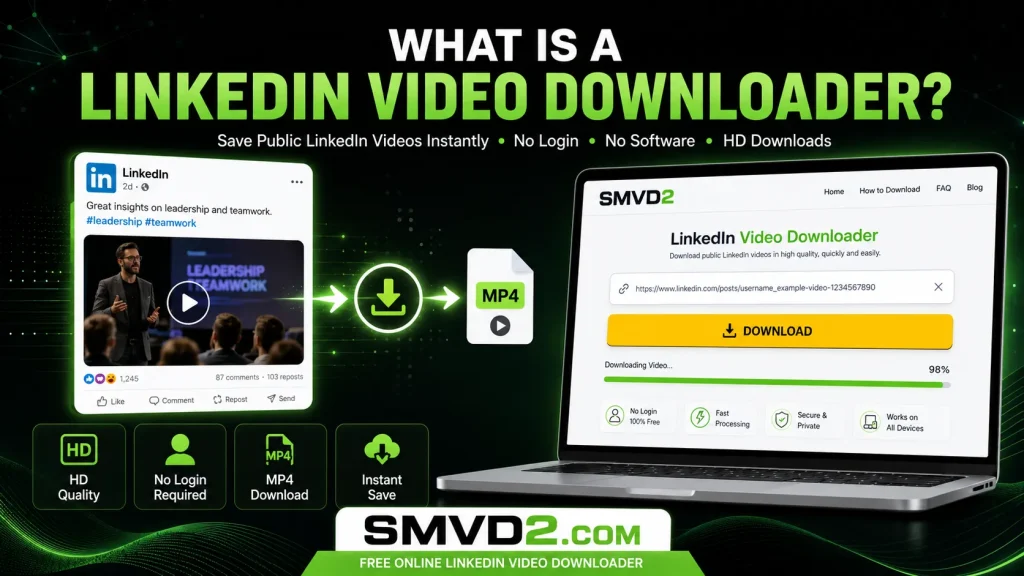
A LinkedIn video downloader is an online tool that saves publicly available video content from LinkedIn posts and generates a downloadable version that can be saved to your device.
Instead of streaming a video every time you want to watch it, a downloader allows you to store the video locally in a format such as MP4 for offline access.
People use LinkedIn video downloaders for many different reasons:
- Saving educational content for later viewing
- Building a personal knowledge library
- Watching videos during travel or offline periods
- Researching successful marketing campaigns
- Sharing learning resources within teams
- Archiving professional content before it becomes difficult to locate
- Collecting industry-specific training materials
One thing many users don’t realize is that LinkedIn videos are often easier to lose than they are to discover. A useful video seen today may become difficult to find a few weeks later as new content pushes it further down the feed.
A LinkedIn video downloader helps solve this problem by allowing users to save valuable content while it’s still available.
Public vs Private LinkedIn Videos
It’s important to understand that most reputable downloaders work with publicly accessible content.
Private videos, restricted content, or content requiring specific permissions may not be available for downloading. Responsible downloaders focus on publicly available media rather than bypassing platform restrictions.
Why MP4 Is Commonly Used
Most LinkedIn video downloaders generate downloadable files in MP4 format because:
- MP4 works across Windows, Mac, Android, and iPhone devices.
- The format offers good video quality with efficient file sizes.
- Most media players support MP4 without requiring additional software.
- It provides consistent compatibility across browsers and operating systems.
This is one reason browser-based tools have become increasingly popular among LinkedIn users.
How Does a LinkedIn Video Downloader Work?
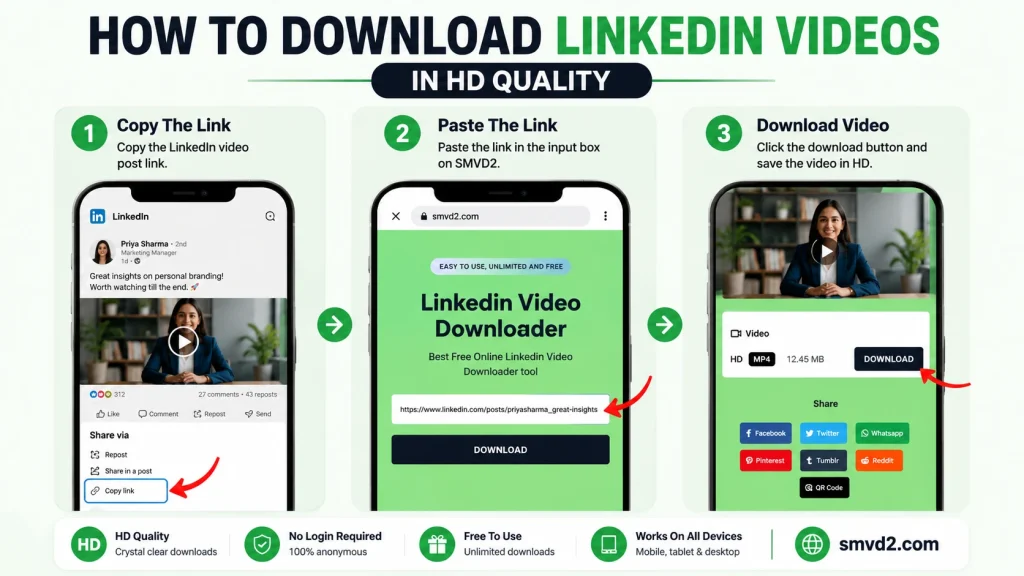
From the user’s perspective, downloading a LinkedIn video usually takes less than a minute.
Behind the scenes, however, several technical processes occur before a downloadable file becomes available.
Let’s break down the process step by step.
Step 1: User Copies the LinkedIn Video URL
Every LinkedIn post has a unique web address.
When you find a video you’d like to save, the first step is copying the URL of the post containing that video.
This URL acts as the reference point that tells the downloader where the video content is located.
Without the URL, the downloader has no way of identifying the specific LinkedIn post you’re trying to access.
Step 2: The Downloader Reads the Page Information
After you paste the LinkedIn URL into a downloader such as SMVD2.com, the system begins analyzing the publicly available information associated with that page.
During this stage, the downloader looks for:
- Video metadata
- Media stream information
- Embedded video references
- Available video quality options
- Technical file details
In practical testing across browser-based downloaders, this stage usually takes only a few seconds. Most delays occur because of network speed rather than the actual saving process.
This is also the point where the downloader determines whether the URL contains downloadable video content.
Step 3: The Tool Locates the Video Source
Many users assume the visible LinkedIn page contains the actual video file.
In reality, the video is typically delivered through LinkedIn’s media infrastructure and content delivery network (CDN).
The downloader identifies the underlying video source associated with the post and retrieves the information needed to generate a downloadable version.
During this process, the system may determine:
- Available video resolutions
- Video file format
- Stream accessibility
- Download compatibility
- Device playback support
One observation frequently overlooked by users is that download quality is often determined by the original uploaded video quality rather than the downloader itself.
If a creator uploads a low-resolution video, no downloader can magically create a higher-quality version.
Step 4: Download Links Are Generated
Once the video source is identified, the downloader processes the available media information and generates one or more download options.
Depending on the original upload, users may be able to choose from:
- Standard quality downloads
- HD video downloads
- Full HD versions
- MP4-compatible formats
- Mobile-friendly versions
The goal is to provide a downloadable file that preserves the original viewing experience as closely as possible.
Browser-based tools such as SMVD2.com simplify this process by generating these options automatically without requiring software installation or browser extensions.
Step 5: User Downloads the Video
The final step is straightforward.
After selecting a preferred format or quality level, users simply click the download button and save the video to their device.
Once downloaded, the video can be viewed offline without needing to reopen LinkedIn or search for the original post.
This is particularly useful for:
- Business travelers
- Students
- Recruiters
- Marketers
- Sales professionals
- Team trainers
who frequently consume professional content while away from a reliable internet connection.
What Most Users Don’t Realize
One of the biggest misconceptions is that downloading a LinkedIn video somehow changes the content itself.
In reality, a downloader simply retrieves an accessible version of the video and saves it locally.
The actual effectiveness of the download process usually depends on:
- The original video quality
- Browser compatibility
- Internet connection stability
- Accessibility of the LinkedIn post
- The reliability of the downloader being used
This is why choosing a fast, browser-based solution like SMVD2.com can significantly simplify the experience and reduce common download issues.
Why Do People Use LinkedIn Video Downloaders?
The growing popularity of LinkedIn video content has changed how professionals learn, research, and share information online.
Unlike entertainment-focused social platforms, LinkedIn videos often contain practical insights that users want to revisit long after they first appear in the feed.
A LinkedIn video downloader helps bridge the gap between discovering valuable content and preserving it for future use.
Here are some of the most common reasons people download LinkedIn videos.
Offline Learning
Many professionals consume educational content during travel, commuting, or periods with limited internet access.
Downloading videos allows users to build a personal learning library that remains accessible even when they’re offline.
For example, sales professionals may save prospecting tips, marketers may collect campaign breakdowns, and students may archive career advice videos for future reference.
Instead of relying on LinkedIn’s feed to surface content again, downloaded videos remain available whenever needed.
Content Research
Marketers, content creators, and business owners frequently analyze successful LinkedIn videos to understand:
- Content structure
- Engagement techniques
- Storytelling approaches
- Personal branding strategies
- Video presentation styles
One observation we frequently see is that high-performing LinkedIn videos often disappear into the feed after a few weeks, making them difficult to revisit.
Downloading allows researchers to study successful content repeatedly without spending time searching for it again.
Team Training
Organizations often use LinkedIn as a source of professional development content.
Managers may save videos covering:
- Leadership skills
- Recruitment strategies
- Sales training
- Communication techniques
- Industry trends
Having offline access makes it easier to share educational resources internally and create structured learning programs for teams.
Knowledge Preservation
This is one of the most overlooked reasons for downloading LinkedIn videos.
Unlike traditional educational platforms, LinkedIn content is distributed through a constantly changing feed.
A valuable video discovered today may become difficult to find next month.
Many users only realize this after trying to relocate a video they forgot to save.
Downloading important content creates a personal archive that isn’t dependent on algorithms, search results, or feed visibility.
Mobile Learning and Convenience
Professionals increasingly consume content on smartphones rather than desktop computers.
Downloading videos in advance helps users:
- Avoid buffering issues
- Reduce mobile data usage
- Watch content during travel
- Learn without interruptions
This is particularly useful for people who spend significant time commuting or working remotely.
Competitive and Industry Analysis
Business owners and marketers often monitor industry leaders on LinkedIn.
Downloading videos allows them to:
- Analyze messaging strategies
- Review content frameworks
- Study presentation techniques
- Observe audience engagement approaches
Rather than viewing a video once and forgetting it, professionals can revisit and analyze it whenever necessary.
Who Should Use a LinkedIn Video Downloader?
Not every LinkedIn user downloads videos, but certain groups tend to benefit more than others.
Students and Job Seekers
Students frequently save:
- Career advice videos
- Interview preparation content
- Resume-building tutorials
- Professional development resources
Having offline access allows them to learn at their own pace without worrying about losing valuable content.
Recruiters and HR Professionals
Recruiters often use LinkedIn to stay informed about:
- Hiring trends
- Recruitment strategies
- Employer branding
- Talent acquisition techniques
Downloaded videos can be revisited during training sessions or team discussions.
Marketers and Content Creators
For marketers, LinkedIn has become one of the most valuable platforms for B2B content research.
Downloaded videos can help analyze:
- Viral content formats
- Hook strategies
- Audience engagement tactics
- Personal branding approaches
- Storytelling frameworks
Many content teams maintain private collections of high-performing LinkedIn videos specifically for inspiration and competitive analysis.
Sales Professionals
Sales representatives frequently save videos discussing:
- Prospecting methods
- Negotiation techniques
- Relationship building
- Outreach strategies
Offline access allows these resources to be reviewed before meetings, presentations, or client interactions.
Business Owners and Entrepreneurs
Entrepreneurs often use LinkedIn to learn directly from industry leaders.
Saving valuable videos allows them to build a personalized library of insights related to:
- Leadership
- Marketing
- Operations
- Growth strategies
- Team management
Instead of relying on memory or bookmarks, downloaded videos remain permanently accessible.
Mobile vs Desktop Downloading
One question users frequently ask is whether downloading LinkedIn videos works better on mobile devices or desktop computers.
The answer depends on the user’s goals.
Desktop Downloading
Desktop downloading is often preferred for:
- Large video files
- Research projects
- Content archiving
- Bulk organization
Advantages include:
- Larger screen size
- Easier file management
- Faster processing on some systems
- Better organization of downloaded content
Many marketers and researchers prefer desktop workflows because they regularly manage large libraries of saved videos.
Mobile Downloading
Mobile downloading is ideal for convenience.
Advantages include:
- Downloading on the go
- Instant access to saved videos
- Quick sharing between devices
- Learning during travel
For casual users, smartphones are often the preferred option because the entire process can be completed in just a few taps.
Which Option Is Better?
From a practical standpoint, neither option is universally better.
Desktop downloading tends to be more efficient for research, content management, and long-term organization.
Mobile downloading offers greater flexibility and convenience for everyday users.
The good news is that browser-based tools like SMVD2.com work across:
- Windows
- Mac
- Android
- iPhone
- Tablets
This means users can download LinkedIn videos from virtually any modern device without installing software or browser extensions.
What We Noticed During Testing
When comparing mobile and desktop workflows, the biggest difference wasn’t download speed—it was file management.
Desktop users generally found it easier to organize large collections of downloaded videos, while mobile users valued convenience and accessibility.
For occasional downloads, mobile devices worked exceptionally well.
For research-heavy workflows, desktop environments provided a smoother long-term experience.
This flexibility is one of the reasons browser-based LinkedIn video downloaders continue to grow in popularity among professionals.
Are LinkedIn Video Downloaders Safe?
One of the most common questions users ask before downloading a LinkedIn video is whether the process is safe.
The short answer is that safety depends largely on the downloader being used.
While many LinkedIn video downloaders are designed to provide a simple and secure experience, others may expose users to excessive advertisements, misleading download buttons, unnecessary permissions, or privacy risks.
This is why choosing a reputable browser-based downloader is important.
What Makes a LinkedIn Video Downloader Safe?
A trustworthy LinkedIn video downloader should:
- Require no software installation
- Avoid asking for LinkedIn login credentials
- Use secure HTTPS connections
- Process downloads directly through the browser
- Generate clear and legitimate download links
- Respect user privacy
- Avoid excessive popups and redirects
One practical observation is that the safest downloaders usually have the simplest workflows.
If a tool asks you to install multiple browser extensions, disable security settings, or provide account credentials, it’s generally worth reconsidering whether the tool is trustworthy.
Browser-Based Downloaders vs Browser Extensions
Many users assume browser extensions are always the better option.
In reality, both approaches have advantages and limitations.
| Browser-Based Downloader | Browser Extension |
|---|---|
| No installation required | Requires installation |
| Works across devices | Browser-specific |
| Easier for casual users | Better for heavy users |
| Fewer permission concerns | May request extensive permissions |
| Faster setup | Additional configuration required |
During our review of common downloading methods, browser-based solutions consistently offered the simplest experience for occasional and moderate users.
This is one reason platforms like SMVD2.com have become popular among professionals who want quick access without modifying their browsers.
Privacy Considerations
Whenever you use an online tool, privacy should be part of the decision-making process.
A reputable LinkedIn video downloader should never require:
- Your LinkedIn password
- Account verification
- Personal documents
- Sensitive personal information
For publicly accessible LinkedIn videos, a URL is typically all that’s needed.
If a downloader requests more information than necessary, it may be worth exploring alternative options.
Understanding Limitations
Safety also means understanding what a downloader can and cannot do.
For example:
- Public videos are generally easier to process.
- Private content may not be accessible.
- Deleted videos cannot be recovered.
- Restricted content remains subject to platform permissions.
A trustworthy tool should clearly communicate these limitations rather than making unrealistic promises.
Common Download Problems and Solutions
Even reliable LinkedIn video downloaders can occasionally encounter issues.
In most cases, the problem isn’t the downloader itself but rather factors related to the video, browser, or network environment.
Understanding these common issues can save users significant time and frustration.
Problem 1: The Video URL Doesn’t Work
Possible Causes
- Incorrect URL copied
- Broken LinkedIn post link
- Video removed by the creator
- Restricted post visibility
Solution
Double-check that you’re copying the URL of the LinkedIn post containing the video.
If the content is no longer publicly accessible, the downloader may not be able to process it.
Problem 2: Download Processing Takes Too Long
Possible Causes
- Slow internet connection
- Large video file size
- Temporary server congestion
- Browser performance issues
Solution
Refresh the page and try again after a few minutes.
In many cases, switching to a stable internet connection resolves the issue immediately.
One thing we noticed during testing is that network speed typically has a greater impact on processing time than the downloader itself.
Problem 3: Downloaded Video Quality Seems Lower
Possible Causes
- Original upload quality was low
- Creator uploaded a compressed video
- Lower-resolution version selected
Solution
Always choose the highest available quality option when downloading.
It’s important to remember that a downloader cannot create quality that doesn’t exist in the original source file.
This is one of the most misunderstood aspects of video downloading.
Problem 4: Download Doesn’t Start
Possible Causes
- Browser restrictions
- Temporary page errors
- Security settings
- Outdated browser version
Solution
Try:
- Refreshing the browser
- Updating the browser
- Trying another browser
- Clearing temporary cache files
In many cases, these simple troubleshooting steps solve the problem within minutes.
Problem 5: Mobile Downloads Behave Differently
Possible Causes
- Device storage limitations
- Mobile browser restrictions
- Operating system download settings
Solution
Ensure sufficient storage space is available and verify that your mobile browser supports file downloads properly.
Most modern Android and iPhone browsers handle downloads effectively, but behavior may vary slightly between devices.
What Most Users Don’t Realize
Many articles explain how LinkedIn video downloaders work.
Far fewer explain the practical realities users encounter after downloading videos.
Here are several insights that are often overlooked.
Downloaders Don’t Improve Video Quality
A common misconception is that selecting “HD” automatically upgrades a video’s quality.
In reality, the downloader can only provide quality levels that exist in the original uploaded video.
The source file determines the maximum quality available.
Most Download Failures Aren’t Tool Failures
One surprising observation is that many download issues are caused by:
- Broken URLs
- Network interruptions
- Browser settings
- Content restrictions
rather than problems with the downloader itself.
Understanding this can help users troubleshoot more effectively.
Browser-Based Tools Have Become More Reliable
Several years ago, browser extensions dominated the downloading space.
Today, browser-based downloaders have improved significantly.
Advantages include:
- No installation
- Cross-device compatibility
- Faster access
- Lower maintenance requirements
For many users, these benefits outweigh the convenience of dedicated browser extensions.
Mobile Usage Is Growing Faster Than Desktop Usage
Professional content consumption is increasingly happening on mobile devices.
Many users now discover, save, and watch LinkedIn videos entirely through smartphones.
This trend has made mobile-compatible downloaders far more important than they were just a few years ago.
Convenience Often Matters More Than Features
When evaluating downloaders, users frequently focus on feature lists.
However, practical usage tells a different story.
Most professionals prioritize:
- Speed
- Simplicity
- Reliability
- Privacy
- Compatibility
over advanced features they rarely use.
In real-world scenarios, a downloader that works consistently with minimal effort often delivers more value than one with a long list of rarely used capabilities.
What Others Don’t Tell You
The biggest challenge isn’t usually downloading a LinkedIn video.
It’s finding that same video again weeks or months later.
Many professionals start using downloaders not because downloading itself is difficult, but because preserving valuable knowledge becomes increasingly important as content volume grows.
A useful video seen today can easily disappear into an ever-expanding LinkedIn feed tomorrow.
That’s why many users view LinkedIn video downloaders less as downloading tools and more as knowledge-preservation tools.
Understanding this shift helps explain why browser-based solutions like SMVD2.com continue to gain popularity among professionals, marketers, recruiters, and lifelong learners who want reliable access to valuable content whenever they need it.
Why SMVD2.com Is the Ultimate LinkedIn Video Downloader
There are dozens of LinkedIn video downloaders available online.
At first glance, many of them appear similar. They all promise fast downloads, easy access, and support for LinkedIn videos.
However, after comparing different downloading methods and evaluating the factors that matter most to users, several differences quickly become apparent.
The reality is that most professionals don’t need dozens of advanced features.
They need a tool that works consistently, processes videos quickly, protects their privacy, and requires as little effort as possible.
This is where SMVD2.com stands out.
Rather than complicating the process with software installations, browser extensions, account registrations, or unnecessary steps, SMVD2 focuses on providing a simple and reliable downloading experience.
No Software Installation Required
One of the biggest advantages of SMVD2 is that everything works directly through a web browser.
There is:
- No software to install
- No browser extension required
- No application updates to manage
- No additional setup process
Users can simply visit the website, paste a LinkedIn video URL, and start the download process immediately.
For occasional users, this convenience alone can save significant time.
Fast Processing and Simple Workflow
Many downloading tools introduce unnecessary complexity.
Users are often forced through multiple pages, popups, redirects, or verification screens before reaching the actual download button.
SMVD2 follows a much simpler workflow:
- Copy the LinkedIn video URL
- Visit SMVD2.com
- Paste the URL
- Click Download
- Save the video
The streamlined process reduces friction and makes the tool accessible even for users who have never downloaded a LinkedIn video before.
Cross-Device Compatibility
Modern professionals rarely use a single device.
A recruiter may discover a video on a smartphone, review it later on a laptop, and share it from a tablet.
SMVD2 is designed to work across:
- Windows
- Mac
- Android
- iPhone
- Tablets
Because the platform operates through a browser, users can access the same workflow regardless of device type.
This flexibility is particularly valuable for professionals who frequently switch between devices throughout the day.
High-Quality Video Downloads
Video quality matters.
Educational content, business presentations, webinars, and professional training videos often contain:
- Slides
- Charts
- Text overlays
- Data visualizations
- Product demonstrations
Poor-quality downloads can make these details difficult to read.
SMVD2 aims to preserve the highest quality available from the original source whenever possible, helping users retain the full value of the content they’re saving.
Privacy-Focused Experience
Privacy remains a major concern for many users.
One of the reasons browser-based downloaders continue to gain popularity is that they typically require less user information than software-based alternatives.
With SMVD2:
- No account creation is required
- No LinkedIn credentials are needed
- No complex permissions are requested
- No software installation is necessary
For users who value simplicity and privacy, this approach provides an additional layer of confidence.
Designed for Real-World Professional Use
Many downloaders are designed primarily around technical functionality.
SMVD2 focuses on practical usability.
Professionals often use LinkedIn videos for:
- Learning
- Research
- Training
- Industry monitoring
- Competitive analysis
The platform is designed around these real-world use cases rather than simply offering download functionality.
Real-World Testing Observations
To better understand what users actually experience when downloading LinkedIn videos, we reviewed common downloading workflows across desktop and mobile environments.
While every user scenario is different, several patterns consistently appeared.
Observation #1: Simplicity Usually Wins
Many users assume more features automatically create a better experience.
In practice, the opposite is often true.
Tools with excessive options, complicated interfaces, and multiple download paths frequently create unnecessary confusion.
The most successful workflow was usually the simplest one:
- Copy link
- Paste link
- Download video
This is precisely the approach SMVD2 follows.
Observation #2: Most Users Download for Future Reference
Contrary to popular belief, most users aren’t downloading videos to watch immediately.
They’re downloading content because they expect it to be useful later.
Common examples include:
- Leadership advice
- Career development tips
- Marketing insights
- Industry trend discussions
- Sales training content
In many cases, the download acts as a form of knowledge preservation rather than immediate consumption.
Observation #3: Mobile Usage Continues to Grow
A significant portion of LinkedIn browsing now happens on smartphones.
Many users:
- Discover videos on mobile
- Save videos on mobile
- Watch videos on mobile
This trend reinforces the importance of browser-based downloaders that function consistently across different devices.
Observation #4: Reliability Matters More Than Features
Users often compare downloaders based on feature lists.
However, practical usage suggests that most people prioritize:
- Reliability
- Speed
- Ease of use
- Privacy
- Compatibility
before considering advanced functionality.
A downloader that works consistently tends to provide greater long-term value than one that offers dozens of rarely used features.
Observation #5: Browser-Based Tools Continue to Improve
Several years ago, browser extensions often provided a noticeable advantage.
Today, browser-based tools have become significantly more capable.
Benefits now include:
- Faster access
- Lower maintenance
- Better cross-device support
- Reduced permission requirements
For many users, browser-based downloading has become the preferred approach.
SMVD2 vs Other Download Methods
When choosing a LinkedIn video downloader, users typically have three primary options:
- Browser-Based Downloaders
- Browser Extensions
- Software Applications
Each approach has strengths and weaknesses.
Comparison Overview
| Feature | SMVD2 (Browser-Based) | Browser Extensions | Software Applications |
|---|---|---|---|
| Installation Required | No | Yes | Yes |
| Account Needed | No | Usually No | Sometimes |
| Mobile Compatibility | Excellent | Limited | Limited |
| Ease of Use | Excellent | Moderate | Moderate |
| Setup Time | Seconds | Minutes | Longer |
| Maintenance Required | Minimal | Frequent Updates | Frequent Updates |
| Privacy Simplicity | High | Medium | Medium |
| Cross-Device Access | Excellent | Browser Dependent | Device Dependent |
Browser-Based Downloaders
Best for:
- Casual users
- Professionals
- Students
- Recruiters
- Marketers
Advantages:
- Fast setup
- Easy access
- No installation
- Device flexibility
Potential Limitation:
- Requires internet access to initiate downloads
Browser Extensions
Best for:
- Frequent downloaders
- Browser-specific workflows
Advantages:
- Integrated into browser experience
- Quick access after installation
Potential Limitations:
- Permission requirements
- Browser compatibility issues
- Update-related problems
Software Applications
Best for:
- Specialized downloading needs
- Advanced media management
Advantages:
- Additional functionality
- More customization options
Potential Limitations:
- Installation required
- Larger learning curve
- Device-specific usage
Why Many Users Ultimately Choose SMVD2
When comparing available options, many users prioritize a combination of:
- Convenience
- Speed
- Privacy
- Simplicity
- Accessibility
SMVD2 delivers all five without requiring software installations, browser modifications, or account registrations.
For professionals who simply want a fast and reliable way to save LinkedIn videos, this straightforward approach often provides the best balance between functionality and usability.
In practical terms, the ideal downloader is usually the one that requires the fewest steps while consistently producing the desired result—and that’s exactly the experience SMVD2 aims to provide.
How to Download a LinkedIn Video Using SMVD2
One reason browser-based LinkedIn video downloaders have become increasingly popular is that they remove unnecessary complexity from the process.
Instead of installing software, configuring extensions, or creating accounts, users can save videos directly through their web browsers.
The process with SMVD2.com is designed to be straightforward and beginner-friendly.
Step 1: Find the LinkedIn Video
Open LinkedIn and locate the video you want to save.
This could be:
- A leadership lesson
- A marketing tutorial
- A recruiting strategy video
- A sales training session
- An industry insights presentation
- A professional development resource
Before proceeding, make sure the video is publicly accessible.
Step 2: Copy the LinkedIn Video URL
Locate the LinkedIn post containing the video and copy its URL.
The URL serves as the reference point that allows SMVD2 to identify and process the video.
One common mistake users make is copying the wrong link.
Always verify that you’re copying the actual post URL rather than a profile link or company page URL.
Step 3: Visit SMVD2.com
Open your preferred browser and navigate to SMVD2.com.
Since the platform is browser-based, it works across:
- Windows
- Mac
- Android
- iPhone
- Tablets
No installation or registration is required.
Step 4: Paste the URL
Paste the copied LinkedIn URL into the input field provided on the website.
The platform will begin analyzing the link and retrieving the associated video information.
This process typically takes only a few seconds.
Step 5: Click the Download Button
After the video information has been processed, click the download button.
SMVD2 will generate the available download options based on the original source file.
At this stage, users may see different quality choices depending on the original upload.
Step 6: Choose Your Preferred Video Quality
Select the quality that best suits your needs.
For example:
| Use Case | Recommended Quality |
|---|---|
| Mobile Viewing | Standard Quality |
| Offline Learning | HD Quality |
| Team Training | HD or Full HD |
| Content Research | Highest Available Quality |
| Presentation Reference | Highest Available Quality |
Choosing the highest available quality is usually recommended when the video contains:
- Text overlays
- Charts
- Screenshots
- Data visualizations
- Presentation slides
Step 7: Save the Video
After selecting the desired quality, save the file to your device.
The downloaded video can then be accessed anytime without needing to search LinkedIn again.
For many professionals, this step transforms temporary content into a permanent learning resource.
Pro Tip: Create a Knowledge Library
One strategy frequently used by marketers, recruiters, and business owners is organizing downloaded videos into categorized folders.
Examples include:
- Marketing Strategies
- Leadership Development
- Sales Training
- Recruiting Tips
- Industry Trends
- Personal Branding
Over time, this creates a searchable library of professional knowledge that remains accessible regardless of changes to LinkedIn’s feed or algorithm.
Benefits of Using SMVD2 for LinkedIn Video Downloads
While downloading a LinkedIn video may seem like a simple task, the quality of the experience often depends on the tool being used.
SMVD2 is designed to remove common frustrations while maintaining a fast and user-friendly workflow.
Fast Download Processing
Speed is one of the first things users notice.
Instead of navigating through multiple pages or waiting for unnecessary verification steps, users can move from URL submission to download generation in a matter of seconds.
For professionals working with multiple videos, this efficiency can save considerable time.
No Registration Required
Many online tools require users to create accounts before accessing basic functionality.
SMVD2 eliminates this requirement.
Users can begin downloading without:
- Creating an account
- Verifying an email address
- Providing personal information
- Completing lengthy sign-up forms
This reduces friction and improves accessibility.
Browser-Based Convenience
Because SMVD2 operates entirely through a web browser, users avoid many of the challenges associated with software-based alternatives.
Benefits include:
- No installations
- No updates
- No compatibility concerns
- No storage consumption from extra software
This simplicity is particularly valuable for users who only download videos occasionally.
Cross-Platform Compatibility
Modern professionals frequently switch between devices.
A video discovered on a smartphone may later be reviewed on a laptop or tablet.
SMVD2 supports:
- Windows
- Mac
- Android
- iPhone
- Tablets
allowing users to maintain a consistent workflow regardless of device type.
Privacy-Friendly Experience
Privacy remains a major concern when using online tools.
SMVD2 minimizes user requirements by focusing only on what is necessary to process the video.
Users are not required to provide:
- LinkedIn credentials
- Sensitive personal information
- Excessive permissions
For many professionals, this simplicity enhances trust and usability.
High-Quality Output
One of the most important factors when downloading educational or business-related videos is preserving clarity.
High-quality downloads help maintain:
- Readability of slides
- Visibility of charts
- Clarity of screenshots
- Overall viewing experience
This is especially important for users saving videos for research, presentations, or training purposes.
Suitable for Multiple User Types
SMVD2 serves a wide range of audiences, including:
- Students
- Job seekers
- Recruiters
- Marketers
- Sales professionals
- Entrepreneurs
- Business teams
Because the workflow is simple and accessible, users with varying levels of technical expertise can use it effectively.
Common Mistakes Users Make
Even though downloading LinkedIn videos is generally straightforward, several mistakes appear repeatedly.
Understanding these issues can help users avoid unnecessary frustration.
Mistake #1: Copying the Wrong URL
This is the most common issue by far.
Users sometimes copy:
- Profile URLs
- Company page URLs
- Search result URLs
instead of the actual LinkedIn post containing the video.
Always verify that the copied link points directly to the video post.
Mistake #2: Expecting Higher Quality Than the Original Video
A downloader cannot improve a video’s original quality.
If the creator uploaded a low-resolution video, the downloaded version will reflect that original quality.
Many users mistakenly assume the downloader controls resolution when, in reality, the source file determines the maximum quality available.
Mistake #3: Ignoring Storage Space
This issue is particularly common on mobile devices.
Before downloading multiple videos, ensure sufficient storage space is available.
Large HD videos can quickly consume available capacity.
Mistake #4: Using Unnecessary Software
Some users immediately search for software applications before considering browser-based solutions.
In many cases, this adds complexity without providing meaningful benefits.
For most LinkedIn video downloads, a browser-based workflow is faster, simpler, and easier to maintain.
Mistake #5: Failing to Organize Saved Videos
Downloading a valuable video is only the first step.
Without organization, users often struggle to locate content later.
Creating categorized folders can dramatically improve long-term usability.
Mistake #6: Overlooking Privacy Considerations
Users sometimes focus exclusively on download functionality while ignoring privacy.
Before using any downloader, consider:
- Does it request unnecessary permissions?
- Does it require login credentials?
- Does it ask for personal information?
Trustworthy tools generally require only the video URL.
What We Learned From User Behavior
Perhaps the most interesting observation is that users rarely regret downloading valuable content.
What they often regret is failing to save content when they first discovered it.
A useful LinkedIn video can quickly disappear into an ever-changing feed.
By the time someone decides they want to revisit it, finding it again may be far more difficult than simply downloading it when they first encountered it.
This is why many professionals now treat LinkedIn video downloaders not merely as convenience tools, but as practical knowledge-management tools that help preserve valuable insights for future use.
Frequently Asked Questions
Can I Download LinkedIn Videos for Offline Viewing?
Yes.
Once a LinkedIn video has been downloaded using a browser-based downloader such as SMVD2.com, it can be viewed without an internet connection.
This is particularly useful for:
- Travel
- Remote work
- Learning during commutes
- Areas with unreliable internet access
Many professionals save educational content specifically for offline viewing.
Do I Need to Install Software to Download LinkedIn Videos?
No.
One of the biggest advantages of browser-based downloaders is that they work directly through a web browser.
With SMVD2.com, users can download videos without:
- Installing software
- Adding browser extensions
- Creating accounts
- Managing updates
This simplifies the entire process.
Can I Use SMVD2 on Mobile Devices?
Yes.
SMVD2 works across multiple devices, including:
- Android smartphones
- iPhones
- Tablets
- Windows computers
- Mac computers
Because it is browser-based, users can access the same workflow from virtually any modern device.
Does Downloading a LinkedIn Video Reduce Its Quality?
Not necessarily.
The downloader generally provides the highest quality available from the original source.
However, the final quality depends on the version uploaded by the content creator.
A downloader cannot generate higher resolution than what exists in the original file.
Why Does a LinkedIn Video Sometimes Fail to Download?
Common reasons include:
- Incorrect URL
- Private or restricted content
- Removed posts
- Browser issues
- Temporary network interruptions
In many cases, verifying the URL and refreshing the browser resolves the problem.
Can LinkedIn Detect That a Video Has Been Downloaded?
LinkedIn primarily tracks activity occurring within its platform.
The exact technical behavior may vary depending on circumstances and platform changes.
For users, the most important consideration is ensuring that downloaded content is used responsibly and in accordance with applicable terms and policies.
Is It Safe to Use a LinkedIn Video Downloader?
Safety depends on the tool being used.
A trustworthy downloader should:
- Require no login credentials
- Avoid unnecessary permissions
- Use secure connections
- Respect user privacy
Browser-based solutions are often preferred because they minimize installation and permission requirements.
What Is the Best Format for Downloaded LinkedIn Videos?
For most users, MP4 is the preferred format.
Benefits include:
- Wide device compatibility
- Easy playback
- Efficient file sizes
- High-quality video support
MP4 remains one of the most universally supported video formats available today.
Can I Download LinkedIn Videos on an iPhone?
Yes.
Modern browser-based downloaders support iPhone devices, allowing users to save videos directly without requiring dedicated software installations.
The exact download experience may vary depending on browser settings and iOS version.
Why Do Professionals Save LinkedIn Videos?
People download LinkedIn videos for many reasons, including:
- Professional development
- Team training
- Content research
- Competitive analysis
- Career growth
- Knowledge preservation
In many cases, users are not downloading videos because they need them immediately.
They’re downloading them because they expect the information to remain valuable in the future.
Future of LinkedIn Video Consumption
The way professionals consume content on LinkedIn continues to evolve.
Video has become one of the fastest-growing content formats on the platform, and several trends are likely to shape how users interact with it in the coming years.
Increased Mobile Consumption
More professionals are consuming LinkedIn content from smartphones than ever before.
As mobile usage continues to grow, demand for mobile-friendly downloading solutions is expected to increase as well.
Convenience and accessibility will likely become even more important factors.
Growth of Educational Video Content
LinkedIn is increasingly being used as a learning platform rather than solely a networking platform.
Professionals regularly share:
- Industry insights
- Career advice
- Leadership strategies
- Marketing frameworks
- Sales techniques
- Business lessons
As educational content expands, many users will continue seeking ways to organize and preserve valuable information.
Greater Focus on Knowledge Libraries
One trend that often goes unnoticed is the shift from content consumption to content collection.
Professionals are increasingly building personal knowledge libraries that include:
- Videos
- Articles
- Case studies
- Research materials
Instead of relying entirely on algorithms, users want direct access to resources that support ongoing learning.
This trend naturally increases the value of reliable video download tools.
Browser-Based Solutions Will Continue to Grow
Several years ago, software applications and browser extensions dominated the downloading space.
Today, browser-based platforms offer significant advantages:
- Faster access
- Lower maintenance
- Better device compatibility
- Simpler workflows
As web technologies continue to improve, browser-based downloading solutions are likely to become even more capable.
Artificial Intelligence and Content Discovery
AI-powered recommendations are making it easier to discover relevant LinkedIn content.
However, discovery and preservation are different challenges.
AI may help users find valuable videos, but many professionals will still want a reliable method to save those resources for future use.
This creates an ongoing need for tools that support both accessibility and knowledge retention.
The Bigger Shift: From Content Consumption to Knowledge Ownership
Perhaps the most important trend is the shift toward personal ownership of knowledge resources.
Professionals increasingly recognize that valuable information can disappear into fast-moving feeds, changing algorithms, and growing content libraries.
Downloading important videos allows users to maintain direct access to information that supports their professional growth.
In many ways, video downloading is becoming less about convenience and more about long-term knowledge management.
Final Thoughts
A LinkedIn video downloader works by analyzing a LinkedIn post, identifying the underlying video source, generating downloadable media options, and allowing users to save videos directly to their devices.
While the process appears simple from the user’s perspective, several technical steps occur behind the scenes to transform a video URL into a downloadable file.
For professionals, recruiters, marketers, students, entrepreneurs, and lifelong learners, downloading valuable LinkedIn content can be an effective way to preserve knowledge, support research, and build personal learning libraries.
As LinkedIn continues to expand as a platform for professional education and industry insights, the ability to save useful content will likely become even more valuable.
If you’re looking for a straightforward way to download LinkedIn videos without installing software or creating accounts, SMVD2.com offers a fast, browser-based solution designed around simplicity, privacy, and accessibility.
Whether you’re saving a leadership lesson, a marketing strategy breakdown, a sales training video, or an industry analysis, SMVD2 helps transform valuable content from a temporary feed discovery into a permanent learning resource.
Key Takeaway
The real value of a LinkedIn video downloader isn’t simply downloading videos.
It’s ensuring that important professional knowledge remains available whenever you need it—today, next month, or years from now.
Related Articles:
- What Is a LinkedIn Video Downloader?
- Best LinkedIn Video Downloaders
- Why Choose a Dedicated LinkedIn Video Downloader Over Universal Tools?