What Is a LinkedIn Video Downloader?
LinkedIn has evolved from juts a networking platform to a content based platform now. Today, it is one of the largest hubs for business content, industry insights, marketing strategies, educational tutorials, personal branding, and professional storytelling. Millions of professionals, creators, recruiters, and businesses share valuable videos every day, making LinkedIn a major source of learning and industry knowledge.
However, LinkedIn does not provide a built-in option to download most videos directly to your device. This is where a LinkedIn Video Downloader becomes useful.
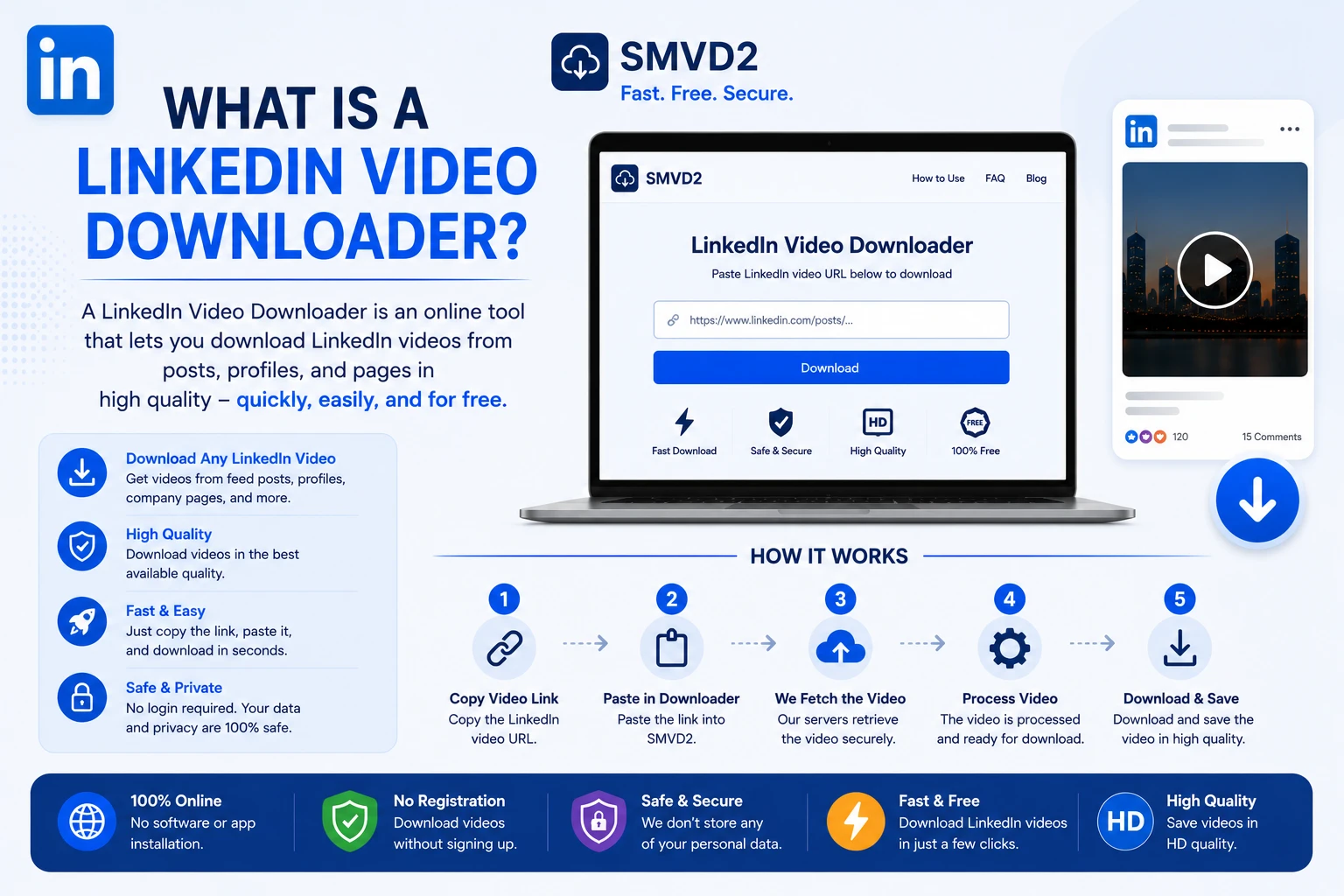
A LinkedIn Video Downloader is an online tool that allows users to save videos from LinkedIn posts for offline viewing, professional research, team training, educational purposes, and content repurposing. Instead of searching for the same post repeatedly, users can save a copy of the video and access it whenever needed.
Among the available options, SMVD2 provides one of the simplest ways to download publicly accessible LinkedIn videos without installing software or browser extensions.
Why Do People Use a LinkedIn Video Downloader?
Professionals use LinkedIn differently than other social platforms. The videos often contain practical business advice, industry trends, recruitment insights, product demonstrations, and educational content that users may want to revisit later.
Save Educational Content
Industry experts frequently share tutorials, webinars, career advice, and marketing lessons on LinkedIn. Downloading these videos allows users to create their own learning library for future reference.
Learn From Industry Leaders
Many business owners, founders, recruiters, and marketing professionals regularly publish high-value content. Saving videos makes it easier to revisit important insights without searching through old posts.
Offline Viewing
Whether you’re traveling, commuting, or working in areas with limited internet access, downloaded videos remain accessible without requiring a live connection.
Content Research
Content creators and marketers often analyze successful LinkedIn videos to understand:
- Audience engagement patterns
- Video structures
- Opening hooks
- Storytelling techniques
- Call-to-action strategies
Content Repurposing
Creators frequently reuse their own LinkedIn videos across multiple platforms, including:
- YouTube Shorts
- Instagram Reels
- Facebook Videos
- TikTok
- Internal training platforms
A LinkedIn Video Downloader helps retrieve original content quickly when the original file is no longer readily available.
How Does a LinkedIn Video Downloader Work?
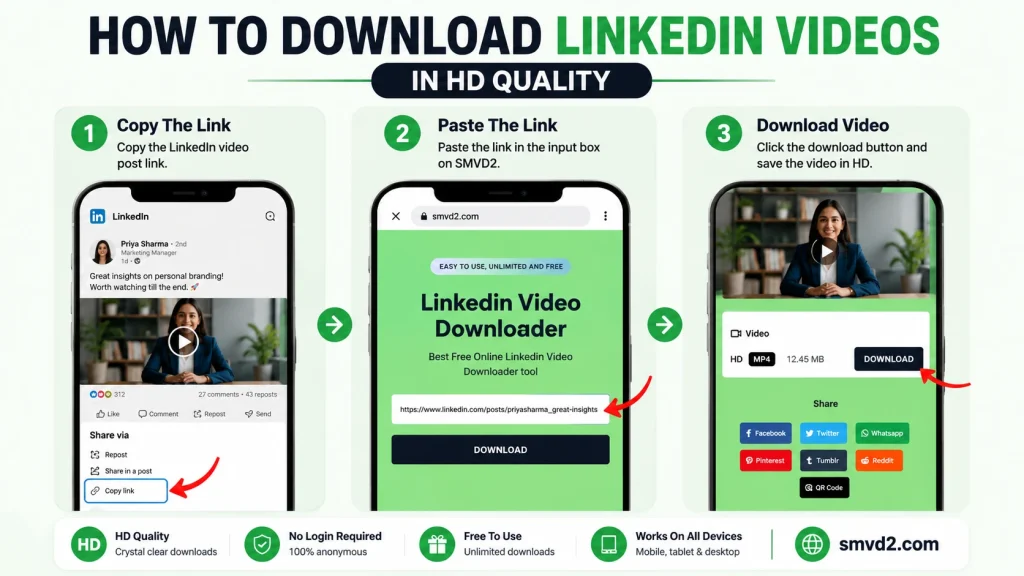
Most LinkedIn video downloaders follow a simple process.
Step 1: Copy the LinkedIn Video URL
- Search or find the LinkedIn post or the video.
- Click the three-dot menu and select:
- Copy Link to Post
Step 2: Paste the URL
Open the linkedin video downloader tool and paste the copied URL into the input field.
Step 3: Process the Video
The tool analyzes the public LinkedIn post and identifies the available video file.
Step 4: Download the Video
Click on the download button and your video will be saved
The process usually takes only a few seconds and requires no technical knowledge.
Features of a Good LinkedIn Video Downloader

Not all LinkedIn downloaders offer the same experience. Based on practical usage, a reliable downloader should provide more than just a download button.
Fast Downloads
Nobody wants to wait several minutes to save a short video. Efficient processing helps users download content quickly.
High-Quality Video
A good downloader should preserve the original video quality whenever possible, especially for presentations, tutorials, and educational content.
No Registration Required
Many users prefer tools that work instantly without requiring account creation or unnecessary personal information.
Mobile Compatibility
The downloader should work smoothly on:
- Android phones
- iPhones
- Tablets
- Windows computers
- Mac devices
Secure Processing
Users should never be required to share their LinkedIn login credentials to download publicly accessible videos.
Unlimited Downloads
For researchers, recruiters, educators, and marketers who save multiple videos, unlimited usage is a significant advantage.
Benefits of Using SMVD2 for LinkedIn Video Downloads
After reviewing common LinkedIn downloading methods, browser-based tools remain the most convenient option for most users because they require no installation and work across multiple devices.
SMVD2 is designed around this approach.
Simple and User-Friendly
The process is straightforward:
Copy the LinkedIn URL, paste it into SMVD2, and download the video.
There are no complicated menus or technical settings to configure.
No Software Installation
Unlike desktop software or browser extensions, SMVD2 works directly through your web browser.
This reduces setup time and avoids extension compatibility issues.
Works Across Devices
Whether you’re using:
- Windows
- Mac
- Android
- iPhone
SMVD2 can be accessed through a modern browser.
Fast Processing
One thing many users appreciate about browser-based downloaders is the ability to process videos without lengthy installations or account setups.
SMVD2 focuses on keeping the process quick and straightforward.
Free to Use
Users can download LinkedIn videos without purchasing subscriptions or premium plans.
Clean Experience
Compared to many tools that overwhelm users with multiple download options and unnecessary steps, SMVD2 keeps the workflow simple and beginner-friendly.
Our Practical Review of SMVD2
To better understand the user experience, we reviewed SMVD2 from a usability perspective and evaluated the overall workflow required to download publicly accessible LinkedIn videos.
What We Noticed
During our review, a few things stood out:
- The interface is straightforward and easy to understand.
- The workflow follows a simple copy-and-paste process.
- No account creation is required before using the tool.
- The downloader can be accessed directly through a browser.
- The overall process feels beginner-friendly and requires minimal effort.
For users who simply want to save a LinkedIn video quickly, reducing unnecessary steps often creates a better experience than adding complex features.
Why This Matters
Many users are not looking for advanced technical functionality. They simply want a fast way to save a video and watch it later.
From a usability perspective, simplicity often becomes the deciding factor. A tool that helps users complete the task in fewer steps generally creates a smoother experience.
How to Download LinkedIn Videos Using SMVD2
Downloading LinkedIn videos with SMVD2 takes only a few steps.
Step 1
Open LinkedIn and locate the video post you want to save.
Step 2
Copy the URL of the LinkedIn post.
Step 3
Visit: Linkedin Video Downloader Tool
Step 4
Paste the copied URL into the downloader field.
Step 5
Click the download button.
Step 6
Save the video to your device.
The process can be completed in less than 1 minute in favorable conditions.
SMVD2 vs Other LinkedIn Video Download Methods
Many users are unsure whether they should use browser-based tools, browser extensions, or desktop software.
The table below highlights some common differences.
| Feature | SMVD2 | Browser Extensions | Desktop Software |
|---|---|---|---|
| Installation Required | No | Yes | Yes |
| Works on Mobile | Yes | Limited | No |
| Quick Setup | Yes | Moderate | Moderate |
| Account Creation Needed | No | Varies | Varies |
| Accessible Anywhere | Yes | Browser Dependent | Device Dependent |
| Easy for Beginners | Yes | Moderate | Moderate |
For most casual users and professionals, browser-based solutions offer the fastest path from finding a video to downloading it.
What Most Guides Don’t Tell You
One common misconception is that download failures are always caused by the downloader itself.
In reality, many download issues happen because:
- The wrong LinkedIn URL was copied.
- The post is private or restricted.
- The video is no longer publicly available.
- Browser-related issues prevent proper loading.
Understanding these situations can save users time when troubleshooting download problems.
Common Problems Users Face When Downloading LinkedIn Videos
While downloading public LinkedIn videos is usually straightforward, some situations can cause confusion.
Private or Restricted Posts
If a LinkedIn post is private or restricted to specific users, a downloader may not be able to access the video.
Incorrect URLs
Copying the wrong page URL is one of the most common reasons downloads fail.
Browser Issues
Outdated browsers can occasionally cause loading or processing problems.
Network Interruptions
A weak internet connection may prevent the video from being processed correctly.
In most cases, refreshing the page, verifying the URL, and ensuring the post is publicly accessible resolves the issue.
Quick Troubleshooting Checklist
Before assuming a downloader is not working, check the following:
- Is the LinkedIn post publicly accessible?
- Did you copy the correct LinkedIn post URL?
- Is your browser updated?
- Is your internet connection stable?
- Does the video still exist on LinkedIn?
In many situations, one of these simple checks identifies the issue.
Is It Legal to Download LinkedIn Videos?
Downloading videos for personal learning, offline viewing, research, and educational purposes is generally acceptable.
However, users should always respect:
- Copyright regulations
- Creator ownership rights
- LinkedIn’s terms and policies
If you intend to redistribute, edit, republish, or commercially use someone else’s content, it is advisable to obtain permission from the original creator.
Can You Download LinkedIn Videos on Mobile?
Yes.
Many professionals consume LinkedIn content primarily on smartphones.
Using a mobile browser, users can:
- Open the LinkedIn app.
- Copy the post URL.
- Visit SMVD2.
- Paste the URL.
- Download the video.
This process works well for users who want to save videos while traveling or working remotely.
Common Uses for Downloaded LinkedIn Videos
Professionals use downloaded LinkedIn videos in many practical situations.
These include:
- Business training sessions
- Team onboarding programs
- Marketing research
- Educational reference
- Competitive analysis
- Industry trend tracking
- Content inspiration
- Offline presentations
As LinkedIn continues expanding its video ecosystem, these use cases are becoming increasingly common.
Why LinkedIn Video Content Is Growing
Video has become one of the most engaging forms of professional communication.
Unlike lengthy text posts, videos allow creators to explain concepts, demonstrate products, share experiences, and build trust more effectively.
Businesses, recruiters, educators, consultants, and creators increasingly use LinkedIn video content to:
- Build personal brands
- Educate audiences
- Generate leads
- Share expertise
- Increase engagement
- Showcase products and services
As video adoption continues to grow, more users are looking for practical ways to organize and save valuable content for future reference.
Who Should Use a LinkedIn Video Downloader?
Different users benefit from LinkedIn video downloading in different ways.
Marketers
Save successful LinkedIn videos for competitor analysis, content inspiration, and campaign research.
Recruiters
Store hiring-related content, employer branding videos, and recruitment insights for future reference.
Business Owners
Build a library of expert advice, industry discussions, and educational content.
Students
Save career guidance, educational tutorials, and professional development videos for offline learning.
Content Creators
Organize and repurpose original video content across multiple platforms when needed.
Frequently Asked Questions
Can I download LinkedIn videos without installing software?
Yes. Browser-based tools such as SMVD2 allow users to download videos directly from a web browser without installing additional software.
Does SMVD2 work on mobile devices?
Yes. SMVD2 works on most modern Android and iPhone browsers.
Why is my LinkedIn video not downloading?
Common reasons include incorrect URLs, private posts, browser issues, or temporary network interruptions.
Can I download my own LinkedIn videos?
Yes. Many creators use LinkedIn downloaders to retrieve and repurpose their own content.
Do I need a LinkedIn account to use SMVD2?
Publicly accessible content can generally be processed without requiring users to provide their LinkedIn login credentials.
Final Thoughts
A LinkedIn Video Downloader is a practical tool for professionals, marketers, recruiters, students, educators, and creators who want to save valuable LinkedIn content for future use.
Whether you’re building a learning library, conducting content research, preparing training materials, or simply saving useful videos for offline viewing, a reliable downloader can make the process significantly easier.
For users looking for a simple browser-based solution, SMVD2 offers a fast and straightforward way to download publicly accessible LinkedIn videos without software installations, account creation, or unnecessary complexity.
Visit https://smvd2.com and start saving your favorite LinkedIn videos in just a few clicks.
Related Articles:
- How Does a LinkedIn Video Downloader Work?
- Best LinkedIn Video Downloaders
- Why Choose a Dedicated LinkedIn Video Downloader Over Universal Tools?