How Marketers Use LinkedIn Videos for Content Repurposing
LinkedIn has quietly become one of the highest ROI content platforms for marketers.
But here’s something most people misunderstand:
They treat LinkedIn like a content creation platform.
In reality, many smart marketers use it more like a content distribution engine.
The goal is not always:
“Create more.”
Often, the smarter move is:
“Saves more value from content that already performs.”
That shift changes everything.
Direct Answer (How Marketers Use LinkedIn Videos for Content Repurposing)
The workflow many marketers follow looks something like this:
Find/Create → Save → Break → Transform → Distribute → Repeat
And one of the most important parts of that process?
Access to the original video asset.
Because once a marketer has the source video, it can be transformed into:
- short-form clips
- educational posts
- blog content
- email content
- platform-specific edits
- remarketing assets
That’s why tools that help save public LinkedIn videos — such as: smvd2.com
become part of many repurposing workflows.
Real Agency Scenario (What Actually Happens)
A small marketing agency we observed was struggling with a common problem:
Constantly creating new content from scratch was slowing the team down.
Instead of producing more videos every week, they shifted toward repurposing existing high-performing content.
Their workflow was simple:
- Identify a LinkedIn video that already performed well
- Saves the strongest insights
- Re-edit the content for different platforms
- Redistribute it in multiple formats
One educational LinkedIn video eventually became:
- multiple Instagram Reels
- several short-form clips
- text-based social posts
- a blog-style article
- email discussion content
What improved wasn’t just reach.
The team also noticed:
- faster publishing cycles
- lower production fatigue
- more consistent content output
- stronger reuse of proven messaging
That’s the real advantage of repurposing.
Why LinkedIn Videos Work So Well for Repurposing
1. Insight-Heavy Content
LinkedIn content is often:
- educational
- experience-driven
- strategy-focused
- professionally contextual
Which means: a single video usually contains multiple reusable ideas.
Compared to entertainment video based platforms like Instagram, LinkedIn videos often have:
higher information density.
That makes them easier to repurpose into:
- clips
- quotes
- breakdowns
- threads
- carousels
- blog sections
2. High-Intent Audience Signals
A lot of LinkedIn content is created around:
- business growth
- hiring
- marketing
- leadership
- operations
- sales
- productivity
So when a video performs well on LinkedIn, it often means:
the topic already has strong audience relevance.
Marketers frequently use that as a validation signal before redistributing content elsewhere.
3. Longer Shelf Life
One interesting thing about LinkedIn content:
Strong educational videos often stay useful for months.
Unlike trend-heavy platforms, many LinkedIn topics are evergreen:
- marketing psychology
- business systems
- hiring advice
- productivity workflows
- sales strategies
That gives repurposed content a much longer usable lifespan.
The Repurposing SOP Many Marketers Follow
Here’s a simplified version of the workflow commonly used.
STEP 1: Identify a High-Performing Video
Look for:
- strong engagement
- useful educational insight
- audience discussion in comments
- replay/watch potential
Sometimes even videos with moderate views perform well after repurposing because the core insight is strong.
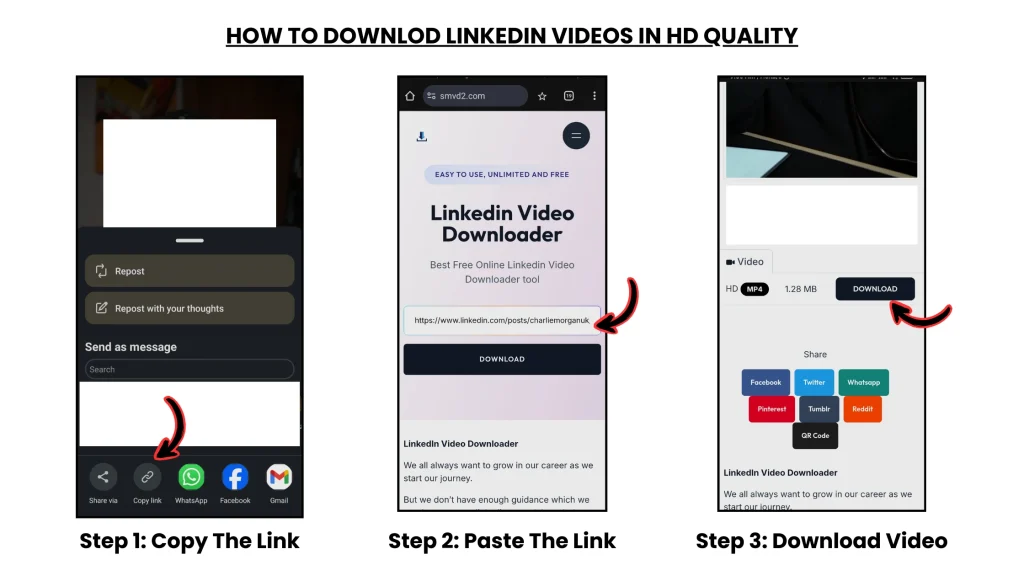
STEP 2: Save the Original Video
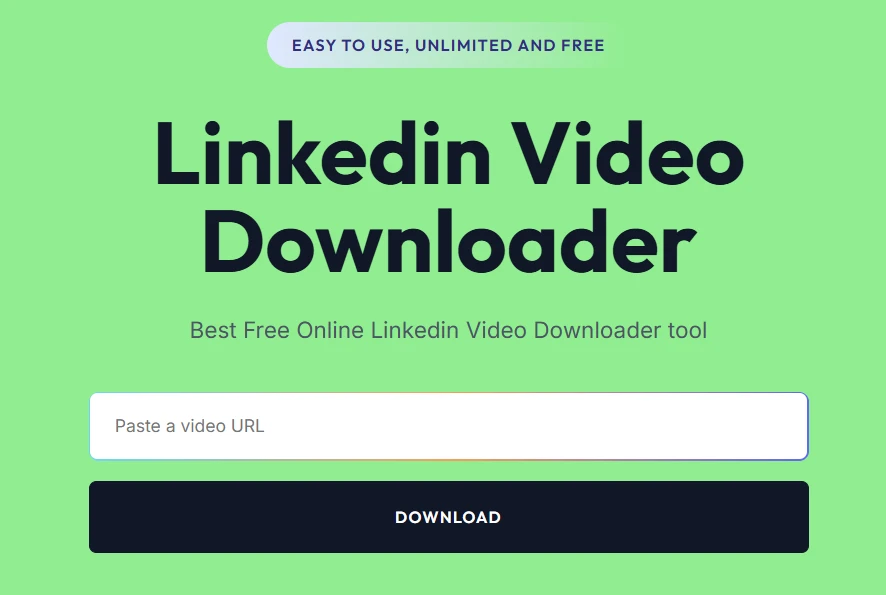
For public LinkedIn videos, tools like: smvd2.com
are commonly used to save the source file in MP4 or HD format.
Why this matters:
Editing becomes much easier when working from the original file instead of screen recordings.
STEP 3: Break Long Videos into Micro-Content
This is where most of the leverage happens.
Example:
- one 3-minute video
can become: - multiple short clips
- quote graphics
- educational posts
- hooks for ads
- email snippets
Most marketers are not actually creating more ideas.
They are saving more assets from the same idea.
STEP 4: Transform the Content (Most Important Step)
This is the step most beginners skip.
Simply reposting a LinkedIn video rarely performs well on other platforms.
Successful repurposing usually involves:
- stronger hooks
- faster pacing
- captions/subtitles
- formatting changes
- platform-native editing
- contextual framing
One creator we observed shortened a 2-minute business clip into a 28-second Reel with captions and a sharper opening hook.
The shorter version significantly outperformed the original on Instagram.
That happens often.
STEP 5: Adapt for Each Platform
Different platforms reward different behaviors.
Instagram Reels
Usually performs better with:
- faster pacing
- stronger visual hooks
- tighter editing
YouTube Shorts
Often rewards:
- retention
- looping structure
- curiosity-driven intros
X (Twitter)
Usually works better when:
- paired with strong text context
- insight-driven captions
- opinion framing
Blog Content
Many marketers convert:
- videos → articles
- clips → SEO posts
- insights → newsletters
This simple idea change 1 video content in to multiple content formats.
STEP 6: Build a Distribution Loop
Instead of posting once and moving on:
Many marketers reuse strong content every few weeks in different formats.
Examples:
- clip version
- text version
- carousel version
- short quote version
- commentary version
This creates a repeatable content engine instead of a constant creation cycle.
Where Most Marketers Fail (Important)
1. Direct Reposting
One of the most common mistakes:
Downloading a video and reposting it without changes.
Result:
- weak retention
- lower reach
- poor engagement
Platforms generally reward adapted content more than duplicated content.
2. Weak First 3 Seconds
Most short-form performance depends heavily on:
the opening hook.
Even strong educational content fails if the beginning is slow.
3. No Platform Adaptation
A LinkedIn-style video usually does NOT behave the same way on:
- YouTube Shorts
- TikTok
Each platform has different audience behavior patterns.
4. Overproduced Editing
Interestingly, overly polished edits sometimes perform worse.
Several creators have noticed:
more natural-looking clips often feel more authentic and retain attention better.
Real Repurposing Observation
One creator posted a LinkedIn clip directly to Instagram with almost no edits.
Result:
- low retention
- weak engagement
- limited reach
Later, the same content was:
- shortened
- captioned
- re-hooked
- tightened in pacing
The second version performed dramatically better.
The insight stayed the same.
The packaging changed.
That’s the real lesson behind repurposing.
Why SMVD2 Fits Into This Workflow
Repurposing usually begins with:
access to the source content.
For public LinkedIn videos, tools like SMVD2 help simplify that first step.
During testing, a few things stood out:
- quick processing
- HD support on many videos
- easier mobile downloading
- cleaner workflow compared to screen recording
| Feature | Practical Benefit |
|---|---|
| HD Download | Better editing quality |
| Faster Processing | Saves workflow time |
| No Watermark | Cleaner branding |
| Mobile Compatibility | Flexible usage |
| MP4 Support | Easier editing/import |
The important thing is not the downloader itself.
The real value comes from:
what marketers DO with the content afterward.
Content Repurposing Framework
Content Pyramid
A common workflow looks like this:
LinkedIn Video
↓
Short Clips
↓
Social Posts
↓
Email Content
↓
SEO Articles
↓
Evergreen Assets
One core idea can feed multiple channels.
Evergreen Reuse Loop
Strong content is often reused every:
30–60 days
Usually with:
- updated framing
- new hooks
- different edits
- platform adaptation
Cross-Platform Distribution
A single insight might move through:
LinkedIn → Instagram → YouTube → Newsletter → Blog → Back to LinkedIn
That’s why many marketers now focus more on:
distribution efficiency
than raw content volume.
Legal & Ethical Guidelines
Generally safe:
- your own content
- transformed educational edits
- credited commentary
- fair contextual reuse
Risky:
- direct reposting
- removing creator attribution
- misleading redistribution
- commercial misuse of others’ content
Best practice:
add transformation and context instead of simple duplication.
FAQ
How many assets can one LinkedIn video create?
Often:
5–10 pieces of content or more.
Depends on:
- depth of insight
- editing style
- distribution strategy
Is editing really necessary?
Usually yes.
Transformation is often the biggest performance multiplier.
Why do reposted videos perform poorly?
Because most platforms prioritize:
- native formatting
- audience adaptation
- retention optimization
What tools help save LinkedIn videos?
Tools like SMVD2 are commonly used for downloading public LinkedIn videos for editing workflows.
Can beginners use this strategy?
Yes.
The workflow is relatively simple once the process becomes repeatable.
Future Insight
Content marketing is increasingly moving toward:
- repurposing-first workflows
- multi-platform distribution
- shorter content formats
- asset multiplication systems
The marketers growing fastest are often not creating dramatically more content.
They are:
distributing existing ideas more intelligently.
Final Verdict
If you want to grow using LinkedIn videos, the real system is usually:
Find → Save → Transform → Distribute → Reuse
The biggest gains rarely come from:
creating endlessly.
They usually come from: saving more value from content that already works.
Bottom Line
Content creation is expensive.
Content repurposing is scalable.
Smart marketers often turn: 1 strong video into multiple long-term content assets.
Related Articles
- How to Download LinkedIn Videos for Social Media Reposting
- How to Archive Company Videos from LinkedIn
- How to Save Client or Employer Videos from LinkedIn