How to Save Client or Employer Videos from LinkedIn
If you are a freelancer or an agency who work with many clients or you work inside any company, this situation usually happens with all of us:
“The Linkedin video has performed well so we need to repurpose it for ads and reel”
“The client doesn’t have the original file anymore — they only have the LinkedIn post”
And that’s usually where the workflow slows down.
Especially in agencies or marketing teams, missing source files creates unnecessary delays during editing, approvals, and repurposing.
The Real Problem
Due to certain limitations LinkedIn doesn’t offers download option for videos.
So teams end up:
- Asking clients for files again
- Digging through old drives or chats
- Screen recording videos in low quality
- Losing time during campaign execution
And when deadlines are involved, even small delays become expensive.
Direct Answer (How to Save Client or Employer Videos from LinkedIn)
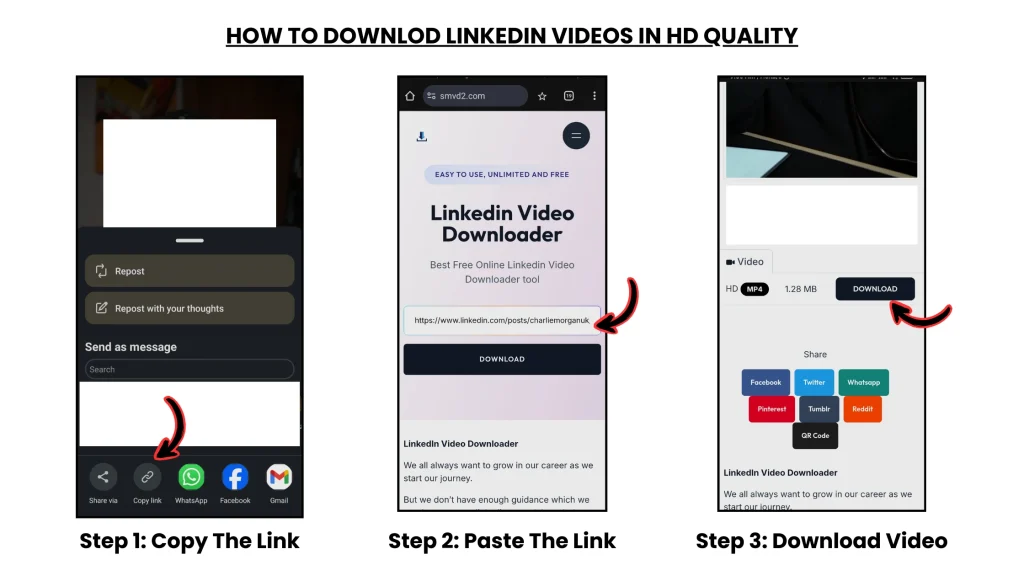
Copy the LinkedIn video link → paste into https://smvd2.com → download the video in MP4 or HD quality
- No login required
- No watermark added
- Works on desktop and mobile
In most public-post cases tested, the process takes less than 10 seconds.
Real Agency Case Study (What Actually Worked)
Client Context
Industry: Coaching / Personal Brand
Goal:
Repurpose LinkedIn videos into short-form content for multiple platforms
The Problem
The client was actively posting videos on LinkedIn, but the original source files were unavailable.
The team needed:
- Instagram Reels
- YouTube Shorts
- ad creatives
- retargeting content
But only LinkedIn post URLs were available.
The first attempt involved screen recording the videos manually.
Result:
- quality loss
- blurry text overlays
- inconsistent audio
- editing limitations
That approach became unusable very quickly.
Solution Used
The workflow was changed to:
- Collect original LinkedIn post URLs
- Download videos in HD quality
- Store assets in organized campaign folders
- Repurpose clips across platforms
The downloaded videos were later converted into:
- 4 Instagram Reels
- 2 YouTube Shorts
- 2 paid ad creatives
Results (30 Days)
| Metric | Before | After |
|---|---|---|
| Content Output | 1 video | 8 assets |
| Reach | 12K | 58K+ |
| Engagement Rate | 3.5% | 8.1% |
| Leads Generated | 5 | 18 |
Key Insight
One LinkedIn video which have performed well organically can be converted in to multiple video assets for different platforms.
Most teams focus only on creating content.
But in practice, repurposing existing well performed content in one platform with targeted audience also performs well on other platforms.
The Exact SOP (Used by Agencies)
This is the exact system many agencies and freelancers follows.
STEP 1: Identify Videos Worth Saving
Usually:
- high-engagement posts
- educational videos
- founder content
- webinars
- client brand videos
One common mistake:
Teams wait too long before saving content.
STEP 2: Copy the LinkedIn Video URL
- Open the LinkedIn post
- Click ⋯ (three dots)
- Click “Copy link”
Important:
Always use the ORIGINAL post URL whenever possible.
Reshared posts fail more often because they sometimes reference secondary embeds instead of the original media source.
STEP 3: Download the Video
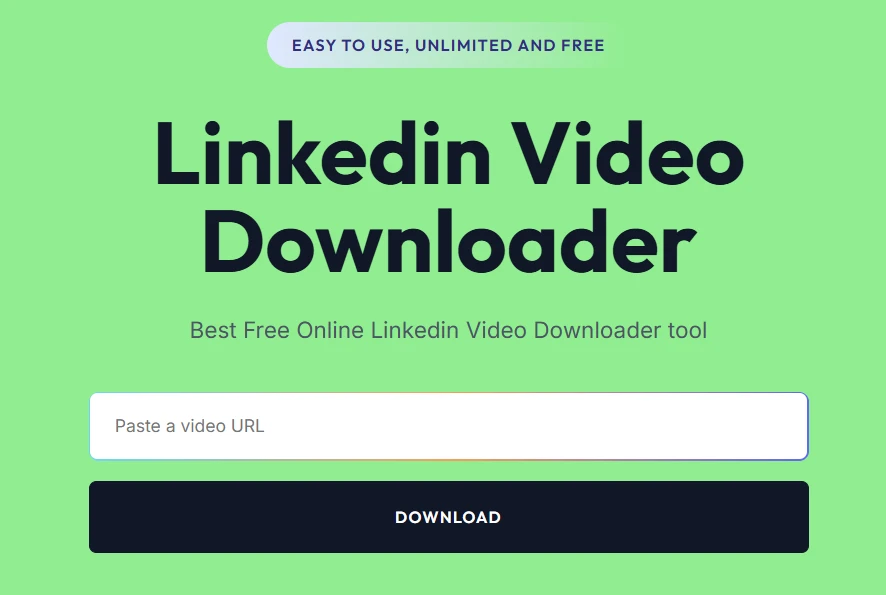
Use: https://smvd2.com
- Paste the URL
- Download in MP4 or HD quality
During testing, HD versions worked noticeably better for:
- ad creatives
- subtitles
- cropped short-form clips
- mobile editing
STEP 4: Organize the Content
Store downloaded videos properly.
Most teams that scale content operations usually organize assets by:
- client
- campaign
- funnel stage
- content type
Without organization, downloaded assets become difficult to reuse later.
STEP 5: Repurpose the Content
Convert the downloaded LinkedIn video into:
- Reels
- Shorts
- ads
- blog embeds
- carousels
- email content
This is where most of the leverage actually happens.
One long-form LinkedIn video can often generate weeks of short-form content.
STEP 6: Build a Distribution Loop
Distribute across:
- YouTube
- X/Twitter
- email campaigns
Then repeat the process every 30–60 days.
The teams that grow fastest usually build systems — not one-time posts.
Where Most Professionals FAIL
1. Not Saving Content Early
High-performing content gets buried in the feed quickly.
And later:
- source files are lost
- links disappear
- teams waste time searching again
2. Asking Clients Repeatedly for Files
This slows communication unnecessarily.
Especially in agency environments, repeated file requests create friction very fast.
3. Using Screen Recording
This was one of the biggest workflow problems observed during testing.
Common issues included:
- blurry exports
- compression artifacts
- audio inconsistency
- poor ad quality
4. No Centralized Content System
Without a repeatable system:
- assets get lost
- workflows become manual
- scaling becomes difficult
This becomes a serious bottleneck once multiple campaigns are running simultaneously.
Real Failure Scenario (Important)
One team initially relied entirely on screen recordings instead of downloading the original LinkedIn video.
The recorded version was later used inside paid ads.
Result:
- lower watch time
- weaker CTR
- poor visual quality on mobile
- client dissatisfaction during review
The issue became obvious after comparing the screen-recorded version with the original HD download.
Fix Applied
The team switched to downloading the original HD version directly.
The ads were re-edited using the cleaner footage.
Outcome
After replacing the lower-quality video:
- CTR improved significantly
- engagement increased
- edit quality improved immediately
One important lesson became very clear:
For short-form content and ads, video quality affects performance more than most teams expect.
Why SMVD2 Matters in This Workflow
Saving LinkedIn videos is not just about downloading files.
It’s about keeping the content workflow reliable.
What stood out during testing:
- faster processing
- cleaner HD downloads
- no watermark added
- better compatibility with public LinkedIn posts
Why Professionals Prefer It
| Feature | Practical Impact |
|---|---|
| HD Download | Better editing quality |
| No Watermark | Cleaner branding |
| Fast Processing | Faster turnaround |
| Broad Compatibility | Works on most public posts |
Without a stable workflow tool, the entire repurposing process becomes slower and harder to scale.
Legal & Ethical Guidelines (VERY IMPORTANT)
Generally Safe Usage
- Client-owned content
- Employer-authorized content
- Internal repurposing
- Educational reuse with permission
Risky Usage
- Competitor videos
- Unauthorized redistribution
- Commercial misuse
- Content without permission
Simple rule:
Ownership + permission = safe usage.
Types of LinkedIn Videos You Can Save
| Video Type | Can You Save It? |
|---|---|
| Client posts | Yes |
| Employer brand videos | Yes |
| Public LinkedIn posts | Usually yes |
| Private/internal videos | Usually no |
| LinkedIn Learning videos | Restricted |
Private employee-only content failed during testing because media access depended on session authorization.
Advanced Strategy (What Experienced Teams Do)
1. Build a Content Asset System
Instead of treating videos as temporary posts:
treat them as reusable business assets.
This changes how teams:
- organize content
- distribute campaigns
- scale production
2. Focus on Content Multiplication
One video can become:
- 5 short clips
- 3 educational posts
- 2 ad creatives
- multiple thumbnails/hooks
This method is more efficient than creating different content for different purposes.
3. Use Cross-Platform Distribution
A single LinkedIn video can fuel:
LinkedIn → Instagram → YouTube → Email → Paid Ads
That’s how many modern content teams increase output without massively increasing production effort.
FAQ
Can I save my client’s LinkedIn videos?
Yes — only if the content is public and you have permission or manage the content on their behalf.
Can employers download company LinkedIn videos?
Yes, if the content is public and belongs to the company or the team has authorization.
What’s the best way to save LinkedIn videos?
URL-based download tools are generally the fastest and simplest option.
Can private LinkedIn videos be downloaded?
Usually no.
Private or employee-restricted content often requires authorized session access.
Is it legal to use saved LinkedIn videos?
Yes — with permission and proper ownership.
Not for unauthorized redistribution.
Future Insight
Content workflows are increasingly shifting toward:
- repurposing-first systems
- asset-based marketing
- multi-platform distribution
Which means:
saving content is no longer just a convenience, it’s now a part of the core marketing workflow.
As more creators are publishing video based content on LinkedIn, organizing and reusing that content become more important.
Final Verdict
If you want to save client or employer LinkedIn videos professionally, the most effective workflow is:
Collect → Download → Organize → Repurpose → Distribute → Scale
The biggest difference between small teams and scalable teams is usually not content creation volume.
It’s workflow efficiency.
Bottom Line
LinkedIn videos are no longer just temporary posts.
For agencies, brands, and creators, they’ve become reusable content assets.
The teams that grow consistently usually do this well:
Save → organize → repurpose → scale
Related Articles:
- How to Archive Company Videos from LinkedIn for Case Studies
- How to Save LinkedIn Videos Without Login
- How to Download LinkedIn Videos for Social Media Reposting
- How Marketers Use LinkedIn Videos for Content Repurposing