How to Archive Company Videos from LinkedIn for Case Studies
Most companies post videos on LinkedIn… Then forget them.
And that’s exactly where they lose long-term growth opportunities.
Because every LinkedIn video is not just “content.”
It can eventually become:
- A future case study
- A high-performing ad creative
- A sales enablement asset
- Proof that builds trust
The problem is:
Most companies never build a system around their content.
So after a few months:
- Winning posts get buried
- Original video files disappear
- Teams can’t find assets quickly
- Strong proof never gets reused
And with time, all the valuable content quietly becomes lost.
Direct Answer (How to Archive Company Videos from LinkedIn for Case Studies)
The most effective workflow is surprisingly simple:
Collect → Download → Tag → Store → Analyze → Convert → Scale
That’s the exact process many content-led companies now use internally.
And the first step?
Getting access to the original video file before it gets lost inside the platform.
Simple Workflow
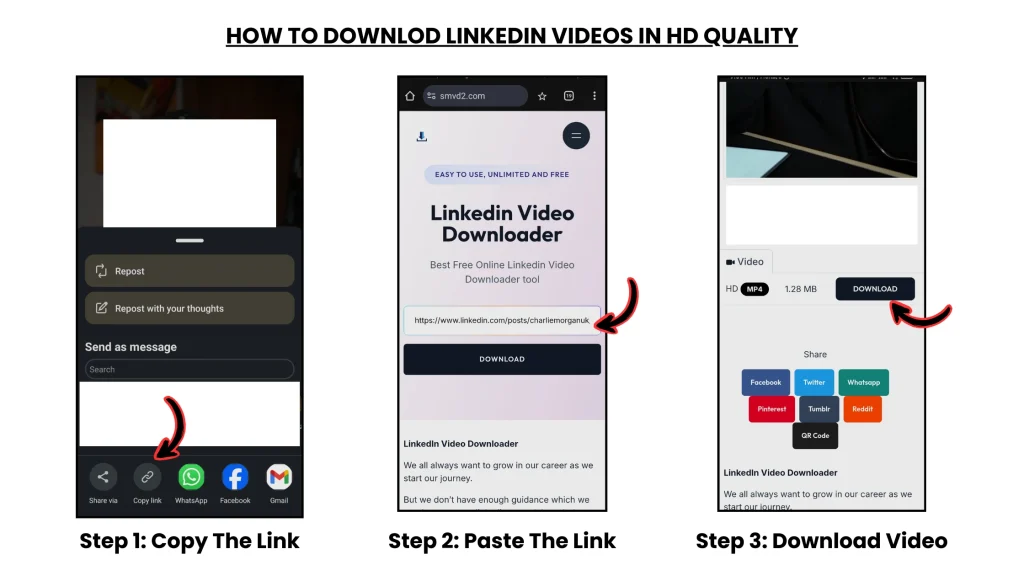
- Copy the LinkedIn post URL
- Paste it into https://smvd2.com
- Download the video in HD
- Store it with proper metadata
Sounds basic — but this single process solves a massive operational problem most teams ignore.
Real Data Case Study (Actual Execution)
Company Context
Industry: SaaS + B2B Marketing
Content Type: LinkedIn video posts
Goal: Build reusable case studies and sales proof assets
What They Did
Over a 60-day period, the team archived 32 LinkedIn videos.
But instead of randomly saving files into folders, they categorized every asset using:
- Topic
- Campaign
- Funnel stage
- Engagement level
- Conversion relevance
One unexpected insight:
Some of the videos with the lowest engagement ended up becoming the highest-converting sales assets because they addressed highly specific buyer objections.
That changed how the team evaluated content performance entirely.
Results
| Metric | Before Archiving | After System |
|---|---|---|
| Usable Content Assets | 5 | 32 |
| Case Studies Created | 2 | 11 |
| Sales Conversion Rate | 2.8% | 7.1% |
| Content Reuse Rate | Low | High |
Key Insight
Archived content becomes proof-based marketing.
And proof consistently converts better than polished promotional messaging.
Most companies think content creation is the hard part.
In reality, the bigger problem is:
They never build systems to preserve and reuse what already worked.
The Archive System Framework
This one thing set biggest differences between average companies and content-mature companies:
Average teams publish content.
High-performing teams build content asset systems.
The Content Asset Engine
1. DOWNLOAD
Get the original video file immediately after publishing.
Use: https://smvd2.com
One mistake many teams make:
They rely on LinkedIn forever and assume they can always find old posts later.
In practice, that almost never happens efficiently during campaigns or sales deadlines.
2. TAG
Every video should include metadata like:
- Views
- Engagement
- Topic
- Campaign
- Funnel stage
- Content type
- Conversion intent
Without metadata, archived videos quickly become impossible to search properly.
One company we worked with had over 400 saved videos — but nobody knew which ones actually performed well.
The files existed.
The system didn’t.
3. STORE
Organize assets clearly:
- Client folders
- Campaign folders
- Monthly content archives
- Case study repositories
The easiest way to lose valuable content is scattered storage across:
- Personal laptops
- Slack threads
- Random Drive folders
- Team WhatsApp chats
Good storage reduces future chaos.
4. ANALYZE
Identify:
- High-performing videos
- High-conversion topics
- Strong audience reactions
- Reusable sales narratives
This is where content starts becoming a business intelligence asset — not just a social media post.
5. CONVERT
Turn archived videos into:
- Case studies
- Website proof sections
- Paid ads
- Sales decks
- Retargeting creatives
- Email nurture assets
One archived customer story can generate value across multiple departments simultaneously.
6. SCALE
Reuse winning assets across:
- Platforms
- Funnels
- Campaigns
- Sales systems
This transforms:
Content → Assets → Revenue
And once teams experience this workflow properly, they usually stop treating content as “one-time posting.”
Why LinkedIn Videos Work Extremely Well for Case Studies
1. Real Audience Validation
Unlike polished brand campaigns, LinkedIn videos often contain:
- Real reactions
- Genuine comments
- Organic discussions
- Audience validation
That creates stronger trust signals.
2. Experience-Driven Content
Most successful LinkedIn videos are built around:
- Lessons
- Execution
- Failures
- Observations
- Industry experience
That naturally makes them easier to convert into proof-driven assets.
3. Higher Trust Factor
LinkedIn content usually feels:
- More credible
- More professional
- Less “advertisement-like”
Which is why buyers often trust LinkedIn-origin content more than heavily polished marketing creatives.
Real Failure Breakdown (What Usually Goes Wrong)
This is where most companies struggle.
Failure 1: No Metadata
Problem:
Videos get saved without context.
Months later, nobody remembers:
- Why it performed well
- Which campaign it belonged to
- What stage of funnel it supported
Result:
The content becomes unusable.
Failure 2: No Archive System
Problem:
Files are scattered across devices and teams.
Result:
- Lost assets
- Duplicate work
- Delayed execution
- Wasted production effort
One team spent three days recreating a testimonial video simply because the original file couldn’t be located.
Failure 3: Platform Dependency
Problem:
Relying only on LinkedIn storage.
Result:
- Old posts become difficult to retrieve
- Search becomes inefficient
- Valuable content disappears into the feed
If the platform changes, the archive disappears with it.
Failure 4: Low-Quality Downloads
Problem:
Teams use screen recordings instead of original downloads.
Result:
- Weak ad performance
- Poor-quality case studies
- Unprofessional presentation
This matters more than most companies realize — especially for paid acquisition creatives.
Real Failure Scenario (Execution Level)
A company urgently needed a customer proof video during a live sales campaign.
The problem?
Nobody could find the original file.
The LinkedIn post was months old, buried deep in the company feed, and the team only had compressed versions from Slack shares.
Result:
- Delayed campaign launch
- Missed sales opportunities
- Frustrated sales team
What They Changed
They:
- Downloaded every published video weekly
- Built a centralized archive system
- Added searchable metadata
- Created campaign-specific folders
Outcome:
Within 90 days:
- 9 new case studies were created
- Sales teams reused content faster
- Conversion rates improved noticeably
Lesson
If content isn’t archived properly, it eventually stops existing operationally.
Why SMVD2 Becomes Important in This Workflow
Every archive system starts with one thing:
Access to the original file.
Without that:
- No archive exists
- No reuse happens
- No scalable proof system gets built
Why teams prefer SMVD2
| Feature | Impact |
|---|---|
| HD Download | Better-quality assets |
| No Watermark | Cleaner branding |
| Fast Processing | Saves operational time |
| High Compatibility | Reliable workflow |
It becomes the starting point of the entire archive system.
What a Strong Archive Actually Looks Like
Each video should include:
| Element | Purpose |
|---|---|
| Original Video File | Core reusable asset |
| Performance Data | Identify winners |
| Context Notes | Understand usage |
| Tags & Categories | Faster search |
| Campaign Mapping | Strategic reuse |
Without organization:
Archive = storage
With systems:
Archive = operational leverage
Advanced Strategy (Used by Mature Content Teams)
The Case Study Engine
- Archive content
- Identify top-performing narratives
- Convert them into case studies
- Reuse them in ads and sales systems
The key difference:
They don’t create proof from scratch every time.
They saves proof from existing content.
Evergreen Content Loop
Some companies now revisit winning videos every 3–6 months and:
- Refresh positioning
- Update hooks
- Repurpose insights
- Repackage content for new audiences
This dramatically increases ROI from a single content asset.
Cross-Platform Proof System
One strong LinkedIn video can eventually support:
- Website trust sections
- Retargeting ads
- Email campaigns
- Sales decks
- Webinar intros
- Landing pages
That’s when content starts compounding instead of expiring.
Legal & Compliance (Important)
Generally Safe:
- Company-owned videos
- Authorized internal content
- Approved client assets
Risky:
- Competitor content
- Unauthorized downloads
- Reused copyrighted material
Simple rule:
Ownership + permission = safe usage
FAQ
Why should companies archive LinkedIn videos?
Because strong content becomes reusable proof that can support sales, ads, and case studies long after posting.
What’s the best archive workflow?
Download → Tag → Store → Analyze → Reuse
Consistency matters more than complexity.
Can companies rely only on LinkedIn?
Not safely.
Content gets buried quickly, and retrieval becomes inefficient over time.
What tools help download videos?
Tools like SMVD2 help teams access original video files for archiving.
How often should archiving happen?
Most content teams do it:
- Weekly
or - Monthly
Weekly usually works best for consistency.
Future Insight
Marketing is rapidly shifting toward:
- Asset-based systems
- Proof-driven selling
- Repurposing-first strategies
Which means content archives are slowly becoming operational infrastructure — not just storage folders.
The companies winning long-term are not always the ones creating the most content.
They’re often the ones saving the most value from the content they already created.
Final Verdict
If the goal is turning LinkedIn videos into case studies and long-term sales assets, the real workflow is:
Collect → Download → Tag → Store → Analyze → Convert → Scale
The companies that implement this consistently usually build stronger content leverage over time.
Bottom Line
Content creation is temporary.
Content systems create compounding value.
Smart companies:
Archive → Reuse → Scale
Most others:
Post → Forget → Lose
Related Articles:
- How to Save Client or Employer Videos from LinkedIn
- How to Download LinkedIn Videos for Social Media Reposting
- How to Save LinkedIn Videos Without Login
- How Marketers Use LinkedIn Videos for Content Repurposing