How to Download LinkedIn Videos Without Watermark
Today, LinkedIn has evolved into a professional video knowledge platform, where founders, marketers, educators, recruiters, and industry experts consistently share high-value content such as business strategies, real-world case studies, hiring insights, technical tutorials, and operational breakdowns.
Unlike casual social media platforms, LinkedIn videos often carry long-term learning value. Many professionals save important videos for offline study, internal training, team onboarding, research, presentation references, or repeated learning sessions.
In practice, this is especially common among:
- marketers saving campaign breakdowns
- recruiters reviewing hiring insights
- founders archiving growth strategies
- students revisiting educational explainers
However, LinkedIn introduces certain limitations when it comes to saving this content.
Because of these restrictions, many users start searching for reliable ways to download LinkedIn videos without watermark or quality loss, often encountering inconsistent tools, fake downloaders, or low-quality recording methods.
This guide is designed to give you complete clarity — not just steps.
In this guide, you’ll learn:
Why LinkedIn restricts direct downloads
Whether watermark-free downloads are technically possible
How LinkedIn video delivery actually works (important for quality)
The safest, easiest, and most reliable way to save LinkedIn videos
A step-by-step method that works across all devices
You’ll also understand what makes SMVD2.com a reliable solution, based on how modern video delivery and source-saving systems function in real-world usage.
Why LinkedIn Videos Cannot Be Downloaded Directly
LinkedIn intentionally restricts direct video downloads due to a combination of content protection, streaming architecture, engagement control, and professional platform integrity.
To fully understand this, it’s important to look at how LinkedIn actually delivers videos behind the scenes.
1. Streaming-Based Video Delivery (Core Reason)
LinkedIn does not serve videos as simple downloadable files.
Instead, it uses adaptive streaming technology, where videos are broken into smaller media segments and delivered dynamically depending on:
- internet speed
- device capability
- browser performance
- network conditions
This is why LinkedIn videos behave differently from traditional downloadable MP4 files.
In real-world testing, this adaptive system is also one of the biggest reasons why screen recordings often lose consistency during playback. When the stream automatically changes quality mid-playback, frame drops and audio sync issues become much more common.
This means:
- there is no direct “download” button available to users
- the video is streamed dynamically instead of being permanently stored locally
2. Protecting Original Content Creators
Professionals and companies invest significant time and resources creating:
- educational videos
- business explainers
- marketing campaigns
- hiring content
- product demonstrations
Restricting downloads helps reduce:
- unauthorized redistribution
- content theft
- reposting without credit
- misuse across other platforms
This is particularly important on a professional platform where original content often represents business expertise or brand authority.
3. Preventing Content Misuse
If direct downloads were openly available, videos could easily be:
- reuploaded without attribution
- monetized elsewhere
- edited misleadingly
- redistributed outside intended audiences
This would weaken trust within the platform ecosystem.
4. Maintaining Platform Privacy
LinkedIn content is frequently shared in professional or semi-private contexts.
Some videos are intended only for:
- a specific audience
- a company network
- temporary campaigns
- contextual discussions
Restricting downloads helps maintain this controlled environment.
5. Platform Control & Engagement Integrity
By limiting downloads, LinkedIn also maintains better control over:
- content distribution
- platform engagement
- analytics tracking
- creator visibility
- recommendation systems
This is common across most modern streaming-based platforms.
Why Screen Recording Is Not a Reliable Solution
Because of these restrictions, many users attempt screen recording as a workaround.
While it may initially seem convenient, real-world usage reveals several technical problems.
Common issues include:
- reduced resolution due to screen capture limitations
- frame drops during adaptive streaming
- browser lag during playback
- notifications appearing during recording
- cropped or misaligned frames
- audio-video synchronization issues
- additional editing requirements
During testing, one of the most common problems appeared on mobile browsers where incoming notifications interrupted the recording and permanently affected the final video.
Another common issue occurs when LinkedIn dynamically changes stream quality mid-playback. This often creates inconsistent frame pacing that becomes visible in the recording itself.
This happens because screen recording captures display output rather than the original source file.
As a result, the final quality is usually lower than the original uploaded video.
Is It Possible to Download LinkedIn Videos Without Watermark?
Yes — and this is one of the most misunderstood aspects of LinkedIn video downloading.
Key Insight
LinkedIn videos do not contain built-in watermarks embedded directly into the original source file.
Unlike some social platforms, LinkedIn generally stores uploaded videos as clean media files without permanent branding overlays.
This means:
If a downloader accesses the original source file correctly, the saved video can remain:
- watermark-free
- visually clean
- identical to the original upload
This is also why some tools produce clean downloads while others generate videos filled with overlays or branding.
Where Watermarks Actually Come From
In most cases, watermarks are introduced by:
- third-party downloader branding
- screen recording UI elements
- low-quality reprocessing systems
- unnecessary video re-encoding
What many users don’t realize is that watermark issues are usually caused by the downloader itself — not LinkedIn.
Some low-quality tools reprocess videos before delivery, which can:
- reduce clarity
- lower bitrate quality
- introduce compression artifacts
- create sync inconsistencies
- add branding overlays
What Determines a Clean Download
The final output depends almost entirely on how the downloading system works.
A high-quality LinkedIn downloader should:
- retrieve the original source file
- avoid unnecessary re-encoding
- avoid overlay insertion
- preserve original resolution and bitrate
- maintain audio synchronization
- retain original frame consistency
This is the major difference between:
- source-file saving
vs - screen capture recording
And in practice, this difference is immediately noticeable in final quality.
SMVD2.com – A Reliable LinkedIn Video Downloader

SMVD2.com is a web-based LinkedIn video downloader designed to simplify the
process of saving videos while preserving original quality and avoiding unnecessary processing.
Instead of recording the screen or heavily modifying the file, it focuses on direct source retrieval, which is generally the most reliable method for maintaining quality and preventing watermark issues.
In practical usage, browser-based tools are also more convenient for professionals because they avoid:
- extension permission requests
- browser compatibility conflicts
- software installations
- background app maintenance
Because everything works directly in the browser, users can quickly save videos without changing their workflow.
What Makes SMVD2.com the Best Option
Several technical and usability advantages make it stand out from low-quality download methods.
Watermark-Free Downloads
The system retrieves the original video source without adding:
- logos
- overlays
- branding layers
Original Video Quality Preservation
Since the file is not unnecessarily reprocessed, it retains:
- original resolution
- frame rate
- visual clarity
- bitrate quality
No Installation Required
Everything works directly inside the browser:
- no software
- no apps
- no extensions
- no manual updates
This also reduces the permission-related risks often associated with browser extensions.
Works Across All Devices
Compatible with:
- Android devices
- iPhones and iPads
- Windows systems
- macOS devices
- tablets
- desktop browsers
Free and Unlimited Usage
No:
- login requirements
- subscriptions
- forced installations
- payment barriers
How to Download LinkedIn Videos Without Watermark Using SMVD2.com
Downloading a LinkedIn video usually takes only a few seconds when using the correct method.
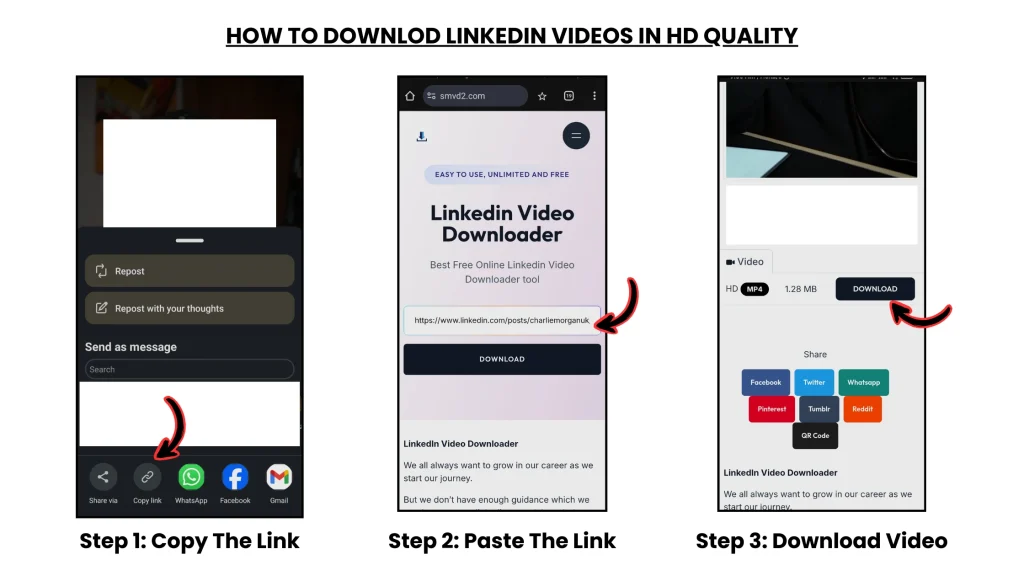
Step 1: Find the LinkedIn Video
Open LinkedIn and locate the public video post.
Videos may appear in:
- your feed
- company pages
- creator profiles
- educational posts
- discussion threads
Step 2: Copy the Video Link
Copy the URL of the LinkedIn post.
On desktop:
- Click the three-dot menu (•••)
- Select “Copy link to post”
On mobile:
- Tap “Share”
- Tap “Copy link”
Step 3: Open SMVD2.com
Visit the website using any modern browser.
No login or permissions are required.
Step 4: Paste the LinkedIn Video URL
Paste the copied link into the input field.
The system automatically detects the associated video source.
Step 5: Click Download
Start the processing and saving process.
Step 6: Save the Video
Choose your preferred resolution (if available) and save the file.
The downloaded video will remain:
- watermark-free
- visually clean
- close to original quality
- in its original format whenever possible
Why SMVD2.com Is Better Than Screen Recording
| Factor | Screen Recording | SMVD2.com |
|---|---|---|
| Video Quality | Often Reduced | Original Source Quality |
| Output Method | Screen Capture | Direct File Retrieval |
| Notifications | May Appear | None |
| Audio Sync | Sometimes Unstable | Stable |
| Frame Consistency | Can Drop Frames | Original Playback Quality |
| Browser Performance Impact | High | Minimal |
| Cropping Risk | Possible | None |
| Extra Editing Needed | Often Required | Usually Not Needed |
The difference ultimately comes down to:
- capturing playback
vs - retrieving the original media source
When Downloading LinkedIn Videos Is Useful
Downloading LinkedIn videos can be valuable in several real-world scenarios.
Professional Learning
Revisit educational insights, tutorials, and business strategies anytime.
Internal Team Training
Many teams save instructional videos for:
- onboarding
- workshops
- process training
- sales education
Research and Competitive Analysis
Professionals often archive:
- industry case studies
- marketing campaigns
- product explainers
- hiring strategies
for deeper analysis later.
Offline Viewing
Downloaded videos remain accessible even without stable internet connectivity.
This is especially useful while traveling or working in low-bandwidth environments.
Important Legal and Ethical Considerations
While downloading LinkedIn videos is technically possible, responsible usage remains essential.
Recommended Practices
- download your own content
- save public videos for personal reference
- request permission before redistribution
- credit original creators whenever appropriate
Avoid
- reposting content as your own
- monetizing videos without permission
- downloading private or restricted content
- violating creator rights or platform policies
It’s also important to understand that some private or login-protected videos may not work properly with downloader tools due to access restrictions or temporary streaming tokens.
Tools like SMVD2.com provide technical access, but usage responsibility always remains with the user.
Frequently Asked Questions
Can I download LinkedIn videos on my phone?
Yes. The process works on most modern mobile browsers without requiring apps or extensions.
Why do some LinkedIn downloaders reduce quality?
Many low-quality tools re-encode videos before delivery, which can reduce bitrate quality and introduce compression artifacts.
Why does screen recording sometimes lag?
Because the browser is capturing live playback rather than retrieving the original source file. Adaptive streaming changes can also create frame pacing issues during recording.
Do I need to create an account?
No. No registration or login is required.
Does SMVD2.com store videos?
No. Videos are processed temporarily and are not intended for permanent storage.
What format will the video be downloaded in?
Most videos are downloaded in MP4 format.
Will the downloaded video contain a watermark?
No. LinkedIn videos generally do not include built-in watermarks, and the tool does not add branding overlays.
Why do some downloads fail?
In some cases:
- private posts
- deleted videos
- region restrictions
- expired streaming sessions
- browser cache conflicts
can affect retrieval.
Final Thoughts
LinkedIn has become one of the most valuable professional video knowledge platforms, offering insights that many users revisit repeatedly for learning, research, and business use.
However, because LinkedIn relies heavily on adaptive streaming architecture and content protection systems, direct downloads are intentionally restricted.
Understanding how LinkedIn delivers videos — and how source-based saving differs from screen recording — makes a major difference in final output quality.
In real-world usage, the biggest quality problems usually come from:
- screen capture limitations
- low-quality reprocessing systems
- downloader-added overlays
- unstable browser recording conditions
Instead of relying on inconsistent recording methods, using a source-based downloader like SMVD2.com helps preserve:
- original quality
- clean watermark-free output
- stable playback
- faster downloading
For professionals looking to save high-value LinkedIn content efficiently without compromising quality, this remains one of the most reliable and practical approaches available today.
Related Articles:
- How to Download LinkedIn Videos Without Losing Quality
- How to Download LinkedIn Videos in MP4 or HD Format
- How to Convert LinkedIn Videos to MP4 (Step-by-Step)
- How to Download LinkedIn Videos by URL or Link
- Top 5 Best No-Watermark LinkedIn Video Downloader Tools
- Best LinkedIn Video Downloaders