
How to Download LinkedIn Videos Without Losing Quality
Today, LinkedIn has evolved into a knowledge-driven professional video ecosystem where founders, marketers, recruiters, educators, consultants, and industry experts regularly share valuable insights through:
- short-form videos
- training clips
- interviews
- educational explainers
- webinars
- strategy breakdowns
Many of these videos carry long-term learning value. Professionals often revisit them later for:
- offline learning
- internal team training
- marketing research
- competitor analysis
- presentation references
- knowledge archiving
However, LinkedIn still does not provide a direct download option for most native videos.
Because of this, many users rely on quick workarounds like screen recording — which often leads to:
- blurry visuals
- reduced resolution
- frame drops
- bitrate loss
- inconsistent audio quality
- compression artifacts
In many real-world cases, recorded LinkedIn videos may initially look “acceptable,” but quality degradation becomes obvious when:
- viewed on larger screens
- replayed multiple times
- used in presentations
- paused during educational review
To avoid these issues, it is important to understand how LinkedIn actually delivers video content and what causes quality loss during recording.
This guide explains:
- how LinkedIn video streaming works
- why screen recording reduces quality
- the best way to download LinkedIn videos without losing clarity
- a practical step-by-step workflow
- real quality differences between recording and direct downloads
- common mistakes and professional tips
Understanding How LinkedIn Video Quality Works
LinkedIn uses adaptive bitrate streaming (ABS) — the same core streaming technology used by platforms like YouTube and Netflix.
This system dynamically adjusts video quality based on factors such as:
- internet speed
- device capability
- browser performance
- playback stability
- network conditions
What this means in practice:
- higher resolutions like 720p or 1080p are only delivered when bandwidth allows
- playback quality can change dynamically during viewing
- the video displayed on screen is usually a compressed streaming layer, not the original uploaded file
For example, if your connection briefly weakens, LinkedIn may automatically switch playback from 1080p to 480p without many users even noticing immediately.
Important Insight:
LinkedIn stores videos in higher-quality source formats, but delivers them through multiple compressed bitrate layers optimized for streaming efficiency.
This is one of the main reasons recording playback rarely preserves full quality accurately.
Why Screen Recording Reduces Video Quality (Deep Explanation)
Screen recording captures what is displayed on the screen, not the original source video file.
That difference is extremely important.
Instead of preserving the original uploaded stream, screen recording creates a second-generation video capture — which introduces multiple layers of quality degradation.
1. Resolution Loss
If your screen recorder or display runs at 720p, even a 1080p LinkedIn video may be captured at lower effective quality.
In practical testing, this becomes especially noticeable when:
- zooming into slides
- reading small text
- viewing charts
- watching presentations on larger monitors
2. Bitrate Reduction (Most Important Factor)
Many users think resolution alone determines quality.
In reality, bitrate is equally important.
Example:
- Original upload → 1080p with high bitrate
- Screen recording → 1080p with lower bitrate
Result:
- softer visuals
- reduced sharpness
- blurry motion
- compression artifacts
This is why recorded videos often “look worse” even when the resolution number appears identical.
3. Frame Rate Instability
Screen recording software may reduce FPS (frames per second), especially when:
- CPU usage becomes high
- multiple applications are open
- browser acceleration changes
- laptop power-saving modes activate
This can create:
- choppy motion
- lag
- inconsistent smoothness
In real-world use, these issues become more noticeable on lower-powered laptops or during multitasking.
4. Compression Artifacts
Most screen recorders compress video in real time while recording.
This often introduces:
- pixelation
- blocky motion
- blurry edges
- visual noise
Fast-moving scenes or animated transitions are usually affected the most.
5. Audio Re-Encoding
Audio is also processed again during recording.
This may lead to:
- reduced clarity
- minor synchronization delay
- inconsistent volume
- compressed sound quality
The degradation may appear subtle initially, but becomes more noticeable when using headphones or external speakers.
6. Playback Dependency Problem
This is one of the most overlooked issues.
If LinkedIn temporarily switches playback quality because of unstable internet conditions, your screen recording permanently captures that lower-quality stream.
Example:
- Video begins at 1080p
- Internet fluctuates
- LinkedIn automatically switches to 480p
- Screen recorder captures the lower-quality playback permanently
Many users assume the recorder caused the issue, when the real problem was adaptive streaming quality switching during playback.
Real Quality Comparison: Recording vs Direct Download
| Factor | Screen Recording | Direct Video Download |
|---|---|---|
| Resolution | Often reduced | Matches original source |
| Bitrate | Significantly lower | Preserved |
| Visual Clarity | Slight blur or pixelation | Sharper output |
| Frame Rate | May fluctuate | Stable |
| Audio Quality | Re-encoded | Original audio preserved |
| Compression | High | Minimal |
| Playback Dependency | Yes | No |
| Professional Usability | Lower | Much higher |
Conclusion
Screen recording creates a second-generation compressed file, while direct download methods preserve quality much closer to the original uploaded stream.
That difference becomes increasingly important for:
- educational review
- presentations
- training material
- content archiving
- professional playback environments
What a High-Quality LinkedIn Video Download Method Should Do
To preserve maximum quality, a download method should:
- access the original video stream rather than screen playback
- retain the highest available bitrate
- preserve maximum available resolution
- maintain stable audio-video synchronization
- avoid unnecessary re-encoding
- export in a widely compatible format like MP4
This is why browser-based direct download workflows usually outperform screen recording.
They eliminate several quality-loss layers that recording introduces automatically.
How to Download LinkedIn Videos Without Losing Quality
Follow this practical workflow:
Step 1: Find the LinkedIn Video
Locate the LinkedIn post containing the video you want to save.
Step 2: Copy the Post URL
Use LinkedIn’s share option and copy the full post link.
Make sure the link points to the actual post, not a shortened or partial URL.
Step 3: Use a Direct Video Downloader
Open a browser-based tool that processes the original LinkedIn video stream rather than recording playback.
Step 4: Paste the URL
Insert the copied LinkedIn post URL into the downloader input field.
Step 5: Download the Video
Download the processed file in the highest available quality.
Because this workflow accesses the underlying stream directly, output quality remains significantly closer to the original upload compared to screen recording.
Example Method Using SMVD2.com
One practical way to apply this workflow is by using SMVD2.com, a browser-based LinkedIn video downloader.
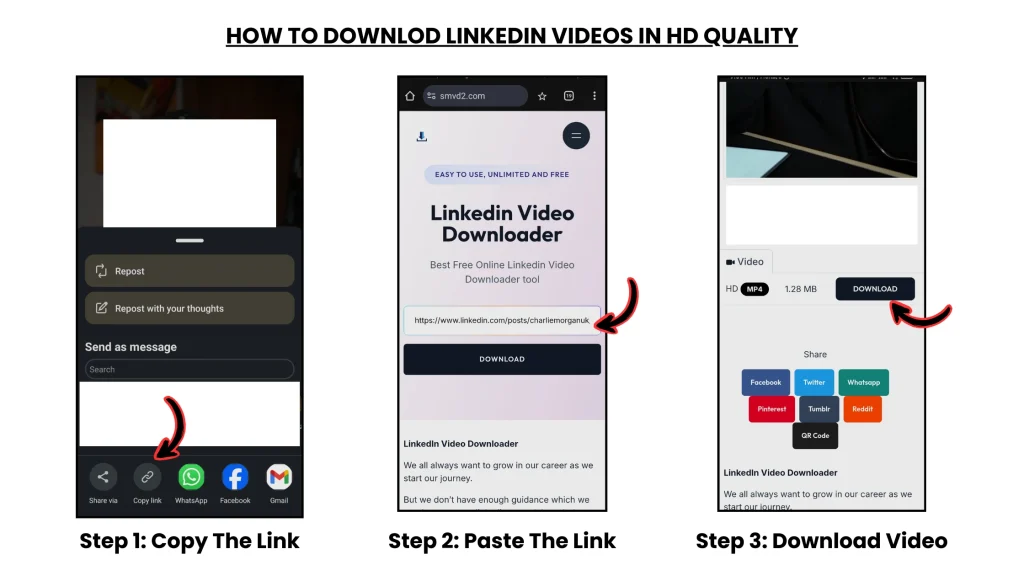
How to Use It
- Open LinkedIn and locate the video
- Copy the post link
- Visit SMVD2.com
- Paste the link into the input field
- Download the video
The downloaded file is typically provided in MP4 format, which helps ensure:
- broad compatibility
- stable playback
- preserved clarity
- consistent audio synchronization
Because the tool processes the original stream instead of recording playback, the output quality remains much closer to the original uploaded file.
Supported Devices and Accessibility
Modern browser-based download workflows work smoothly across:
- desktop computers
- laptops
- Android smartphones
- iPhones and iPads
- tablets
No software installation or browser extensions are usually required.
This simplicity is one reason browser-based workflows are preferred by many professionals.
In practical usage, browser-based methods are also easier to repeat consistently across multiple devices compared to extension-heavy workflows.
Video Format and Quality Considerations
File Format
MP4 remains the preferred format because it offers:
- strong compatibility
- efficient compression
- reliable playback
- broad device support
Resolution vs Bitrate (Critical Insight)
Many users focus only on resolution.
However, bitrate often has an equally large impact on perceived quality.
Example:
- 1080p at low bitrate → softer image quality
- 720p at high bitrate → sharper and cleaner visuals
This is why preserving the original bitrate matters significantly.
Audio Quality
Direct-download workflows preserve:
- original audio streams
- cleaner synchronization
- better playback consistency
without introducing additional recording compression.
Watermarks
Most reliable download tools provide clean files without additional watermarks or branding overlays.
Common Mistakes That Reduce Video Quality
Avoid these mistakes if you want the best possible output:
- recording videos instead of direct downloading
- downloading while playback quality has already dropped
- using unstable internet during playback-based recording
- relying on low-quality or outdated tools
- ignoring bitrate differences
- multitasking heavily during recording workflows
In practical use, many “low-quality download” complaints are actually caused by playback-quality switching during unstable internet sessions.
Best Practices for Maximum Quality
To preserve the best output possible:
- use direct download workflows whenever possible
- ensure the video is publicly accessible
- choose the highest available quality
- maintain stable internet connectivity
- avoid excessive background processing during downloads
- verify video clarity before archiving permanently
These small steps can noticeably improve final output quality.
Legal and Ethical Use of Downloaded LinkedIn Videos
Downloading LinkedIn videos should always be done responsibly.
Acceptable Use
- personal learning
- offline reference
- educational review
- internal training
- content you uploaded yourself
- content shared with permission
Avoid
- reposting without consent
- unauthorized redistribution
- monetizing others’ content
- violating creator rights
- breaking platform policies
Respecting creators helps maintain ethical and sustainable professional content usage.
Frequently Asked Questions
Can you download LinkedIn videos directly?
LinkedIn does not currently provide a native download option for most videos, which is why external workflows are commonly used.
Why do recorded LinkedIn videos look blurry?
Because screen recording captures compressed playback rather than the original uploaded source file.
Which format is best?
MP4 is generally the best option because it balances:
- compatibility
- compression efficiency
- playback stability
- quality preservation
Do download tools reduce quality?
If the workflow accesses the original stream correctly, quality remains much closer to the original uploaded video.
How do you preserve the highest possible quality?
Use direct-stream download methods that preserve original bitrate and resolution rather than recording playback.
The Future of Video Access on Professional Platforms
As LinkedIn continues evolving into a video-first professional platform, demand for offline access and high-quality preservation will continue increasing.
Future improvements across professional video platforms may include:
- higher-resolution streaming
- improved compression efficiency
- faster processing workflows
- better cross-device synchronization
- smarter adaptive streaming systems
Understanding how modern video delivery works helps users preserve content more effectively without unnecessary quality loss.
Final Thoughts
LinkedIn videos have become valuable sources of:
- professional learning
- industry insight
- marketing education
- business strategy
- career development
However, preserving video quality depends heavily on choosing the right workflow.
By understanding:
- adaptive streaming
- bitrate behavior
- playback compression
- recording limitations
you can avoid many of the quality problems most users encounter.
Instead of relying on screen recording, direct-stream workflows preserve:
- sharper visuals
- smoother playback
- cleaner audio
- more stable quality
Browser-based tools like SMVD2.com simply apply this principle by helping users save LinkedIn videos while maintaining quality much closer to the original uploaded stream.
Related Articles:
- Why Are LinkedIn Videos Downloading in Low Quality?
- How to Download LinkedIn Videos Without Watermark
- How to Download LinkedIn Videos in MP4 or HD Format
- How to Convert LinkedIn Videos to MP4 (Step-by-Step)
- Why Downloaded LinkedIn Videos Lose Quality