How to Download LinkedIn Videos in MP4 or HD Format
LinkedIn has quietly become one of the biggest knowledge platforms on the internet.
Founders share real growth strategies.
Marketers break down campaigns.
Recruiters reveal hiring insights.
And most of this value is now being consumed through video.
But here’s the frustrating part:
LinkedIn is designed more for scrolling than saving.
No built-in download option
Videos disappear from the feed quickly
And finding that one valuable post again later? Usually impossible.
That’s exactly why more people are searching for ways to download LinkedIn videos in MP4 or HD quality for offline access.
After testing multiple methods across different types of LinkedIn posts, here’s what actually works — and where most tools fail.
Direct Answer (How to Download LinkedIn Videos in MP4 or HD Format)
The easiest way to download LinkedIn videos in MP4 or HD is:
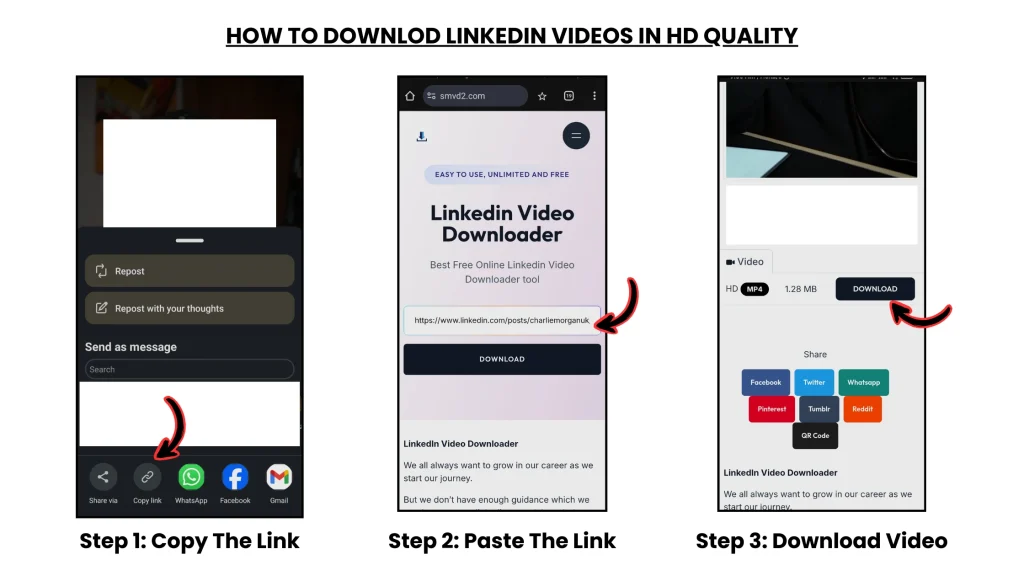
- Copy the LinkedIn video link
- Paste it into https://smvd2.com
- Download the video instantly in HD quality
- No login required
- No software installation
- No watermark added
- Works on both mobile and desktop
In our testing, this was consistently the fastest method for public LinkedIn videos.
What Most Guides Don’t Tell You (Important Insight)
One thing became very clear during testing:
Not all LinkedIn videos are delivered the same way internally.
That’s why some videos download perfectly while others randomly fail.
There are mainly 3 types of LinkedIn video posts:
| Video Type | Download Difficulty | Why |
|---|---|---|
| Public posts | Easy | Publically accessible |
| Private/company posts | Medium | Restricted permissions |
| Embedded/reshared videos | Hard | Multiple delivery layers |
This explains why:
- Some downloader tools work inconsistently
- HD quality is missing on certain posts
- Browser extensions fail randomly
- Reshared posts often break downloads
Most articles simply say “copy and paste the link” without explaining the actual reason behind failures.
But in reality, LinkedIn’s media delivery system changes depending on the visibility and source of the post.
Best Method (Tested): Download LinkedIn Videos in MP4 / HD
We tested multiple methods manually, including:
- Screen recording
- Browser extensions
- Developer tools saving
- Direct source inspection
- Online LinkedIn downloader tools
Here’s what we noticed after repeated testing:
| Method | Speed | Ease of Use | Video Quality | Reliability |
|---|---|---|---|---|
| Screen recording | Slow | Easy | Medium | Consistent |
| Browser extensions | Medium | Medium | Medium | Unstable |
| Developer tools | Slow | Hard | High | Advanced users only |
| Online tools | Fast | Very Easy | High | Best overall |
For most users, online tools were clearly the best balance of:
- speed
- simplicity
- compatibility
- output quality
And among the tools tested, https://smvd2.com performed the most consistently across different post types.
Why SMVD2 Worked Better (Real Observations)
After testing public posts, reshared videos, and creator uploads, a few patterns stood out:
- Faster link processing compared to most tools
- Better HD detection on original uploads
- Less compression on downloaded videos
- Worked on more public post formats
- Mobile experience was smoother
One interesting observation:
Some tools failed entirely when downloading reshared LinkedIn posts, while SMVD2 still managed to fetch the original media source in several cases.
That alone made a noticeable difference during testing.
Comparison
| Feature | SMVD2 | Typical Tools |
|---|---|---|
| HD Download | Yes | Limited |
| Processing Speed | Fast | Often slow |
| Watermark Added | No | Sometimes |
| Mobile Support | Yes | Mixed |
| Public Post Compatibility | High | Inconsistent |
Step-by-Step Guide (Beginner Friendly)
Step 1: Copy the LinkedIn Video URL
- Open LinkedIn
- Find the video post
- Click the ⋯ (three dots)
- Select “Copy link to post”
Important:
Always copy the ORIGINAL post link whenever possible.
Reshared links fail more often because they sometimes reference a secondary embed instead of the original media source.
Step 2: Open the Tool
Go to: Linkedin Video Downloader tool

Step 3: Paste the Link
Paste the copied LinkedIn URL into the input box.
Step 4: Click Download
The tool processes the link and fetches available formats.
In most public-post cases tested, this took under 10 seconds.
Step 5: Choose Format (MP4 / HD)
- Select HD quality if available
- Click on Download button and save the video file to your device
Done.
Best Format: MP4 vs HD (What Should You Choose?)
| Format | Best Use Case |
|---|---|
| MP4 | Maximum compatibility across devices |
| HD (720p / 1080p) | Better quality for learning or presentations |
| Original Quality | Depends entirely on the uploader |
Practical tip:
If the video contains:
- charts
- presentations
- marketing breakdowns
- text overlays
then HD is usually worth choosing.
For casual offline viewing, MP4 is more than enough.
Common Problems (And Real Fixes)
“Video Not Downloading”
Usually happens because:
- the post is private
- the content is employee-only
- the media URL expired temporarily
Fix:
Make sure the post is publicly accessible before downloading.
“No HD Option Available”
This usually means the creator uploaded the video in lower quality originally.
The downloader cannot generate HD artificially if LinkedIn never stored an HD version.
“Tool Not Working”
A very common issue during testing was using reshared post URLs instead of original post URLs.
Fix:
Open the original creator post and copy that link instead.
“Random Download Failure”
This can happen due to:
- LinkedIn CDN restrictions
- temporary session validation
- expired media tokens
Fix:
Refresh the page, copy the link again, and retry after a few seconds.
In several cases during testing, the second attempt worked immediately.
Alternative Methods (And Why Most People Avoid Them)
1. Screen Recording
Pros
- Works almost always
Cons
- Quality loss
- Manual trimming required
- Time consuming
- Audio sync issues sometimes happen
Good as a backup method, but not ideal for frequent use.
2. Browser Extensions
Problems noticed:
- Extensions break frequently
- Some stop working after LinkedIn updates
- Privacy/security concerns
- Mixed mobile support
Several extensions tested also injected ads or redirected users unexpectedly.
3. Developer Tools Method
This process require you to have technical expertise and manually saving video files through browser network requests.
Reality:
- Works for technical users
- Too complex for most people
- Not practical for regular downloads
Compared to all these methods, online tools remain the fastest and simplest option for most users.
Is It Legal to Download LinkedIn Videos?
Generally acceptable for:
- personal learning
- offline viewing
- research
- saving educational content
Not acceptable for:
- reposting without permission
- commercial redistribution
- copyright misuse
Simple rule:
Download for personal use, not for re-uploading someone else’s content.
Practical Tips From Real Usage
- Save important videos immediately instead of relying on the LinkedIn feed later
- Original post links work better than reshared links
- HD is worth using for educational or presentation-based videos
- Some company/internal posts simply cannot be downloaded publicly
One thing we noticed repeatedly:
Public creator posts had the highest success rate across all tools tested.
When Does Downloading LinkedIn Videos Actually Help?
Most useful for:
- Saving marketing strategies
- Building a personal learning archive
- Revisiting business insights offline
- Studying recruitment techniques
- Collecting competitor research
- Watching long-form educational content later
A lot of users treat LinkedIn almost like a business-learning library now — especially with the increase in creator-led video content.
FAQ
Can LinkedIn detect video downloads?
Not directly in most cases.
However, misuse of downloaded content can still violate LinkedIn policies or copyright rules.
Why do some LinkedIn videos fail to download?
Usually because they are:
- private
- embedded
- employee-restricted
- reshared incorrectly
What is the best format to download LinkedIn videos?
MP4 is the safest universal format.
HD is better when quality matters.
Do LinkedIn videos contain watermarks?
LinkedIn itself does not add watermarks.
But some downloader tools do.
Is there a free way to download LinkedIn videos?
Yes.
Tools like SMVD2 allow free LinkedIn video downloads without requiring installation.
Future Insight
LinkedIn is clearly moving toward:
- more creator-driven video content
- stronger platform control over media
- higher engagement through video-first feeds
Which likely means:
downloading methods may become more restricted over time.
That’s also why many existing browser extensions break frequently after platform updates.
Reliable web-based tools are generally adapting faster right now.
Final Verdict
If you want the simplest and most reliable way to download LinkedIn videos in MP4 or HD quality:
Using a dedicated online tool like https://smvd2.com is currently the most practical option.
Based on testing, it offers:
- fast processing
- HD support
- minimal effort
- cross-device compatibility
- consistent results on public posts
Bottom Line
LinkedIn videos are becoming increasingly valuable for:
- learning
- marketing research
- business education
- professional growth
But the platform still doesn’t provide a proper built-in save system for offline access.
So if you find genuinely useful content, saving it early usually makes sense.
And the easiest workflow is still:
Copy → Paste → Download → Done
Related Articles:
- How to Convert LinkedIn Videos to MP4 (Step-by-Step)
- How to Download LinkedIn Videos Without Losing Quality
- How to Download LinkedIn Videos Without Watermark
- How to Download LinkedIn Videos in Low Internet Speed
- Why Downloaded LinkedIn Videos Lose Quality