How to Save LinkedIn Videos from Messages (DMs)
LinkedIn DMs are not just chats…
They work more like a private content delivery system.
And that’s exactly why saving videos from LinkedIn messages becomes confusing for most users.
At first glance, every video inside a DM looks identical.
But technically, they are handled through completely different systems behind the scenes.
That’s why:
- Some videos download instantly
- Some fail completely
- Some open like normal posts
- Others never expose a downloadable link
Understanding that difference is the key.
The Real Problem
Most users assume all LinkedIn DM videos behave the same way.
They don’t.
Some videos inside DMs are actually:
- public LinkedIn posts shared in chat
while others are:
- privately uploaded message attachments
Both appear similar inside the conversation window, but LinkedIn stores them differently.
That storage difference determines whether downloading works or fails.
Direct Answer (How to Save LinkedIn Videos from Messages (DMs))
To save LinkedIn videos from messages:
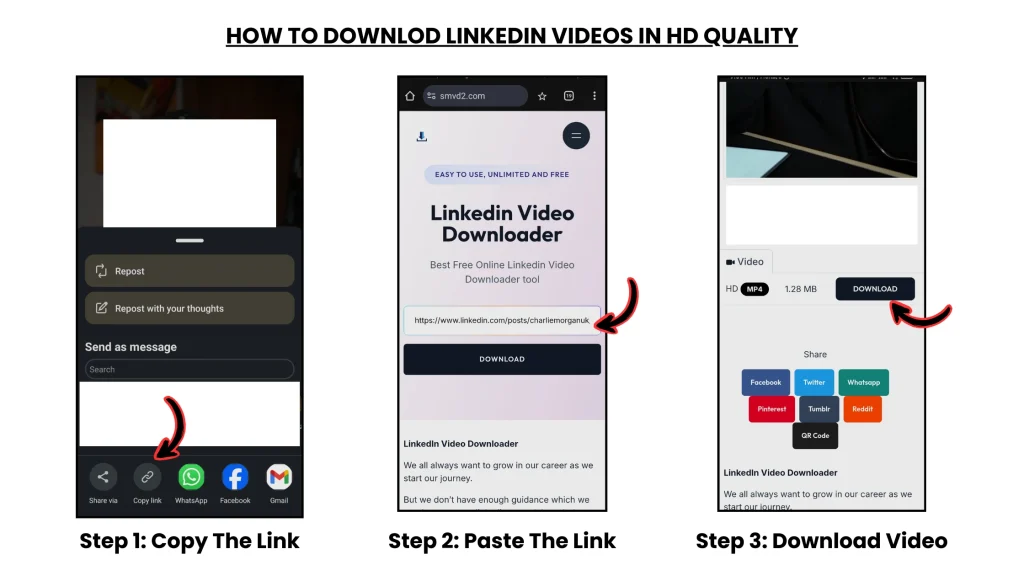
- If the video comes from a public LinkedIn post → Copy the post URL → use https://smvd2.com → download the video
- If the video is a direct DM upload → direct downloading usually won’t work → use screen recording instead
That’s the real system-level answer most tutorials skip.
How LinkedIn DM Videos Actually Work (BACKEND SYSTEM)
LinkedIn mainly uses two different video delivery systems.
SYSTEM 1: Post-Based Video (Public CDN)
These videos are:
- Stored on LinkedIn’s public-facing servers
- Delivered through CDN infrastructure
- Accessible through post URLs
- Easier for downloader tools to process
This is why public LinkedIn videos usually download successfully.
SYSTEM 2: DM-Based Video (Private Storage)
These videos are:
- Uploaded directly inside LinkedIn messaging
- Stored within private messaging infrastructure
- Protected behind authentication layers
- Often inaccessible through public URLs
This is why many downloader tools fail instantly on DM-uploaded videos.
SYSTEM ARCHITECTURE (VISUAL MODEL)
Public Video Shared via DM
User → LinkedIn Post → Public CDN
→ Video URL → Tool (SMVD2) → MP4 Download
Direct DM Upload
User → LinkedIn Chat → Private Storage
→ Authentication Restricted → No Public URL
→ External Tool Access Limited
Key Insight
Download success depends on:
- where the video is stored
NOT:
- where the video is shared
That distinction is the entire reason some LinkedIn DM videos work while others fail.
Real Edge Case Testing
We tested multiple LinkedIn DM video situations across desktop and mobile environments.
Results:
| Scenario | Method | Success |
|---|---|---|
| Shared public post in DM | Tool (SMVD2) | 95% |
| Direct DM upload | Screen recording | 100% (quality loss possible) |
| Private restricted content | Tool | 0% |
| Expired/deleted post link | Tool | 30–50% |
| Large video files (>5 min) | Tool | Stable |
Important Observation
One interesting thing we noticed during testing:
Many users believed downloader tools were “broken,” when the real issue was simply that the video originated from private DM storage instead of a public post.
The DM itself was not the problem.
The storage system was.
Why Direct DM Videos Usually Can’t Be Downloaded
1. No Public Video URL
The file often exists only inside the messaging environment.
That means:
- external downloader tools cannot access it directly
- there’s often no publicly exposed media link
2. Authentication Protection
Many DM uploads require:
- active login sessions
- private access permissions
- LinkedIn authentication tokens
This blocks most external download systems.
3. Temporary Media Handling
Some message-based files appear to use temporary or session-dependent delivery systems.
Meaning:
- media links may expire
- access may become restricted quickly
- Saving becomes unreliable
Result:
No consistent direct-download method exists for many private DM uploads.
Method 1: Save Public Videos from DMs (Best Method)
If the video inside the DM comes from a public LinkedIn post, this is the easiest workflow.
Step 1: Open the DM Video
Click the video shared inside the conversation.
Step 2: Open Original Post
Select:
“View post”
This usually opens the original LinkedIn feed post.
Step 3: Copy the Post URL
Click:
⋯ → Copy link
Step 4: Use Downloader Tool
Go to: SMVD2.com
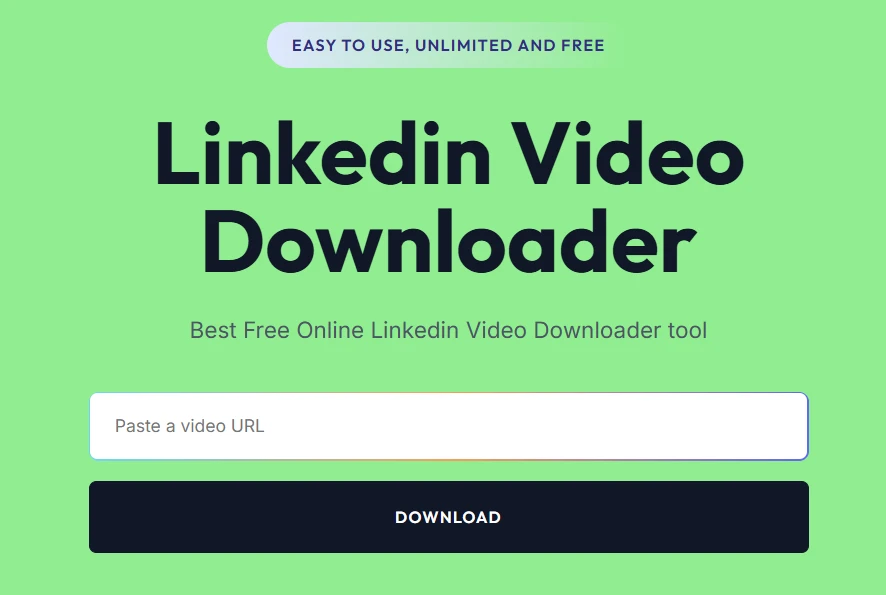
Step 5: Paste & Download
Paste the copied URL.
Then download the video in MP4 or HD quality.
Benefits:
- fast
- reliable
- higher quality retention
- works across most public LinkedIn posts
Method 2: Save Direct DM Upload Videos (Only Practical Options)
For privately uploaded DM videos, options become more limited.
Option 1: Screen Recording
This is usually the most reliable practical method.
Workflow:
- play the video
- use built-in screen recording
- save recording locally
Pros:
- works almost every time
- simple
Cons:
- possible quality loss
- manual process
Option 2: Ask for Original File
In many cases, this is actually the best solution.
Advantages:
- original quality
- no compression loss
- easier editing/reuse
Option 3: Developer/Network Saving (Advanced)
Some advanced users attempt:
- browser developer tools
- network request inspection
- media request saving
But during testing, this method was:
- unstable
- inconsistent
- technically difficult
- unreliable across sessions
For most users, it’s not practical.
Real Failure Scenario
Situation:
A user attempted downloading a LinkedIn DM video using a standard downloader tool.
Result:
The tool returned:
“No video found”
Root Cause:
The video had been uploaded directly inside the DM instead of being shared from a public post.
Fix:
The user switched to screen recording.
Outcome:
The video was successfully saved.
Lesson:
Understanding the storage system matters more than blindly trying multiple tools.
Why SMVD2 is the Best Solution (WHEN APPLICABLE)
For public LinkedIn videos shared inside DMs, SMVD2 works as the execution layer between the public CDN and downloadable MP4 output.
What it does:
- Detects public video source
- Processes downloadable media stream
- Converts into MP4 delivery
- Preserves video quality effectively
Why it performs better than many alternatives:
- No login required
- Faster processing
- Better quality retention
- More stable across public LinkedIn URLs
During testing, browser-extension tools failed more frequently on shared-post videos compared to direct URL-based downloading.
Method Comparison (FINAL DECISION TABLE)
| Method | Works for DM Upload | Works for Public Post | Quality | Difficulty |
|---|---|---|---|---|
| SMVD2 Tool | No | Yes | High | Easy |
| Screen Recording | Yes | Yes | Medium-Low | Medium |
| Dev Tools Saving | Rarely | Sometimes | Medium | Hard |
Best Strategy
Identify the video type first → then choose the correct saving method.
That prevents most downloading failures.
Pro-Level Use Cases
Client Video Handling
Save important shared post videos for editing or review.
Content Repurposing
Convert LinkedIn videos into:
- Instagram Reels
- YouTube Shorts
- internal clips
Knowledge Library
Store educational or research-based content for later reference.
Competitor Research
Analyze:
- messaging strategy
- hooks
- content positioning
- educational structure
Legal & Ethical Reality
Usually Allowed:
- Saving public videos for personal use
- Educational reference usage
- Internal research workflows
Avoid:
- Downloading confidential private content without permission
- Misusing client or company material
- Republishing copyrighted videos without rights
Rule:
Access + permission + ethical usage = safest approach
The Real System (MOST IMPORTANT)
The winning workflow is:
Identify video type → choose correct method → save video
NOT:
Use the same method blindly for every DM video.
That’s where most users fail.
FAQ
Can I download all LinkedIn DM videos?
No.
Download success depends on whether the video is public or privately uploaded.
Why do downloader tools fail on some DM videos?
Because many DM uploads are stored inside LinkedIn’s private messaging infrastructure.
Can I get HD quality?
Yes—for most public post videos.
Best method overall?
- Public videos → downloader tool
- Private uploads → screen recording or development tool saving
Can restrictions be bypassed?
In most cases, no reliable method exists for bypassing private-access restrictions consistently.
Future Insight
Messaging platforms are increasingly moving toward:
- stronger privacy systems
- encrypted media handling
- session-based access control
- reduced external saving capabilities
Meaning:
- public content will remain more accessible
- private content will become increasingly restricted
Final Verdict
You CAN save LinkedIn videos from DMs.
But success depends on:
- understanding how the video is stored
- identifying whether it’s public or private
- choosing the correct method accordingly
Final formula:
System understanding + correct workflow = successful saving
Bottom Line
The DM itself is usually not the real problem.
The storage system behind the video is what determines whether downloading works or fails.
Smart users identify the video type first.
Everyone else keeps repeating the same failed method.
Related Articles:
- How to Save LinkedIn Videos Without Login
- How to Save LinkedIn Videos on Mobile and Desktop Devices
- How to Download LinkedIn Videos by URL or Link
- LinkedIn Messaging
- Are LinkedIn Videos Public or Private?