Are LinkedIn Videos Public or Private?
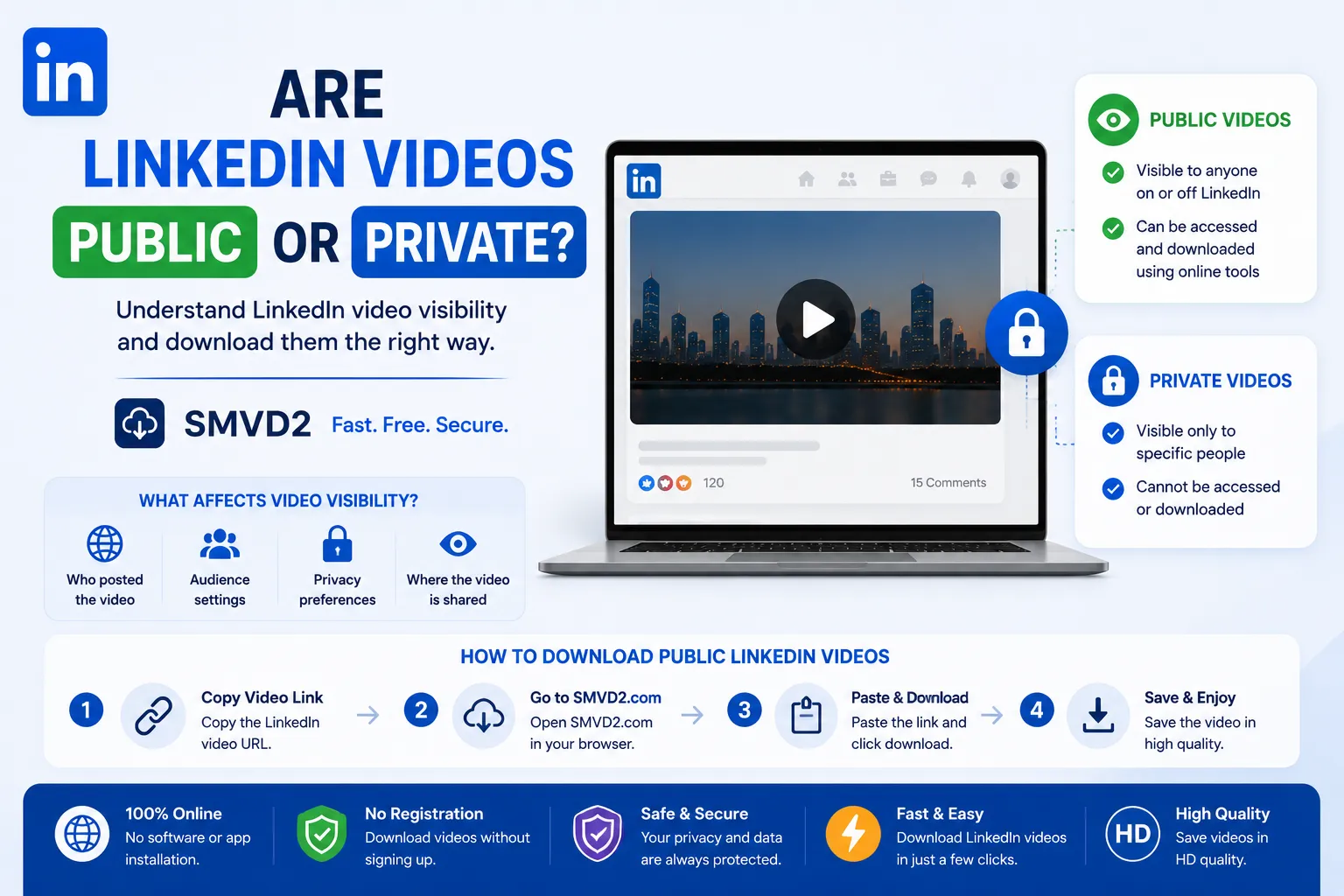
Yes, LinkedIn videos can be either public or private depending on the audience settings chosen by the person or company that published the content. Some LinkedIn videos are visible to anyone on the internet, while others can only be viewed by specific connections, group members, employees, or event participants.
As LinkedIn continues to grow as a platform for professional content, educational videos, webinars, recruiting campaigns, and thought leadership, many users wonder whether the videos they see are publicly accessible or protected by privacy restrictions.
The answer isn’t always obvious.
During our review of LinkedIn posts and company pages, we noticed that video visibility varies significantly depending on how the content was published. Some videos can even appear in search engine results, while others remain inaccessible unless you’re logged into the correct LinkedIn account with the necessary permissions.
Understanding how LinkedIn video privacy works is important for:
- Professionals sharing content
- Recruiters posting hiring campaigns
- Businesses publishing company updates
- Students consuming educational content
- Marketers researching industry trends
In this guide, we’ll explain how LinkedIn video visibility works, what makes a video public or private, how to identify accessibility restrictions, and how you can save publicly available LinkedIn videos using Social Media Video Downloader (SMVD).
Understanding LinkedIn Video Privacy
Unlike entertainment-focused platforms where most content is designed for mass distribution, LinkedIn gives users greater control over who can access their posts and videos.
When a video is uploaded to LinkedIn, it inherits the visibility settings of the post in which it appears. This means that two videos uploaded by different users may have completely different accessibility levels even if they look similar on the surface.
One misconception we frequently encounter is that every LinkedIn video is public simply because a shareable URL exists. In reality, the URL alone doesn’t determine accessibility. The creator’s audience settings play the biggest role in deciding who can view the content.
In practical usage, LinkedIn videos generally fall into two categories:
- Public LinkedIn videos
- Private or restricted LinkedIn videos
Understanding the difference between these categories helps users avoid confusion when sharing, viewing, or downloading content.
What Is a Public LinkedIn Video?
A public LinkedIn video is a video that can be viewed by a broader audience beyond the creator’s direct network.
In many cases, these videos are intentionally published to maximize visibility and engagement.
Depending on the creator’s settings, public videos may be accessible to:
- LinkedIn members
- Followers
- Connections
- Search engine users
- Visitors who are not connected to the creator
- Potential customers and prospects
Businesses, recruiters, educators, and industry experts often publish public videos because their goal is to reach as many relevant viewers as possible.
Common examples include:
- Career advice videos
- Industry insights
- Product demonstrations
- Company announcements
- Professional tutorials
- Leadership content
- Recruiting campaigns
What We Observed During Testing
While reviewing publicly accessible LinkedIn posts, we found that many videos published with broad audience settings could be shared freely and, in some cases, appeared in search engine results. These videos were generally intended for maximum visibility rather than restricted distribution.
However, not every publicly visible post behaves identically. Some content may still have limitations depending on regional settings, company page permissions, or LinkedIn’s indexing behavior.
This is one reason many users mistakenly assume all LinkedIn videos are either fully public or fully private when the reality falls somewhere in between.
What Is a Private LinkedIn Video?
A private LinkedIn video is content that has restricted visibility and can only be viewed by a specific audience chosen by the creator.
These restrictions are designed to protect confidential information, internal communications, and exclusive content.
Private videos may only be available to:
- First-degree connections
- Members of a LinkedIn group
- Employees within an organization
- Event attendees
- Course participants
- Closed professional communities
- Specific audiences selected by the publisher
Organizations frequently use private videos for:
- Employee onboarding
- Internal training
- Corporate communications
- Team updates
- Exclusive webinars
- Private networking events
- Confidential business discussions
One important limitation many articles fail to mention is that even if someone shares a link to a private LinkedIn video, access restrictions typically remain in place. Possessing the URL alone doesn’t automatically grant viewing permission.
This privacy layer is one of the reasons LinkedIn remains a trusted platform for professional communication.
Public vs Private LinkedIn Videos: Quick Comparison
| Feature | Public Videos | Private Videos |
|---|---|---|
| Visible Beyond Connections | Yes | Usually No |
| Can Appear in Search Engines | Sometimes | No |
| Shareable Across Platforms | Often | Limited |
| Audience Reach | Broad | Restricted |
| Common Use Case | Marketing & Education | Internal Communication |
| Offline Saving Possibility | Publicly Available Content Only | Permission Required |
| Privacy Level | Lower | Higher |
What Most Users Don’t Realize
Many people assume that public videos are always downloadable and private videos are never accessible.
The reality is more nuanced.
A video’s accessibility depends not only on privacy settings but also on factors such as:
- Company page restrictions
- Event permissions
- Group access controls
- Regional visibility settings
- Creator audience configuration
Understanding these differences helps users determine whether a LinkedIn video is intended for broad distribution or limited viewing.
How LinkedIn Determines Video Visibility
Many users assume that LinkedIn decides whether a video is public or private based solely on the video itself. In reality, LinkedIn determines visibility primarily through the audience settings attached to the post that contains the video.
This means the exact same video could be public when shared in one post and restricted when shared in another.
From a practical standpoint, understanding these visibility factors helps explain why some LinkedIn videos are easily accessible while others require specific permissions.
Profile Visibility
The visibility of a creator’s profile can influence how widely their content is distributed.
For example, professionals who actively build a public presence on LinkedIn often configure their profiles to maximize discoverability. Their videos are more likely to reach users beyond their immediate network.
On the other hand, users who prioritize privacy may restrict profile visibility, which can reduce the audience for their content.
While profile settings alone do not determine video privacy, they contribute to the overall accessibility of published posts.
Post Audience Selection
This is the single most important factor affecting LinkedIn video visibility.
When publishing a post, LinkedIn allows users to choose who can see the content.
Common audience options include:
- Anyone
- Connections only
- Followers
- Group members
- Event attendees
- Employees of an organization
- Custom audiences
In our experience reviewing LinkedIn content across personal profiles and company pages, audience selection almost always determines whether a video becomes publicly accessible or remains restricted.
If a creator chooses a broad audience, the video has a greater chance of being discovered by people outside their network.
If they choose a limited audience, visibility remains restricted regardless of how many times the link is shared.
Company Page Settings
Businesses often use LinkedIn videos to increase brand awareness, generate leads, recruit talent, and educate their audience.
As a result, many company-page videos are intentionally made public.
Common examples include:
- Product launches
- Industry reports
- Company culture videos
- Recruitment campaigns
- Customer success stories
- Educational webinars
However, not all company content is public.
Some organizations use LinkedIn to distribute employee-only updates, internal announcements, or restricted event content.
This creates a common misconception that every company video is publicly accessible.
LinkedIn Events
LinkedIn Events introduce another layer of visibility control.
Videos shared within events may only be available to:
- Registered attendees
- Invited participants
- Event organizers
- Approved members
This restriction is particularly common for:
- Professional conferences
- Industry webinars
- Virtual networking events
- Exclusive training sessions
One thing many users discover only after clicking a shared event link is that access often depends on event registration status rather than the link itself.
Group-Based Content
LinkedIn Groups provide additional privacy controls.
Videos posted inside private groups may only be visible to approved members.
These videos are commonly used for:
- Professional communities
- Industry discussions
- Alumni networks
- Membership organizations
- Exclusive learning groups
Even if a group member shares the URL externally, non-members usually cannot access the content.
What Most People Overlook
A common mistake is focusing only on the video itself rather than the context in which it was published.
In reality, LinkedIn evaluates visibility through a combination of:
- Audience settings
- Group permissions
- Event access
- Profile visibility
- Company page configurations
This layered approach is what makes LinkedIn’s privacy system more flexible than many other social platforms.
Can People Outside LinkedIn Watch Public Videos?
In many cases, yes.
Public LinkedIn videos can sometimes be viewed by people who are not directly connected to the creator.
Depending on the creator’s settings, public content may be accessible to:
- LinkedIn members
- Non-connections
- Search engine users
- Prospective employers
- Potential clients
- General internet users
However, accessibility isn’t always guaranteed.
When Public Videos Can Be Viewed Outside LinkedIn
Public videos are most likely to be accessible outside LinkedIn when:
- The creator selected a broad audience
- The post is publicly shareable
- Search engine indexing is enabled
- No additional restrictions exist
Under these conditions, LinkedIn content may appear in search results and be accessible through direct links.
What We Observed
During our review of publicly available LinkedIn posts, we noticed that many videos published by brands, recruiters, and thought leaders were intentionally optimized for broad visibility.
These videos were frequently shared across:
- Websites
- Blogs
- Newsletters
- Professional communities
- Social media platforms
This distribution strategy helps creators maximize reach beyond LinkedIn itself.
Why Some “Public” Videos Still Seem Restricted
A situation that often confuses users is when a video appears public but still cannot be viewed.
This may happen because of:
- Regional restrictions
- Temporary platform changes
- Deleted posts
- Event-related permissions
- Group membership requirements
- Login requirements
As a result, “public” does not always mean universally accessible in every situation.
Can Search Engines Index LinkedIn Videos?
Sometimes.
Public LinkedIn posts can appear in search results when:
- The content is publicly accessible
- Search engines are allowed to index it
- The creator has not restricted visibility
This is why professionals occasionally discover LinkedIn videos through search engines without actively searching on LinkedIn itself.
Why This Matters
Understanding external visibility is important for:
- Marketers expanding content reach
- Recruiters promoting opportunities
- Businesses increasing brand awareness
- Professionals building personal brands
The broader a video’s accessibility, the greater its potential audience.
How to Check Whether a LinkedIn Video Is Public
If you’re unsure whether a LinkedIn video is publicly accessible, there are several simple ways to verify its visibility.
Check the Audience Indicator
LinkedIn usually displays an audience icon on each post.
This indicator provides a quick clue about who can view the content.
While icons may vary, they generally reflect whether the post is intended for:
- Everyone
- Connections
- Group members
- Event attendees
- Specific audiences
Checking this indicator is often the fastest way to understand visibility settings.
Open the Post in an Incognito Window
One practical method we often recommend is testing the post in a private browser session.
To do this:
- Copy the LinkedIn post URL.
- Open an incognito or private browsing window.
- Paste the URL into the address bar.
- Check whether the video loads without signing in.
If the content remains accessible, it is likely publicly available.
If LinkedIn requests authentication or denies access, restrictions may be in place.
Share the Link With Someone Outside Your Network
Another simple test involves sharing the post URL with someone who is not connected to the creator.
If they can view the content without issues, the video is likely public.
If access is blocked, the creator has probably applied audience restrictions.
Search for the Post Online
In some cases, public LinkedIn posts appear in search engine results.
You can search using:
- The creator’s name
- Post title
- Relevant keywords
If the post appears publicly, this is often a strong indicator that visibility settings allow broader access.
Review Company Page Visibility
Company pages frequently publish content intended for wide audiences.
If a video appears on a public company page, there is a higher probability that it is publicly accessible.
However, this should still be verified because some organizations publish restricted content for employees or specific groups.
Common Mistakes When Checking Video Privacy
Many users incorrectly assume:
- If a URL exists, the video is public.
- If they can view a video, everyone else can too.
- Company videos are always public.
- Search engines index every LinkedIn video.
In reality, LinkedIn’s privacy system is far more nuanced and depends on multiple visibility layers.
Quick Visibility Checklist
Before assuming a video is public, ask:
- Can it be viewed in an incognito window?
- Does the audience indicator suggest broad visibility?
- Can someone outside the creator’s network access it?
- Is it visible in search results?
- Is it hosted on a public company page?
The more “yes” answers you have, the more likely the video is publicly accessible.
Why LinkedIn Uses Privacy Controls
LinkedIn is fundamentally different from most social media platforms.
While platforms like Instagram, TikTok, and YouTube are designed primarily for public content distribution, LinkedIn serves professionals, businesses, recruiters, educators, executives, and organizations that often need greater control over who can access their content.
This is why LinkedIn has invested heavily in audience management and privacy settings.
Privacy controls allow users to decide whether a video should be:
- Publicly discoverable
- Shared with connections only
- Restricted to group members
- Available to event participants
- Limited to employees
- Visible to a custom audience
Without these controls, many professionals would be reluctant to share sensitive information on the platform.
Protecting Confidential Business Information
One of the biggest reasons privacy settings exist is to protect company information.
Organizations frequently use LinkedIn to distribute:
- Internal announcements
- Employee training materials
- Executive updates
- Corporate communications
- Exclusive webinars
Making this content publicly accessible could expose information that was intended only for specific audiences.
Supporting Professional Networking
LinkedIn’s primary purpose is professional networking.
Not every conversation, discussion, or video is meant for the entire internet.
Privacy controls help users:
- Build trusted communities
- Share industry insights selectively
- Communicate with colleagues
- Collaborate within professional groups
This creates a more controlled environment compared to traditional social media platforms.
Improving Audience Relevance
Another benefit of LinkedIn’s privacy system is audience targeting.
Rather than broadcasting every video to everyone, creators can focus on reaching the most relevant viewers.
For example:
- Recruiters may target job seekers.
- Companies may target employees.
- Industry experts may target professional communities.
- Event organizers may target attendees.
This often leads to higher engagement and more meaningful interactions.
What Most Users Don’t Realize
Many people view privacy settings as limitations.
In practice, they often improve content quality.
When creators know exactly who will see their videos, they’re more likely to share:
- Detailed insights
- Industry-specific knowledge
- Internal expertise
- Professional experiences
Without privacy controls, much of this valuable content might never be published.
Can You Download Private LinkedIn Videos?
In most situations, no.
Private LinkedIn videos are protected by visibility restrictions established by the creator and enforced by LinkedIn.
If you do not have permission to access a video, downloading it may violate platform policies, copyright rights, or the creator’s intended audience restrictions.
Why Private Videos Are Restricted
Private videos are often created for:
- Employee training
- Internal communications
- Paid communities
- Private groups
- Exclusive webinars
- Restricted professional networks
The purpose of these restrictions is to ensure that content remains available only to authorized viewers.
What Happens If You Have Access?
Even if you are authorized to view a private video, that does not automatically mean you have permission to redistribute or download it.
Before saving or sharing any content, it is always a good idea to:
- Respect copyright ownership.
- Follow company policies.
- Obtain permission when necessary.
- Follow LinkedIn’s terms and conditions.
Common Misconception
A common myth online is that every LinkedIn video can be downloaded if you simply find the right tool.
That is not how LinkedIn’s privacy system works.
Visibility restrictions exist for a reason, and responsible users should respect those restrictions.
Our Recommendation
If a video is clearly intended for a limited audience, treat it accordingly.
Professional relationships are built on trust, and respecting content permissions helps maintain that trust.
Can You Download Public LinkedIn Videos?
Yes.
Publicly accessible LinkedIn videos can often be saved for offline viewing using a LinkedIn video downloader.
Many professionals choose to save public videos because they contain valuable information that may be useful later.
Examples include:
- Career advice
- Educational tutorials
- Industry insights
- Marketing strategies
- Product demonstrations
- Leadership discussions
- Professional webinars
Offline access makes it easier to revisit content without relying on LinkedIn’s feed or internet connectivity.
Why Users Download Public LinkedIn Videos
During our review of LinkedIn content consumption habits, several common reasons emerged.
Users frequently save videos to:
Learn at Their Own Pace
Professional content often contains actionable advice that users want to revisit later.
Downloading allows them to study the material without worrying about finding the post again.
Build Personal Knowledge Libraries
Many marketers, recruiters, business owners, and students create collections of valuable educational content for future reference.
Watch Offline
Internet access isn’t always available.
Offline viewing is particularly useful when:
- Traveling
- Commuting
- Working remotely
- Studying on the go
Prevent Losing Valuable Content
LinkedIn feeds move quickly.
A useful video that appears today may become difficult to find a few weeks later.
Saving important content ensures continued access.
When Downloading Makes Sense
Downloading is most useful when:
- The video is publicly available.
- The content provides ongoing value.
- You want offline access.
- You need educational reference material.
Responsible downloading should always respect the rights and intentions of the original creator.
The Ultimate Solution: Social Media Video Downloader (SMVD)

If you’re looking for a simple and reliable way to save publicly available LinkedIn videos, Social Media Video Downloader (SMVD) provides one of the easiest solutions available.
SMVD is designed for users who want a fast, browser-based method of downloading videos without complicated software installations or technical setup.
Why We Recommend SMVD
After reviewing how most users interact with video download tools, one pattern becomes clear:
People want speed, simplicity, and convenience.
They don’t want to:
- Install extensions
- Download software
- Create accounts
- Navigate complicated interfaces
SMVD addresses these frustrations with a straightforward workflow.
Key Benefits of SMVD
Fast Processing
Simply paste the LinkedIn video URL and begin the download process within seconds.
Browser-Based Convenience
Everything works directly through your browser.
No installations are required.
User-Friendly Experience
Whether you’re a beginner or an experienced professional, the interface is designed to be intuitive and easy to use.
Mobile and Desktop Compatibility
SMVD works across:
- Smartphones
- Tablets
- Laptops
- Desktop computers
High-Quality Downloads
When available, videos can be saved in their original quality for a better viewing experience.
Multi-Platform Support
In addition to LinkedIn, SMVD supports downloading videos from multiple social media platforms, making it a versatile tool for users who consume content across different networks.
What We Noticed During Evaluation
One thing many users appreciate is reducing the number of tools they need.
Instead of maintaining separate downloaders for different platforms, having a single solution streamlines the workflow considerably.
This becomes particularly valuable for marketers, content researchers, recruiters, and social media professionals who frequently work across multiple platforms.
How to Download Public LinkedIn Videos Using SMVD
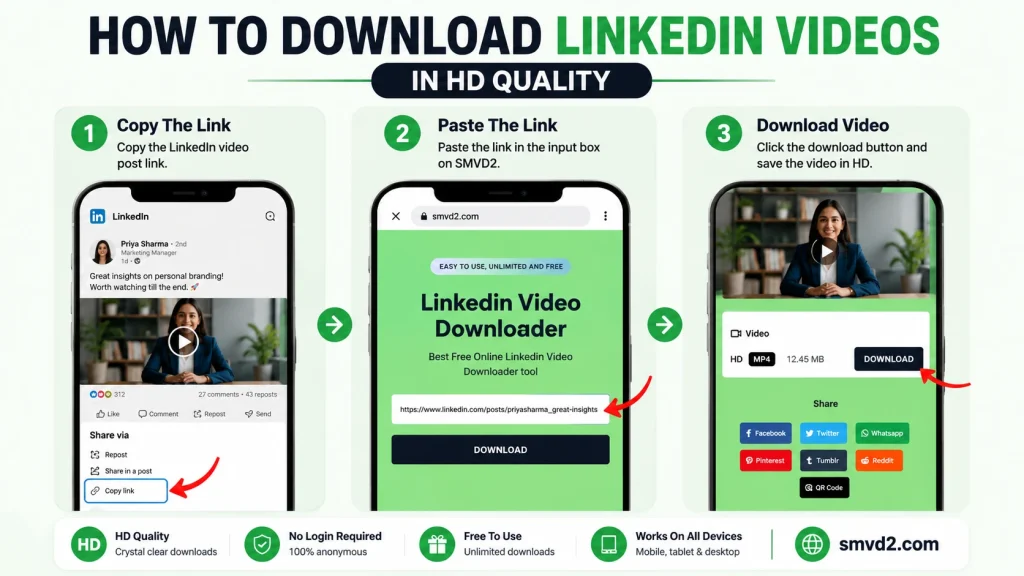
Downloading a publicly available LinkedIn video using SMVD is straightforward.
Step 1: Locate the LinkedIn Video
Find the LinkedIn post containing the video you want to save.
Verify that the content is publicly accessible and intended for public viewing.
Step 2: Copy the Video URL
Use LinkedIn’s sharing options to copy the post link.
Make sure you copy the correct URL associated with the video post.
Step 3: Visit SMVD
Open Social Media Video Downloader in your preferred browser.
Because SMVD is browser-based, there is no need to install additional software.
Step 4: Paste the Link
Paste the copied LinkedIn URL into the downloader field.
Double-check the URL to ensure it was copied correctly.
Step 5: Process the Video
Allow SMVD to retrieve the video information.
This typically takes only a few seconds.
Step 6: Download the Video
Choose your preferred format and save the video to your device.
Once completed, you can watch the content whenever you want, even without an internet connection.
Quick Download Checklist
Before downloading, confirm:
- The video is publicly available
- You have permission to use the content if required
- The creator’s rights are respected
- The video is being saved for legitimate purposes
Following these simple guidelines helps ensure responsible use.
Best Practices When Downloading LinkedIn Videos
Downloading public content is convenient, but it should also be done responsibly.
Respect Copyright Ownership
Creators invest time and expertise into producing valuable content.
Always respect ownership rights.
Give Credit When Appropriate
If you reference or share ideas from a downloaded video, acknowledge the original creator whenever possible.
Avoid Unauthorized Redistribution
Downloading for personal use is very different from republishing content without permission.
Always consider the creator’s intentions before sharing material publicly.
Use Videos for Learning and Reference
Many LinkedIn videos are educational by nature.
Some of the best uses include:
- Professional development
- Research
- Training
- Skill building
- Industry analysis
Verify Content Accuracy
Like any platform, LinkedIn contains content of varying quality.
Consider evaluating:
- Source credibility
- Creator expertise
- Supporting evidence
- Industry relevance
before relying on information presented in a video.
Common Mistakes Users Make
Many users:
- Assume every LinkedIn video is public.
- Download content without checking permissions.
- Forget to save the original source link.
- Redistribute content without attribution.
- Ignore copyright considerations.
Avoiding these mistakes helps ensure ethical and professional use of downloaded content.
Common Misconceptions About LinkedIn Video Privacy
LinkedIn’s privacy system is often misunderstood, even by experienced users.
Many assumptions about LinkedIn videos are based on how other social media platforms work rather than how LinkedIn actually manages content visibility.
Understanding these misconceptions can help users make better decisions when viewing, sharing, or downloading videos.
Misconception #1: All LinkedIn Videos Are Public
This is one of the most common myths.
Many users assume that because a LinkedIn video appears in their feed, it must be publicly accessible to everyone.
In reality, video visibility depends entirely on the audience settings selected by the creator.
A video may be visible to:
- Everyone
- Connections only
- Group members
- Event attendees
- Employees
- Custom audiences
Just because you can view a video doesn’t mean every LinkedIn user can.
What We Observed
During our review of LinkedIn posts, we found that two videos can appear nearly identical on the surface while having completely different visibility permissions behind the scenes.
This often creates confusion when users attempt to share content with colleagues who cannot access the same video.
Misconception #2: If I Have the URL, I Can Access the Video
Many people believe that obtaining a LinkedIn post URL automatically grants access to the content.
That isn’t necessarily true.
If a video belongs to:
- A private group
- A restricted event
- An employee-only audience
- A connections-only post
the URL alone usually won’t bypass those restrictions.
LinkedIn still checks whether the viewer has permission to access the content.
Why This Matters
This misconception is one reason users often think a video link is broken when it actually requires additional permissions.
Misconception #3: Company Videos Are Always Public
Businesses frequently publish public content on LinkedIn, which leads many users to assume that all company videos are publicly accessible.
However, companies also use LinkedIn for:
- Employee communications
- Internal training
- Recruitment initiatives
- Private webinars
- Exclusive events
As a result, some company videos are intentionally restricted.
The organization’s goals ultimately determine the video’s visibility.
Misconception #4: Public Means Unlimited Usage Rights
A public LinkedIn video is publicly viewable.
That does not automatically mean users can:
- Republish it
- Modify it
- Monetize it
- Redistribute it
Visibility and ownership are two different concepts.
Even publicly available content remains subject to copyright and intellectual property rights.
Professional Best Practice
Whenever possible:
- Credit the original creator.
- Respect copyright ownership.
- Obtain permission for commercial use.
This helps maintain professional standards while protecting creator rights.
Misconception #5: Private Videos Can Easily Be Downloaded
Many websites suggest that every LinkedIn video can be downloaded if users find the “right method.”
This is misleading.
LinkedIn’s privacy controls exist specifically to restrict access to certain content.
Private videos are generally intended for authorized audiences only.
Responsible users should always respect visibility settings established by creators and organizations.
What Most Articles Don’t Tell You About LinkedIn Video Privacy
Many guides focus only on whether videos are public or private.
The reality is much more nuanced.
Several factors influence accessibility beyond the audience setting itself.
Visibility Can Change Over Time
One detail often overlooked is that creators can modify visibility settings after publication.
A video that is public today could become restricted later.
Similarly, a previously limited post may be opened to a broader audience.
This is one reason some users notice changing access permissions over time.
Search Engine Visibility Isn’t Guaranteed
Even when a LinkedIn video is public, there is no guarantee that search engines will index it.
Visibility depends on several factors, including:
- Creator settings
- Platform policies
- Search engine crawling behavior
- Content accessibility
Many users mistakenly assume public content automatically appears in Google search results.
In practice, indexing is never guaranteed.
Groups and Events Create Additional Privacy Layers
Private groups and LinkedIn Events introduce extra restrictions that many users don’t initially notice.
A video may appear public within a group while remaining inaccessible to users outside that group.
The same principle applies to event-based content.
Understanding these layers helps explain why some videos appear inconsistent in their accessibility.
Public Content Can Still Have Practical Limitations
A public video may still encounter restrictions due to:
- Regional availability
- Login requirements
- Platform updates
- Content removal
- Organizational policies
This explains why some users occasionally encounter accessibility issues despite the content being publicly published.
The Future of LinkedIn Video Privacy
As professional content continues to evolve, LinkedIn’s privacy system will likely become more sophisticated.
Creators increasingly want greater control over who can access their content, while audiences expect flexible viewing options.
Several trends are already shaping the future of LinkedIn video visibility.
More Granular Audience Controls
LinkedIn continues expanding audience segmentation capabilities.
Future privacy controls may allow creators to target content based on:
- Professional roles
- Industries
- Geographic locations
- Skill sets
- Organizational relationships
This would give publishers even greater precision when distributing content.
Growth of Premium and Exclusive Content
Professional creators are increasingly monetizing expertise through:
- Courses
- Webinars
- Workshops
- Membership communities
As this trend grows, LinkedIn may introduce additional privacy tools designed to support premium content distribution.
AI-Powered Content Distribution
Artificial intelligence is already influencing content visibility across social platforms.
Future LinkedIn systems may use AI to determine:
- Content relevance
- Audience matching
- Personalized recommendations
- Visibility optimization
This could significantly impact how videos are discovered and consumed.
Greater Privacy Awareness
Professionals are becoming more conscious of:
- Data protection
- Intellectual property
- Content ownership
- Audience control
As awareness grows, privacy settings will likely become an even more important part of LinkedIn’s content ecosystem.
Frequently Asked Questions (FAQ)
Are LinkedIn Videos Public or Private?
LinkedIn videos can be either public or private depending on the audience settings selected by the creator. Some videos are visible to everyone, while others are restricted to specific groups, connections, employees, or event attendees.
Can Anyone Watch a Public LinkedIn Video?
In many cases, yes.
Public LinkedIn videos may be accessible to users outside the creator’s network and can sometimes appear in search engine results.
However, accessibility may still depend on platform-specific restrictions.
Can LinkedIn Videos Appear on Google?
Some public LinkedIn content can appear in search results.
Whether a specific video is indexed depends on factors such as visibility settings, accessibility, and search engine crawling behavior.
Can I Download Private LinkedIn Videos?
Private LinkedIn videos are protected by visibility restrictions established by the creator.
Users should respect access permissions and follow applicable platform policies and copyright requirements.
Can I Download Public LinkedIn Videos?
Yes.
Publicly available LinkedIn videos can often be saved for offline viewing using a reliable solution such as Social Media Video Downloader (SMVD).
How Can I Tell If a LinkedIn Video Is Public?
You can check:
- Audience indicators
- Incognito browser access
- External sharing capability
- Search engine visibility
- Company page accessibility
These signals can help determine whether a video is publicly accessible.
Why Are Some LinkedIn Videos Restricted?
Restrictions help creators:
- Protect sensitive information
- Manage audience access
- Share exclusive content
- Maintain professional privacy
- Control content distribution
Privacy settings are an essential part of LinkedIn’s professional environment.
Final Thoughts
LinkedIn videos are not automatically public or private.
Their visibility depends on the audience settings chosen by the creator, the context in which the content is shared, and additional factors such as groups, events, and company page permissions.
Throughout our analysis of LinkedIn’s video ecosystem, one consistent pattern emerged: understanding visibility settings is the key to understanding accessibility.
Many users assume that every video is either completely public or completely private, but LinkedIn’s system is far more flexible than that.
For professionals, marketers, recruiters, businesses, and learners, understanding these privacy distinctions can help:
- Share content more effectively
- Protect sensitive information
- Reach the right audience
- Access valuable educational resources responsibly
When it comes to saving publicly available LinkedIn videos for offline viewing, research, training, or professional reference, Social Media Video Downloader (SMVD) offers a simple and efficient solution.
By respecting creator permissions and understanding how LinkedIn privacy works, users can make informed decisions while getting the most value from the platform’s growing library of professional video content.
Key Takeaways
- LinkedIn videos can be public or private.
- Audience settings determine visibility.
- Public videos may sometimes appear in search engines.
- Private videos remain restricted to authorized audiences.
- Having a URL does not automatically grant access.
- Public visibility does not equal ownership rights.
- SMVD provides a convenient way to save publicly available LinkedIn videos for offline viewing.
- Understanding privacy settings helps both viewers and creators use LinkedIn more effectively.
Related Articles:
- How to Save LinkedIn Videos from Messages
- Can You Download Live LinkedIn Videos?
- Why LinkedIn Learning Videos Won’t Download?