Types of LinkedIn Videos You Can Download
LinkedIn has evolved far beyond a platform for professional networking. Today, it functions as a knowledge-sharing ecosystem where professionals, businesses, recruiters, educators, consultants, and industry leaders publish video content designed to inform, educate, and inspire audiences worldwide.
Whether it’s a career growth strategy from an executive, a product demonstration from a SaaS company, a webinar packed with industry insights, or a recruitment campaign showcasing company culture, LinkedIn videos have become valuable resources that users often revisit long after they first appear in their feed.
The challenge is that LinkedIn’s feed moves quickly. Valuable content can easily get buried beneath newer posts, making it difficult to find a specific video when you need it again. For professionals who rely on continuous learning, losing access to useful content can mean losing valuable insights, examples, and reference materials.
This is one of the primary reasons why LinkedIn video downloaders have become increasingly popular. Instead of depending on LinkedIn’s algorithm to resurface important content, users can save videos for offline viewing, organize them into personal learning libraries, and access them whenever necessary.
At SMVD2, we reviewed dozens of publicly available LinkedIn video posts across different industries and content formats. One interesting observation was that the videos users most frequently wanted to save weren’t necessarily promotional videos. Educational content, webinar recordings, industry discussions, and practical tutorials consistently offered the highest long-term value because users often returned to them multiple times.
If you’re looking for a simple way to save publicly available LinkedIn videos, SMVD2.com provides a fast, browser-based solution that helps users download videos without installing software or dealing with complicated workflows.
Before downloading, however, it’s helpful to understand the different types of LinkedIn videos available and why certain categories are downloaded more often than others.
Why People Download LinkedIn Videos
People download LinkedIn videos for many different reasons, but the motivation usually comes down to one thing: preserving valuable information.
Unlike entertainment-focused social platforms, LinkedIn content often contains professional knowledge, business strategies, educational insights, and industry expertise that remain useful long after the original post was published.
Some users save videos because they travel frequently and need offline access. Others download videos to build personal knowledge libraries that can be referenced during projects, meetings, training sessions, or career development activities.
Common reasons professionals download LinkedIn videos include:
- Watching content offline during travel
- Saving educational resources for future learning
- Building a personal knowledge archive
- Referencing training materials later
- Sharing insights with team members
- Preserving valuable industry discussions
- Archiving important company announcements
- Collecting inspiration for content creation
- Reviewing webinar sessions multiple times
- Studying competitor strategies and market trends
However, the value of downloaded videos often depends on the type of content being saved.
For example, a product launch announcement may be useful for a few weeks, while a detailed SEO tutorial, leadership lesson, or industry webinar may continue providing value for months or even years. This difference in long-term usefulness explains why some LinkedIn video categories are downloaded significantly more often than others.
What Most Users Don’t Realize About LinkedIn Videos
One pattern we noticed while reviewing LinkedIn content is that professionals rarely download videos simply because they are popular. Instead, they tend to save videos that solve future problems.
For example:
- A marketer may save a LinkedIn advertising tutorial for future campaigns.
- A recruiter may download employer branding videos for inspiration.
- A business owner may archive industry forecast discussions for strategic planning.
- A sales professional may keep prospecting and negotiation videos for ongoing training.
In other words, the most downloaded LinkedIn videos are usually the ones that continue delivering value after the initial viewing experience.
This is why educational videos, webinars, expert interviews, and professional development content consistently rank among the most frequently saved video formats on the platform.
As LinkedIn continues expanding its video ecosystem, understanding the different categories of content available becomes increasingly important for users who want to build a valuable library of professional resources.
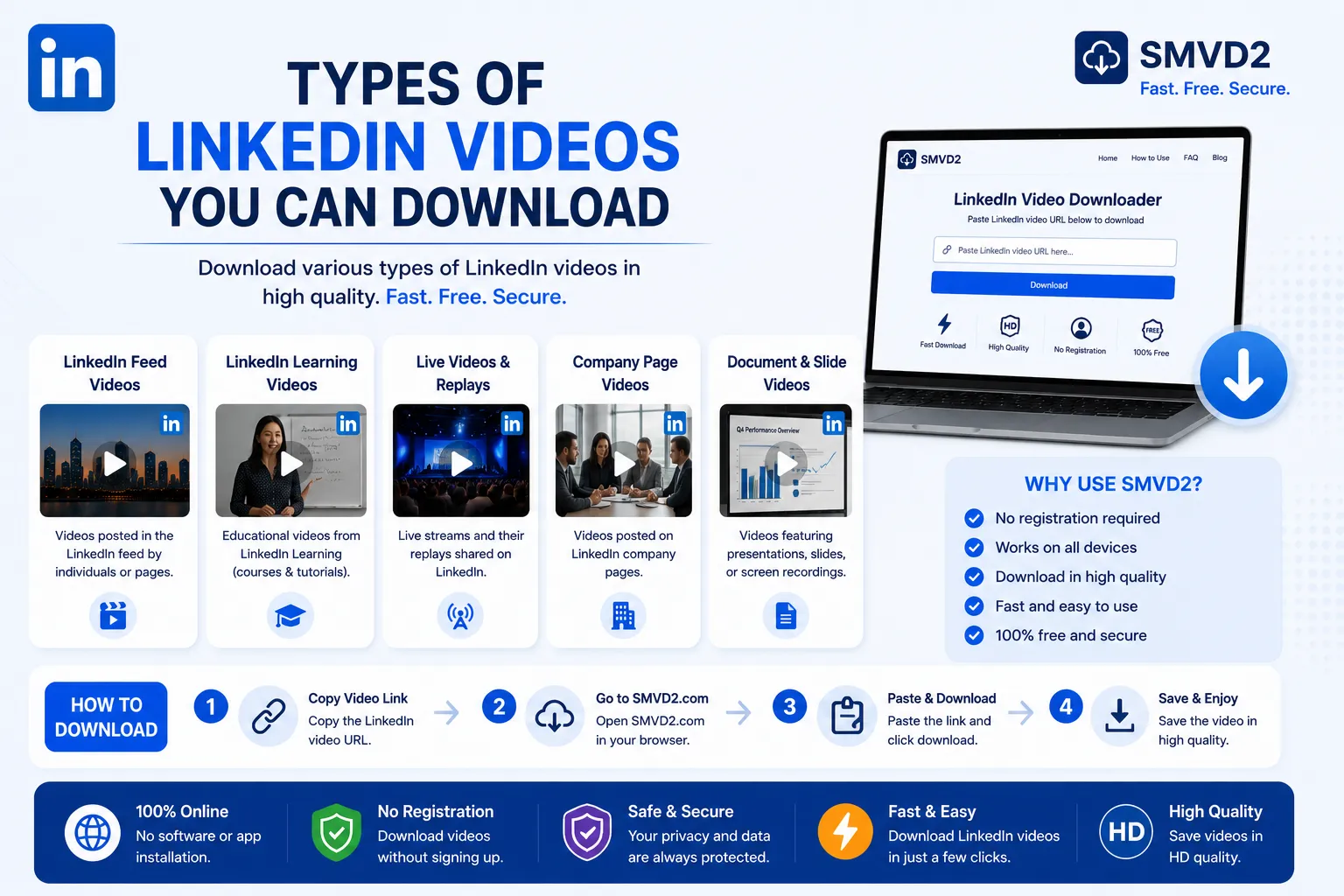
Types of LinkedIn Videos You Can Download
LinkedIn hosts many different types of video content. Understanding these categories helps users identify the content they may want to save for future use.
1. Educational and Training Videos
Educational videos are among the most downloaded types of LinkedIn content, and for good reason. Unlike news updates or company announcements that may lose relevance over time, educational content often delivers long-term value that professionals can revisit repeatedly.
These videos are typically created by:
- Industry experts
- Consultants
- Coaches
- Business leaders
- Marketing professionals
- Technology specialists
- Corporate trainers
Common topics include:
- SEO and digital marketing
- Sales techniques
- Leadership development
- Business growth strategies
- Artificial intelligence
- Personal branding
- Productivity systems
- Project management
- Software tutorials
One trend we noticed is that educational videos often become part of a user’s personal learning library. Many professionals download them not because they need the information immediately, but because they anticipate needing it later.
For example, a marketer may save an advanced LinkedIn advertising tutorial today and revisit it months later when launching a new campaign.
Why People Save Educational Videos
Educational videos typically offer:
- High replay value
- Evergreen knowledge
- Actionable insights
- Professional development opportunities
Among all LinkedIn video categories, educational content generally provides the strongest long-term return on attention.
2. Industry Insight Videos
Industry insight videos help professionals stay informed about developments within their field.
These videos often discuss:
- Market trends
- Economic developments
- Emerging technologies
- Industry forecasts
- Consumer behavior changes
- Regulatory updates
- Competitive shifts
Business leaders and decision-makers frequently use these videos to understand where their industry is heading.
For example:
A cybersecurity professional may download a video discussing emerging security threats, while a SaaS founder may save a discussion about future software trends.
Why These Videos Are Often Downloaded
Industry insight videos can quickly disappear from LinkedIn feeds, yet the information they contain often influences strategic decisions.
Users commonly save them for:
- Future reference
- Strategic planning
- Team discussions
- Market research
- Competitive analysis
What Most Articles Don’t Mention
The value of an industry insight video isn’t always immediate.
In many cases, users revisit these videos months later to compare predictions against actual market outcomes. This makes them surprisingly valuable long-term resources.
3. Thought Leadership Videos
Thought leadership videos are designed to share expertise, perspectives, and professional experiences.
Rather than teaching a specific skill, these videos often focus on:
- Business philosophies
- Leadership lessons
- Career development
- Professional growth
- Entrepreneurship
- Organizational culture
- Personal experiences
Many of LinkedIn’s most influential creators use thought leadership videos to build authority and credibility within their industries.
Examples include:
- A CEO discussing lessons learned from scaling a company.
- A recruiter sharing hiring trends.
- A founder explaining startup challenges.
- A sales leader discussing negotiation strategies.
Why Users Download Thought Leadership Content
These videos often contain unique viewpoints that cannot be found in traditional articles or documentation.
Professionals save them because they offer:
- Real-world perspectives
- Experience-based insights
- Leadership guidance
- Career inspiration
Replay Value
Unlike breaking news content, strong thought leadership videos often remain relevant for years because they focus on principles rather than temporary trends.
4. Webinar Recordings
Webinars have become one of LinkedIn’s most valuable content formats.
Many organizations use webinars to educate audiences on complex topics while demonstrating expertise.
Popular webinar topics include:
- Digital marketing
- AI and automation
- Finance
- Human resources
- Recruiting
- Business operations
- Product development
- Customer acquisition
A typical webinar contains significantly more depth than an average LinkedIn post.
Some webinar recordings last:
- 30 minutes
- 60 minutes
- 90 minutes
- Even longer
Because of their depth, webinars are often downloaded more frequently than short-form videos.
Why Professionals Save Webinar Recordings
Webinars typically contain:
- Detailed explanations
- Real examples
- Demonstrations
- Audience questions
- Expert discussions
Many users watch webinars multiple times to absorb insights they may have missed during the first viewing.
SMVD2 Observation
During our review of publicly available LinkedIn video content, webinar recordings consistently ranked among the highest-value videos for repeat viewing.
Unlike promotional videos, webinars often continue delivering value months after publication because they focus on solving specific professional problems.
5. LinkedIn Live Videos
LinkedIn Live allows creators and businesses to broadcast content in real time.
These live sessions are commonly used for:
- Industry discussions
- Expert interviews
- Product launches
- Q&A sessions
- Virtual conferences
- Panel discussions
- Company updates
The appeal of LinkedIn Live lies in its authenticity. Unlike heavily edited videos, live broadcasts often contain spontaneous conversations and unscripted insights.
Why Users Download LinkedIn Live Recordings
Professionals frequently save LinkedIn Live content because:
- Live events may not be available forever.
- Important insights can be difficult to locate later.
- Long discussions often contain valuable information that isn’t summarized elsewhere.
A Common Mistake
Many users assume only the main presentation matters.
In reality, some of the most valuable insights often emerge during audience Q&A segments, where experts answer real-world questions and share practical advice.
This is one reason why LinkedIn Live recordings often have higher replay value than standard video posts.
6. Company Announcement Videos
Businesses regularly use LinkedIn to communicate important updates.
These videos may include:
- Product launches
- Funding announcements
- Partnerships
- Expansion plans
- New service offerings
- Event promotions
- Corporate milestones
For professionals tracking competitors or industry developments, company announcement videos can serve as useful reference materials.
Why People Save Company Announcement Videos
Downloaded announcement videos are commonly used for:
- Market research
- Competitive intelligence
- Business analysis
- Industry monitoring
Although these videos usually have lower long-term replay value than educational content, they can provide important historical context when evaluating a company’s growth and strategic direction.
7. Product Demonstration Videos
Product demonstrations are especially common among B2B companies, SaaS businesses, and technology providers.
These videos typically showcase:
- Product features
- Platform walkthroughs
- New releases
- Workflow examples
- Customer use cases
- Integrations
Why Product Demo Videos Are Frequently Downloaded
Potential buyers often save demo videos because evaluating a product usually requires multiple viewings.
A product may look impressive during a live presentation, but decision-makers often revisit demonstration videos later to assess:
- Features
- Ease of use
- Compatibility
- Business value
Hidden Advantage
Many professionals create comparison libraries where they save product demonstrations from multiple vendors and review them side by side before making purchasing decisions.
This makes product demo videos one of the most practical LinkedIn video categories for business users.
8. Recruitment and Hiring Videos
Recruitment content has become increasingly popular on LinkedIn as companies compete for top talent.
These videos often include:
- Job opportunities
- Company culture showcases
- Employee testimonials
- Office tours
- Hiring campaigns
- Team introductions
Why Job Seekers Download Recruitment Videos
Candidates often save recruitment videos because they provide information that traditional job descriptions cannot.
For example, a company culture video may reveal:
- Team dynamics
- Work environment
- Leadership style
- Employee satisfaction
These insights help candidates make more informed career decisions.
Recruitment videos are also commonly downloaded by HR teams looking for inspiration for their own employer branding campaigns.
9. Customer Success Stories and Testimonial Videos
Customer success stories are among the most persuasive video formats on LinkedIn because they demonstrate how real businesses, teams, or individuals achieved measurable results.
These videos often feature:
- Customer interviews
- Case studies
- Business transformation stories
- Product implementation journeys
- Before-and-after outcomes
- Success metrics and achievements
Unlike traditional advertisements, testimonial videos provide social proof through real experiences.
Why Users Download Customer Success Videos
Professionals frequently save these videos for:
- Competitive research
- Sales enablement
- Marketing inspiration
- Internal training
- Client presentations
For example, a marketing agency might download several customer success videos from leading SaaS companies to analyze storytelling techniques and customer communication strategies.
What Makes These Videos Valuable?
The strongest testimonial videos don’t simply explain what happened.
They explain:
- The original challenge
- The implementation process
- Obstacles encountered
- Final results achieved
This problem-to-solution structure gives viewers practical insights they can apply in their own situations.
Replay Value
Medium to High
While these videos may not be revisited as often as educational content, they often serve as excellent reference material for sales, marketing, and business development teams.
10. Event Highlight Videos
Industry conferences, workshops, trade shows, networking events, and corporate gatherings generate a tremendous amount of video content on LinkedIn.
Event highlight videos commonly feature:
- Keynote speeches
- Speaker presentations
- Panel discussions
- Behind-the-scenes footage
- Networking sessions
- Industry announcements
- Event recaps
These videos condense hours—or sometimes days—of content into short, digestible summaries.
Why Professionals Save Event Videos
Not everyone can attend every industry event.
Downloaded event highlight videos allow professionals to:
- Stay informed
- Learn from experts
- Discover emerging trends
- Review key announcements
- Gain insights from industry leaders
Hidden Benefit
One overlooked advantage of event recap videos is trend forecasting.
Major conferences often reveal where industries are heading before those trends become widely discussed elsewhere.
Professionals who save and review event videos can identify emerging opportunities earlier than their competitors.
Long-Term Value
Moderate to High
The value depends largely on the event’s subject matter and the significance of the insights shared.
11. Short-Form Professional Videos
LinkedIn has increasingly embraced short-form video content.
These concise videos typically focus on delivering one valuable insight in a short amount of time.
Popular examples include:
- Career tips
- Leadership lessons
- Productivity hacks
- Marketing insights
- Networking advice
- Communication strategies
- Industry updates
Most short-form videos are designed to be consumed quickly, often in less than two minutes.
Why These Videos Are Frequently Downloaded
Professionals often save short-form videos because:
- They are easy to revisit.
- They contain focused advice.
- They can be consumed during busy schedules.
- They provide quick reminders and refreshers.
Practical Use Case
A sales professional may save several short-form negotiation tips and review them before important client meetings.
Similarly, a recruiter might create a collection of hiring-related videos to reference during recruitment campaigns.
What Makes Them Effective?
The best short-form LinkedIn videos:
- Solve one problem.
- Deliver one clear lesson.
- Require minimal time investment.
This combination makes them highly shareable and frequently downloaded.
12. Native LinkedIn Videos
Native videos are videos uploaded directly to LinkedIn rather than shared from external platforms.
These videos often receive stronger engagement because they are optimized for LinkedIn’s ecosystem and user experience.
Native video content can include:
- Educational content
- Product demonstrations
- Recruitment campaigns
- Industry insights
- Company updates
- Personal branding content
Why Users Download Native Videos
Native videos are often easier to discover but harder to locate later once they disappear from the feed.
Downloading them allows users to:
- Preserve valuable information
- Access content offline
- Organize resources efficiently
- Build long-term knowledge libraries
Why Native Videos Matter
Many of LinkedIn’s highest-performing videos are uploaded directly to the platform.
As a result, native video represents one of the most important categories users download using LinkedIn video downloader tools.
The SMVD2 LinkedIn Video Value Framework
After reviewing various categories of publicly available LinkedIn videos, we noticed that not all videos provide the same long-term value.
To help users prioritize what to save, we created the SMVD2 LinkedIn Video Value Framework™.
| Video Type | Learning Value | Replay Value | Download Frequency | Overall Value |
|---|---|---|---|---|
| Educational Videos | Very High | Very High | Very High | ⭐⭐⭐⭐⭐ |
| Webinar Recordings | Very High | Very High | Very High | ⭐⭐⭐⭐⭐ |
| Industry Insight Videos | High | High | High | ⭐⭐⭐⭐⭐ |
| Thought Leadership Videos | High | High | High | ⭐⭐⭐⭐ |
| Product Demonstrations | High | Medium | High | ⭐⭐⭐⭐ |
| LinkedIn Live Videos | High | Medium | High | ⭐⭐⭐⭐ |
| Customer Success Videos | Medium | Medium | Medium | ⭐⭐⭐ |
| Event Highlights | Medium | Medium | Medium | ⭐⭐⭐ |
| Recruitment Videos | Medium | Low | Medium | ⭐⭐⭐ |
| Company Announcements | Low | Low | Medium | ⭐⭐ |
Key Insight
One surprising observation is that the videos receiving the most engagement aren’t always the videos that provide the most long-term value.
For example:
A product launch announcement may generate significant engagement during its first week, but a detailed webinar or educational tutorial may continue providing value for years.
This is why professionals often prioritize downloading:
- Educational videos
- Webinar recordings
- Industry insight discussions
- Thought leadership content
These categories consistently offer the highest return on attention over time.
What Most LinkedIn Users Don’t Realize
Many people assume downloading LinkedIn videos is primarily about convenience.
In reality, the most successful professionals often use downloaded videos as part of a larger knowledge-management system.
For example:
Marketers
Save:
- SEO tutorials
- Advertising strategies
- Case studies
- Campaign breakdowns
Recruiters
Save:
- Employer branding examples
- Hiring strategy discussions
- Recruitment campaign ideas
Sales Professionals
Save:
- Prospecting frameworks
- Negotiation strategies
- Objection handling techniques
Business Owners
Save:
- Industry forecasts
- Leadership insights
- Growth strategies
- Market trend analyses
The difference between casual consumption and strategic learning often comes down to whether valuable content is preserved and organized for future use.
This is one reason LinkedIn video downloaders continue growing in popularity among professionals across industries.
Which LinkedIn Videos Can You Download?
In general, users should only download videos that are publicly accessible and comply with applicable copyright laws, platform policies, and creator permissions.
Publicly shared videos often include:
- Educational content
- Industry discussions
- Public webinars
- Thought leadership videos
- Product demonstrations
- Company updates
- LinkedIn Live replays
Private, restricted, premium, or permission-protected content should always be respected and accessed according to the rights granted by the creator or platform.
Downloading content responsibly helps maintain trust within LinkedIn’s professional ecosystem while ensuring creators receive proper credit for their work.
How to Download LinkedIn Videos Easily
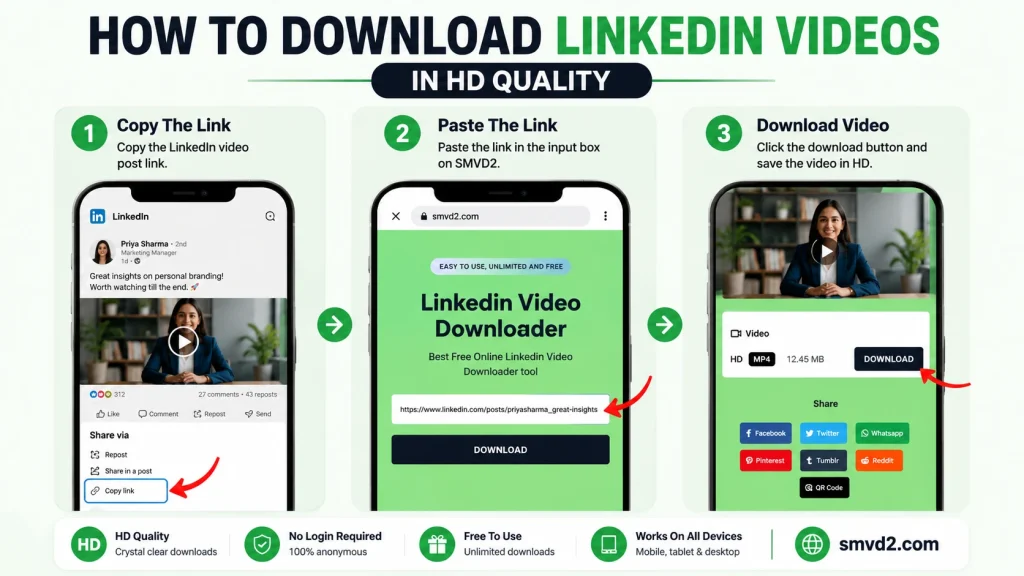
If you’ve found a valuable LinkedIn video and want to save it for offline viewing, future reference, or professional learning, the process is straightforward.
The biggest advantage of downloading videos is that you gain control over when and how you access the content. Instead of searching through weeks of LinkedIn posts trying to find a video again, you can build an organized library of resources that remain available whenever you need them.
Whether you’re saving a webinar, an educational tutorial, an industry discussion, or a product demonstration, the process remains largely the same.
Step 1: Copy the LinkedIn Video URL
Navigate to the LinkedIn post containing the video you want to save.
Click the share option and copy the URL of the post.
Before downloading, verify that the video is publicly accessible and that you have the appropriate rights or permissions to access the content.
Step 2: Visit SMVD2.com
Open SMVD2.com in your preferred browser.
Because the platform operates entirely online, there is no need to install software, browser extensions, or third-party applications.
This browser-based approach is particularly useful for professionals who frequently switch between devices.
Step 3: Paste the Video Link
Paste the copied LinkedIn URL into the downloader field.
SMVD2 automatically analyzes the link and prepares the video for download.
Step 4: Generate the Download
After processing the link, the platform generates the downloadable video file.
Depending on the original source video, processing generally takes only a few moments.
Step 5: Save the Video
Choose your preferred location and save the video to your device.
Many professionals create folders based on categories such as:
- Marketing
- Leadership
- Recruiting
- Sales
- Product Development
- Industry Research
Organizing downloaded videos from the beginning makes future retrieval significantly easier.
Pro Tip: Build a Professional Knowledge Library
One habit we consistently observe among high-performing professionals is that they don’t simply consume content—they archive it systematically.
For example:
Marketing Teams
- Save campaign case studies
- Archive advertising tutorials
- Store SEO walkthroughs
Recruiters
- Save employer branding examples
- Archive hiring strategy discussions
- Store recruitment campaign inspiration
Sales Teams
- Save negotiation frameworks
- Archive prospecting techniques
- Store objection-handling strategies
Over time, these collections become valuable internal knowledge bases that support continuous learning and team development.
Why SMVD2 Is the Ultimate LinkedIn Video Downloader

Many LinkedIn video downloaders claim to offer a fast and simple experience.
However, professionals typically care about more than just downloading a video.
They want:
- Reliability
- Ease of use
- Speed
- Compatibility
- Consistent performance
SMVD2 was built around these priorities.
Fast Processing
One of the biggest frustrations users experience with video downloaders is waiting.
A slow workflow can quickly turn a simple task into an inconvenience.
SMVD2 focuses on minimizing unnecessary steps so users can move from link to download as efficiently as possible.
User-Friendly Interface
A downloader should not require technical expertise.
One thing we appreciate about browser-based tools is that they eliminate many of the barriers associated with traditional software.
Instead of:
- Installing applications
- Updating software
- Managing browser extensions
Users can simply access the platform and begin downloading.
This simplicity is especially beneficial for professionals who value speed and convenience.
Free Accessibility
Many users only need occasional downloads.
For those situations, a free browser-based solution often provides a more practical experience than subscription-based alternatives.
Cross-Device Compatibility
Modern professionals work across multiple devices.
A LinkedIn video downloader should support:
- Desktop computers
- Laptops
- Smartphones
- Tablets
SMVD2 provides flexibility for users regardless of where they access LinkedIn content.
No Software Installation Required
Installing unnecessary software introduces additional complexity.
Browser-based downloading offers several advantages:
- No installation process
- No software updates
- No storage overhead
- Faster accessibility
For many users, this convenience alone is a deciding factor.
High-Quality Downloads
Video quality matters.
Whether you’re saving:
- Educational tutorials
- Product demonstrations
- Webinar recordings
- Industry presentations
Maintaining viewing quality improves the overall experience.
Poor-quality downloads can reduce readability, particularly when videos contain slides, charts, or screen recordings.
Designed for Professional Use Cases
One area where LinkedIn differs from entertainment-focused platforms is the purpose behind downloads.
Professionals often save videos to:
- Learn new skills
- Conduct research
- Train teams
- Reference future projects
- Preserve industry knowledge
Because of this, reliability and usability become more important than flashy features.
What We Noticed During Evaluation
While reviewing different types of LinkedIn video content, one pattern became clear:
Users rarely download videos for immediate consumption alone.
Instead, most downloads serve a future purpose.
For example:
- A marketer saves a webinar for a future campaign.
- A recruiter archives employer branding examples.
- A founder preserves industry forecasts for strategic planning.
- A sales professional saves negotiation techniques for upcoming client interactions.
This future-oriented usage pattern is one reason why simple and reliable downloading workflows matter so much.
The easier it is to preserve valuable content today, the easier it becomes to access that knowledge tomorrow.
Who Benefits Most from SMVD2?
Marketing Professionals
Useful for saving:
- Marketing tutorials
- Case studies
- Industry trend discussions
- Advertising walkthroughs
Recruiters and HR Teams
Useful for preserving:
- Hiring campaigns
- Employer branding examples
- Recruitment webinars
- Talent acquisition strategies
Sales Professionals
Useful for archiving:
- Prospecting frameworks
- Sales training videos
- Negotiation lessons
- Customer success stories
Business Owners and Entrepreneurs
Useful for collecting:
- Leadership insights
- Market forecasts
- Growth strategies
- Industry analysis
Students and Lifelong Learners
Useful for building:
- Educational libraries
- Professional development resources
- Career advancement collections
Why Many Professionals Prefer Browser-Based Downloaders
One observation that frequently emerges is that convenience often outweighs additional features.
Most users simply want to:
- Copy a link.
- Paste it.
- Download the video.
For many LinkedIn users, that simplicity is exactly what makes SMVD2 a practical solution.
Best Practices When Downloading LinkedIn Videos
How you manage, organize, and use those videos determines the value you ultimately receive from them.
Professionals who build organized knowledge systems typically gain significantly more long-term benefit than those who download content without a clear strategy.
1. Respect Copyright and Creator Rights
Always ensure that downloaded content is used responsibly.
Downloaded videos should not be redistributed, modified, or republished without appropriate permissions from the original creator.
Responsible usage helps maintain trust within the professional community while supporting the individuals and organizations that create valuable content.
2. Organize Videos by Topic
One of the biggest mistakes users make is saving videos into a single folder.
Over time, this creates a cluttered collection that becomes difficult to navigate.
Instead, consider creating folders such as:
- Marketing
- Sales
- Leadership
- Recruiting
- AI and Technology
- Entrepreneurship
- Product Development
- Industry Research
A well-organized system makes it easier to locate valuable content when needed.
3. Rename Files Immediately
Generic file names can become confusing after downloading dozens or hundreds of videos.
A simple naming structure can save significant time later.
For example:
Good Format
- LinkedIn_SEO_Webinar_2026.mp4
- Leadership_Strategy_Interview.mp4
- SaaS_Product_Demo.mp4
This approach improves searchability and organization.
4. Prioritize Evergreen Content
Not every LinkedIn video provides long-term value.
If storage space or organization is a concern, prioritize videos that remain useful over time.
Examples include:
- Tutorials
- Webinars
- Industry analysis
- Leadership lessons
- Educational content
These videos often deliver value long after publication.
5. Build a Learning Routine
Downloading videos without revisiting them creates a digital storage problem rather than a learning system.
Successful professionals often schedule regular review sessions to revisit saved content.
Even reviewing one or two videos each week can significantly improve knowledge retention.
Common Mistakes Users Make When Downloading LinkedIn Videos
Many users download videos successfully but fail to maximize their value afterward.
Here are some common mistakes to avoid.
Saving Everything
Not every video deserves a permanent place in your library.
Ask yourself:
- Will I watch this again?
- Does it teach something useful?
- Can it help me make better decisions later?
Ignoring Organization
A video library with hundreds of unorganized files quickly becomes difficult to use.
ithout a system, valuable content often becomes as hard to find as it was on LinkedIn.
Focusing Only on Popular Content
High engagement does not always equal high value.
Many of the most useful LinkedIn videos have modest engagement but contain highly actionable insights.
What Actually Matters
When deciding what to save, consider:
- Learning value
- Practical application
- Replay potential
- Long-term usefulness
Rather than:
- Likes
- Comments
- Viral popularity
Forgetting Why the Video Was Saved
One useful technique is to keep a short note alongside important downloads.
For example:
Video: Advanced LinkedIn Ads Strategy
Reason Saved: Future campaign optimization ideas.
This small habit can make a huge difference months later.
Frequently Asked Questions
Can You Download LinkedIn Videos?
Yes. Publicly accessible LinkedIn videos can often be downloaded using browser-based tools such as SMVD2, provided usage complies with applicable copyright laws, platform policies, and creator permissions.
Can You Download LinkedIn Live Videos?
If a LinkedIn Live session is publicly available as a replay, it may be downloadable in the same way as other public LinkedIn videos.
However, availability depends on how the content was published and shared.
Can Private LinkedIn Videos Be Downloaded?
Private, restricted, or permission-protected content should be respected.
Users should only access and download content they are authorized to view.
Do Downloaded Videos Lose Quality?
Quality depends on the original source video and download process.
In general, maintaining higher-quality downloads is important for webinars, presentations, tutorials, and videos containing detailed visuals.
Why Do Professionals Download LinkedIn Videos?
Professionals commonly download LinkedIn videos to:
- Learn offline
- Build knowledge libraries
- Archive webinars
- Preserve industry insights
- Train teams
- Save educational content
Which LinkedIn Videos Are Downloaded Most Often?
Based on common professional usage patterns, the most frequently downloaded categories include:
- Educational videos
- Webinar recordings
- Industry insight discussions
- Thought leadership content
- Product demonstrations
These categories typically provide the highest long-term value.
Is a Browser-Based Downloader Better Than Installing Software?
For many users, browser-based solutions offer greater convenience because they eliminate:
- Software installation
- Updates
- Storage overhead
- Extension management
The ideal choice depends on individual preferences and workflow requirements.
How Should I Organize Downloaded LinkedIn Videos?
A topic-based folder structure generally works best.
Examples include:
- Marketing
- Leadership
- Sales
- Recruiting
- Business Strategy
- AI and Technology
This makes future retrieval significantly easier.
Future Trends in LinkedIn Video Content
LinkedIn’s video ecosystem continues to evolve.
As more professionals, companies, and creators invest in video-first communication, the volume and variety of content available on the platform will likely continue growing.
Several trends are already becoming apparent:
More Educational Content
Professionals increasingly use LinkedIn as a learning platform rather than solely a networking platform.
This is leading to growth in:
- Tutorials
- Industry explainers
- Professional development content
- Skill-building videos
Increased Adoption of Short-Form Video
Short-form professional content is becoming more common because it delivers insights quickly and efficiently.
These videos are particularly effective for:
- Career advice
- Leadership lessons
- Productivity tips
- Industry updates
More Live Events
LinkedIn Live continues to expand as organizations seek deeper engagement with audiences.
Expect growth in:
- Expert interviews
- Virtual conferences
- Panel discussions
- Interactive Q&A sessions
Stronger Knowledge Sharing Communities
Video content increasingly serves as a mechanism for sharing expertise and building professional communities.
As a result, preserving valuable content for future learning is becoming more important than ever.
Our Observations After Reviewing LinkedIn Video Content
While analyzing publicly available LinkedIn videos across multiple industries, we noticed several patterns that are rarely discussed in most LinkedIn downloader guides.
Educational Content Delivers the Highest Long-Term Value
Many users assume viral videos are the most valuable.
However, educational videos consistently offered the strongest replay value because users returned to them repeatedly for learning, training, and professional development.
Examples include:
- Marketing tutorials
- Sales frameworks
- Leadership lessons
- Recruiting strategies
- AI implementation guides
Unlike trending posts, these videos often remain useful months or even years after publication.
Webinar Recordings Are Frequently Underestimated
Webinars are often viewed once and forgotten.
Yet many webinar recordings contain:
- Advanced strategies
- Detailed demonstrations
- Expert Q&A sessions
- Real-world examples
In many cases, the audience questions at the end of a webinar provide insights that are not available elsewhere.
Short-Form Videos Drive Action Faster
Long-form webinars generally provide deeper education.
Short-form videos often generate faster implementation because they focus on a single actionable takeaway.
This makes them particularly useful for busy professionals who want immediate value.
Things Most LinkedIn Video Download Guides Don’t Mention
Most articles focus entirely on the downloading process.
What they often overlook is how professionals actually use downloaded content.
The Most Valuable Videos Are Usually Not Promotional
Promotional videos tend to have short-term relevance.
Educational content, industry analysis, and expert discussions typically provide significantly greater long-term value.
Building a Video Library Creates Compound Learning
One useful strategy is creating a categorized video archive.
For example:
| Category | Purpose |
|---|---|
| Marketing | Campaign ideas and SEO strategies |
| Sales | Prospecting and negotiation training |
| Recruiting | Employer branding inspiration |
| Leadership | Management and growth insights |
| AI | Automation and productivity learning |
Over time, this collection becomes a personalized professional knowledge base.
Consistent Learning Beats Occasional Consumption
Downloading videos alone does not create value.
The real benefit comes from:
- Saving valuable content
- Organizing it properly
- Reviewing it regularly
- Applying what is learned
Professionals who follow this process typically gain much more from LinkedIn content than those who consume videos passively.
Who Should Download Different Types of LinkedIn Videos?
Not every video category is equally valuable for every audience.
For Marketers
Best videos to save:
- SEO tutorials
- Paid advertising strategies
- Content marketing webinars
- Case studies
For Recruiters
Best videos to save:
- Hiring trend discussions
- Employer branding examples
- Recruitment webinars
- Talent acquisition strategies
For Sales Professionals
Best videos to save:
- Prospecting frameworks
- Objection handling lessons
- Negotiation training
- Customer success stories
For Founders and Business Owners
Best videos to save:
- Leadership insights
- Market forecasts
- Growth strategies
- Industry trend analyses
For Students and Job Seekers
Best videos to save:
- Career guidance
- Interview preparation tips
- Professional development content
- Skill-building tutorials
This targeted approach helps users build more relevant and valuable video libraries.
Final Recommendation
If your goal is simply to watch a video once, downloading may not be necessary.
However, if you’re trying to:
- Build professional knowledge
- Create a learning archive
- Preserve valuable insights
- Reference content later
- Train teams
- Study industry trends
Then saving important LinkedIn videos becomes a practical long-term strategy.
Among all LinkedIn video categories, educational videos, webinar recordings, industry insight discussions, and thought leadership content consistently provide the greatest long-term value because they continue helping professionals long after they leave the LinkedIn feed.
For users looking for a straightforward way to save publicly available LinkedIn videos, SMVD2.com offers a browser-based solution that makes downloading quick, accessible, and convenient across devices.
Conclusion
LinkedIn hosts an incredibly diverse range of video content, from educational tutorials and webinar recordings to thought leadership discussions, recruitment campaigns, customer success stories, product demonstrations, and LinkedIn Live broadcasts.
Each category serves a different purpose, and understanding these differences helps professionals identify which videos are worth preserving for future use.
One of the most important insights is that the most downloaded videos are not always the most popular ones. Educational content, webinars, industry analysis, and expert-led discussions consistently provide the greatest long-term value because they continue delivering useful knowledge long after they are first viewed.
Whether you’re a marketer building a learning library, a recruiter collecting employer branding examples, a sales professional archiving training resources, or a business owner tracking industry trends, saving valuable LinkedIn videos can help create a powerful knowledge base that supports long-term growth.
When you need a simple and efficient way to download publicly available LinkedIn videos, SMVD2.com provides a browser-based solution that makes the process fast, straightforward, and accessible across devices.
Rather than relying on LinkedIn’s feed to rediscover important content, you can preserve the videos that matter most and build a professional resource library that continues to deliver value well into the future.
Related Articles:
- Difference Between LinkedIn Posts, Reels, Stories & Learning Videos
- How to Download LinkedIn Reels and Short Videos
- Can You Download Live LinkedIn Videos?