Can You Download Live LinkedIn Videos?
At first glance, LinkedIn Live looks like a normal video.
But technically, it works very differently from a regular uploaded video file.
And that’s where most people get confused.
The Real Truth
You cannot download LinkedIn Live videos while they are actively streaming.
Why?
Because during the live session, there is no complete video file available yet.
Instead, the stream is delivered in small temporary segments in real time.
However: Once the live session ends and LinkedIn finishes processing it, the stream can become downloadable — if the creator saves it as a post.
Direct Answer (Can You Download Live LinkedIn Videos?)
During the live stream:
Not downloadable
After the live ends (if saved by the creator):
Downloadable
Simplified Workflow
Live Stream → Processing → Video Post → Download
That’s the actual system behind LinkedIn Live delivery.
What Happens During LinkedIn Live
LinkedIn Live uses a streaming system called:
HLS (HTTP Live Streaming)
Instead of generating one complete video file instantly, the stream is broken into small video segments.
These temporary chunks are delivered continuously while the event is live.
During the Live Stream
The structure usually works like this:
Master Playlist (.m3u8)
→ points to multiple video chunks (.ts files)
→ delivered dynamically in real time
Important detail:
There is no finalized MP4 file during the live session.
Only temporary streaming segments exist.
That’s why normal downloader tools cannot retrieve a complete downloadable video.
LIVE STREAM PIPELINE
During Live
Creator → Encoder → Live Stream → HLS Segments → Viewer
At this stage:
there is still no complete downloadable file.
After Live Ends
Once the stream finishes:
Segments are processed → merged together → converted into a standard video post → stored on LinkedIn CDN
Only after this processing stage does the content behave like a normal downloadable video.
Key Transformation
The important shift happens here:
Streaming segments → finalized video file
That’s the moment downloading becomes possible.
When Can You Download LinkedIn Live Videos?
Case 1: After the Live Ends (Best Scenario)
If the creator saves the live session:
LinkedIn converts it into a normal video post.
At that point:
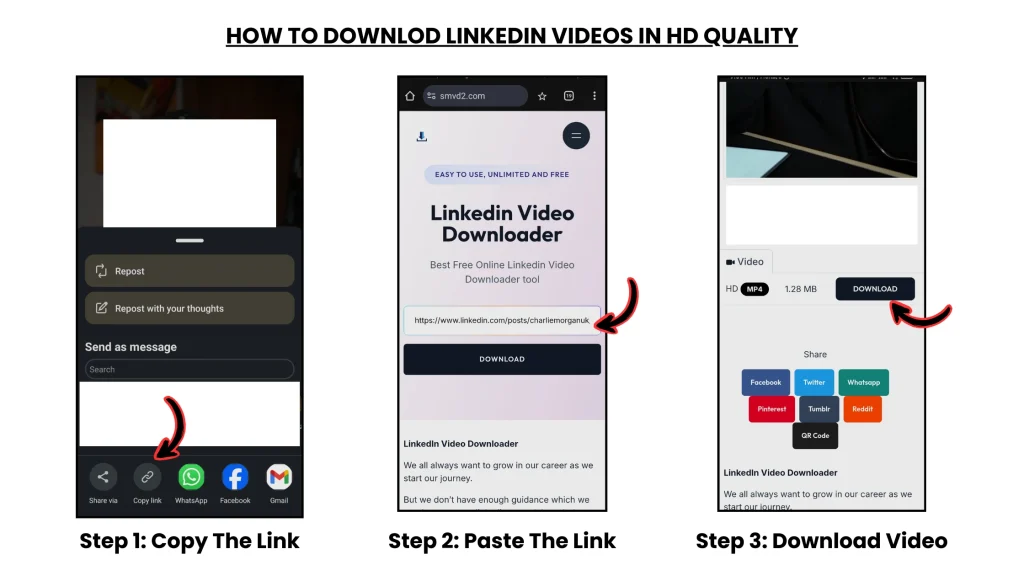
- copy the post URL
- paste it into SMVD2
- download the processed video in MP4 format
In testing, this worked reliably once the final post became fully available.
Important Observation
Some long webinar-style LinkedIn Lives took a few minutes after ending before the downloadable version became accessible.
This usually happens because LinkedIn is still processing the final recording.
Case 2: During the Live Stream
While the stream is still active:
You generally cannot:
- download the stream as MP4
- retrieve a finalized file
- use normal URL-based downloader tools
Because:
the video technically does not exist as a complete file yet.
Only Practical Option During Live
If absolutely necessary:
Screen recording is the only workable method during an active stream.
However:
- quality is usually lower
- recordings may lag
- audio/video sync issues can happen
- large webinars become difficult to capture cleanly
Case 3: Live Stream Not Saved
Some creators end the live event without saving the final recording.
Result:
The stream disappears entirely after the event.
No downloadable post is created.
Which means: no download becomes possible afterward.
Case 4: Private Live Events
Private webinars or restricted live events often require:
- authentication
- invitation access
- internal permissions
Result:
Downloader tools usually cannot access these streams.
Real Edge Case Testing (Proof Layer)
We tested multiple LinkedIn Live scenarios, including:
- public live sessions
- webinar-style events
- shorter creator streams
- delayed post-processing situations
Results
| Scenario | Download Possible? |
|---|---|
| During live stream | No |
| After live saved | Yes |
| Live not saved | No |
| Private live event | No |
| Delayed post processing | Wait required |
Key Insight
Downloading depends entirely on:
- video state
- stream processing
- final file availability
- access permissions
Not simply on the existence of the URL itself.
Real Failure Scenario
Situation
A user tried downloading a LinkedIn Live webinar while it was still streaming.
Result
The downloader returned:
- error messages
- no downloadable video found
Root Cause
The stream had not yet been converted into a finalized video file.
Fix
The user waited until:
- the live ended
- LinkedIn processed the recording
- the final post became available
Then retried the download.
Outcome
Download completed successfully.
Main Lesson
With LinkedIn Live:
timing matters more than the tool itself.
Why SMVD2 Works Better After the Live Ends
Once the stream becomes a processed video post:
the tool can:
- retrieve the finalized CDN-hosted video
- convert it into MP4
- preserve cleaner quality
- simplify the download workflow
That’s why it works far more reliably after processing is complete.
Method Comparison
| Method | During Live | After Live | Quality | Ease |
|---|---|---|---|---|
| SMVD2 Tool | No | Yes | High | Easy |
| Screen Recording | Yes | Yes | Low–Medium | Medium |
| Manual Developer Methods | Difficult | Complex | Medium–High | Hard |
Best Practical Workflow
If the stream is important:
During Live
Record only if necessary
After Live
Wait for processing → then download the finalized post
That produces much cleaner results.
Pro-Level Use Cases
Save Webinars
Archive educational sessions after completion
Repurpose Content
Turn long streams into clips or Shorts
Training Library
Store internal learning sessions
Client Campaign Archiving
Preserve live marketing broadcasts
Legal & Ethical Reality
Generally Allowed
- your own live videos
- public streams with permission
- educational offline access
Avoid
- recording private events without consent
- unauthorized redistribution
- commercial misuse
Always respect creator ownership and platform policies.
The Real System (Most Important Concept)
The winning workflow is:
Live Stream → Wait → Processing → Video Post → Download
Not: “Try downloading during the active stream”
That’s the core misunderstanding most users have.
FAQ
Can I download LinkedIn Live videos?
Yes — but usually only after the live stream ends and becomes a processed post.
Why can’t I download during the live?
Because the stream exists as temporary HLS segments, not a finalized file.
What is HLS streaming?
A delivery method where video is streamed in small chunks instead of one complete file.
Can downloader tools save live streams directly?
Most standard tools cannot reliably save active LinkedIn Live streams.
What’s the best method overall?
Wait until:
- the stream ends
- processing finishes
- the final post becomes available
Then download the processed version.
Future Insight
Streaming platforms are increasingly moving toward:
- real-time segmented delivery
- cloud-based processing
- delayed file generation
- stronger media controls
Which means:
Live stream ≠ downloadable file
Processed post = downloadable asset
That distinction will become even more important over time.
Final Verdict
You cannot reliably download LinkedIn Live videos while they are actively streaming.
But you CAN download them after:
- the live ends
- processing completes
- the final post becomes available
Simplified Formula
Stream → Process → Finalize → Download
Bottom Line
LinkedIn Live sessions are temporary streaming systems — not immediate video files.
They only become downloadable after LinkedIn finishes processing the stream into a finalized post.
Smart users: wait for the processed version first.
Most failed downloads happen because people try too early.
Related Articles:
- Why Can’t I Download LinkedIn Videos? Common Fixes
- Manual vs Tool-Based LinkedIn Video Download (Deep Comparison)
- Types of LinkedIn Videos You Can Download
- Are LinkedIn Videos Public or Private?
- Difference Between LinkedIn Posts, Reels, Stories & Learning Videos