
How to Download LinkedIn Reels and Short Videos
LinkedIn is no longer just a platform for resumes and professional networking. Over the past few years, it has evolved into a video-first professional ecosystem where creators regularly publish short-form content such as reels, vertical videos, career advice clips, expert breakdowns, startup lessons, and quick educational insights.
Today, founders use LinkedIn videos to explain business strategies, recruiters share hiring trends, marketers discuss growth tactics, and educators publish bite-sized learning content designed for fast professional consumption.
These short videos often contain practical, experience-driven knowledge that professionals genuinely want to revisit later.
However, LinkedIn has one major limitation — the platform does not provide a built-in option to save reels or short-form videos directly from posts. As a result, useful content quickly disappears into the feed and becomes difficult to locate again after a few days.
In real-world usage, many professionals end up wasting time searching through old activity, saved posts, or creator profiles just to find one valuable clip they watched earlier.
Because LinkedIn is designed primarily for content discovery and engagement rather than long-term content storage, users often look for a reliable method to save important videos for future reference.
This Guide Explains
- What LinkedIn reels and short videos are
- How LinkedIn short-form videos actually work
- The best way to download LinkedIn reels safely and in high quality
- A step-by-step download process
- Common issues and practical fixes
- Best practices for reliable video downloads
What Are LinkedIn Reels and Short Videos?
LinkedIn reels and short videos are vertical, mobile-first video posts created for quick consumption, higher engagement, and improved feed visibility.
Unlike traditional long-form webinars or professional presentations, these videos are designed to deliver concise value within seconds.
They are typically:
- Short in duration (from a few seconds to a few minutes)
- Optimized for mobile viewing using vertical formats
- Focused on actionable professional insights
- Easy to consume directly inside the LinkedIn feed
Common Types of LinkedIn Short Videos
- Career advice clips
- Industry insights
- Marketing strategies
- Startup lessons
- Product demonstrations
- Hiring and recruiting guidance
- Educational micro-learning videos
Important Insight:
Unlike long-form educational content, LinkedIn short videos are heavily optimized for feed engagement and rapid visibility. In many cases, high-performing videos become difficult to rediscover after they disappear from the main feed.
This is one of the biggest reasons professionals prefer saving valuable videos locally.
Why People Download LinkedIn Reels and Short Videos
LinkedIn videos differ significantly from entertainment-focused platforms because much of the content is professionally useful rather than purely recreational.
1. Save Educational Content
Many professionals download short videos to revisit frameworks, growth strategies, hiring advice, or business insights shared by experienced creators.
For example, marketers often save campaign breakdowns, while founders archive startup-related lessons for future reference.
2. Watch Videos Offline
Downloaded videos can be accessed without an internet connection, which becomes useful during flights, travel, commuting, or low-network situations.
3. Archive Industry Insights
Important trends, case studies, and tactical advice shared on LinkedIn can become valuable long-term learning resources.
4. Use Videos for Team Learning or Discussions
Some teams use LinkedIn short videos internally for brainstorming, training references, or educational discussions.
5. Backup Personal Content
Creators also download their own LinkedIn videos to maintain a personal content archive across devices.
Key Insight:
LinkedIn is excellent at surfacing useful knowledge, but not particularly effective for long-term organization or retrieval of older video content. Downloading important videos helps bridge that gap.
Smvd2.com – A Simple LinkedIn Video Downloader
Smvd2.com is a browser-based LinkedIn video downloader that allows users to save reels, short videos, and standard LinkedIn video posts directly using a post link.
The platform is intentionally designed to remain simple and accessible, even for users with minimal technical knowledge.
Key Features
- No login or account required
- Works directly inside the browser
- Supports LinkedIn reels and short videos
- Maintains original video quality
- Downloads videos in MP4 format
- Compatible with both mobile and desktop devices
- No software installation needed
In practical testing, browser-based download methods are usually faster and safer than relying on random extensions or third-party mobile apps that request unnecessary permissions.
Because smvd2.com processes the original hosted video source attached to the LinkedIn post, the downloaded file generally retains significantly better quality compared to screen recordings.
How to Download LinkedIn Reels and Short Videos
Downloading a LinkedIn video only requires the original post URL.
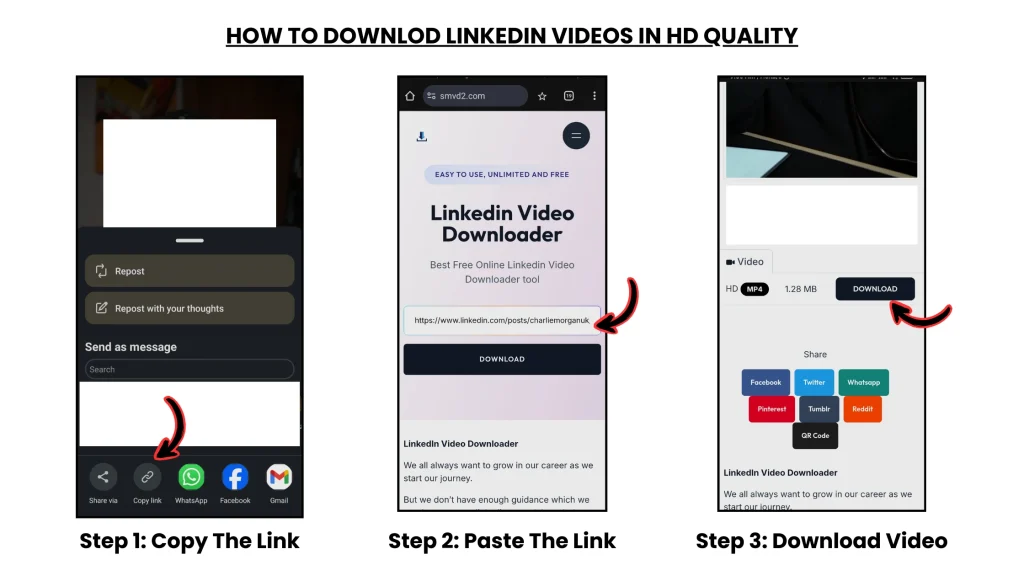
Step 1: Copy the LinkedIn Video Link
First, locate the reel or short video you want to download.
Steps:
- Open LinkedIn (mobile app or desktop browser)
- Find the target video post
- Click the three-dot (•••) menu
- Select Copy link to post
This copied URL acts as the reference point for identifying the original hosted video source.
Step 2: Visit smvd2.com

Open your preferred browser and visit smvd2.com.
The interface is intentionally minimal, allowing users to quickly paste the copied LinkedIn link without additional setup or account creation.
Step 3: Paste the Link and Download
Steps:
- Paste the LinkedIn video or post URL into the input field
- Click the Download button
- Allow the system to process the video source
- Download the MP4 video file
Because the tool accesses the original uploaded video rather than recording the screen playback, video clarity, frame quality, and audio synchronization are generally preserved more effectively.
How LinkedIn Reels Actually Work (Important Insight)
Not all LinkedIn videos are processed the same way internally.
Understanding this helps explain why some videos download properly while others do not.
1. Native LinkedIn Videos
These videos are uploaded directly to LinkedIn.
They are:
- Hosted on LinkedIn infrastructure
- Integrated into the LinkedIn feed system
- Usually downloadable through LinkedIn-compatible video tools
2. External or Embedded Videos
Some LinkedIn posts contain embedded content from platforms like YouTube or Vimeo instead of native LinkedIn uploads.
These videos are not actually hosted by LinkedIn itself.
As a result, LinkedIn-based download tools may not detect or process them properly.
Key Insight:
Most LinkedIn reels are optimized for mobile-first streaming and feed delivery, not long-term storage.
Download tools work by identifying the original hosted media source connected to the LinkedIn post rather than capturing the on-screen playback itself.
Supported Devices and Platforms
smvd2.com works across most major devices and browsers.
Desktop Devices
- Windows PCs
- macOS computers
Mobile Devices
- Android smartphones
- iPhones and iPads
Supported Browsers
- Chrome
- Safari
- Firefox
- Edge
- Opera
Because the platform operates entirely inside the browser, users do not need to install software, browser extensions, or applications.
Video Quality and Format
Videos downloaded using smvd2.com generally maintain quality close to the original uploaded version.
Key Characteristics
- MP4 format for universal compatibility
- Stable audio synchronization
- No additional watermark
- Resolution based on the original uploaded file
Important Insight:
Download tools can preserve original quality, but they cannot artificially improve low-resolution uploads. If the source video itself was uploaded in lower quality, the final downloaded version will reflect those same limitations.
Common Issues and How to Fix Them
Issue 1: Video Not Downloading
Cause:
Incorrect or incomplete post URL
Fix:
Copy the full LinkedIn post link directly from the share menu
Issue 2: Private or Restricted Content
Cause:
Limited audience visibility settings
Fix:
Ensure the LinkedIn post is publicly accessible
Issue 3: No Video Detected
Cause:
Embedded external content instead of a native LinkedIn upload
Fix:
Confirm that the video is directly uploaded to LinkedIn
Issue 4: Low Video Quality
Cause:
Original upload quality was low
Fix:
Download the highest available version provided by the source
Real-world Observation:
One of the most common mistakes users make is copying profile URLs instead of actual post URLs. Download tools typically require the specific video post link to identify the hosted media correctly.
Is smvd2.com Safe to Use?
Yes. smvd2.com is designed with simplicity, privacy, and minimal data dependency in mind.
Safety Highlights
- No login required
- No personal account access
- No storage of downloaded videos
- No forced software installations
- No intrusive pop-ups or aggressive redirects
Users remain in control of their downloads throughout the process.
Compared to random browser extensions that sometimes request unnecessary permissions, browser-based tools with minimal access requirements are generally considered safer for casual use.
Legal and Responsible Use
LinkedIn videos should always be downloaded responsibly and ethically.
Acceptable Use
- Personal learning
- Educational reference
- Backup of your own content
- Content used with permission
Avoid
- Republishing without creator consent
- Commercial redistribution without rights
- Violating platform or copyright policies
Respecting creator ownership helps maintain ethical and professional use of online content.
Smvd2.com vs Other Download Methods
| Method | Video Quality | Ease of Use | Risk Level |
|---|---|---|---|
| smvd2.com | High | Very Easy | Low |
| Screen Recording | Medium | Manual | Medium |
| Browser Extensions | Variable | Complex | High |
| Mobile Apps | Variable | App Required | High |
Conclusion:
Direct browser-based tools typically provide the best balance between simplicity, quality preservation, accessibility, and user safety.
Frequently Asked Questions
Can I download LinkedIn reels directly?
No. LinkedIn currently does not provide a built-in native download option for most public video posts.
Is it legal to download LinkedIn videos?
Generally, downloading for personal or educational use is acceptable, but redistribution without permission should be avoided.
Do I need to install software?
No. smvd2.com works entirely inside your browser.
Can I download videos on mobile devices?
Yes. The tool works across modern smartphones, tablets, and desktop devices.
What format are videos downloaded in?
Videos are typically downloaded in MP4 format, which is compatible with most devices and media players.
The Growing Importance of LinkedIn Video Content
Short-form video is becoming one of the fastest-growing content formats on LinkedIn.
Professionals increasingly use reels and short videos to:
- Share expertise quickly
- Build professional authority
- Educate niche audiences
- Increase engagement
- Communicate ideas more efficiently
In recent years, LinkedIn’s algorithm has visibly increased video visibility across the feed, especially for mobile users. As a result, short-form professional content is becoming a larger part of how knowledge is shared on the platform.
As LinkedIn continues prioritizing video engagement, the ability to save valuable educational content will likely become even more useful for professionals and teams.
Final Thoughts
LinkedIn reels and short videos have evolved into valuable sources of professional education, business insights, and practical industry knowledge.
However, because LinkedIn primarily prioritizes feed visibility and engagement rather than permanent accessibility, useful videos can quickly become difficult to rediscover later.
By understanding how LinkedIn short-form videos work and using the correct download method, users can:
- Save valuable insights
- Build a personal learning library
- Access important videos anytime
- Preserve useful professional content for future reference
Tools like smvd2.com simplify this process by turning a LinkedIn post link into a downloadable video while maintaining speed, accessibility, and original video quality.
Related Articles:
- How to Download LinkedIn Videos from Posts or Feeds
- How to Save LinkedIn Videos on Mobile and Desktop Devices
- How to Download LinkedIn Videos Without Watermark
- Difference Between LinkedIn Posts, Reels, Stories & Learning Videos
- Types of LinkedIn Videos You Can Download