
Top 5 LinkedIn Downloading Methods Ranked (With Pros & Cons)
LinkedIn has become much more than a professional networking platform. Today, it is one of the most valuable places online for professional video content, where founders, recruiters, marketers, educators, consultants, and industry experts regularly share useful insights through videos.
From leadership interviews and product demos to webinars, tutorials, hiring advice, and marketing breakdowns, LinkedIn videos often contain information professionals want to save for:
- future learning
- internal reference
- competitor research
- team training
- strategy discussions
- offline viewing
However, LinkedIn still does not provide a built-in download option for most native video posts.
Because of this, many users look for practical ways to:
- download LinkedIn videos
- save LinkedIn videos for offline viewing
- archive webinars or educational clips
- preserve professional learning material
- store useful business insights locally
- build long-term knowledge libraries
In many cases, valuable LinkedIn posts disappear quickly inside the feed, which is one reason professionals increasingly prefer saving important videos instead of trying to rediscover them later.
Quick Answer
If you want the best overall method for saving LinkedIn videos, browser-based LinkedIn video downloader tools are usually the strongest option for most users.
Why?
Because they combine the things professionals actually care about most:
- speed
- simplicity
- no installation
- cross-device access
- high convenience
- low technical effort
- reliable workflow
Compared with:
- screen recording
- browser extensions
- desktop software
- developer-heavy saving methods
browser-based downloader tools are generally the most practical solution in real-world professional usage.
Most users are not looking for complex workflows. They simply want a clean and repeatable way to save useful LinkedIn content quickly.
This guide ranks the top 5 LinkedIn downloading methods based on:
- ease of use
- output quality
- speed
- flexibility
- technical complexity
- long-term reliability
- practical everyday usability
We will also explain why a focused browser-based solution like SMVD2.com can work as one of the most balanced all-in-one options for professionals.
What Is a LinkedIn Video Downloader?

A LinkedIn video downloader is a tool or workflow that helps users save publicly accessible LinkedIn videos to their device.
In most cases, these tools allow users to:
- copy a LinkedIn post URL
- process the underlying video stream
- generate a downloadable video file
- save the content locally, often in MP4 format
The goal is simple:
make it easier to preserve valuable LinkedIn video content for offline access, learning, research, or future reference.
Professionals commonly use LinkedIn video downloaders to:
- save educational clips
- archive webinars
- store marketing research material
- preserve case-study videos
- collect sales or recruiting examples
- build internal learning libraries
- save useful creator insights
A good LinkedIn downloader reduces friction. Instead of relying on temporary workarounds, users can save relevant content in a faster and more repeatable way.
In practical use, workflow simplicity matters more than most people realize. Even technically powerful methods often become frustrating when users need to repeat the process regularly.
Why People Download LinkedIn Videos
The demand for LinkedIn video downloads has increased rapidly because LinkedIn is no longer just a networking platform — it has become a serious professional learning ecosystem.
Here are some of the most common reasons professionals save LinkedIn videos.
1. Professional Learning
Many creators publish highly valuable educational content through:
- expert tips
- mini tutorials
- hiring advice
- B2B marketing strategies
- founder lessons
- industry commentary
- workflow breakdowns
Downloading these videos allows professionals to revisit them later without needing to search through the feed again.
In many cases, users save videos specifically because LinkedIn’s feed moves quickly and older posts become harder to rediscover over time.
2. Internal Team Training
Managers, founders, and team leads often discover useful LinkedIn clips that explain concepts clearly.
Instead of repeatedly sharing post links, they may prefer storing the videos locally for:
- onboarding
- internal workshops
- team education
- sales training
- presentation material
- knowledge-sharing systems
Short LinkedIn videos are increasingly being used like “micro-learning assets” inside organizations.
3. Marketing Research
Marketers frequently analyze LinkedIn videos to study:
- competitor messaging
- ad creative structures
- founder branding
- webinar hooks
- storytelling patterns
- engagement strategies
- audience response behavior
Saving video posts makes future analysis easier and more organized.
In practice, many B2B marketers build swipe files of strong LinkedIn videos for future campaign inspiration.
4. Client Education
Consultants and agencies often save relevant LinkedIn videos to support:
- strategy discussions
- client presentations
- workshop material
- educational sessions
- business recommendations
For example, a consultant may save a LinkedIn video explaining:
- creator strategy
- B2B growth
- recruitment trends
- positioning frameworks
to reference later during meetings.
5. Personal Knowledge Libraries
Many professionals build private collections of valuable LinkedIn content for future learning.
This is especially common among:
- recruiters
- sales professionals
- marketers
- founders
- consultants
- coaches
- job seekers
- educators
When content is genuinely useful, people naturally want a dependable way to preserve it.
Top 5 LinkedIn Downloading Methods Ranked
Below are the most common ways to download LinkedIn videos, ranked based on:
- usability
- efficiency
- flexibility
- quality
- reliability
- long-term practicality
1. Online LinkedIn Video Downloader Tools (Best Overall Method)
Online LinkedIn video downloader tools are the best overall option for most users.
They work directly inside the browser and usually require nothing more than copying and pasting the LinkedIn post URL.
How This Method Works
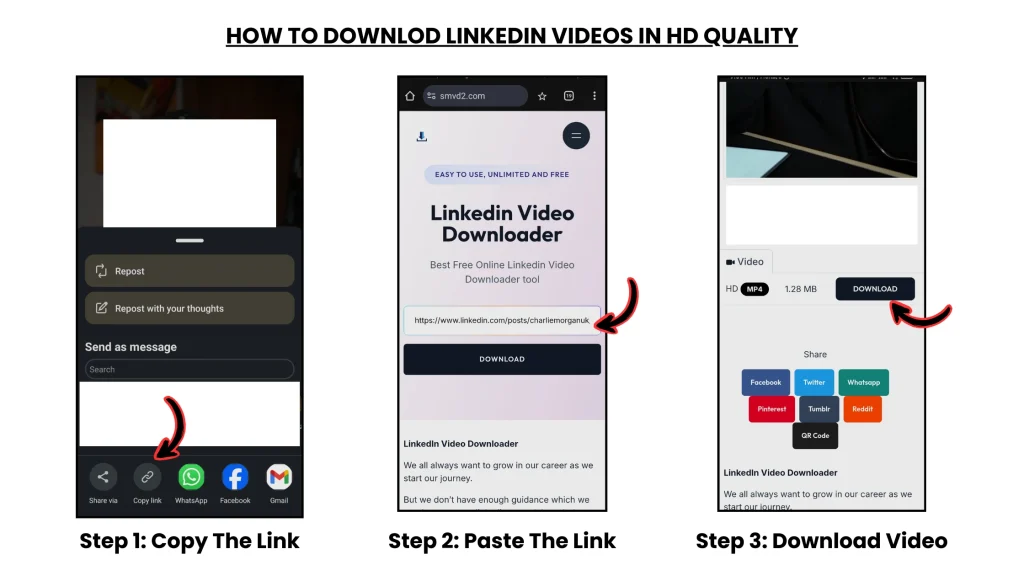
The process is usually straightforward:
- Copy the LinkedIn video post URL
- Paste the link into an online LinkedIn video downloader
- Let the tool process the video
- Download and save the file, usually as MP4
For most public LinkedIn video posts, this is the fastest and least complicated workflow.
Why This Method Ranks #1
This method ranks first because it solves the core user problem with the least friction.
Most professionals do not want:
- software installation
- browser permission risks
- manual trimming
- technical inspection tools
- command-line workflows
They simply want a fast and clean method that works consistently.
That is where browser-based downloader tools perform best.
In practical testing, browser-based tools are often easier to repeat across multiple devices compared to extensions or software-heavy workflows.
Best For
- beginners
- professionals who prioritize speed
- mobile users
- desktop users
- occasional downloaders
- frequent downloaders
- users who prefer no-installation workflows
Real-World Example
A marketing manager finds a LinkedIn webinar clip explaining a strong campaign framework and wants to use it later during internal team training.
Instead of:
- screen recording
- editing clips
- installing software
they simply:
- copy the post link
- paste it into a browser-based downloader
- save the file within seconds
That level of simplicity is why browser-based tools remain the preferred option for most users.
Pros
- extremely easy to use
- no installation required
- fast processing
- works across devices
- usually supports high-quality downloads
- beginner friendly
- simple copy-paste workflow
Cons
- quality varies depending on the tool infrastructure
- some tools may contain ads or clutter
- certain tools may temporarily break after LinkedIn backend updates
- private or restricted videos are usually unsupported
In practice, this last limitation is important because many users mistakenly assume a tool is broken when the issue is actually post visibility restrictions.
Final Verdict
For most real-world professionals, browser-based LinkedIn video downloaders remain the most efficient, scalable, and beginner-friendly solution.
They provide the best balance between:
- simplicity
- speed
- accessibility
- output quality
- workflow convenience
2. Screen Recording (Best Backup Method)
Screen recording is the most universal fallback option.
If a video can be played on the screen, it can usually be recorded.
How It Works
- Open the LinkedIn video
- Start your device’s screen recorder
- Play the video
- Stop recording
- Save and trim the file if needed
Why It Ranks #2
Screen recording ranks second because it works in situations where downloader detection may fail.
It becomes useful when:
- downloader tools are temporarily unavailable
- a stream is difficult to detect
- the content is being watched live
- users need a quick emergency backup
In real-world situations, many professionals keep screen recording as a fallback rather than a primary workflow.
Best For
- emergency backup situations
- one-time saves
- live content
- users who want universal compatibility
Pros
- works in many situations
- built into most devices
- no additional tools needed in many cases
- useful backup workflow
Cons
- lower quality than original source files
- audio clarity may vary
- requires real-time playback
- manual trimming is often needed
- inefficient for repeated use
Screen recordings also frequently capture:
- notifications
- cursor movement
- accidental interruptions
which reduces professional usability.
Final Verdict
Screen recording is dependable as a backup method, but it is not the cleanest or most efficient long-term solution.
3. Browser Extensions (Convenient but Less Reliable Long Term)
Browser extensions can make LinkedIn video downloading feel convenient because they integrate directly into the browsing experience.
For users who save videos frequently, that shortcut can initially feel attractive.
How It Works
- Install a video downloader extension
- Open the LinkedIn post
- Let the extension detect the media
- Click the download option
Why It Ranks #3
Extensions rank third because they combine convenience with higher long-term risk.
Most extensions depend heavily on:
- browser permissions
- extension maintenance
- LinkedIn compatibility
- backend stability
A browser extension that works today may suddenly fail after:
- browser updates
- LinkedIn infrastructure changes
- streaming endpoint modifications
In practical usage, extension reliability is often inconsistent over long periods.
Best For
- frequent desktop users
- users comfortable with extensions
- people who prefer in-browser shortcuts
Pros
- fast workflow
- integrated browser experience
- useful for repeat downloads
- less copy-paste effort
Cons
- some extensions create privacy concerns
- browser performance may slow down
- reliability varies significantly
- mobile compatibility is often poor
- extensions can stop working after updates
Some extensions also request excessive browser permissions, which creates unnecessary security concerns for professionals handling sensitive work environments.
Final Verdict
Browser extensions can be convenient, but they are not always the safest or most future-proof workflow.
4. Dedicated Video Downloader Software (Best for Heavy Use Cases)
Dedicated desktop software is usually more advanced than browser-based workflows and often includes additional controls.
These tools may support:
- batch downloads
- format conversion
- resolution handling
- media organization
- advanced save settings
How It Works
- Install the software
- Paste the LinkedIn video URL
- Configure settings if needed
- Save the video locally
Why It Ranks #4
This method ranks fourth because it is often excessive for average users.
Most professionals do not need advanced configuration every time they save a single LinkedIn clip.
Desktop software generally makes more sense for:
- repeated workflows
- content teams
- researchers
- large-scale media handling
Best For
- media-heavy workflows
- advanced users
- research teams
- bulk download needs
Pros
- strong output quality
- better file control
- batch download support
- advanced workflow options
Cons
- requires installation
- setup takes longer
- some tools are paid
- unnecessary complexity for casual users
- heavier workflow overhead
In practical business environments, many users abandon desktop tools because browser-based workflows are faster for everyday usage.
Final Verdict
Dedicated downloader software is powerful, but it is generally better suited for advanced or repeated workflows rather than simple day-to-day LinkedIn video saving.
5. Technical / Developer Methods (Maximum Control, Lowest Practicality)
Technical workflows include advanced methods such as:
- browser network inspection
- media request tracing
- stream saving
- developer tools
- command-line scripts
These methods are typically used when users want maximum technical control over how video streams are identified or processed.
Why This Method Ranks #5
This method ranks last not because it is weak, but because it is highly impractical for most professionals.
It usually requires:
- technical experience
- manual troubleshooting
- understanding of media requests
- familiarity with streaming behavior
- significant time investment
For average LinkedIn users, this complexity is unnecessary.
Best For
- developers
- technical researchers
- advanced users
- difficult edge cases
Pros
- maximum technical control
- useful for rare situations
- can help diagnose complex media workflows
Cons
- not beginner friendly
- time-consuming
- easy to misconfigure
- inconsistent for daily use
- requires technical confidence
In many situations, LinkedIn dynamically refreshes video streams, which makes manual saving unreliable even for experienced users.
Final Verdict
Developer-heavy workflows may help in difficult situations, but they are not the right solution for most professionals who simply want a fast and repeatable way to save LinkedIn videos.
Related Articles:
- Manual vs Tool-Based LinkedIn Video Download (Deep Comparison)
- How to Download LinkedIn Videos Without Third-Party Apps
- Best LinkedIn Video Downloaders
- Browser Based vs App Based LinkedIn Downloaders