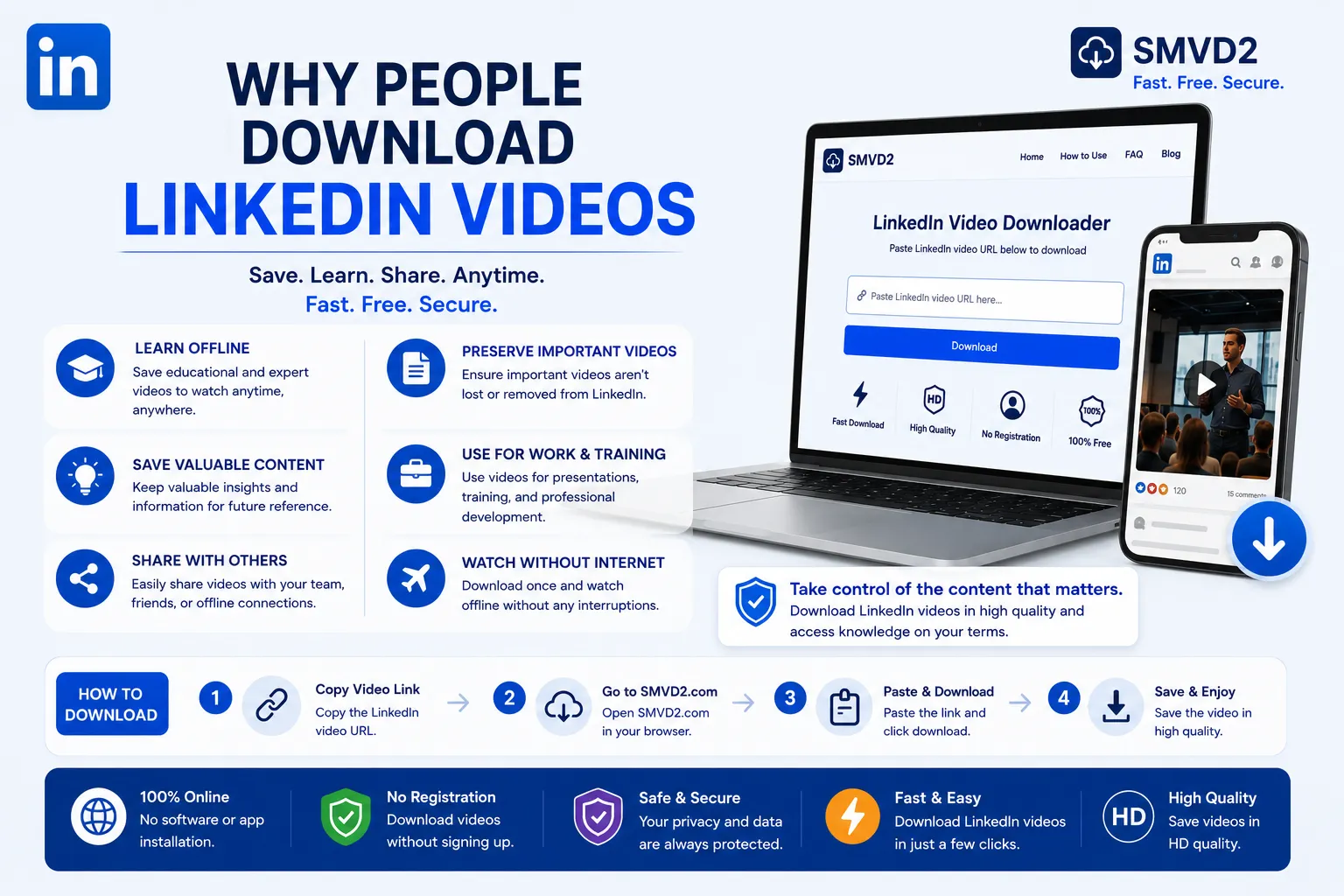
Why People Download LinkedIn Videos
LinkedIn has evolved far beyond a platform for job seekers and recruiters. Today, it functions as one of the world’s largest professional content hubs, where industry leaders, marketers, educators, recruiters, founders, and business professionals share valuable knowledge through video.
From career advice and leadership lessons to marketing strategies, AI insights, sales training, and product demonstrations, LinkedIn videos have become an important source of professional learning. Unlike entertainment-focused platforms, many LinkedIn videos provide practical information that users can immediately apply to their careers or businesses.
Because of this, more professionals are looking for ways to save valuable LinkedIn videos for future reference.
In simple terms, people don’t download LinkedIn videos because they’re afraid of missing entertainment content—they download them because they don’t want to lose access to useful knowledge.
During our analysis of LinkedIn video consumption trends and user behavior across professional communities, one pattern became clear: users often discover highly valuable videos but struggle to find them again weeks or months later. LinkedIn’s feed is designed to surface fresh content, which means even saved posts can become buried over time.
This is one of the biggest reasons LinkedIn video downloaders have become increasingly popular among professionals, students, business owners, and corporate teams.
In this guide, we’ll explore exactly why people download LinkedIn videos, the real-world situations where downloading makes sense, common challenges users face, and how SMVD2.com provides a simple solution for saving LinkedIn videos for offline access.
The Growing Popularity of Video Content on LinkedIn
Video has rapidly become one of LinkedIn’s most engaging content formats.
A few years ago, most LinkedIn content consisted of text posts and articles. Today, video is used for everything from thought leadership and educational content to product launches and company updates.
Professionals regularly use LinkedIn videos to:
- Share industry insights
- Publish educational tutorials
- Demonstrate products and services
- Conduct interviews
- Present business case studies
- Share conference highlights
- Explain emerging technology trends
- Deliver career development advice
One interesting observation is that LinkedIn videos often have a much longer practical lifespan than social media content on platforms focused on entertainment.
For example:
A funny viral clip may be forgotten within days.
A LinkedIn video explaining B2B lead generation, personal branding, SEO strategy, AI automation, or sales psychology may remain useful for years.
This difference fundamentally changes how users interact with content.
Instead of consuming a video once and moving on, professionals frequently revisit the same content multiple times to review key concepts, training materials, or implementation strategies.
That’s where downloading becomes valuable.
What We Noticed About Professional Video Consumption
While researching how professionals interact with LinkedIn videos, we noticed that most users fall into three broad categories:
1. Learners
These users consume educational content to improve their skills.
Common examples include:
- Students
- Job seekers
- Freelancers
- Marketers
- Business owners
Their primary goal is to learn something new and revisit important lessons later.
2. Team Leaders and Managers
These users often discover useful videos they want to share internally.
Examples include:
- Sales managers
- HR leaders
- Marketing managers
- Business consultants
Instead of sending employees back to search for the original LinkedIn post, they prefer having quick access to the content whenever training opportunities arise.
3. Researchers and Industry Analysts
These users monitor industry developments and thought leadership content.
They frequently save:
- Market trend analyses
- Industry forecasts
- Technology updates
- Expert interviews
For this audience, downloading serves as a way to build a searchable knowledge archive.
This distinction is important because it highlights something many articles overlook:
People rarely download LinkedIn videos simply because they can.
They download them because the content continues to provide value long after it disappears from their feed.
Why LinkedIn’s Feed Creates a Need for Downloads
One factor that many users don’t consider is the nature of LinkedIn’s algorithm.
The platform prioritizes fresh content and engagement signals.
As a result:
- Older posts become harder to find.
- Educational videos may disappear from your feed.
- Valuable resources get buried beneath newer updates.
- Saved collections become increasingly difficult to navigate.
In practical terms, finding a video you watched six months ago can sometimes take longer than learning from the video itself.
This creates a simple decision for many professionals:
Continue searching through LinkedIn every time they need the information again, or save the video once and access it instantly whenever needed.
For many users, downloading becomes the more efficient option.
Why People Download LinkedIn Videos
There isn’t a single reason professionals save LinkedIn videos.
Different users have different goals, industries, and workflows.
However, after examining common usage patterns, several motivations appear consistently across most audiences.
1. To Watch Videos Offline
Offline viewing remains one of the most common reasons people download LinkedIn videos.
Professionals often:
- Travel frequently
- Commute daily
- Work remotely
- Attend conferences
- Experience unreliable internet connections
Downloading allows them to access content anytime without depending on network availability.
For example, a marketing professional flying to a conference may download several LinkedIn tutorials beforehand and watch them during travel.
Similarly, students and remote workers often save educational content to review when internet access is limited.
What Most People Don’t Realize
Offline access isn’t only about convenience.
It also reduces distractions.
Watching a downloaded video eliminates notifications, feed recommendations, and endless scrolling—allowing users to focus entirely on learning.
This is one reason many professionals prefer downloaded educational content over streaming directly through social feeds.
2. To Save Valuable Educational Content
One of the biggest reasons people download LinkedIn videos is to preserve educational content that may be useful months or even years later.
LinkedIn has become a major learning platform where professionals regularly share practical advice on topics such as:
- Digital marketing
- Search engine optimization (SEO)
- Artificial intelligence (AI)
- Leadership development
- Sales strategies
- Personal branding
- Entrepreneurship
- Recruitment and hiring
- Business operations
Unlike traditional social media content, many LinkedIn videos solve real-world professional problems.
For example, a founder may share a framework for acquiring the first 100 customers, while a recruiter may explain common interview mistakes that cost candidates job opportunities.
These aren’t videos people watch once and forget.
They are resources that users often revisit multiple times.
A Common Challenge Professionals Face
Many users save LinkedIn posts expecting to return later.
However, after a few months, their saved collection may contain hundreds of posts.
Finding a specific video can become surprisingly difficult.
Downloading important videos creates a personal learning library that remains organized and instantly accessible.
Our Observation
One pattern we consistently notice among professionals is that the most frequently downloaded LinkedIn videos are rarely promotional.
Instead, they’re usually educational.
People tend to save content that teaches them something valuable rather than content that simply advertises a product or service.
This is especially true for:
- Marketing tutorials
- Career advice
- Industry analysis
- Software demonstrations
- Productivity frameworks
The more practical the information, the more likely users are to download it.
3. To Build a Personal Learning Library
Many professionals approach LinkedIn the same way previous generations approached bookshelves.
They use it to collect knowledge.
Downloading videos allows users to create a structured archive of content tailored to their interests and career goals.
A typical professional learning library may include:
- Leadership lessons
- Marketing strategies
- Sales training videos
- Industry forecasts
- Product walkthroughs
- Business case studies
- AI tutorials
- Professional development content
Instead of relying on LinkedIn’s search functionality, users can organize videos into folders and access them whenever needed.
Why This Matters
Learning often happens in stages.
A video that seems irrelevant today may become extremely valuable six months later.
For example:
A freelancer learning SEO may initially focus on content creation.
Months later, they may revisit previously downloaded videos covering technical SEO, link building, or analytics.
Without downloads, locating those resources again may be difficult.
Downloading vs Saving Posts
| Method | Advantage | Limitation |
|---|---|---|
| Save LinkedIn Post | Quick and easy | Can become difficult to find later |
| Bookmark URL | No storage required | Original content may be removed |
| Download Video | Permanent offline access | Requires downloading beforehand |
This is one reason many professionals prefer downloading particularly valuable content.
4. To Prevent Losing Important Content
One of the most overlooked reasons people download LinkedIn videos is content preservation.
Many users assume content posted today will always be available.
In reality, that’s not always the case.
Videos may disappear because:
- The creator deletes the post
- Privacy settings change
- Accounts are removed
- Content is edited
- Posts become difficult to locate
A useful video available today may no longer be accessible in the future.
What Most Articles Don’t Mention
The risk isn’t always deletion.
Sometimes the biggest challenge is discoverability.
A video may still exist on LinkedIn, but finding it again months later can be nearly impossible.
Professionals who regularly consume educational content often recognize this issue and proactively save important resources while they’re available.
Real-World Example
Imagine finding a detailed video explaining how a SaaS company increased conversions by 40%.
You may not need that information immediately.
However, six months later, when optimizing your own sales funnel, that exact video could become extremely valuable.
Downloading ensures you don’t lose access when the information becomes relevant.
5. To Share Videos Within Teams
LinkedIn has become a major source of workplace learning.
Managers, team leaders, consultants, and business owners frequently discover videos worth sharing with colleagues.
Common examples include:
- Sales coaching videos
- Leadership training
- Marketing strategy breakdowns
- Recruitment best practices
- Industry trend updates
- Productivity frameworks
Rather than repeatedly searching for the same LinkedIn post, many teams prefer having quick access to downloaded content.
How Businesses Use Downloaded LinkedIn Videos
Downloaded videos are often used for:
- Team meetings
- Employee onboarding
- Internal workshops
- Training sessions
- Knowledge-sharing initiatives
In practical business environments, convenience matters.
When a manager needs a specific training video during a meeting, having the file readily available can save valuable time.
Important Consideration
Organizations should always respect content ownership and use downloaded content responsibly.
Downloading should support learning and professional development rather than unauthorized redistribution.
6. To Use Content During Presentations and Training Sessions
Professionals regularly incorporate external resources into presentations, workshops, and educational sessions.
LinkedIn videos often provide:
- Expert insights
- Industry examples
- Real-world case studies
- Practical demonstrations
These resources can enhance presentations by providing additional context and credibility.
Why Offline Access Matters
One thing we’ve noticed is that internet reliability is often overlooked until something goes wrong.
A training session may run perfectly until a video fails to load.
A conference presentation may be disrupted by poor connectivity.
A client meeting may lose momentum because a video buffers unexpectedly.
Downloaded videos eliminate these risks.
Trade-Off Analysis
| Benefit | Consideration |
|---|---|
| Instant access | Uses device storage |
| No internet dependency | Requires preparation beforehand |
| Reliable playback | Must keep files organized |
| Consistent training experience | Content may need periodic updates |
For many professionals, these trade-offs are worthwhile because reliability often matters more than convenience during important presentations.
A Growing Trend
As video-first professional communication continues to grow, more organizations are building internal resource libraries that include carefully selected LinkedIn videos.
This trend is especially common among:
- Marketing agencies
- Consulting firms
- Startups
- Sales organizations
- Educational institutions
In these environments, downloaded videos become more than simple media files—they become part of an ongoing learning and development system.
7. To Study Industry Trends and Market Insights
LinkedIn has become one of the fastest places to discover what’s happening across industries.
Executives, founders, consultants, analysts, and subject matter experts regularly publish videos discussing:
- Emerging technologies
- Market shifts
- Consumer behavior
- Economic trends
- AI developments
- Industry forecasts
- Business strategy changes
For professionals who rely on staying informed, these videos often serve as valuable research material.
Why Researchers Download LinkedIn Videos
Unlike traditional articles, videos frequently include:
- Personal insights
- Real-world experiences
- Market predictions
- Lessons learned from implementation
Many professionals download these videos so they can review them later when making strategic decisions.
For example:
A marketing director may save multiple videos discussing AI-powered advertising.
Months later, when evaluating AI tools for their company, those videos become a useful reference point.
What We Observed
One interesting pattern is that industry researchers rarely download videos immediately because they need them.
Instead, they download them because they anticipate needing them in the future.
In many cases, the value of a LinkedIn video increases over time as market conditions evolve.
This is particularly common with:
- Business strategy discussions
- Technology trend analyses
- Economic forecasts
- Leadership insights
Professionals often revisit these videos later to compare predictions against actual outcomes.
Building a Knowledge Archive
Some professionals create organized collections of downloaded videos categorized by:
- Industry
- Topic
- Skill
- Market trend
- Business function
Over time, this becomes a searchable knowledge archive that can support research, planning, and decision-making.
8. To Learn From Industry Leaders
One of LinkedIn’s biggest strengths is direct access to experienced professionals.
The platform hosts content from:
- CEOs
- Entrepreneurs
- Marketing leaders
- Recruiters
- Sales experts
- Investors
- Technology specialists
- Business consultants
Many users follow these individuals because they provide perspectives based on real-world experience rather than theory alone.
Why People Save Expert Videos
Professional advice often becomes more valuable when revisited.
For example:
A founder may share lessons from scaling a startup.
At first, the information may seem interesting but not immediately relevant.
However, when another entrepreneur encounters similar growth challenges months later, those insights can suddenly become highly actionable.
Downloading important videos allows users to revisit expert advice exactly when they need it.
What Most People Don’t Realize
The real value isn’t necessarily the video itself.
The value is preserving access to the thinking behind the video.
Many industry leaders share frameworks, decision-making processes, and problem-solving approaches that remain useful long after specific trends change.
That’s why professionals often treat these videos as educational assets rather than temporary social media content.
Common Mistake
Many users assume they will remember where they found a valuable video.
In reality, after consuming hundreds of pieces of content, recalling a specific post can become difficult.
Downloading important resources when you discover them is often far easier than trying to locate them later.
9. To Avoid Searching Through the Feed Again
This is one of the simplest yet most practical reasons people download LinkedIn videos.
Searching for previously viewed content can be frustrating.
Even when users remember:
- The creator
- The topic
- The approximate date
Finding the original video may still take significant time.
LinkedIn’s feed is designed to prioritize recent and relevant content, not necessarily content you’ve viewed before.
The Hidden Cost of Not Downloading
Most people think downloading saves content.
In reality, it often saves time.
Consider this scenario:
You spend:
- 30 seconds downloading a useful video today
Or
- 15 minutes searching for it six months later
From a productivity perspective, downloading often becomes the more efficient choice.
Our Observation
Many professionals underestimate how much time they spend searching for previously viewed information.
The issue isn’t that LinkedIn lacks content. It’s abundance of content available on the platform.
As the platform grows, rediscovering older educational resources becomes increasingly difficult.
Downloading solves this problem by creating immediate and permanent access.
A Practical Framework
Many professionals use a simple decision-making process:
If a video provides value today and may provide value again in the future, save it.
This approach helps build a useful collection without downloading everything encountered in the feed.
10. To Preserve Important Career Resources
Career-related content is among the most downloaded categories on LinkedIn.
Professionals frequently save videos covering:
- Resume optimization
- Interview preparation
- Networking strategies
- Personal branding
- Career transitions
- Salary negotiation
- Leadership development
- Professional communication
Unlike trend-based content, career guidance often remains relevant for years.
Why Career Videos Are Different
Many career lessons are not consumed once.
They’re revisited repeatedly throughout a professional journey.
For example:
A job seeker may watch interview preparation videos multiple times before different interviews.
A professional pursuing a promotion may revisit leadership-related content several times throughout the year.
A freelancer building a personal brand may repeatedly reference networking strategies shared by industry experts.
Knowledge Retention Matters
Learning research consistently suggests that repetition improves retention.
Watching a useful career video once may provide inspiration.
Watching it multiple times often leads to implementation.
This is one reason downloaded content can become more valuable than streamed content.
Users can revisit key lessons whenever they need reinforcement.
Career Development Libraries
Many professionals maintain personal collections containing:
- Interview guides
- Resume advice
- Communication frameworks
- Leadership lessons
- Industry-specific training
These libraries often grow over time and become long-term career assets.
Who Benefits Most?
Downloaded career content is especially valuable for:
- Students
- Job seekers
- Freelancers
- Entrepreneurs
- Managers
- Professionals changing industries
For these groups, preserving access to proven advice can provide long-term benefits far beyond the original viewing experience.
A Quick Summary of the Top Reasons People Download LinkedIn Videos
After analyzing common usage patterns, most LinkedIn video downloads can be grouped into five broader motivations:
| Motivation | Why It Matters |
|---|---|
| Learning | Access educational content repeatedly |
| Convenience | Watch videos without internet access |
| Preservation | Avoid losing valuable content |
| Research | Build industry knowledge archives |
| Professional Growth | Save career and skill-development resources |
The common theme across all of these motivations is simple:
People aren’t downloading LinkedIn videos because they’re trying to collect content.
They’re downloading them because they’re trying to preserve knowledge.
And in a professional environment where information can directly impact careers, businesses, and decision-making, preserving valuable knowledge often becomes a worthwhile investment.
Challenges of Downloading LinkedIn Videos
While downloading LinkedIn videos can provide significant benefits, the process is not always as straightforward as many users expect.
Unlike some platforms that offer built-in download functionality for certain content types, LinkedIn generally does not provide a native download button for most public videos.
As a result, users often look for alternative solutions.
During our review of common user discussions, support questions, and downloader workflows, we noticed that most frustrations don’t come from downloading itself—they come from choosing the wrong method.
Many users spend more time troubleshooting download issues than actually saving the video.
Understanding these challenges can help users choose a more reliable approach from the beginning.
Common Problems Users Face When Downloading LinkedIn Videos
Several recurring issues appear across professional communities and online discussions.
1. No Direct Download Option
The biggest obstacle is simple:
Most LinkedIn videos cannot be downloaded directly through the platform.
Users may find valuable content but have no obvious way to save it for offline access.
This often leads people to search for:
- LinkedIn video downloader
- Save LinkedIn video
- Download LinkedIn videos without software
- LinkedIn video to MP4
The demand for these searches highlights a clear gap between how people consume professional content and the tools available for preserving it.
2. Videos Become Difficult to Locate Later
Many users assume saving a post solves the problem.
In practice, it only postpones it.
A saved post collection can quickly grow into hundreds of items.
After several months, locating a specific video may require:
- Remembering the creator
- Remembering the topic
- Searching through saved posts
- Browsing activity history
At that point, finding the content often becomes more difficult than downloading it would have been initially.
3. Software Installation Requirements
Some download solutions require:
- Desktop software
- Browser extensions
- Third-party applications
While these methods may work, they can introduce additional complexity.
For casual users, installing software simply to save a single video often feels unnecessary.
What We Noticed
Many professionals prefer browser-based tools because they require no setup.
The ability to copy a URL, paste it into a tool, and download a video within seconds is generally more convenient than installing and maintaining additional software.
4. Device Compatibility Issues
Not every solution works equally well across devices.
Some methods perform well on desktop computers but create difficulties on mobile devices.
Others may support:
- Windows
- Mac
But struggle with:
- Android
- iPhone
- iPad
This creates frustration for users who switch between multiple devices throughout the day.
Professionals increasingly expect tools to work consistently regardless of platform.
5. Video Quality Concerns
Another common challenge involves quality preservation.
Users often want to save videos for:
- Training
- Presentations
- Research
- Professional reference
Poor-quality downloads can reduce the usefulness of the content.
This is especially important when videos contain:
- Charts
- Graphs
- Screenshots
- Product demonstrations
- Detailed visual instructions
Maintaining video clarity becomes a critical factor.
6. Broken Download Methods
One challenge many users don’t anticipate is that some download methods stop working over time.
Platform updates can affect:
- Browser extensions
- Scripts
- Older software solutions
Real-World Observation
One thing we’ve consistently observed across social media download tools is that methods relying heavily on browser permissions or interface elements tend to be more vulnerable to platform updates.
When LinkedIn changes how content is displayed, some solutions may require updates before functioning properly again.
This is one reason users often prefer actively maintained web-based tools.
Common Mistakes People Make When Downloading LinkedIn Videos
Many download issues are caused by avoidable mistakes.
Mistake #1: Waiting Too Long
Users often assume content will always be available.
Months later, they discover:
- The post is deleted
- The creator changed privacy settings
- The video is difficult to find
If a video contains valuable professional knowledge, saving it while it’s available is often the safest approach.
Mistake #2: Downloading Everything
Not every video needs to be saved.
A better strategy is to focus on content that provides long-term value.
Examples include:
- Educational tutorials
- Business frameworks
- Career advice
- Industry research
- Training material
This helps maintain a useful and organized collection.
Mistake #3: Ignoring Organization
Downloading videos is only part of the process.
Without organization, users may simply replace one problem with another.
Many professionals create folders based on:
- Marketing
- Leadership
- Sales
- Recruiting
- AI
- Personal branding
This makes future retrieval significantly easier.
Downloading LinkedIn Videos: Comparing Different Approaches
Not all download methods offer the same experience.
The following comparison highlights common approaches.
| Method | Advantages | Limitations |
|---|---|---|
| Save Post on LinkedIn | Fast and simple | Content may become difficult to find |
| Bookmark URL | No storage required | Depends on post remaining available |
| Browser Extension | Quick access | May require permissions and updates |
| Desktop Software | Additional features | Installation required |
| Online Downloader | Browser-based convenience | Requires internet access during download |
What Most Users Ultimately Want
After evaluating different workflows, most professionals prioritize four things:
- Simplicity
- Speed
- Reliability
- Compatibility
They don’t necessarily need dozens of advanced features.
They simply want a dependable way to save useful videos and access them later.
What Makes a Good LinkedIn Video Downloader?
A high-quality LinkedIn downloader should solve the problems discussed above rather than create new ones.
The best solutions typically focus on user experience and efficiency.
Fast Processing
Professionals value tools that minimize friction.
A download process should take seconds, not minutes.
High-Quality Video Output
Downloaded videos should remain clear and usable.
This is particularly important for educational and professional content where details matter.
No Software Installation
Modern users increasingly prefer browser-based solutions.
Removing installation requirements simplifies the experience and reduces technical barriers.
Cross-Device Compatibility
A good downloader should work consistently across:
- Windows
- Mac
- Android
- iPhone
- Tablets
Users should not need different solutions for different devices.
User-Friendly Design
The download process should be intuitive enough that first-time users can complete it without instructions.
A simple workflow often creates a better experience than a feature-heavy workflow.
The Trade-Off Most People Overlook
Many users spend significant time searching for the “perfect” download solution.
In reality, the most valuable downloader is usually the one that reliably helps users save important content when they need it.
A tool that works consistently and efficiently often provides more value than a complex tool with dozens of rarely used features.
This perspective becomes especially important for professionals whose primary goal is preserving knowledge, not managing technology.
Why Reliability Matters More Than Features
When professionals save LinkedIn videos, they are often preserving:
- Career advice
- Training resources
- Industry research
- Business insights
- Educational content
The value lies in the content itself.
The downloader’s role is simply to make that content accessible whenever it’s needed.
That’s why reliability, simplicity, and speed consistently rank among the most important factors when choosing a LinkedIn video downloader.
And this is exactly where modern browser-based solutions have gained significant popularity among professionals looking for a practical way to save valuable LinkedIn videos.
Why SMVD2.com Is the Ultimate Solution

After understanding why professionals download LinkedIn videos and the challenges they commonly face, the next question becomes obvious:
What’s the easiest and most reliable way to save LinkedIn videos?
While there are multiple approaches available, most users ultimately want a solution that is:
- Fast
- Simple
- Reliable
- Easy to access
- Compatible with their devices
This is where SMVD2.com stands out.
Rather than overwhelming users with complicated workflows, software installations, or technical requirements, SMVD2 focuses on delivering a straightforward experience designed for modern professionals.
What We Looked For in an Ideal LinkedIn Video Downloader
When evaluating what makes a LinkedIn downloader genuinely useful, several factors consistently emerged as priorities.
Professionals generally care less about advanced technical features and more about practical usability.
The questions most users ask are:
- Can I download the video quickly?
- Do I need to install anything?
- Will it work on my device?
- Is the process easy to understand?
- Can I access the video offline afterward?
A downloader that answers “yes” to these questions usually provides a better experience than one packed with features that most users never use.
This practical perspective is one reason browser-based solutions continue gaining popularity.
What We Noticed About Browser-Based Downloaders
One interesting trend is the growing preference for tools that work directly through a web browser.
Users increasingly avoid:
- Software downloads
- Extension installations
- Account registrations
- Complex configurations
Instead, they prefer solutions that work immediately.
The reason is simple:
Most people download LinkedIn videos occasionally rather than every day.
Installing software for a task that takes less than a minute often feels unnecessary.
Browser-based tools remove that friction.
This is one of the strongest advantages offered by SMVD2.com.
Easy to Use
One of the biggest strengths of SMVD2 is simplicity.
The workflow follows a process that most users can understand instantly:
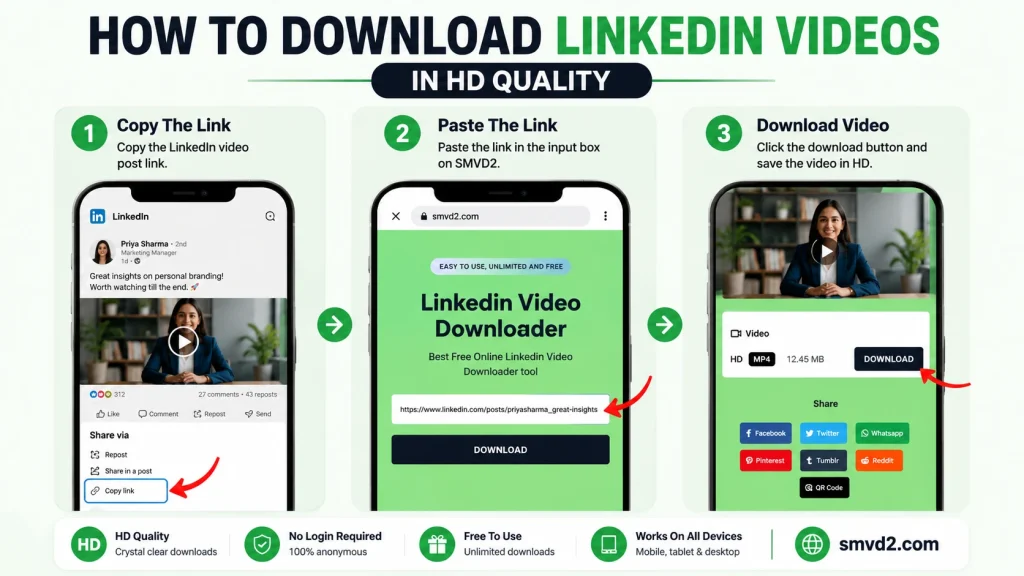
Step 1
Find the LinkedIn video you want to save.
Step 2
Copy the URL of the LinkedIn post.
Step 3
Visit SMVD2.com.
Step 4
Paste the URL into the downloader field.
Step 5
Generate the download link and save the video.
That’s it.
There are no complicated settings, learning curves, or technical requirements.
For professionals who value efficiency, a streamlined workflow can save significant time.
No Software or Extension Installation Required
Many download methods depend on:
- Browser extensions
- Desktop applications
- Third-party software
While these solutions may work, they introduce additional steps.
Some users are also hesitant to install software simply to download a single video.
SMVD2 eliminates this concern by operating entirely through a browser.
Why This Matters
From a usability perspective, browser-based tools offer several advantages:
| Browser-Based Approach | Software-Based Approach |
|---|---|
| No installation required | Installation required |
| Accessible instantly | Setup required |
| Works across devices | Device-specific |
| Lower learning curve | Often more complex |
For casual users and busy professionals alike, simplicity often wins.
Works Across Multiple Devices
Modern professionals rarely use a single device.
A typical workflow may involve:
- A desktop computer at work
- A laptop during travel
- A smartphone throughout the day
- A tablet during meetings
Because of this, device flexibility has become increasingly important.
SMVD2 is designed to work across a variety of environments, making it easier for users to access downloaded content wherever they are.
Particularly Useful For
- Remote workers
- Business travelers
- Students
- Freelancers
- Consultants
- Agency teams
These audiences frequently switch between devices and benefit from a solution that remains accessible regardless of platform.
Fast Video Processing
One frustration users often encounter with online tools is waiting.
Lengthy processing times create unnecessary friction.
Professionals generally want to:
- Save the video.
- Access the file.
- Continue working.
SMVD2 focuses on providing a quick workflow that minimizes delays and helps users preserve valuable content efficiently.
Why Speed Matters
The faster the process, the more likely users are to save educational resources when they discover them.
This becomes especially important when researching industry content, building learning libraries, or collecting training materials.
Built for Professional Use Cases
Many video downloaders are designed primarily around entertainment-focused platforms.
LinkedIn users have different goals.
They often download content for:
- Learning
- Training
- Research
- Career development
- Knowledge management
Because of this, the requirements are different.
Professionals typically value:
- Reliability
- Clarity
- Accessibility
- Convenience
More than flashy features.
SMVD2 aligns closely with these priorities.
Beginner vs Advanced User Perspective
One thing we noticed while evaluating common downloader workflows is that beginners and advanced users often approach tools differently.
Beginners Usually Want
- Simplicity
- Fast results
- No technical setup
- Clear instructions
Advanced Users Usually Want
- Efficiency
- Consistency
- Reliable performance
- Cross-device accessibility
Interestingly, both groups often arrive at the same conclusion:
The less friction involved, the better.
This is one reason browser-based workflows continue to attract a wide range of users.
Common Situations Where SMVD2 Can Help
Professionals use LinkedIn videos in many different ways.
Some common examples include:
Learning New Skills
Saving educational tutorials for future reference.
Building a Knowledge Archive
Creating a personal collection of industry insights and expert advice.
Team Training
Sharing useful learning resources within organizations.
Career Development
Preserving interview tips, leadership lessons, and professional guidance.
Industry Research
Maintaining access to trend analyses and expert commentary.
These practical use cases demonstrate why video downloading has become an important part of many professional workflows.
What Makes SMVD2 Different?
Most LinkedIn downloader discussions focus exclusively on downloading.
The larger picture is often overlooked.
The real goal is not simply obtaining a video file.
The goal is preserving valuable professional knowledge.
This distinction matters.
A downloaded LinkedIn video may contain:
- A career-changing insight
- A business strategy framework
- An industry trend prediction
- A leadership lesson
- A marketing technique
In many cases, the knowledge contained within the video is far more valuable than the file itself.
SMVD2 helps users preserve access to that knowledge in a simple and efficient way.
A Practical Recommendation
If a LinkedIn video provides:
- Educational value
- Professional insight
- Long-term usefulness
It may be worth saving.
A simple rule many professionals follow is:
If the information could still be valuable six months from now, preserve it today.
This approach helps build a meaningful resource library while avoiding unnecessary downloads.
And when users decide a video is worth preserving, having a straightforward solution available makes the process significantly easier.
Why More Professionals Are Turning to Browser-Based Downloaders
The broader trend is clear.
Professionals increasingly prioritize:
- Convenience
- Accessibility
- Reliability
- Simplicity
Over complicated workflows.
As LinkedIn continues growing as a source of professional education, business insight, and industry knowledge, tools that simplify content preservation will likely become even more important.
For users looking for a fast and practical way to save LinkedIn videos for future reference, SMVD2.com offers a streamlined experience designed around exactly those needs.
How to Download LinkedIn Videos Using SMVD2.com
Downloading a LinkedIn video with SMVD2.com is designed to be straightforward, even for users who have never used a video downloader before.
Step 1: Find the LinkedIn Video
Locate the LinkedIn post containing the video you want to save.
This could be:
- An educational tutorial
- A leadership lesson
- A marketing strategy video
- An industry analysis
- A product demonstration
- A career development resource
Step 2: Copy the LinkedIn Post URL
Copy the URL of the LinkedIn post where the video is published.
Most browsers and mobile apps allow users to quickly copy the post link using the share menu.
Step 3: Visit SMVD2.com
Open your preferred browser and navigate to SMVD2.com.
Because the platform is browser-based, there is no need to install additional software or browser extensions.
Step 4: Paste the URL
Paste the copied LinkedIn video URL into the provided input field.
Step 5: Download the Video
Generate the download option and save the video to your preferred device.
Once downloaded, the video can be accessed whenever needed, even without an internet connection.
Best Practices When Downloading LinkedIn Videos
Downloading videos can be incredibly useful, but following a few best practices helps ensure a better long-term experience.
Focus on Long-Term Value
Instead of downloading every interesting video you encounter, prioritize content that provides lasting value.
Examples include:
- Educational tutorials
- Industry insights
- Professional frameworks
- Career guidance
- Leadership lessons
This helps keep your collection organized and useful.
Organize Your Downloads
One thing we’ve noticed is that many users spend significant time building a video library but very little time organizing it.
Creating folders based on categories such as:
- Marketing
- Sales
- Leadership
- AI
- Recruiting
- Career Development
can make future retrieval dramatically easier.
Review Content Periodically
Industries evolve.
Technology changes.
Strategies improve.
A useful habit is periodically reviewing your downloaded resources and replacing outdated content with newer insights when appropriate.
Download Responsibly
Always respect content ownership and professional standards.
Downloaded content should be used responsibly and ethically.
The goal should be learning, research, and knowledge preservation—not unauthorized redistribution.
Common Mistakes to Avoid
Many professionals can improve their experience simply by avoiding a few common mistakes.
Downloading Without a Purpose
If a video provides little long-term value, downloading it may create unnecessary clutter.
A focused collection is usually more useful than a large collection.
Failing to Organize Content
Without organization, downloaded videos can become just as difficult to find as LinkedIn posts.
A simple folder structure can solve this problem.
Waiting Too Long
Valuable content isn’t always available forever.
If a video contains information you expect to revisit, preserving it while it’s available can prevent future frustration.
Ignoring Updates and New Insights
Professional knowledge evolves rapidly.
Downloaded content should complement ongoing learning rather than replace it.
Ethical Considerations and Responsible Usage
Whenever downloading content from any platform, professional responsibility matters.
Users should:
- Respect creator ownership
- Follow platform policies
- Avoid unauthorized redistribution
- Use content for legitimate educational or professional purposes
Downloading should support learning, research, and productivity while respecting the rights of content creators.
A Balanced Perspective
The most valuable professional communities thrive when both creators and learners benefit.
Creators share knowledge.
Professionals learn from it.
Responsible use helps maintain that ecosystem.
The Future of LinkedIn Video Consumption
LinkedIn’s role as a professional learning platform continues to grow.
Several trends are shaping how professionals consume video content.
Short-Form Professional Learning
Professionals increasingly prefer concise videos that deliver actionable insights quickly.
Micro-learning is becoming a major part of career development.
AI-Powered Professional Education
Artificial intelligence is influencing:
- Training programs
- Content recommendations
- Skill development
- Professional learning pathways
As a result, more educational content is being published in video format.
Video-First Thought Leadership
Many industry experts now prioritize video over traditional text content.
This trend is expected to continue as audiences increasingly prefer visual learning experiences.
Personal Knowledge Libraries
One emerging trend is the growth of personal knowledge management systems.
Professionals are increasingly building collections of:
- Articles
- Videos
- Research
- Frameworks
- Industry insights
Downloaded LinkedIn videos often become an important part of these systems.
What This Means for Professionals
As the volume of professional content continues growing, the ability to preserve and organize valuable knowledge may become just as important as discovering it.
The professionals who can efficiently capture, store, and revisit useful information often gain a long-term learning advantage.
Frequently Asked Questions
Why do people download LinkedIn videos?
Most people download LinkedIn videos to save educational content, watch videos offline, preserve valuable insights, build personal learning libraries, conduct research, and support professional development.
Can I watch downloaded LinkedIn videos without internet access?
Yes.
Once a video has been downloaded, it can typically be viewed offline without requiring an internet connection.
Why not simply save the LinkedIn post?
Saving a post can be useful, but older content often becomes difficult to locate over time.
Downloading provides permanent access and reduces the need to search for content later.
Are LinkedIn videos useful for professional learning?
Absolutely.
Many LinkedIn videos contain practical advice, industry insights, business strategies, and career guidance that professionals revisit repeatedly.
Who benefits most from downloading LinkedIn videos?
Common users include:
- Students
- Job seekers
- Freelancers
- Entrepreneurs
- Recruiters
- Managers
- Consultants
- Researchers
Anyone who regularly learns from professional content can benefit from preserving valuable resources.
What is the easiest way to download LinkedIn videos?
For many users, browser-based tools provide the simplest experience because they require no installation and can be accessed quickly from multiple devices.
SMVD2.com offers a streamlined workflow that allows users to paste a LinkedIn video URL and download the content directly through their browser.
Is downloading LinkedIn videos useful for teams and businesses?
Yes.
Many organizations use downloaded videos for:
- Internal learning
- Training programs
- Workshops
- Knowledge sharing
When used responsibly, downloaded content can support professional development across teams.
Will LinkedIn videos always remain available online?
Not necessarily.
Posts may become harder to find, creators may remove content, or privacy settings may change.
This is one reason professionals often preserve particularly valuable resources while they remain accessible.
Final Thoughts
The reasons people download LinkedIn videos extend far beyond convenience.
Professionals use downloaded videos to preserve knowledge, support career growth, conduct research, train teams, build learning libraries, and maintain access to valuable educational content.
Throughout this guide, one theme has remained consistent:
The true value isn’t the video file itself.
The true value is the information contained within it.
A leadership lesson, marketing framework, hiring strategy, AI insight, or business case study can continue delivering value long after it disappears from a social media feed.
That’s why many professionals choose to save important resources while they’re available.
As LinkedIn continues evolving into a major destination for professional learning and thought leadership, the ability to preserve valuable content will likely become increasingly important.
For users seeking a fast, straightforward, and browser-based way to save LinkedIn videos, SMVD2.com provides a practical solution that helps transform temporary content into a lasting professional resource.
In a world where information moves quickly, preserving the right knowledge can become a competitive advantage.
Related Articles:
- What Is a LinkedIn Video Downloader?
- How Marketers Use LinkedIn Videos for Content Repurposing
- How to Download LinkedIn Videos for Social Media Reposting