
LinkedIn Video Downloader vs Chrome Extensions – Pros & Cons
Downloading LinkedIn videos is no longer just about convenience. For many professionals, it now involves:
- privacy
- workflow efficiency
- browser security
- long-term reliability
- device flexibility
- team-level consistency
While both Chrome extensions and web-based downloader tools can save LinkedIn videos, they operate very differently behind the scenes — and those differences directly affect:
- security exposure
- browser performance
- workflow stability
- maintenance overhead
- long-term usability
Short Answer (LinkedIn Video Downloader vs Chrome Extensions)
For most professionals, web-based LinkedIn video downloader tools are usually the safer and more reliable option — especially for repeated use across multiple devices, teams, or work environments.
Chrome extensions may initially feel faster because they integrate directly into the browser experience. However, in long-term real-world use, many users eventually move away from extension-heavy workflows after dealing with:
- broken updates
- browser slowdowns
- permission concerns
- compatibility issues
- inconsistent extension maintenance
- IT or security restrictions
To understand why this happens, it is important to go beyond simple “pros and cons” lists and look at how both methods actually work.
What Is a LinkedIn Video Downloader?
A LinkedIn video downloader is a tool designed to save publicly accessible LinkedIn videos directly to a device — usually in formats like MP4.
These tools are commonly used for:
- offline learning
- saving webinars and case studies
- marketing research
- competitor analysis
- internal training libraries
- presentation preparation
- knowledge archiving
Most modern browser-based tools work without requiring LinkedIn login access, meaning they process only publicly accessible video URLs.
That separation is important because it reduces unnecessary account exposure and keeps workflows simpler for most users.
How LinkedIn Video Downloading Actually Works (Behind the Scenes)
LinkedIn does not deliver videos as simple downloadable files in the same way older media platforms once did.
Instead, LinkedIn videos are typically:
- streamed dynamically
- processed through adaptive bitrate systems
- delivered through temporary media requests
- controlled using session-based access behavior
In practical terms:
- you are not downloading a traditional “static file”
- you are accessing a processed video stream
- playback quality may change dynamically during viewing
- download tools must identify the correct media stream
This is where the difference between Chrome extensions and web-based tools becomes extremely important.
The way each method interacts with the browser environment affects:
- reliability
- security
- maintenance complexity
- long-term workflow stability
Method 1: Chrome Video Downloader Extensions
Chrome extensions are browser add-ons that detect media elements on a webpage and inject additional functionality directly into the browser experience.
In many cases, they add download buttons or media controls directly inside LinkedIn pages.
Because extensions interact directly with browser sessions and webpage behavior, they often operate with elevated permissions compared to standalone web tools.
Advantages of Chrome Extensions
1. Instant Download Experience
Once installed, many extensions allow users to download videos directly from LinkedIn pages without switching tabs.
This creates a faster workflow for some users because:
- no copy-paste step is required
- the download button appears automatically
- everything happens inside the browser session
For users downloading videos very frequently, this can initially feel more convenient.
2. Integrated Workflow
Extensions operate inside the browsing experience itself.
This means users can:
- stay on the same page
- reduce tab switching
- access media tools more quickly
For repetitive workflows, that integration may save small amounts of time.
3. Automation Features
Some browser extensions include additional features such as:
- automatic media detection
- batch downloads
- download history
- quick-save shortcuts
For advanced users, these features may improve convenience temporarily.
Limitations (Where Most Users Get Surprised)
The convenience of extensions often hides several long-term issues that become more noticeable over time.
1. Hidden Security Risks
Most browser extensions request permissions such as:
- reading browsing activity
- modifying webpage content
- clipboard access
- page interaction control
Technical Reality:
Extensions can inject scripts directly into webpages.
This means they may potentially:
- observe page activity
- interact with browser sessions
- modify visible webpage behavior
- access more information than many users realize
Even if an extension appears safe initially, future updates can change:
- ownership
- permissions
- behavior
- monetization methods
This is one reason many security-conscious professionals avoid installing unnecessary browser extensions entirely.
2. Privacy Exposure
Because extensions run continuously inside the browser environment, they may access:
- browsing behavior
- page interactions
- active tabs
- clipboard data
- input activity
This becomes especially important in environments involving:
- agencies
- client work
- shared systems
- business accounts
- internal company workflows
In practical use, many organizations eventually restrict extension installations altogether because managing browser permissions across teams becomes difficult.
3. Browser Performance Impact
Extensions consume browser resources continuously.
Common real-world issues include:
- slower browser startup
- higher RAM usage
- tab instability
- delayed page rendering
- conflicts with other extensions
These issues may seem minor individually, but they often compound over time — especially for users already running:
- productivity tools
- password managers
- SEO extensions
- communication plugins
- workflow automation tools
In heavily used browser environments, extension overload is a surprisingly common productivity issue.
4. Reliability Breaks (Very Common)
One of the most frustrating realities of browser extensions is long-term reliability.
Extensions frequently stop working because of:
- LinkedIn UI updates
- browser security policy changes
- extension abandonment
- Chrome Web Store removals
- compatibility conflicts
This creates dependency risk.
Many users initially prefer extensions because they feel seamless — but eventually switch workflows after repeated failures or maintenance headaches.
In practice, this is one of the biggest reasons browser-based web tools become more attractive long term.
Method 2: Web-Based LinkedIn Video Downloader Tools
Web-based downloader tools operate outside the browser-extension environment.
Instead of injecting scripts into webpages, they process publicly accessible LinkedIn video URLs externally through browser-accessible workflows.
This architectural difference creates several important advantages.
Advantages of Web-Based Tools
1. No Installation, No Browser Permissions
Web-based tools usually require:
- no installation
- no browser integration
- no persistent permissions
- no background scripts
This dramatically reduces:
- browser exposure
- attack surface
- extension-management complexity
For privacy-conscious users, this separation is a major advantage.
2. Stronger Privacy Model
Most modern browser-based tools:
- do not require login access
- do not integrate into browser sessions
- process only the pasted video URL
- avoid persistent browser monitoring
This gives users more control over:
- browser privacy
- workflow isolation
- session security
For many professionals, especially those handling client work, this workflow feels significantly safer and cleaner.
3. Cross-Device Flexibility
Web-based tools typically work across:
- desktops
- laptops
- Android devices
- iPhones
- tablets
- shared systems
Because no installation is required, workflows remain much more consistent across environments.
This is particularly useful for:
- remote teams
- agencies
- distributed organizations
- freelancers working across multiple devices
4. Zero Browser Performance Impact
Unlike extensions, web tools usually do not run continuously in the background.
That means:
- no persistent RAM usage
- no injected browser scripts
- no extension conflicts
- no startup slowdown
For users already working inside resource-heavy browser environments, this can noticeably improve stability.
5. More Stable Long-Term
Web-based tools are generally less affected by:
- Chrome extension policy updates
- plugin restrictions
- browser-extension removals
- extension maintenance failures
This makes them more sustainable for long-term workflows.
In practice, many users eventually prefer stability over convenience once repeated extension failures begin disrupting workflows.
Limitations (Minor but Real)
Web-based tools are not perfect either.
Some limitations still exist.
1. Manual Step Required
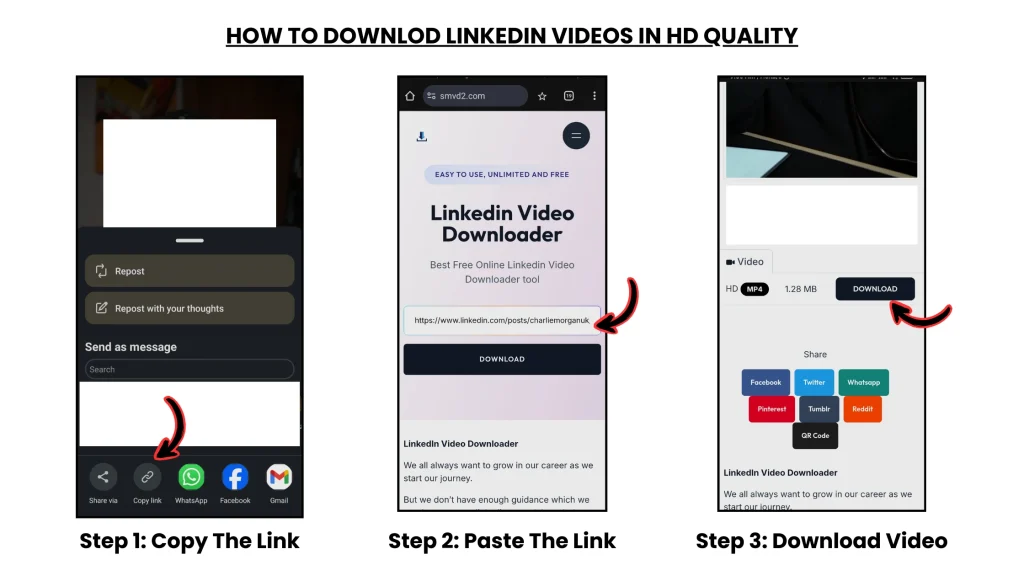
Users usually need to:
Copy → Paste → Download
For some users, this feels slightly slower than integrated extension workflows.
However, many professionals consider the tradeoff worthwhile because of the added stability and lower browser risk.
2. Server Dependency
Because processing happens externally, temporary server interruptions may occasionally delay downloads.
However, reputable tools usually restore functionality quickly.
Compared to extension-maintenance failures, these interruptions are often shorter and easier to manage.
Real-World Scenario: What Actually Happens in Teams
Consider a marketing agency that regularly analyzes LinkedIn video campaigns.
If the Team Uses Browser Extensions
- every employee installs separate plugins
- browser permissions vary between users
- extension behavior becomes inconsistent
- some extensions stop working after updates
- internal IT concerns increase
- troubleshooting consumes time
Over time, managing extensions across multiple users often becomes inefficient.
If the Team Uses Web-Based Tools
- no installation is required
- workflows stay identical across devices
- no extension management exists
- browser environments stay cleaner
- onboarding becomes easier
Result:
Lower friction + higher workflow consistency
This is one reason browser-isolated workflows are becoming more common in professional environments.
The Core Technical Difference (Most Important Insight)
Chrome Extensions
- run inside the browser
- inject scripts into webpages
- depend heavily on UI structure
- interact directly with browsing environments
Web-Based Tools
- process links externally
- remain isolated from browser sessions
- avoid direct browser integration
- operate independently from webpage injection
This architectural difference is why:
- extensions often become fragile over time
- web tools generally remain more stable and isolated
That separation matters more than many users initially realize.
Final Comparison: Chrome Extensions vs Web-Based Downloader Tools
| Factor | Chrome Extensions | Web-Based Downloader |
|---|---|---|
| Security Exposure | Moderate risk | Safer workflow |
| Privacy | Depends on permissions | Better isolation |
| Installation | Required | Not required |
| Browser Performance | Can slow browser | No persistent impact |
| Long-Term Reliability | May break frequently | More stable |
| Device Flexibility | Limited | Universal |
| Maintenance Overhead | Higher | Minimal |
| Team Scalability | Harder to manage | Easier to standardize |
When Should You Use Each?
Use Chrome Extensions If:
- you download videos constantly
- you prefer integrated browser workflows
- you understand browser permissions
- you are comfortable managing extension risks
Extensions may still work well for technically experienced users who actively manage their browser environments carefully.
Use Web-Based Tools If:
- privacy matters to you
- you work across multiple devices
- you prefer cleaner browser environments
- you want lower maintenance overhead
- you are part of a business or team workflow
- you value long-term reliability more than micro-convenience
For most professional users, this becomes the more sustainable option over time.
Future Trend: Why Web-Based Tools Are Growing Faster
The web is increasingly moving toward:
- privacy-first workflows
- no-install experiences
- cloud-based processing
- lightweight browser environments
- cross-device compatibility
This is one reason browser-isolated workflows are becoming more common in professional environments.
Many users are gradually reducing extension-heavy setups because:
- browsers already consume significant memory
- security awareness has increased
- extension trust has declined
- workflow simplicity matters more long term
Ethical & Legal Considerations
Always download responsibly.
Best practices include:
- downloading only publicly accessible videos
- using videos for learning, research, or internal reference
- respecting creator ownership
- avoiding unauthorized redistribution
Responsible usage helps maintain ethical and compliant workflows.
Final Recommendation
For most professionals — including:
- marketers
- recruiters
- agencies
- founders
- researchers
- consultants
- students
web-based LinkedIn video downloader tools are usually the smarter long-term choice.
They offer:
- better browser isolation
- lower permission exposure
- cleaner workflows
- cross-device flexibility
- reduced maintenance overhead
- stronger long-term reliability
Chrome extensions may feel faster initially, but browser-based workflows usually become more practical over time once users experience:
- extension failures
- permission concerns
- browser slowdowns
- compatibility issues
In real-world usage, stability and simplicity usually matter more than saving a few seconds per download.
Frequently Asked Questions
Is it safe to use Chrome extensions for downloading videos?
It depends entirely on the extension.
Some are maintained responsibly, but many request permissions that may expose browsing behavior or create browser-security concerns.
Always review permissions carefully before installing extensions.
Do web-based downloader tools track users?
Reputable browser-based tools are generally designed to process publicly accessible video URLs without requiring login access or persistent browser permissions.
Which method is better for teams?
Web-based tools are usually better for teams because:
- no installation is required
- workflows remain consistent
- maintenance overhead stays lower
- onboarding becomes simpler
Can all LinkedIn videos be downloaded?
No.
Only publicly accessible videos can usually be processed.
Private, restricted, or permission-protected content typically cannot be accessed through standard downloader workflows.
Related Articles:
- Best LinkedIn Video Downloaders
- LinkedIn Video Downloader Not Working?
- Manual vs Tool-Based LinkedIn Video Download (Deep Comparison)
- Browser Based vs App Based LinkedIn Downloaders
- LinkedIn Video Downloader vs Screen Recorder
- How to Download LinkedIn Videos Without Browser Extensions