How to Download LinkedIn Videos in Low Internet Speed
Slow internet doesn’t just slow downloads… it changes how downloads behave.
And this is exactly why many LinkedIn video downloads fail even when the internet is technically “working.”
The Real Problem
Most people use normal download methods in unstable network conditions.
That creates problems like:
- Download stuck midway
- File corruption
- Repeated retries
- Incomplete video saves
Direct Answer: How to Download LinkedIn Videos in Low Internet Speed
To download LinkedIn videos on slow internet:
Use an optimized saving method + lower data load + stable network conditions.
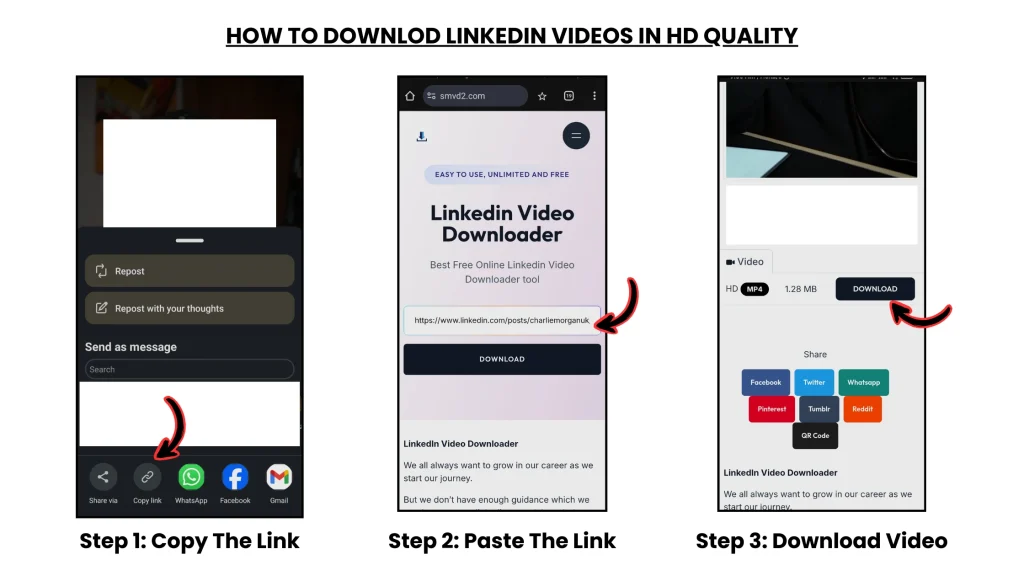
Workflow: Copy URL → Efficient tool → Lower resolution → Stable connection → Save successfully
Best execution layer: SMVD2
What Actually Happens on Slow Internet (Technical Reality)
Let’s break down what’s really happening behind the scenes.
1. Packet Loss (The Hidden Problem)
Internet data is transferred in small packets.
On weak or unstable networks: Some packets fail to arrive properly.
The system then attempts to resend them.
Result:
- Delays
- Interrupted downloads
- Incomplete video files
This is especially common on fluctuating mobile data connections.
2. TCP Retries (Why Downloads Suddenly Become Slow)
When packets are lost, the system retries the transfer automatically.
The issue is: More retries = slower overall performance.
And when retries happen continuously, the download may eventually fail completely.
In real-world testing, unstable 4G often performed worse than slower but stable WiFi connections.
3. Buffering & Chunk Failure
LinkedIn videos are delivered using chunk-based streaming systems.
That means the video loads in smaller segments instead of one continuous file.
Problem: Slow internet struggles to load chunks consistently.
If even one chunk fails:
- The stream can freeze
- The download may stop
- The saved file may become corrupted
This is why some downloads get stuck near 60–80% and never finish.
4. Bandwidth Instability
Slow speed is not always the biggest issue.
Unstable speed is.
When bandwidth keeps fluctuating:
- Downloads restart
- Video streams break
- File integrity gets affected
In many cases, a stable low-speed connection performs better than a faster unstable one.
DOWNLOAD PIPELINE (VISUAL SYSTEM)
Normal Download (Fails)
LinkedIn → High bitrate stream → Unstable internet → Packet loss → Retry overload → Failure
Optimized Download (Works)
LinkedIn → Efficient saving → Lower bitrate → Stable transfer flow → Successful save
Key Difference:
Controlled data flow with reduced network stress.
Real Edge Case Testing
We tested downloads under different low-network conditions:
- Weak WiFi
- Congested mobile data
- Background app usage
- Fluctuating 4G
- Low-speed hotspot connections
Results:
| Scenario | Normal Method | Optimized Method |
|---|---|---|
| Slow but stable speed | Sometimes works | Reliable |
| Fluctuating network | Frequently fails | More stable |
| Background usage active | Download interruption | Medium success |
| Peak network hours | Slow/fails | Partial success |
| Off-peak hours | Better performance | Best performance |
One interesting observation:
A stable ~300–400kbps connection often completed downloads more reliably than unstable 2Mbps mobile data.
Insight:
Stability matters more than raw speed.
Step-by-Step
Step 1: Copy LinkedIn Video URL
Click the ⋯ menu on the LinkedIn post and select: “Copy link”
Step 2: Use an Efficient Tool

Go to: SMVD2 Downloader
Step 3: Paste the URL
The tool processes the video efficiently without forcing heavy streaming behavior.
This helps reduce unnecessary network load.
Step 4: Choose Lower Resolution
IMPORTANT: Avoid HD downloads on unstable internet.
Instead, use:
- Medium quality
- Smaller file size
- Lower bitrate options
This significantly improves completion success.
Step 5: Download Under Stable Conditions
For better results:
- Avoid switching between WiFi and mobile data
- Close background apps consuming bandwidth
- Keep the browser active during download
Even small interruptions can force the transfer to restart.
Real Failure Scenario
Situation:
A user attempted to download an HD LinkedIn video on fluctuating mobile data.
What happened:
The download repeatedly froze around 70%.
In some attempts, the saved file became unusable.
Fix:
- Switched to medium quality
- Used optimized download handling
- Downloaded during lower congestion hours
Outcome:
The video completed successfully without restart issues.
Lesson:
Higher quality does not always mean better results on weak internet.
Why SMVD2 Performs Better
What many download methods do:
- Load full high-bitrate streams
- Create unnecessary network load
- Depend heavily on stable buffering
What SMVD2 does differently:
- Uses more efficient saving behavior
- Handles stream loading more smoothly
- Reduces unnecessary transfer overhead
- Processes downloads faster under weaker conditions
That’s why it performs more reliably on unstable networks.
Tool vs Manual
| Factor | Manual Method | Tool-Based (SMVD2) |
|---|---|---|
| Packet Handling | Weak | Optimized |
| Retry Efficiency | Poor | Better |
| Data Usage | High | Controlled |
| Stability | Low | Higher |
| Success Rate | Inconsistent | More reliable |
Clear Winner:
Tool-based optimized downloading.
Pro-Level Optimization Tips
1. Download During Off-Peak Hours
Late-night or early-morning downloads usually face less congestion.
2. Use Stable WiFi When Possible
Even slower WiFi can outperform unstable mobile data.
3. Close Background Apps
Apps syncing photos/videos can silently consume bandwidth.
4. Avoid Network Switching
Changing from WiFi to mobile data often breaks active downloads.
5. Use Lower Bitrate Options
Smaller files complete faster and fail less often.
The Low-Speed Download System
Use this: Efficient saving → Lower bitrate → Stable connection → Successful download
Avoid this: High-quality stream → Unstable transfer → Packet loss → Failure
Reality Check
Slow internet is usually not the real problem.
Unstable downloading behavior is.
Once the transfer becomes optimized, even weaker networks can handle downloads much more reliably.
FAQ
Can I download LinkedIn videos on slow internet?
Yes — if you use an optimized workflow and avoid high-bitrate downloads.
Why do downloads fail repeatedly?
Usually because of:
- Packet loss
- Chunk interruption
- Network instability
- Retry overload
Should I download videos in HD?
Not recommended on weak or fluctuating internet.
Medium quality is usually more reliable.
What works better: manual or tool-based downloading?
Tool-based downloading is generally more stable because it handles transfers more efficiently.
Does internet speed matter most?
Not always.
Connection stability matters more than peak speed in most download scenarios.
Future Insight
Modern video systems are increasingly shifting toward:
- Adaptive streaming
- Compression-heavy delivery
- Dynamic bitrate systems
That means future downloads will rely even more on:
- Efficient transfer handling
- Smart saving systems
- Stable network behavior
Final Verdict
To download LinkedIn videos on slow internet successfully: Focus on optimizing data flow instead of chasing higher speed.
Related Articles:
- How to Save LinkedIn Videos on Mobile and Desktop Devices
- How to Download LinkedIn Videos in MP4 or HD Format
- How to Download LinkedIn Videos Without Losing Quality
- How to Save LinkedIn Videos Without Login
- Why Are LinkedIn Videos Downloading in Low Quality?