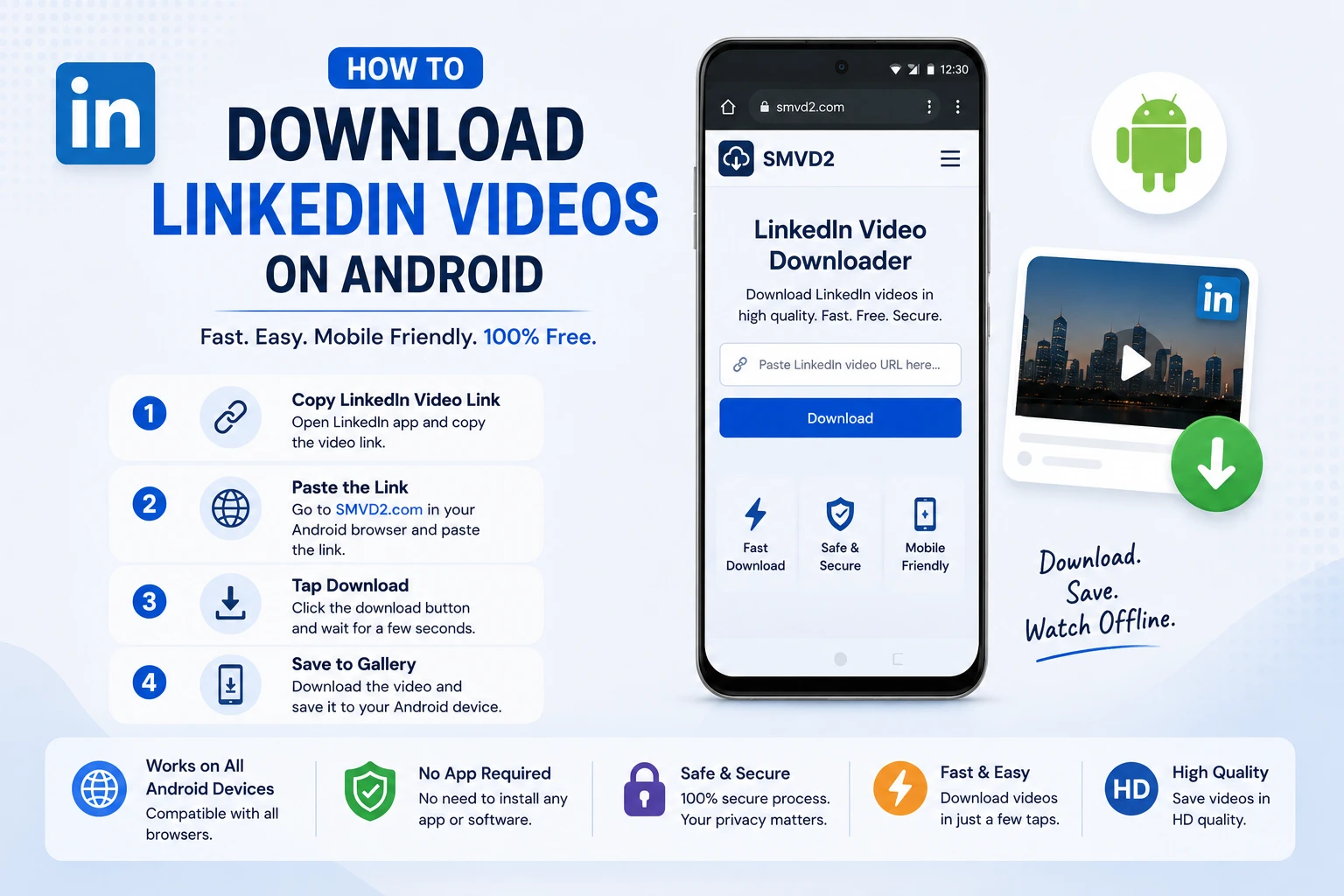
How to Download LinkedIn Videos on Android
LinkedIn has evolved from juts a networking platform to a content based platform. Today, it’s packed with valuable video content, including industry insights, marketing strategies, career advice, product demonstrations, webinars, interviews, and educational tutorials.
If you’ve ever come across a useful LinkedIn video and wanted to watch it later without relying on an internet connection, you’re not alone. Many professionals save LinkedIn videos for learning, team training, research, or future reference.
Unfortunately, LinkedIn doesn’t provide a direct download option for most videos shared in the feed. This can make it difficult to access important content when you’re traveling, dealing with a slow connection, or simply want to build a personal library of useful resources.
The good news is that downloading LinkedIn videos on Android is much easier than most people think.
In this guide, you’ll learn exactly how to download LinkedIn videos on Android using SMVD2.com, a fast and user-friendly online video downloader that works directly from your mobile browser without requiring any app installation.
Why Download LinkedIn Videos on Android?
There are several practical reasons why Android users choose to save LinkedIn videos.
You may want to:
- Watch educational videos during flights or travel
- Save career development content for future learning
- Keep copies of webinars and online workshops
- Share useful videos with colleagues or team members
- Build a personal collection of professional resources
- Avoid searching for the same content repeatedly
- Access videos in areas with limited internet connectivity
For students, job seekers, marketers, recruiters, entrepreneurs, and business professionals, having offline access to valuable LinkedIn content can be extremely convenient.
One thing we’ve noticed is that many users save videos not because they want to watch them immediately, but because they don’t want to lose track of useful content in LinkedIn’s constantly changing feed. A video that appears today can be surprisingly difficult to find again weeks later.
Downloading important videos helps eliminate that problem.
Can You Download LinkedIn Videos Directly from the App?
In most situations, no.
LinkedIn does not provide a built-in download button for standard videos posted on the platform. While certain LinkedIn Learning courses allow offline viewing within the LinkedIn Learning app, regular feed videos typically cannot be downloaded directly to your Android device.
This limitation is one of the main reasons users look for alternative solutions.
Many people initially try:
- Screen recording
- Browser extensions
- Third-party mobile applications
While these methods may work in some cases, they often come with drawbacks.
For example:
| Method | Common Limitation |
|---|---|
| Screen Recording | Lower video quality and extra editing required |
| Browser Extensions | Usually designed for desktop browsers |
| Mobile Apps | Installation required and may contain ads |
| Online Downloader | Fast, browser-based, and requires no installation |
For most Android users, an online downloader provides the simplest and fastest experience.
That’s where SMVD2.com becomes a practical solution.
Best Way to Download LinkedIn Videos on Android
Use SMVD2.com
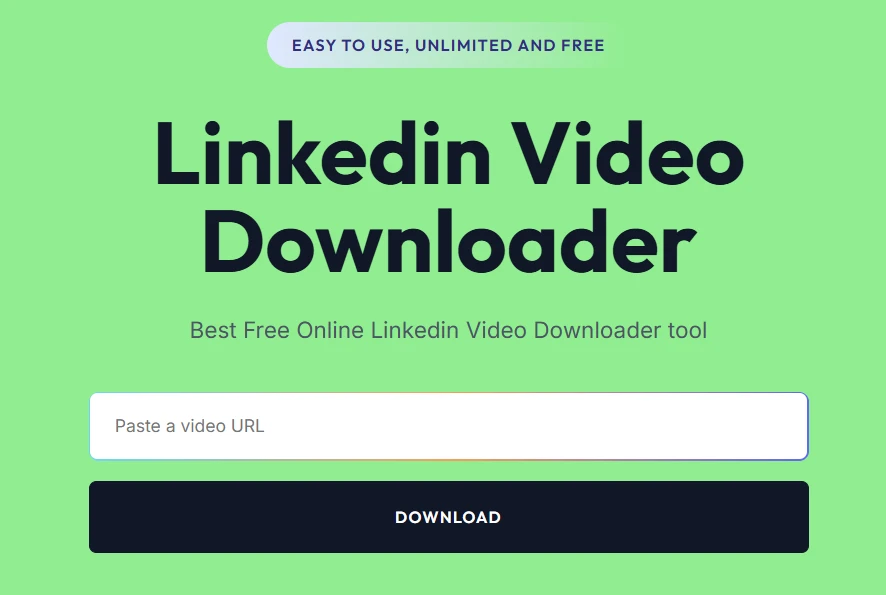
After testing different approaches commonly used by Android users, browser-based downloading remains one of the most convenient methods.
Instead of installing another app, creating an account, or granting unnecessary permissions, you can simply use your mobile browser and download the video in a few taps.
SMVD2.com is a free online social media video downloader that allows users to save videos from LinkedIn and many other popular social media platforms.
What makes it particularly useful for Android users is its simplicity. The entire process happens within your browser, making it accessible on virtually any Android smartphone or tablet.
Benefits of Using SMVD2.com
- No app installation required
- Works directly in Android browsers
- Fast video processing
- High-quality video downloads
- Simple and beginner-friendly interface
- Free to use
- Compatible with Chrome, Firefox, Edge, Opera, and Samsung Internet
- Supports multiple social media platforms
- Accessible from smartphones and tablets
Why Many Android Users Prefer Browser-Based Downloaders
One thing that often gets overlooked is convenience.
Most users only need to download a video occasionally. Installing a dedicated application for a task that may only take a few minutes doesn’t always make sense.
Browser-based tools like SMVD2.com solve this problem by allowing users to download videos instantly without consuming device storage with additional apps.
For occasional users, students, and professionals who want a quick solution, this approach is often the most practical option.
How to Download LinkedIn Videos on Android Using SMVD2.com
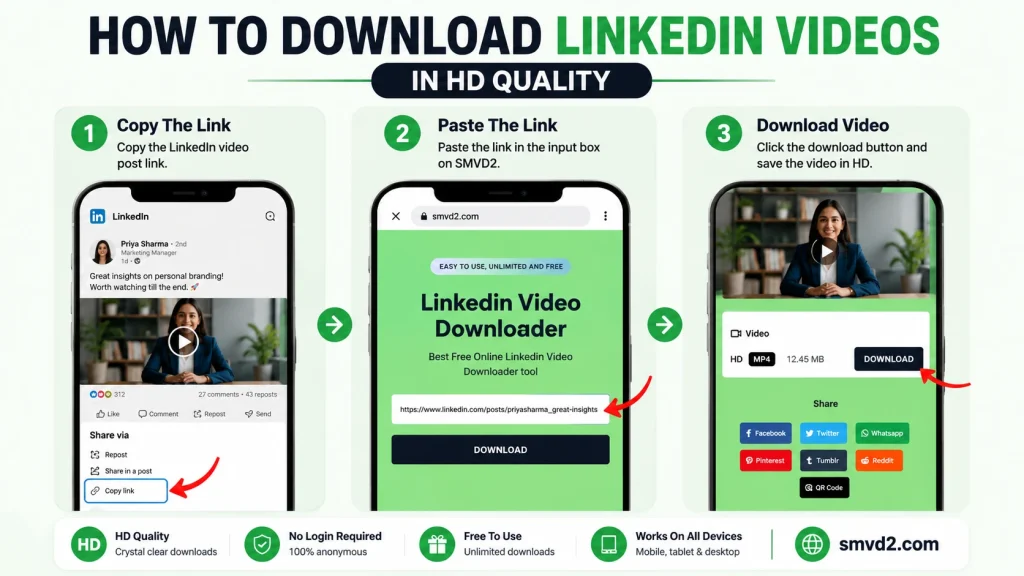
Downloading LinkedIn videos on Android is a straightforward process when you use a browser-based downloader. You don’t need technical knowledge, software installation, or special permissions.
Follow the steps below.
Step 1: Open the LinkedIn App
Launch the LinkedIn app on your Android smartphone or tablet.
You can also use LinkedIn through your mobile browser, but using the app is usually faster when locating videos.
Step 2: Find the Video You Want to Download
Scroll through your feed or visit the profile of the person or company that shared the video.
Make sure you’re opening the actual post that contains the video.
A common mistake users make is trying to copy the profile URL instead of the post URL. Downloaders can only process the video post link.
Step 3: Copy the LinkedIn Video Link
Tap the three-dot menu located in the upper-right corner of the LinkedIn post.
Select:
Copy Link to Post
LinkedIn will automatically copy the URL to your clipboard.
Pro Tip
Before leaving LinkedIn, double-check that the post contains a video.
Sometimes users accidentally copy links from:
- Profiles
- Articles
- Company pages
- Documents
- Images
These links won’t generate downloadable video files.
Step 4: Open SMVD2.com
Launch your preferred Android browser and visit:
The website works across most modern Android browsers, including:
- Google Chrome
- Mozilla Firefox
- Microsoft Edge
- Samsung Internet
- Opera Browser
No registration is required.
No downloads are required.
No account creation is necessary.
Step 5: Paste the LinkedIn URL
Locate the input box on the homepage.
Paste the LinkedIn video URL that you copied earlier.
Before proceeding, verify that the entire URL has been pasted correctly.
Incomplete links are one of the most common reasons downloads fail.
Step 6: Tap the Download Button
Press the download button and allow SMVD2.com to process the video.
During this stage, the platform retrieves the publicly accessible video information and prepares the available download options.
In our experience, this usually takes only a few seconds depending on:
- Internet speed
- Video length
- Server response time
Step 7: Choose Your Preferred Quality
Once processing is complete, available download options will appear.
Select your preferred quality and continue with the download.
If multiple quality options are available, consider the following:
| Quality | Best For |
|---|---|
| Lower Resolution | Faster downloads and smaller file sizes |
| Standard Resolution | Everyday viewing |
| Higher Resolution | Training materials, presentations, and large-screen viewing |
For most Android users, standard quality provides an excellent balance between video quality and storage usage.
Step 8: Save the Video
After selecting your preferred quality, the video will begin downloading.
Depending on your Android device and browser settings, the file may be saved to:
- Downloads Folder
- Internal Storage
- Gallery App
- Files App
- Browser Download Manager
Once the download finishes, you can watch the video anytime without an internet connection.
Common Mistakes Users Make When Downloading LinkedIn Videos
Most download issues aren’t caused by the downloader itself.
They’re usually caused by small mistakes during the process.
Copying the Wrong URL
This is by far the most common issue.
Many users copy:
- Profile URLs
- Company page URLs
- Search result URLs
instead of the actual post URL.
Always copy the link directly from the LinkedIn post containing the video.
Trying to Download Private Content
If a LinkedIn post is restricted or only visible to specific users, the downloader may not be able to access the video.
Publicly accessible posts generally work best.
Closing the Browser Too Early
Some users leave the page immediately after clicking download.
Allow the processing to finish before closing the browser tab.
Weak Internet Connection
Video retrieval depends on a stable connection.
If the process seems slow, try:
- Switching to Wi-Fi
- Moving to a stronger network area
- Refreshing the page
Outdated Browser Version
Older browser versions can occasionally cause compatibility issues.
Using the latest version of Chrome, Firefox, Edge, or Samsung Internet usually provides the smoothest experience.
What We Noticed During Mobile Testing
While evaluating common LinkedIn video downloading methods, a few patterns became clear.
Browser-Based Tools Are Usually Faster
Most Android users prefer browser-based downloaders because they eliminate installation steps and unnecessary permissions.
For occasional downloads, this approach is significantly more convenient than installing dedicated apps.
Screen Recording Creates Extra Work
Although screen recording can technically save a LinkedIn video, users often need to:
- Trim the recording
- Remove notifications
- Remove playback controls
- Manage larger file sizes
This makes the process slower compared to direct downloading.
Extensions Aren’t Practical on Android
Many browser extensions are designed primarily for desktop environments.
Mobile users generally experience a smoother workflow with dedicated web-based tools like SMVD2.com.
Is Downloading LinkedIn Videos Legal?
In general, downloading content for personal offline viewing is different from redistributing, republishing, or monetizing someone else’s content.
Before downloading any video, consider:
- The creator’s rights
- LinkedIn’s terms and policies
- Copyright regulations in your region
The safest approach is to use downloaded content for personal reference, learning, and offline viewing unless you have permission from the original creator.
Why Professionals Save LinkedIn Videos
LinkedIn videos are often more educational than entertainment-focused social media content.
Common users include:
Job Seekers
Saving interview tips, resume advice, and career guidance.
Marketers
Building libraries of marketing strategies and industry insights.
Recruiters
Saving hiring trends and talent acquisition content.
Business Owners
Collecting ideas from industry experts and successful founders.
Students
Creating offline learning collections for future study.
Because valuable content can quickly disappear from a busy feed, downloading important videos helps ensure that useful resources remain accessible whenever they’re needed.
Why SMVD2.com Is the Ultimate LinkedIn Video Downloader for Android
When searching for a way to download LinkedIn videos on Android, you’ll find dozens of tools claiming to offer the same functionality.
However, not all downloaders provide the same user experience.
Some require app installations. Others display excessive advertisements, limit downloads, or create unnecessary steps that make the process more complicated than it needs to be.
For Android users who want a simple, fast, and reliable solution, SMVD2.com offers several advantages that make it stand out.
1. No App Installation Required
One of the biggest benefits of SMVD2.com is that it works entirely through your browser.
You don’t need to:
- Install an APK
- Download a third-party application
- Create an account
- Grant device permissions
- Register with your email
This makes the process quicker and more secure for users who only need occasional downloads.
From a usability perspective, browser-based tools are often the preferred choice because they reduce friction. Instead of filling your device with apps you’ll rarely use, you can simply open a website when needed.
2. Designed for Mobile Users
Many LinkedIn download solutions are originally built for desktop users and later adapted for mobile devices.
This often creates issues such as:
- Small buttons
- Confusing layouts
- Poor touch navigation
- Broken download links
SMVD2.com is optimized for mobile usage, making it easy to complete the entire process from an Android smartphone or tablet.
Whether you’re using:
- Samsung Galaxy devices
- Google Pixel phones
- OnePlus smartphones
- Xiaomi devices
- Realme phones
- Motorola phones
the experience remains straightforward.
3. Supports More Than Just LinkedIn
Most users don’t download content from a single platform.
Today, people regularly save content from multiple social networks.
Instead of using separate tools for every platform, SMVD2.com supports downloading videos from various social media websites through one platform.
This means users can maintain a consistent workflow without constantly switching between different downloader websites.
For frequent content consumers, this convenience becomes a major advantage over platform-specific tools.
4. Fast Processing Speeds
Nobody wants to wait several minutes for a simple video download.
One thing users consistently appreciate is speed.
SMVD2.com is designed to process video links quickly and generate download options within seconds in most situations.
Actual processing times may vary depending on:
- Internet connection quality
- Video size
- Platform response times
- Server load
However, for standard LinkedIn videos, the process is typically fast enough that users can move from copying a link to downloading a file in a matter of moments.
5. Beginner-Friendly Interface
Many downloader websites overwhelm users with:
- Multiple buttons
- Popups
- Redirects
- Technical settings
This can create confusion, especially for users who simply want to save a video quickly.
SMVD2.com focuses on simplicity.
The workflow is easy:
- Copy the LinkedIn video URL
- Paste it into SMVD2.com
- Click Download
- Save the video
Even first-time users can usually complete the process without needing instructions.
That simplicity is one of the reasons browser-based downloaders continue to be popular.
6. Works Across Multiple Browsers
Android users don’t all use the same browser.
SMVD2.com works across most modern mobile browsers, including:
- Google Chrome
- Mozilla Firefox
- Microsoft Edge
- Samsung Internet
- Opera
This flexibility allows users to download videos using whichever browser they already prefer.
7. No Technical Knowledge Required
Many users assume downloading social media videos requires technical expertise.
In reality, the process is straightforward.
You don’t need to understand:
- Video formats
- Browser extensions
- Developer tools
- Video saving methods
SMVD2.com handles the technical side in the background, allowing users to focus on the content rather than the technology.
This makes it accessible for:
- Students
- Professionals
- Recruiters
- Entrepreneurs
- Business owners
- Casual users
SMVD2.com vs Other LinkedIn Video Download Methods
To better understand where SMVD2.com fits, it’s useful to compare it with other commonly used methods.
| Method | Ease of Use | Installation Required | Video Quality | Mobile Friendly | Overall Convenience |
|---|---|---|---|---|---|
| SMVD2.com | Excellent | No | High | Excellent | Excellent |
| Screen Recording | Moderate | No | Variable | Good | Moderate |
| Browser Extensions | Moderate | Usually Yes | High | Limited | Moderate |
| Third-Party Apps | Good | Yes | High | Good | Good |
Our Observation
For Android users, browser-based downloading consistently offers the best balance between:
- Speed
- Simplicity
- Accessibility
- Convenience
Screen recording works in emergencies but often requires editing afterward.
Extensions are generally more suitable for desktop environments.
Apps can work well, but many users don’t want to install software for occasional downloads.
This is where SMVD2.com provides a practical middle ground.
What Makes SMVD2.com Different From Many Other Downloaders?
Many downloader websites focus solely on generating a download link.
SMVD2.com focuses on creating a smoother user experience.
What We Like
- No installation required
- Mobile-friendly workflow
- Quick access from any browser
- Supports multiple social platforms
- Simple interface
- Suitable for beginners
Potential Limitation
Like most online downloaders, functionality depends on:
- Internet connectivity
- Public accessibility of the LinkedIn post
- Platform-level restrictions
If a video is private or restricted, downloading may not always be possible.
Being transparent about these limitations is important because no downloader can bypass platform permissions.
Best Use Cases for SMVD2.com
Different users benefit from LinkedIn video downloads in different ways.
For Students
Save educational content for offline study sessions.
For Job Seekers
Keep interview preparation videos and career advice accessible.
For Recruiters
Build collections of hiring insights and recruitment strategies.
For Marketers
Archive marketing tutorials, thought leadership videos, and trend analyses.
For Business Owners
Create a personal library of industry knowledge and expert insights.
For Frequent Travelers
Watch valuable content even when internet access is limited.
Things Most LinkedIn Downloader Reviews Don’t Mention
Many review articles focus only on the downloading process.
However, there are a few practical realities worth discussing.
Feed Content Can Be Difficult to Rediscover
LinkedIn’s feed moves quickly.
A useful video you see today may be buried under hundreds of new posts next week.
Saving important videos prevents valuable information from being lost.
Offline Access Improves Learning
Many professionals save videos specifically to create learning libraries.
Watching content offline often reduces distractions compared to consuming it directly within a social media feed.
Convenience Often Matters More Than Features
Most users don’t need dozens of advanced options.
They simply want:
- Fast downloads
- Reliable access
- Good quality
- Minimal effort
That’s why straightforward browser-based tools continue to remain popular.
How to Find Downloaded LinkedIn Videos on Android
After successfully downloading a LinkedIn video using SMVD2.com, the next step is locating the file on your Android device.
The exact storage location depends on your browser and device settings, but in most cases, downloaded videos are easy to find.
Common Locations Where Downloads Are Saved
Most Android devices save downloaded videos in one of the following locations:
- Downloads Folder
- Files App
- My Files App (Samsung Devices)
- Gallery App
- Internal Storage → Downloads
- Browser Download Manager
If you’re unsure where the file was saved, open your browser’s download history and tap the completed download.
This usually opens the video directly and reveals its storage location.
Finding Downloads on Samsung Devices
Samsung users can typically find downloaded videos by opening:
My Files → Downloads
Alternatively:
Gallery → Videos
Many Samsung devices automatically index downloaded videos inside the Gallery app.
Finding Downloads on Google Pixel Devices
For Pixel users:
Files by Google → Downloads
You can also search the file name if you recently downloaded multiple videos.
Finding Downloads on Xiaomi, Realme, OnePlus, and Other Android Devices
Most Android manufacturers include a file management application.
Look for:
- Files
- File Manager
- Downloads
- Documents
Downloaded LinkedIn videos are usually stored there automatically.
Pro Tip for Frequent Downloaders
If you regularly save educational LinkedIn videos, consider creating folders such as:
- Marketing Tutorials
- Career Advice
- Sales Training
- Recruitment Insights
- Business Strategy
- Industry Research
Organizing videos from the beginning makes them much easier to find later.
Many professionals build personal learning libraries this way.
Tips for Downloading LinkedIn Videos Successfully
While downloading LinkedIn videos is generally straightforward, a few best practices can significantly improve success rates.
Use a Stable Internet Connection
Slow or unstable connections are responsible for many download interruptions.
For the best experience:
- Use Wi-Fi whenever possible
- Avoid switching networks during processing
- Wait for downloads to finish completely
A stable connection helps ensure smoother processing and faster downloads.
Copy the Correct LinkedIn URL
The most common mistakes users make is copying the wrong link.
Always copy:
✅ The LinkedIn post URL
Avoid copying:
❌ Profile URLs
❌ Company page URLs
❌ Search result URLs
❌ Feed URLs
The downloader needs access to the specific video post.
Verify the Video Is Publicly Accessible
If a LinkedIn video is restricted to:
- Private groups
- Limited audiences
- Specific connections
the downloader may not be able to access the content.
Public posts generally provide the most reliable results.
Keep Your Browser Updated
Modern browsers offer:
- Better compatibility
- Improved security
- Faster performance
Using the latest version of Chrome, Firefox, Edge, or Samsung Internet can reduce download-related issues.
Wait for Processing to Complete
A surprising number of users leave the page too early.
Allow SMVD2.com to fully process the video before:
- Refreshing the page
- Closing the browser
- Opening another tab
Patience during processing often prevents unnecessary download failures.
Common Issues and Solutions
Even reliable downloading methods can occasionally encounter problems.
Fortunately, most issues are easy to resolve.
Video Not Downloading
Possible Causes
- Weak internet connection
- Incorrect LinkedIn URL
- Temporary server issue
- Browser cache conflict
Solutions
- Refresh the page
- Re-copy the LinkedIn post URL
- Try again after a few minutes
- Switch to another browser
- Check your internet connection
In many cases, simply copying the link again resolves the issue.
Invalid Link Error
Why It Happens
The copied URL may not point to a video post.
Users often accidentally copy:
- Profile links
- Company pages
- Search pages
instead of the actual video post.
Solution
Return to LinkedIn and copy the post URL directly from the video.
Download Stuck During Processing
Possible Causes
- Slow network connection
- Browser cache issues
- Temporary platform response delays
Solution
Try:
- Refreshing the page
- Clearing browser cache
- Switching browsers
- Reprocessing the URL
Most processing delays are temporary.
Video Downloads but Won’t Play
Possible Causes
- Incomplete download
- Corrupted file
- Interrupted connection
Solution
Delete the file you have saved and download it again using a stable internet connection.
Android Browser Compatibility Guide
Many users ask which browser works best for downloading LinkedIn videos.
Based on general usability and compatibility observations:
| Browser | Experience |
|---|---|
| Chrome | Excellent |
| Samsung Internet | Excellent |
| Firefox | Excellent |
| Edge | Very Good |
| Opera | Very Good |
The differences are usually minor, but Chrome and Samsung Internet often provide the smoothest experience for Android users.
What We Learned From Common User Download Issues
One interesting pattern appears repeatedly.
Most users assume the downloader is the problem when a download fails.
In reality, download failures are more commonly caused by:
Incorrect URLs
This is the most frequent issue.
Private Content Restrictions
Some videos simply aren’t publicly accessible.
Browser Interruptions
Closing tabs too early can stop processing.
Weak Connections
Network instability remains one of the biggest factors affecting download success.
Understanding these causes helps users troubleshoot problems much faster.
Download Quality vs Storage Space
Many Android users wonder whether they should always choose the highest available quality.
The answer depends on how the video will be used.
| Usage | Recommended Quality |
|---|---|
| Quick Viewing | Standard Quality |
| Offline Learning | Standard or High |
| Presentations | High Quality |
| Large Screens | High Quality |
| Storage Conservation | Lower Quality |
For most users, standard quality offers an excellent balance between clarity and storage efficiency.
Unless you’re planning to display videos on large screens, extremely high resolutions are often unnecessary.
How Professionals Use Saved LinkedIn Videos
Downloading LinkedIn videos isn’t just about convenience.
Many professionals use downloaded content as part of their learning and development process.
Examples include:
Sales Teams
Creating training libraries for onboarding.
Marketing Teams
Archiving industry insights and strategy discussions.
Recruiters
Saving hiring trend content and candidate engagement tips.
Entrepreneurs
Building collections of business growth and leadership content.
Students
Creating offline educational resources for study sessions.
Having content available offline often increases the likelihood that users actually consume and apply the information later.
Is It Safe to Use SMVD2.com?
Safety is one of the first concerns users have when using any online video downloader.
The short answer is: yes, SMVD2.com is designed to provide a simple browser-based downloading experience without requiring software installation.
Unlike many third-party applications that request extensive permissions, browser-based tools reduce the need to install additional software on your Android device.
Why Many Users Prefer Browser-Based Downloaders
When downloading videos, users generally have two options:
- Install an application
- Use a web-based downloader
For occasional downloads, web-based solutions often provide a cleaner experience because they eliminate:
- App installation
- Device permissions
- Storage consumption from additional software
- Account creation requirements
This is one of the primary reasons professionals, students, and casual users frequently prefer browser-based tools.
Best Practices for Safe Video Downloading
Regardless of which downloader you use, following a few basic safety guidelines is always recommended.
Download Content Responsibly
Always respect:
- Copyright laws
- Content ownership
- Platform policies
- Creator rights
Downloading content for personal viewing is very different from redistributing or republishing someone else’s work.
Avoid Sharing Sensitive Information
Legitimate downloader tools generally do not require:
- LinkedIn passwords
- Banking information
- Personal credentials
If any service requests unnecessary sensitive information, proceed with caution.
Keep Your Browser Updated
Modern browsers provide:
- Better security protection
- Improved performance
- Enhanced compatibility
Keeping Chrome, Firefox, Samsung Internet, or Edge updated helps maintain a safer browsing experience.
Use Publicly Accessible Content
For the most reliable experience, use publicly available LinkedIn video URLs whenever possible.
Private content restrictions may prevent successful processing regardless of the downloader being used.
Can I Download LinkedIn Videos Without an App?
Absolutely.
In fact, this is one of the biggest advantages of using SMVD2.com.
The entire process happens directly inside your browser.
You don’t need to:
- Install an APK
- Download software
- Create an account
- Register an email address
- Grant device permissions
Simply:
- Copy the LinkedIn video URL
- Visit SMVD2.com
- Paste the link
- Download the video
That’s it.
For users who only download videos occasionally, this is often the fastest and most practical workflow.
Why App-Free Downloading Has Become More Popular
Over the last few years, many users have shifted toward browser-based tools for simple tasks.
One reason is convenience.
Think about it:
If you download LinkedIn videos only once or twice per month, installing a dedicated application may feel unnecessary.
A browser-based solution allows you to:
- Save storage space
- Avoid app updates
- Access the tool from any device
- Start downloading immediately
From a usability perspective, this creates a much smoother experience.
Mobile vs App Downloading: Which Is Better?
Both methods have advantages.
However, they serve different types of users.
| Feature | Browser-Based Downloading | App-Based Downloading |
|---|---|---|
| Installation Required | No | Yes |
| Device Storage Usage | Minimal | Higher |
| Setup Time | Instant | Longer |
| Accessibility | Any Browser | Device-Specific |
| Maintenance | None | Requires Updates |
| Convenience | Excellent | Good |
Our Take
For most Android users, browser-based downloading is usually the better option because it minimizes complexity while still delivering the desired result.
App-based solutions may be useful for heavy users who download content frequently, but for the majority of people, a browser provides everything they need.
When Downloading LinkedIn Videos Makes the Most Sense
Not every LinkedIn video needs to be saved.
However, downloading becomes particularly valuable in situations such as:
Learning and Skill Development
Many professionals use LinkedIn as a learning platform.
Saving tutorials, webinars, and educational content allows for structured learning later.
Business Research
Entrepreneurs often save:
- Market insights
- Leadership discussions
- Industry trends
- Competitive analysis videos
Offline access makes reviewing this information easier.
Travel and Commuting
A stable internet connection isn’t always available.
Downloaded videos can be watched:
- On flights
- During train rides
- While commuting
- In low-connectivity areas
Team Training
Managers and team leaders often save useful educational content to share with team members during training sessions.
This helps create organized learning resources.
What Most Users Care About
After reviewing common user behavior across video downloading tools, one trend stands out:
Most users don’t care about dozens of advanced features.
They care about:
- Speed
- Simplicity
- Reliability
- Video quality
- Convenience
That’s why straightforward workflows continue to outperform complicated solutions.
The fewer steps required, the more likely users are to complete the task successfully.
Frequently Asked Questions
Can I Download LinkedIn Videos on Android for Free?
Yes.
SMVD2.com allows users to download LinkedIn videos on Android without requiring paid software or subscriptions.
Do I Need to Install an Android App?
No.
SMVD2.com works directly from your browser, eliminating the need for app installation.
Does SMVD2.com Support HD Video Downloads?
Video quality depends on the original upload, but high-quality download options are typically available whenever supported by the source video.
Can I Use SMVD2.com on Android Tablets?
Yes.
The platform works on:
- Android smartphones
- Android tablets
- Large-screen Android devices
The browser-based interface adapts well to different screen sizes.
Why Isn’t My LinkedIn Video Downloading?
Common causes include:
- Incorrect URL
- Private content restrictions
- Network issues
- Browser-related interruptions
Most problems can be resolved by copying the correct post URL and trying again.
Can Private LinkedIn Videos Be Downloaded?
In many cases, private or restricted content cannot be processed because access permissions are controlled by LinkedIn.
Publicly accessible videos generally work best.
Is Screen Recording Better Than Downloading?
Screen recording can work, but it often creates additional steps such as:
- Cropping
- Trimming
- Removing notifications
- Managing larger file sizes
Direct downloading is typically more efficient.
Which Browser Works Best for Downloading LinkedIn Videos?
Most modern browsers perform well.
Popular choices include:
- Google Chrome
- Samsung Internet
- Firefox
- Edge
- Opera
Chrome and Samsung Internet are often preferred by Android users because of their speed and compatibility.
Can I Save LinkedIn Videos for Offline Viewing?
Yes.
Once downloaded, videos can be viewed without an internet connection whenever needed.
Does SMVD2.com Work Only for LinkedIn?
No.
One advantage of SMVD2.com is that it supports multiple social media platforms, allowing users to manage downloads from various sources through a single tool.
Final Thoughts
Downloading LinkedIn videos on Android doesn’t have to be complicated.
While LinkedIn offers excellent professional content, it doesn’t provide a direct download option for most videos shared in the feed. As a result, users often look for practical ways to save valuable content for offline viewing, future reference, training, or research.
Fortunately, the process is simple when you use the right tool.
By copying the LinkedIn video URL and using SMVD2.com, Android users can save videos directly from their browser without installing additional applications or navigating complex software.
Whether you’re a:
- Student building a learning library
- Job seeker collecting career advice
- Recruiter saving hiring insights
- Marketer archiving industry trends
- Entrepreneur researching growth strategies
- Business professional learning from thought leaders
having offline access to valuable content can make learning more flexible and convenient.
Why We Recommend SMVD2.com
Throughout this guide, we’ve explored different ways Android users attempt to save LinkedIn videos.
Some methods involve:
- Screen recording
- Browser extensions
- Third-party applications
These methods do work but they are very complex and will take time.
From a practical usability standpoint, browser-based downloading offers the most balanced solution for the majority of users.
SMVD2.com stands out because it provides:
✅ No app installation
✅ Fast browser-based access
✅ Beginner-friendly workflow
✅ Mobile optimization
✅ High-quality downloads
✅ Multi-platform support
✅ Compatibility with Android smartphones and tablets
Most importantly, it removes unnecessary steps from the downloading process.
For many users, convenience matters just as much as functionality.
What We Learned While Evaluating LinkedIn Video Downloading Methods
One interesting observation is that downloading videos is rarely the real goal.
The real goal is usually one of the following:
- Learning something important
- Saving information for later
- Building a personal knowledge library
- Sharing insights with colleagues
- Improving professional skills
The download itself is simply a way to preserve access to content that users find valuable.
This perspective helps explain why professionals increasingly save educational videos rather than relying solely on social media feeds.
After all, valuable content is only useful if you can find it when you need it.
Common Situations Where Downloading Helps
Downloading LinkedIn videos is especially useful when:
You Want to Learn Offline
Internet access isn’t always available.
Saved videos allow you to continue learning during:
- Flights
- Travel
- Commutes
- Remote work sessions
You Need a Personal Resource Library
Many professionals organize downloaded videos into folders covering:
- Marketing
- Sales
- Leadership
- Recruitment
- Personal development
- Industry trends
Over time, this creates a searchable knowledge base that is often easier to access than scrolling through months of LinkedIn posts.
You Want to Avoid Losing Valuable Content
One challenge with social media platforms is content discovery.
A highly useful video seen today may be difficult to locate weeks later.
Downloading important resources ensures they remain accessible whenever needed.
Things to Remember Before Downloading
To achieve the best results:
- Copy the correct LinkedIn post URL
- Use publicly accessible content whenever possible
- Maintain a stable internet connection
- Keep your browser updated
- Respect copyright and content ownership
Following these simple practices helps create a smoother experience while ensuring responsible use of downloaded content.
The Future of Professional Learning
Professional learning is increasingly becoming mobile-first.
More people now consume educational content on smartphones than ever before.
As this trend continues, the ability to save and organize useful resources will become even more valuable.
Rather than depending on an internet connection or searching through old posts, users increasingly prefer having important content available whenever and wherever they need it.
Browser-based tools help make that possible.
Why SMVD2.com Is the Ultimate Solution
If you’re looking for a simple way to download LinkedIn videos on Android, SMVD2.com offers one of the most convenient solutions available.
It combines:
- Simplicity
- Speed
- Accessibility
- Mobile compatibility
- Multi-platform support
into a workflow that takes only a few moments to complete.
Simply:
- Copy the LinkedIn video URL
- Visit SMVD2.com
- Paste the link
- Download the video
That’s all it takes.
No apps.
No complicated setup.
No technical expertise required.
Just a fast and straightforward way to save valuable LinkedIn videos directly to your Android device.
Key Takeaway
The easiest way to download LinkedIn videos on Android is to use SMVD2.com. Its browser-based approach eliminates unnecessary steps, works across modern Android devices, and allows professionals, students, marketers, recruiters, and business owners to save valuable LinkedIn content for offline access in just a few taps.
Whether you’re building a learning library, preparing for your next career move, researching industry trends, or simply saving content you don’t want to lose, SMVD2.com provides a reliable and user-friendly solution to get the job done.
Related Articles:
- How to Save LinkedIn Videos on Mobile and Desktop Devices
- How to Download LinkedIn Videos on iPhone
- How to Download LinkedIn Videos Without Third-Party Apps