
How to Download LinkedIn Videos Without Third-Party Apps
Quick Answer
Yes, you can download public LinkedIn videos without installing third-party apps, browser extensions, or desktop software.
The most reliable method is to copy the LinkedIn post URL and use a secure browser-based downloader that processes the video link online and generates a downloadable file.
This method works across:
- mobile phones
- tablets
- laptops
- desktop computers
because everything happens directly inside the browser — no installation, permissions, background software, or account access required.
In practical testing, browser-based methods were also more stable after LinkedIn interface updates compared to older extensions or downloadable software tools that depended on fixed saving methods.
Unlike traditional approaches, browser-based downloaders save the publicly accessible video stream directly from LinkedIn’s delivery system instead of relying on software integrations. That makes the process:
- faster
- lighter
- safer
- more compatible across devices
LinkedIn has evolved into one of the most influential professional platforms where educators, founders, recruiters, marketers, and organizations regularly share valuable video content.
Every day, professionals publish:
- Industry insights
- Educational tutorials
- Product demonstrations
- Webinar recordings
- Business interviews
- Training materials
- Thought-leadership videos
Many of these videos contain information users want to revisit later for learning, research, or professional reference.
However, LinkedIn has one major limitation.
LinkedIn does not provide a native download option for most videos because its content is delivered through a streaming-based system rather than stored as a direct downloadable file.
As a result, many users search for reliable ways to download LinkedIn videos safely without installing unknown software or risking account privacy.
In this guide, you’ll learn how to download LinkedIn videos without third-party apps or software using a simple browser-based approach that works across most modern devices.
Why You Might Want to Download LinkedIn Videos
Many professionals save important LinkedIn videos for future reference, learning, or workflow management.
There are several legitimate and practical reasons for doing this.
Offline Learning and Education
Professionals often save videos containing:
- Expert advice
- Career guidance
- Marketing strategies
- Technical tutorials
- Industry breakdowns
Downloading these videos allows users to access them anytime without depending on internet connectivity.
This becomes especially useful during:
- travel
- low-network conditions
- flights
- offline training sessions
Saving Webinars and Professional Training
LinkedIn frequently hosts:
- webinars
- workshops
- live discussions
- educational sessions
Some of this content may later become:
- private
- deleted
- difficult to locate again
Downloading important sessions allows users to:
- revisit key insights
- rewatch complex topics
- archive internal training material
- build learning libraries
Many recruiters and trainers regularly archive LinkedIn learning content for team onboarding and reference purposes.
Archiving Valuable Insights
High-value LinkedIn content can disappear unexpectedly due to:
- Post deletion
- Account changes
- Privacy updates
- Feed restructuring
Saving useful videos early helps preserve important information before it becomes unavailable.
This is something many users realize only after trying to revisit an older post that no longer exists.
Content Research and Reference
Marketers, creators, educators, and analysts often save LinkedIn videos to:
- Analyze presentation styles
- Study marketing campaigns
- Observe engagement strategies
- Research professional storytelling
- Review educational structures
Having a local copy improves workflow efficiency because users can:
- replay videos instantly
- avoid repeated searching
- review content without buffering
- organize references more effectively
The Problem With Apps and Download Software
Many online guides recommend installing third-party applications or browser extensions to download LinkedIn videos.
However, these approaches often introduce unnecessary limitations, privacy concerns, and compatibility problems.
In testing across multiple browsers and devices, browser-based methods generally remained more stable after LinkedIn feed updates than extension-based tools.
Software Installation Requirements
Some tools require installing programs directly onto your device.
This can:
- Slow system performance
- Create compatibility conflicts
- Add unnecessary background processes
- Consume storage and memory resources
For users downloading videos occasionally, installing full software is often excessive.
Excessive Browser Permissions
Many browser extensions request access to:
- Browsing activity
- Website data
- Session tracking
- Browser tabs
This level of access is usually unnecessary for simply downloading a public video.
Privacy-focused users often avoid extensions for this reason alone.
One hidden issue is that some aggressive browser extensions interfere with LinkedIn’s media requests, which can actually cause download failures.
Account or Login Requests
Some platforms ask users to:
- Sign in with LinkedIn credentials
- Create third-party accounts
- Connect browser sessions
This increases the risk of:
- data exposure
- session tracking
- account misuse
- privacy concerns
Reliable browser-based tools generally avoid requiring any login access.
Security and Malware Concerns
Unverified applications or extensions may contain:
- Malicious scripts
- Intrusive advertising
- Tracking mechanisms
- Redirect-based spam
For professionals working with business accounts or sensitive company systems, this creates unnecessary risk.
That’s one reason browser-based solutions have become more popular over time.
Why These Methods Fail Technically
Most apps and browser extensions fail because LinkedIn delivers videos using a dynamic streaming infrastructure powered through CDN-based delivery systems.
This means:
- Videos are not stored as simple downloadable files
- Video URLs change frequently
- Some links expire temporarily
- Access may require session validation
- Streams are often segmented dynamically
Traditional tools usually rely on fixed saving methods.
When LinkedIn updates:
- feed structures
- stream behavior
- security layers
- media requests
many older tools stop working.
In practical testing, extensions failed more often after LinkedIn interface updates, while lightweight browser-based tools adapted more consistently.
Because of these limitations, browser-based download methods have become the preferred alternative for many users.
Best Solution: smvd2.com

A browser-based tool like smvd2.com provides a simpler and safer way to download LinkedIn videos without installing software.
Instead of interacting with your device directly, it processes the LinkedIn post URL online and saves the publicly accessible video stream through the browser.
This approach avoids many of the permission and compatibility problems associated with extensions or downloadable software.
Key Benefits of smvd2.com
No software installation
You don’t need to install:
- apps
- plugins
- extensions
- desktop programs
Everything works directly from the browser.
Works entirely online
The tool runs inside the browser and does not modify system files or browser settings.
This reduces:
- compatibility issues
- software conflicts
- unnecessary permissions
Compatible with all major devices
Works across:
- Android smartphones
- iPhones and iPads
- Windows laptops
- macOS devices
- Tablets
Browser-based workflows also tend to perform more consistently across devices compared to extension-dependent systems.
No login or sign-up required
The tool does not request:
- LinkedIn credentials
- personal information
- account creation
This makes the process more privacy-friendly.
Fast and minimal interface
Designed for quick use without:
- unnecessary popups
- distracting layouts
- complicated dashboards
Paste link → Process → Download.
Because of this browser-based approach, these tools are usually more adaptable to LinkedIn platform updates than traditional fixed software systems.
How to Download LinkedIn Videos Without Third-Party Apps
Follow these simple steps to download a public LinkedIn video.
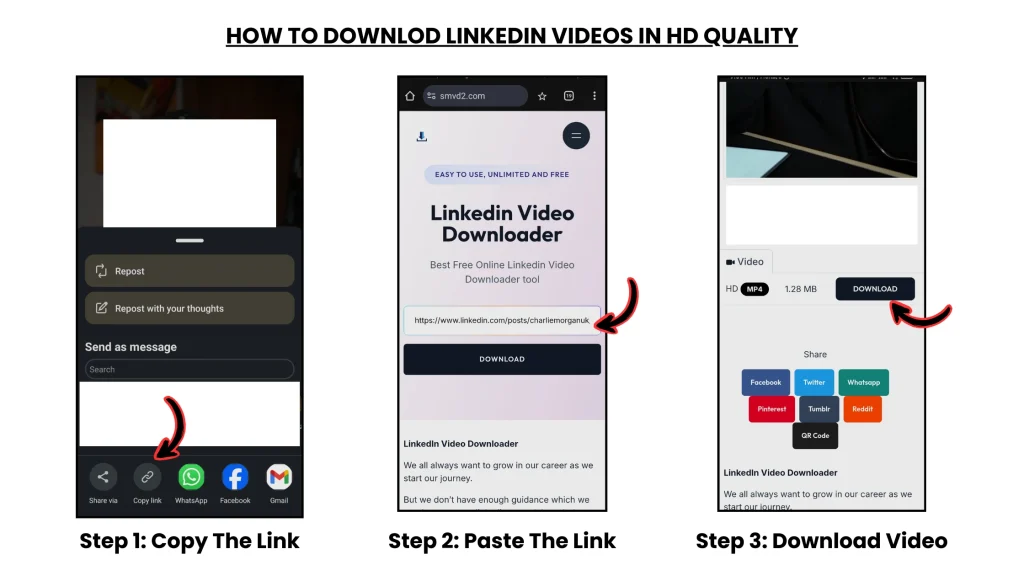
1. Open LinkedIn and Locate the Video
Go to LinkedIn and find the video you want to save.
Make sure:
- the video is publicly accessible
- it is not restricted by privacy settings
- the post loads correctly in your browser
Then:
- Click the Share button
- Select Copy link
For better compatibility, browser-generated URLs usually work more reliably than mobile app share links.
2. Visit smvd2.com
Open a new browser tab and go to:
smvd2.com
You’ll see a simple input field for the video URL.
3. Paste the LinkedIn Video URL
Paste the copied LinkedIn link into the input box.
Then:
- Click Download
- Allow the tool to process the video source
Processing normally takes only a few seconds depending on connection speed and video size.
4. Choose the Video Format
After processing, available download options will appear.
Most LinkedIn videos are provided in:
- MP4 format
Some videos may also provide:
- multiple quality options
- HD resolution choices
Select your preferred version and save the file to your device.
Tips for Best Results
To improve download reliability:
- Use the full LinkedIn post URL
- Avoid shortened or partial links
- Download only public videos
- Refresh the page if processing fails
- Keep your browser updated
Browser-based tools generally work across:
- Android
- iOS
- Windows
- macOS
In testing, Chrome and Edge browsers handled LinkedIn media requests more consistently than some privacy-restricted browser environments.
When This Method May Not Work (Important)
Some LinkedIn videos cannot be downloaded due to platform restrictions.
This includes:
- Private LinkedIn videos
- Content restricted to groups or connections
- Deleted or expired posts
- Videos requiring authentication
- Corporate or internal-only content
No downloader can reliably access content that LinkedIn itself restricts.
Transparent limitations are important because many websites incorrectly imply all videos are downloadable.
Is It Safe to Use smvd2.com?
Safety and privacy matter when using any online downloader.
Browser-based solutions are generally safer because they avoid:
- software installation
- extension permissions
- direct account access
The tool does not require:
- LinkedIn credentials
- personal information
- account creation
- local software installation
It simply processes publicly accessible video links and generates a downloadable version.
For users concerned about privacy, this is usually safer than installing unknown extensions or third-party desktop applications.
Frequently Asked Questions
Can I download LinkedIn videos without installing apps?
Yes. Browser-based downloaders allow you to save public LinkedIn videos without installing apps or browser extensions.
Does this method work on mobile devices?
Yes. It works on most modern mobile browsers, including Android and iPhone devices.
Can I download LinkedIn videos on laptops and desktops?
Yes. The same process works across Windows and macOS systems.
Why do some LinkedIn video downloads fail?
Failures usually happen because:
- the video is private
- the link expired
- the post requires login access
- the URL was copied incorrectly
- LinkedIn updated its streaming structure
Are browser-based downloaders safer than extensions?
In many cases, yes.
Browser-based tools usually require fewer permissions and avoid direct access to browsing activity or session data.
Are LinkedIn video downloads legal?
Videos should only be downloaded for:
- personal use
- education
- research
- fair-use situations
Always respect creator rights, copyright laws, and LinkedIn platform policies.
Final Thoughts
LinkedIn has become a major platform for professional learning, business education, and industry insights.
Because LinkedIn uses a streaming-based delivery system, many traditional download methods fail or create unnecessary privacy and compatibility risks.
Browser-based approaches provide a simpler and more reliable alternative by allowing users to download publicly accessible videos without installing software or exposing account information.
What many users eventually realize is that lightweight browser workflows often remain more stable than extensions after LinkedIn platform updates.
Whether you’re saving:
- webinars
- training sessions
- educational content
- marketing examples
- professional insights
this method provides a practical way to build a personal library of valuable LinkedIn content that can be accessed anytime.
Related Articles:
- How to Save LinkedIn Videos Without Login
- How to Download LinkedIn Videos by URL or Link
- Manual vs Tool-Based LinkedIn Video Download
- Top 5 LinkedIn Downloading Methods Ranked
- How to Download LinkedIn Videos Without Installing Software
- How to Download LinkedIn Videos Without Browser Extensions