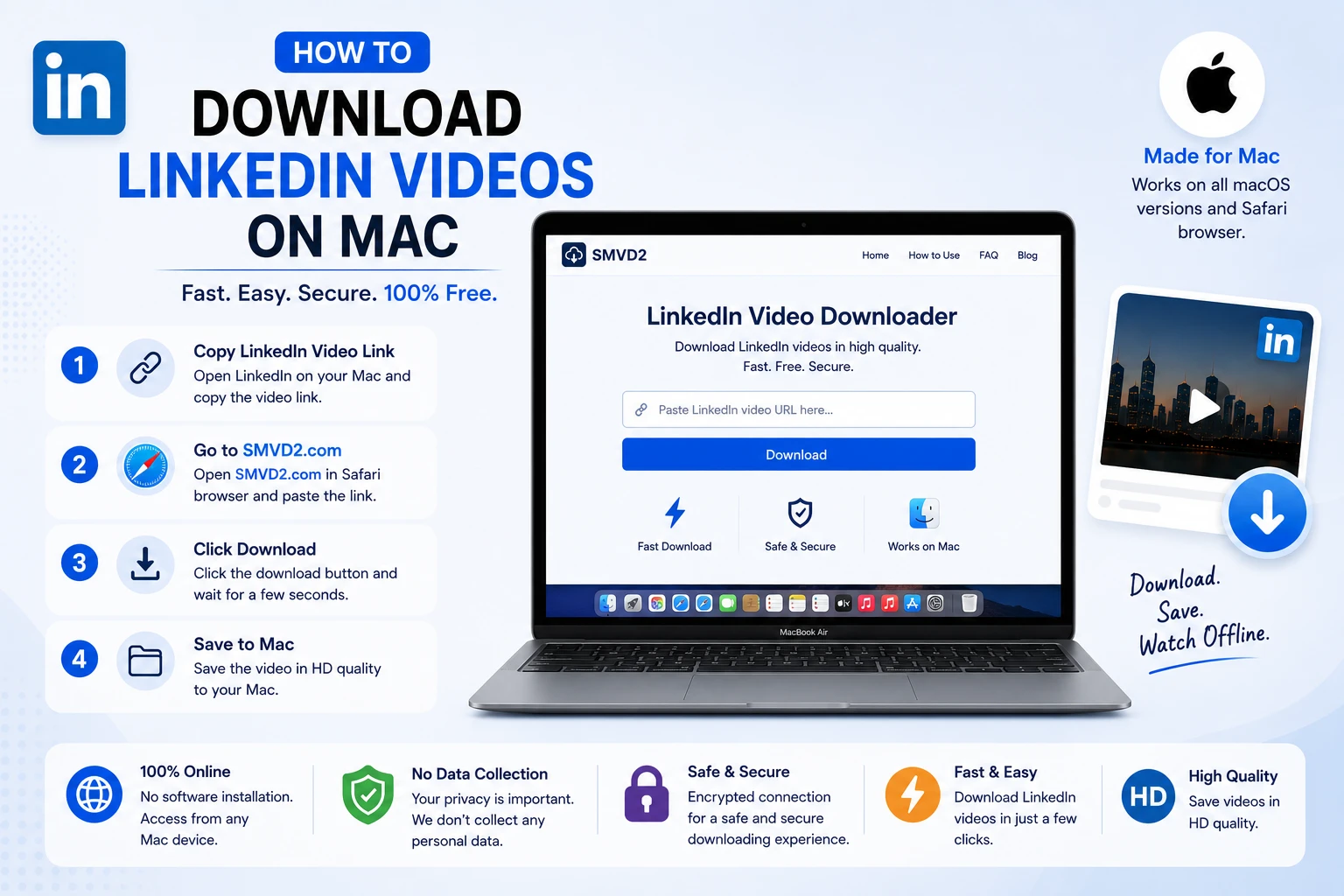
How to Download LinkedIn Videos on Mac
LinkedIn has evolved from just being a networking platform for professionals. Today, it has become a valuable source of professional video content, including industry insights, marketing tutorials, product demonstrations, webinars, recruitment advice, thought leadership discussions, and career development resources. Whether you’re a student, marketer, recruiter, entrepreneur, or business professional, chances are you’ve come across LinkedIn videos worth saving for future reference.
If you’re using a Mac and wondering how to download LinkedIn videos for offline viewing, you’re not alone. Many professionals prefer saving important videos so they can access them anytime, even without an internet connection.
In this guide, you’ll learn exactly how to download LinkedIn videos on Mac, the challenges users often face, and why SMVD2.com is one of the simplest solutions available.
Why Download LinkedIn Videos on Mac?
There are many practical reasons why Mac users choose to download LinkedIn videos.
Some users save videos to build a personal learning library, while others download webinars, industry presentations, or educational content for future reference. Sales teams often save prospecting and outreach videos, marketers collect campaign inspiration, and recruiters keep hiring-related resources organized for later use.
Common reasons to download LinkedIn videos include:
- Watching content offline during travel
- Saving webinars for future reference
- Building a professional learning library
- Researching competitors and industry trends
- Preserving valuable content before it gets deleted
- Sharing educational resources within teams (where permitted)
- Reviewing business and marketing strategies at your convenience
One thing many LinkedIn users discover is that valuable videos can become difficult to find later. A creator may delete a post, content can get buried in your feed, or a video may simply be hard to locate weeks later. Saving important videos helps avoid these issues.
LinkedIn itself focuses primarily on content sharing and professional engagement, which means most public videos do not include a direct download button. As a result, many users look for alternative methods to save videos for offline access.
A Practical Observation
From a usability perspective, Mac users often prefer browser-based download solutions over software downloads. Most professionals already have multiple productivity tools installed on their MacBook, and adding another application simply to save a video can feel unnecessary.
That’s one reason browser-based tools have become increasingly popular—they allow users to download videos quickly without consuming storage space or requiring installation.
Challenges Mac Users Face When Downloading LinkedIn Videos
Although downloading LinkedIn videos sounds simple, Mac users often encounter a few common challenges.
Limited Browser Extension Support
Many video downloader extensions are designed primarily for Windows users. While some work on Mac, compatibility can vary depending on whether you’re using Safari, Chrome, Firefox, or Edge.
Browser updates can also cause extensions to stop working unexpectedly.
Software Installation Requirements
Some download methods require installing desktop applications.
While these tools may offer additional features, they often come with drawbacks such as:
- Additional storage usage
- System permission requests
- Frequent updates
- Compatibility issues after macOS upgrades
For users who only need to save occasional LinkedIn videos, downloading software can feel excessive.
Security and Privacy Concerns
Not all video download websites provide a good user experience.
During testing of various online tools, one issue many users encounter is excessive advertising, unwanted redirects, and confusing download buttons. These can make the process frustrating and sometimes create security concerns.
Choosing a trusted downloader is important to avoid these problems.
Video Quality Issues
Some tools compress videos before downloading them.
This can result in:
- Lower resolution
- Reduced clarity
- Poor playback quality
- Larger quality differences on Retina displays
Mac users often notice these issues more easily because of the high-quality screens found on modern MacBook Air and MacBook Pro devices.
Safari Compatibility Problems
Safari is the default browser for many Mac users, but not every downloader works properly with it.
Some tools are optimized only for Chrome-based browsers, which can lead to:
- Processing errors
- Download failures
- Unsupported browser messages
This is why it’s important to choose a solution that works consistently across Safari and other major browsers.
Common Mistakes Mac Users Make
Before looking for a downloader, many users accidentally:
- Copy their LinkedIn profile URL instead of the video post URL
- Attempt to download private or restricted content
- Use outdated browser versions
- Click incorrect download buttons on ad-heavy websites
Avoiding these mistakes can save significant time and frustration during the downloading process.
The Easiest Way to Download LinkedIn Videos on Mac
Fortunately, downloading LinkedIn videos on Mac doesn’t have to be complicated.
Instead of installing software or relying on browser extensions, many users now prefer browser-based downloaders that work directly through Safari, Chrome, Firefox, or Edge.
These tools simplify the process by allowing users to paste a LinkedIn video link and generate a downloadable file within seconds.
For Mac users looking for a quick, straightforward, and installation-free solution, SMVD2.com offers one of the easiest ways to save LinkedIn videos directly from a web browser.
In the next section, we’ll explore why many professionals choose SMVD2.com and how it works on Mac devices.
Why SMVD2.com Is the Ultimate Solution
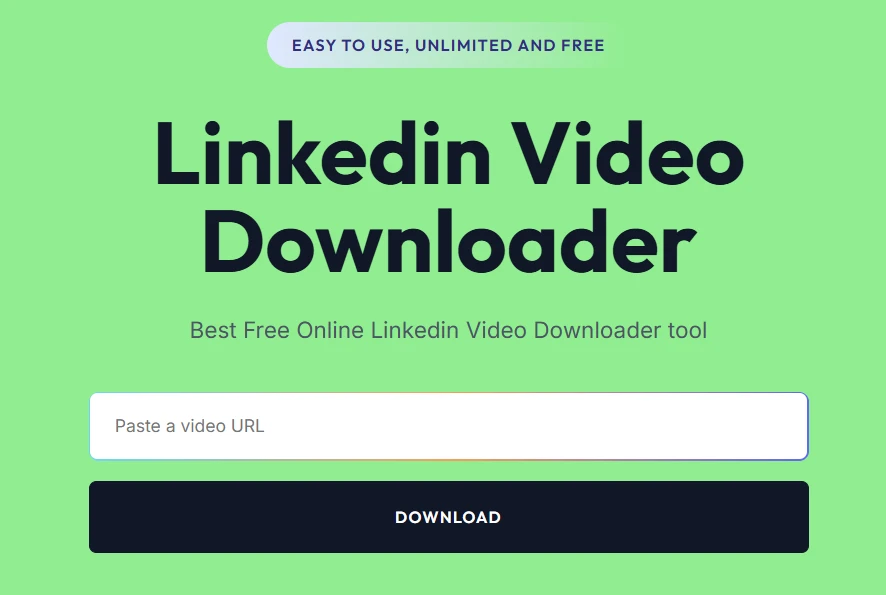
When searching for a way to download LinkedIn videos on Mac, you’ll find plenty of options. Some require software installation, others depend on browser extensions, and a few involve complicated workflows that can be frustrating for non-technical users.
For most Mac users, the ideal solution is simple:
- No software installation
- No browser extensions
- No technical setup
- Fast processing
- High-quality downloads
That’s exactly where SMVD2.com stands out.
Built for Convenience
One thing we’ve noticed when evaluating different download methods is that convenience often matters more than extra features.
Many users don’t want to:
- Install another application
- Grant system permissions
- Configure browser settings
- Manage software updates
They simply want to save a LinkedIn video and move on with their work.
SMVD2.com removes these barriers by working entirely within your browser.
Works Directly on Mac Browsers
Whether you’re using:
- Safari
- Google Chrome
- Mozilla Firefox
- Microsoft Edge
SMVD2.com allows you to access the downloader directly from your browser without installing anything.
This makes it particularly useful for:
- MacBook Air users
- MacBook Pro users
- iMac users
- Mac Mini users
- Mac Studio users
No Installation Required
Unlike traditional desktop applications, SMVD2.com works entirely online.
This means:
- No software downloads
- No storage consumption
- No compatibility concerns
- No update notifications
For users who value a clean and efficient Mac workflow, this can be a significant advantage.
Fast and Beginner-Friendly
Many LinkedIn users only download videos occasionally.
In those situations, learning a complex application doesn’t make much sense.
SMVD2.com keeps the process straightforward:
- Copy the LinkedIn post URL
- Paste it into the downloader
- Download the video
That’s it.
Even first-time users can complete the process in just a few moments.
Maintains a Smooth User Experience
One common issue with many online downloaders is clutter.
Users often encounter:
- Multiple download buttons
- Misleading advertisements
- Redirects to unrelated websites
- Complicated download flows
A cleaner interface helps reduce confusion and improves usability, especially for professionals who simply want quick access to their content.
High-Quality Downloads Matter
Mac devices are known for their excellent displays.
Whether you’re using a MacBook Air or a Retina MacBook Pro, video quality becomes immediately noticeable.
A good downloader should preserve video quality as much as possible so that:
- Text remains readable
- Presentations stay sharp
- Demonstrations remain clear
- Educational content retains its value
This is particularly important when saving:
- Marketing tutorials
- Product demonstrations
- Sales training videos
- Recruitment webinars
- Educational presentations
Supports Professional Workflows
LinkedIn videos are often part of a larger workflow.
For example:
For Digital Marketers
Marketers frequently save:
- Content strategy videos
- LinkedIn growth tutorials
- Advertising case studies
- Industry trend discussions
Downloading these videos allows teams to build reference libraries and revisit ideas later.
For Recruiters
Recruiters often encounter:
- Hiring strategy videos
- Employer branding content
- Candidate sourcing tutorials
Having offline access can make training and team collaboration easier.
For Sales Professionals
Sales teams may save:
- Prospecting techniques
- LinkedIn outreach examples
- Social selling webinars
Offline access helps teams review materials whenever needed.
For Business Owners
Entrepreneurs regularly consume:
- Leadership insights
- Growth strategies
- Industry analysis
- Operational advice
Saving useful content ensures important lessons aren’t lost in a busy LinkedIn feed.
Browser-Based Downloaders vs Desktop Software
Before choosing a method, it’s helpful to understand the trade-offs.
| Feature | SMVD2.com | Desktop Software |
|---|---|---|
| Installation Required | No | Yes |
| Storage Usage | Minimal | Higher |
| Setup Time | Seconds | Minutes |
| Software Updates | No | Yes |
| Accessibility | Any Browser | Installed Device Only |
| Learning Curve | Very Low | Moderate |
| Convenience | Excellent | Varies |
What We Noticed During Evaluation
For occasional and moderate users, browser-based solutions are generally the most convenient option.
Desktop software may make sense for users who download large volumes of videos daily, but for most LinkedIn users, the extra installation and maintenance requirements provide little additional value.
That’s one reason browser-based tools continue to grow in popularity among Mac users.
How to Download LinkedIn Videos on Mac Using SMVD2.com
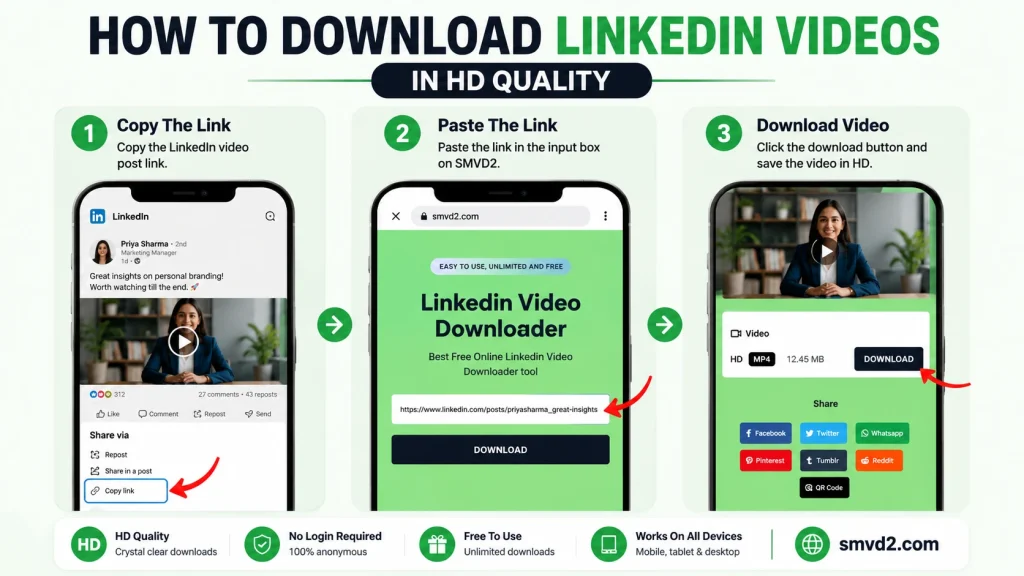
The actual download process is simple and requires only a few steps.
Even if you’ve never downloaded a LinkedIn video before, the process is straightforward.
Step 1: Open LinkedIn
Launch your preferred browser and visit LinkedIn.
Search for the video you want to save.
This could be a video from:
- Your home feed
- A creator profile
- A company page
- A LinkedIn group
- A shared post
Take a moment to ensure you’re opening the actual post that contains the video.
Step 2: Copy the LinkedIn Post URL
Locate the three-dot menu on the LinkedIn post.
Click it and select:
Copy Link to Post
A common mistake is copying:
- Profile URLs
- Company page URLs
- Feed URLs
Instead, make sure you’re copying the specific post URL that contains the video.
Doing so helps ensure the downloader can correctly process the content.
Step 3: Visit SMVD2.com
Open a new browser tab and visit:
SMVD2.com
Because the platform is browser-based, there is no need to install software or extensions before proceeding.
Step 4: Paste the Video Link
Paste the LinkedIn post URL into the input field provided on the homepage.
Double-check that the entire URL has been copied correctly before continuing.
Step 5: Generate the Download
Click the download button.
SMVD2.com will process the video link and prepare the downloadable file.
Depending on your internet connection and the video’s size, this usually takes only a short amount of time.
Step 6: Save the Video to Your Mac
Once the file is ready, choose where you’d like to save it.
Popular locations include:
- Downloads folder
- Desktop
- Documents folder
- External storage devices
- Cloud-synced folders
Creating dedicated folders for LinkedIn content can make organization easier over time.
Pro Tip for Mac Users
If you regularly save educational content, consider creating folders such as:
- LinkedIn Marketing
- LinkedIn Sales Training
- LinkedIn Recruitment
- LinkedIn Leadership
- LinkedIn Webinars
This simple habit makes it much easier to locate important videos later.
Why Professionals Prefer SMVD2.com
LinkedIn has become one of the largest platforms for professional learning. Every day, professionals share valuable insights through video content covering marketing, sales, leadership, recruitment, entrepreneurship, technology, and business growth.
As a result, many users are no longer downloading videos simply for entertainment—they’re building personal knowledge libraries.
This is where a reliable downloader becomes important.
For Digital Marketers
Digital marketers often save LinkedIn videos to:
- Study successful campaigns
- Analyze content strategies
- Learn new SEO techniques
- Review advertising case studies
- Follow industry experts
One thing many marketers discover is that useful content can disappear quickly in a fast-moving LinkedIn feed. Downloading important videos ensures that valuable insights remain accessible when needed.
For Sales Teams
Sales professionals frequently use LinkedIn as a learning platform.
Popular content categories include:
- Prospecting strategies
- Social selling techniques
- Outreach frameworks
- Sales psychology
- Negotiation training
Having offline access allows teams to revisit training materials during meetings, workshops, or travel.
For Recruiters and HR Professionals
Recruiters often save videos related to:
- Talent acquisition
- Employer branding
- Candidate engagement
- Hiring trends
- Recruitment automation
Rather than searching for the same content repeatedly, downloaded videos can be organized into internal learning resources.
For Business Owners
Entrepreneurs and founders regularly consume LinkedIn content focused on:
- Business growth
- Team management
- Leadership development
- Customer acquisition
- Market trends
Many business owners prefer saving educational content so they can revisit important lessons without relying on internet access.
For Students and Job Seekers
Students and job seekers frequently use LinkedIn to learn from industry professionals.
Popular topics include:
- Career development
- Resume optimization
- Interview preparation
- Personal branding
- Industry insights
Saving these videos creates a valuable reference library that can support long-term career growth.
A Practical Observation
One thing we’ve noticed is that professionals often save videos with the intention of watching them later, only to lose track of them within a few days.
LinkedIn’s feed moves quickly, and finding a specific video weeks later can be surprisingly difficult.
Downloading important content helps eliminate this problem.
Is It Legal to Download LinkedIn Videos?
The answer depends largely on how the downloaded content is used.
Generally Acceptable Uses
Many users download videos for:
- Personal learning
- Offline viewing
- Educational reference
- Internal training
- Research purposes
These use cases are fundamentally different from redistributing someone else’s content.
Activities That May Require Permission
You should be cautious if you plan to:
- Re-upload videos elsewhere
- Republish content publicly
- Modify and distribute videos
- Use videos for commercial purposes
In these situations, obtaining permission from the original creator is recommended.
Respect Creator Rights
LinkedIn creators invest significant time into producing valuable content.
When downloading videos, it’s important to:
- Respect copyright protections
- Credit creators appropriately when referencing their work
- Follow applicable laws and platform policies
Using downloaded content responsibly helps support the professional ecosystem that makes LinkedIn valuable.
Can You Download LinkedIn Videos on Safari?
Yes.
Many Mac users prefer Safari because it offers:
- Strong performance
- Battery efficiency
- Deep macOS integration
- Privacy-focused browsing
However, some video download tools are designed primarily for Chrome-based browsers and may not function correctly on Safari.
Why Safari Compatibility Matters
For many Mac users, Safari is their primary browser.
Switching browsers simply to download a video creates unnecessary friction.
A browser-based solution that works directly within Safari offers a much smoother experience.
What We Noticed
One recurring issue with some downloader tools is inconsistent Safari support.
Users may encounter:
- Processing errors
- Unsupported browser warnings
- Incomplete downloads
Because SMVD2.com is designed to work directly through modern web browsers, Mac users can access the downloader without needing browser-specific extensions.
Benefits of Using Safari With SMVD2.com
Safari users can enjoy:
- No extension installation
- Minimal setup
- Quick access
- Native Mac browsing experience
For many users, this is the most convenient workflow available.
Does SMVD2.com Work on All Mac Devices?
Yes.
SMVD2.com is designed to work across modern Apple desktop and laptop devices.
Supported devices include:
- MacBook Air
- MacBook Pro
- iMac
- Mac Mini
- Mac Studio
As long as you have a supported browser and internet connection, the platform can be accessed directly online.
Compatible macOS Versions
SMVD2.com works with modern versions of macOS, including:
- macOS Sonoma
- macOS Ventura
- macOS Monterey
- Later supported releases
Because the downloader operates through a browser, users generally do not need to worry about operating-system-specific installations or compatibility issues.
Browser Compatibility
The platform works with popular browsers such as:
- Safari
- Google Chrome
- Mozilla Firefox
- Microsoft Edge
This flexibility allows users to download videos using whichever browser they prefer.
Why Browser-Based Downloaders Continue Growing in Popularity
The way people use software has changed significantly.
Years ago, downloading a video often required:
- Dedicated software
- Browser plugins
- Technical configuration
Today, users increasingly prefer cloud-based tools that can be accessed instantly.
Advantages of Browser-Based Solutions
Modern browser-based tools offer several benefits:
- Faster access
- Lower maintenance
- Reduced storage requirements
- Better device flexibility
- Easier updates
For most LinkedIn users, these advantages outweigh the benefits of traditional desktop applications.
A Workflow Many Professionals Prefer
The workflow often looks like this:
- Find a useful LinkedIn video.
- Copy the post URL.
- Open a browser-based downloader.
- Save the video.
- Organize it into a learning library.
This simplicity is one of the reasons browser-based downloading has become the preferred choice for many Mac users.
Common Problems When Downloading LinkedIn Videos
Although downloading LinkedIn videos is usually straightforward, users occasionally encounter issues during the process.
Understanding these common problems can save time and help you troubleshoot quickly.
Invalid or Unsupported Link
Most people make this mistake which is using the wrong URL.
For example, users sometimes copy:
- LinkedIn profile URLs
- Company page URLs
- Search result URLs
- Feed URLs
instead of the actual post URL containing the video.
How to Fix It
Always open the specific LinkedIn post and use the Copy Link to Post option.
This ensures you’re sharing the correct URL for processing.
Private or Restricted Content
Not every LinkedIn video is publicly accessible.
Some content may be:
- Restricted to connections
- Shared within private groups
- Visible only to specific audiences
In these situations, downloading may not be possible because access restrictions exist at the source.
What We Noticed
Many users assume the downloader is malfunctioning when the real issue is that the content itself isn’t publicly accessible.
Checking the post’s privacy settings is often the first troubleshooting step worth taking.
Browser Cache Issues
Browsers occasionally store outdated information that can interfere with website functionality.
Symptoms may include:
- Loading errors
- Buttons not responding
- Processing delays
- Unexpected page behavior
Quick Fix
Try:
- Refreshing the page
- Clearing browser cache
- Opening a new browser window
- Restarting your browser
These simple actions often resolve temporary issues.
Slow Download Processing
Processing times depends upon on factors such as:
- Internet speed
- Video size
- Browser performance
- Temporary server load
Most videos process quickly, but larger files may take slightly longer.
Best Practice
Maintain a stable internet connection and avoid refreshing the page while processing is underway.
Outdated Browser Versions
Older browsers may experience compatibility issues.
For the best experience, keep your browser updated.
Supported browsers typically include:
- Safari
- Chrome
- Firefox
- Edge
Modern browser versions generally provide the most reliable performance.
Download Starts but Doesn’t Save
Sometimes users successfully generate a download link but cannot locate the saved file afterward.
Check These Locations
Look in:
- Downloads folder
- Desktop
- Documents folder
- Browser download history
Many users discover the file was downloaded successfully but saved to an unexpected location.
Tips for Managing Downloaded LinkedIn Videos on Mac
Downloading videos is only part of the process.
Organizing them effectively can make a huge difference, especially if you regularly save educational or professional content.
Create Topic-Based Folders
One simple strategy is to organize videos by subject.
Examples include:
- Marketing
- SEO
- Sales
- Recruitment
- Leadership
- Entrepreneurship
- Productivity
This makes it easier to locate videos later without searching through dozens of unrelated files.
Use Clear File Names
Generic file names can quickly become confusing.
Instead of keeping default names, rename videos using descriptive titles.
Examples:
- LinkedIn-SEO-Training.mp4
- B2B-Sales-Webinar.mp4
- Personal-Branding-Tips.mp4
This small step saves significant time in the future.
Store Important Videos in Cloud Storage
For content you want to keep long-term, consider backing up files using:
- iCloud Drive
- Google Drive
- Dropbox
- OneDrive
This provides additional protection against accidental deletion or device issues.
Build a Personal Learning Library
Many professionals create dedicated libraries containing:
- Industry webinars
- Marketing tutorials
- Leadership talks
- Sales frameworks
- Career development content
Over time, this collection becomes a valuable professional resource.
Organize by Priority
Another effective strategy is creating folders such as:
- Watch Later
- Important
- Training
- Team Resources
- Archived Content
This allows you to prioritize what needs attention first.
Browser-Based Downloaders vs Desktop Software: Which Is Better?
Mac users often ask whether browser-based downloaders are better than dedicated desktop software.
The answer depends on your needs.
Browser-Based Downloaders
Best for:
- Casual users
- Professionals saving occasional videos
- Users who prefer simplicity
- People who don’t want software installations
Advantages include:
- Instant access
- No installation
- Lower storage usage
- Device flexibility
- Faster setup
Desktop Software
Best for:
- Power users
- Frequent downloaders
- Advanced workflows
- Large-scale video management
Advantages may include:
- Additional controls
- Batch downloads
- Advanced settings
However, desktop software also introduces:
- Installation requirements
- Storage consumption
- Maintenance responsibilities
- Compatibility considerations
Our Recommendation
For the vast majority of LinkedIn users, browser-based downloading provides the best balance of convenience and functionality.
Most people simply want a fast way to save a video without managing another piece of software.
That’s why browser-based solutions such as SMVD2.com continue to be a preferred option among Mac users.
Safari vs Chrome vs Firefox for Downloading LinkedIn Videos
Many Mac users wonder which browser provides the best experience.
While all modern browsers can work effectively, there are some differences worth noting.
| Feature | Safari | Chrome | Firefox |
|---|---|---|---|
| macOS Integration | Excellent | Good | Good |
| Battery Efficiency | Excellent | Moderate | Moderate |
| Extension Dependency | Low | Moderate | Moderate |
| Speed | Fast | Fast | Fast |
| Resource Usage | Low | Higher | Moderate |
| Mac User Preference | Very High | High | Moderate |
What We Observed
For many Mac users, Safari remains the most convenient option because it is already integrated into the Apple ecosystem.
Chrome is often preferred by users who rely heavily on Google’s productivity tools, while Firefox appeals to privacy-focused users.
The good news is that browser-based solutions like SMVD2.com provide flexibility, allowing users to work within whichever browser they already prefer.
Things Most LinkedIn Video Downloader Guides Don’t Mention
Many guides focus only on the download process itself.
However, there are a few practical considerations that deserve attention.
Videos Can Disappear
LinkedIn content can be:
- Deleted by creators
- Removed by companies
- Lost in your feed over time
Downloading important videos helps preserve access.
Organization Matters
Saving videos without a folder structure often creates digital clutter.
A few minutes spent organizing files can save hours later.
Quality Is More Important Than Speed
Many users prioritize speed when choosing a downloader.
In reality, maintaining video quality is often more important—especially for webinars, presentations, and educational content where text readability matters.
Simplicity Often Wins
The most feature-rich solution isn’t always the best solution.
For most professionals, a simple workflow that works consistently is far more valuable than dozens of advanced settings they may never use.
Advantages of Using an Online Downloader Instead of Software
Mac users have more options than ever when it comes to downloading online videos. However, one trend has become increasingly clear: browser-based tools are gradually replacing traditional desktop software for everyday downloading tasks.
For most professionals, simplicity and efficiency matter more than advanced features they may never use.
Why Many Mac Users Prefer Online Downloaders
Online downloaders eliminate several common frustrations associated with software-based solutions.
Instead of:
- Downloading an application
- Installing updates
- Managing permissions
- Troubleshooting compatibility issues
users can simply open a browser and complete the task immediately.
This streamlined experience is especially valuable for professionals who are focused on productivity.
Faster Access to Content
With browser-based solutions, the workflow is straightforward:
- Copy the LinkedIn post URL.
- Open the downloader.
- Paste the link.
- Download the video.
There are no installation steps or setup processes involved.
For users who only download LinkedIn videos occasionally, this approach is often significantly more convenient.
Lower System Resource Usage
One overlooked advantage of browser-based tools is reduced system overhead.
Desktop applications consume:
- Storage space
- Memory resources
- Background processes
- Update bandwidth
A browser-based downloader avoids most of these concerns.
This is particularly useful for MacBook Air users who prefer keeping their devices lightweight and efficient.
Better Flexibility
Software is tied to a specific device.
Browser-based platforms can be accessed from:
- MacBook Air
- MacBook Pro
- iMac
- Mac Mini
- Mac Studio
without requiring separate installations.
This flexibility makes it easier to work across multiple devices.
Comparison Table
| Feature | SMVD2.com | Traditional Software |
|---|---|---|
| Installation Required | No | Yes |
| Storage Usage | Minimal | Higher |
| Software Updates | No | Yes |
| Setup Complexity | Very Low | Moderate |
| Device Flexibility | High | Limited |
| Accessibility | Browser-Based | Device-Based |
| Learning Curve | Minimal | Moderate |
What We Noticed
During evaluation of various downloading methods, one recurring theme became clear:
Most professionals prioritize convenience.
While advanced software may offer additional functionality, the majority of users simply want a reliable way to save videos without introducing extra complexity into their workflow.
This is where browser-based solutions continue to gain popularity.
Frequently Asked Questions
Can I Download LinkedIn Videos on Mac Without Installing Software?
Yes.
One of the easiest methods is using a browser-based downloader such as SMVD2.com.
Because the platform operates online, there is no need to install software, browser extensions, or additional applications.
Does SMVD2.com Work on Safari?
Yes.
Safari users can access SMVD2.com directly through their browser.
This eliminates the need to switch browsers simply to download a LinkedIn video.
Can I Download LinkedIn Videos in High Quality?
In most cases, yes.
A quality downloader should preserve the original video quality as much as possible so that presentations, webinars, and educational content remain clear and easy to watch.
This is particularly important on Retina displays where quality differences become more noticeable.
Why Is My LinkedIn Video Not Downloading?
Several factors may be responsible.
Common causes include:
- Incorrect post URLs
- Private or restricted content
- Browser cache issues
- Temporary internet connectivity problems
- Outdated browser versions
Verifying the video link is usually the first troubleshooting step.
Can I Download Videos From LinkedIn Company Pages?
If the video is publicly accessible and the URL is supported, downloading may be possible.
However, availability can vary depending on privacy settings and content restrictions.
Is It Safe to Use an Online LinkedIn Video Downloader?
Safety largely depends on the platform you choose.
When evaluating a downloader, look for:
- Clear functionality
- Minimal distractions
- Transparent operation
- Professional user experience
Avoid platforms that rely heavily on misleading buttons, excessive redirects, or intrusive advertising.
Do I Need a LinkedIn Premium Account?
No.
Downloading a publicly accessible LinkedIn video typically does not require a LinkedIn Premium subscription.
Can I Use Downloaded Videos for Commercial Purposes?
Not necessarily.
Downloading a video for personal learning is different from redistributing or republishing it.
Always respect copyright requirements, creator rights, and applicable regulations before using content commercially.
What’s the Best Browser for Downloading LinkedIn Videos on Mac?
The best browser is often the one you already use.
Safari, Chrome, Firefox, and Edge all offer excellent performance on modern Macs.
Safari is particularly popular among Mac users because of its strong integration with macOS and efficient resource usage.
Best Practices for Downloading LinkedIn Videos on Mac
To get the best experience, consider following these recommendations.
Save Videos You Truly Need
Instead of downloading every interesting video, focus on content that provides long-term value.
Examples include:
- Educational tutorials
- Industry webinars
- Professional training sessions
- Leadership presentations
- Marketing case studies
This helps keep your video library organized and useful.
Verify URLs Before Downloading
Using the correct post URL reduces errors and improves processing success rates.
A few seconds spent checking the link can prevent unnecessary troubleshooting later.
Keep Your Browser Updated
Modern browsers receive:
- Security improvements
- Performance enhancements
- Compatibility updates
Running the latest version often provides the smoothest experience.
Organize Content Immediately
Many users intend to organize videos later but never do.
A better approach is to place videos into the correct folder as soon as they are downloaded.
This simple habit makes your content library significantly easier to manage.
Respect Content Creators
Downloading content responsibly helps maintain a healthy professional ecosystem.
Whenever possible:
- Support creators
- Respect copyrights
- Give proper attribution
- Follow platform guidelines
Responsible usage benefits everyone involved.
Final Thoughts
LinkedIn has become one of the most valuable platforms for professional education, networking, and industry knowledge. From marketing tutorials and leadership discussions to recruitment webinars and sales training, the platform contains a growing collection of content worth revisiting.
For Mac users, having the ability to save important videos for offline viewing can be incredibly useful. Whether you’re building a personal learning library, preserving educational resources, conducting competitive research, or collecting team training materials, downloading videos can make valuable content more accessible.
While several methods exist, browser-based solutions have become the preferred option for many professionals because they eliminate the need for software installation, browser extensions, and complex setup procedures.
Why We Recommend SMVD2.com
For Mac users seeking a straightforward experience, SMVD2.com provides several advantages:
- No software installation required
- Works with Safari, Chrome, Firefox, and Edge
- Beginner-friendly workflow
- Fast processing
- Accessible from virtually any modern Mac device
- Ideal for professionals, students, marketers, recruiters, and business owners
Perhaps the biggest advantage is simplicity.
Instead of spending time configuring software or troubleshooting extensions, users can focus on what matters most—saving valuable LinkedIn content and learning from it whenever they choose.
If you’re looking for a convenient way to download LinkedIn videos on Mac, SMVD2.com offers a fast, practical, and user-friendly solution.
Frequently Asked Questions
Can I Download LinkedIn Videos for Free?
Yes. Most users looking to save LinkedIn videos prefer free browser-based solutions because they don’t require software installation or paid subscriptions.
With SMVD2.com, you can download LinkedIn videos directly through your browser without purchasing additional software.
Do I Need to Create an Account to Download LinkedIn Videos?
No.
One advantage of browser-based downloaders is that they simplify the process.
Instead of creating accounts, verifying emails, or installing applications, users can typically access the tool, paste a video link, and begin the download process.
This makes the workflow faster and more convenient for occasional users.
Does SMVD2.com Work on MacBook Air and MacBook Pro?
Yes.
SMVD2.com is accessible through modern web browsers and works across Apple’s most popular devices, including:
- MacBook Air
- MacBook Pro
- iMac
- Mac Mini
- Mac Studio
As long as your browser is updated and you have an internet connection, the platform can be accessed directly.
Can I Download LinkedIn Videos Using Safari?
Absolutely.
Many Mac users prefer Safari because it integrates seamlessly with macOS and offers excellent performance.
Unlike some download methods that rely on browser extensions, SMVD2.com works directly through the browser, making Safari users’ experience much smoother.
Will Downloading Affect Video Quality?
A good downloader should preserve the original quality of the video whenever possible.
This is especially important for:
- Educational presentations
- Training sessions
- Product demonstrations
- Marketing tutorials
- Webinar recordings
On Retina displays, quality differences become much more noticeable, making high-quality downloads particularly valuable for Mac users.
Why Does My Download Fail Sometimes?
Common reasons include:
- Incorrect LinkedIn URLs
- Private or restricted content
- Browser cache issues
- Temporary connectivity problems
- Outdated browser versions
Before troubleshooting further, verify that you’re using the correct LinkedIn post URL rather than a profile or company page URL.
Can I Download Videos From Private LinkedIn Posts?
In many cases, privacy settings and content restrictions determine whether a video can be accessed.
If content is restricted to specific audiences, downloading may not be possible.
Always respect privacy settings established by the original creator.
Is Browser-Based Downloading Better Than Desktop Software?
For most users, yes.
Browser-based solutions generally offer:
- Faster setup
- Greater convenience
- Lower storage requirements
- No installation process
- Better accessibility
Desktop software may be beneficial for advanced users with specialized workflows, but most professionals find browser-based downloading sufficient for their needs.
Can I Download Videos From Other Social Media Platforms Too?
Yes.
One of the advantages of SMVD2.com is that it supports downloading content from multiple social media platforms, making it a versatile solution for users who work across different networks.
This can be particularly useful for marketers, content creators, agencies, and researchers who frequently save videos for analysis and reference.
Is Downloading LinkedIn Videos Safe?
The safety of the experience depends largely on the platform you choose.
When evaluating a downloader, look for:
- Professional user experience
- Clear functionality
- Minimal distractions
- Straightforward workflows
Avoid websites that rely heavily on misleading advertisements, excessive redirects, or confusing download processes.
Final Thoughts
LinkedIn has become one of the most valuable destinations for professional learning. Every day, experts share insights through webinars, interviews, product demonstrations, training sessions, leadership discussions, recruitment advice, and industry analysis.
For many professionals, these videos are more than just content—they’re learning resources that contribute to career growth and business success.
That’s why having offline access can be so valuable.
Whether you’re:
- A marketer studying successful campaigns
- A recruiter saving hiring strategies
- A sales professional collecting outreach techniques
- A student building industry knowledge
- A business owner learning from experienced leaders
being able to save important LinkedIn videos ensures you can revisit them whenever needed.
What We Learned While Researching Download Methods
One interesting observation is that most users aren’t looking for complicated software.
They’re looking for:
- Speed
- Simplicity
- Reliability
- Convenience
The easier the process, the more likely people are to actually save and organize valuable content.
This is one reason browser-based downloaders continue to gain popularity among Mac users.
Why SMVD2.com Stands Out
SMVD2.com simplifies the entire process by removing many of the common barriers associated with video downloading.
Instead of installing applications, configuring extensions, or dealing with software updates, users can simply:
- Copy the LinkedIn video URL.
- Visit SMVD2.com.
- Paste the link.
- Download the video.
The workflow is straightforward, making it suitable for beginners and experienced users alike.
Best for Different Types of Users
| User Type | How SMVD2.com Helps |
|---|---|
| Students | Save educational videos for offline study |
| Recruiters | Build hiring and training libraries |
| Sales Professionals | Store prospecting and outreach resources |
| Marketers | Collect campaign inspiration and tutorials |
| Entrepreneurs | Save business and leadership content |
| Agencies | Maintain research and training archives |
The Bottom Line
If you’re searching for the easiest way to download LinkedIn videos on Mac, a browser-based approach is often the most practical option.
You avoid:
- Software installations
- Storage consumption
- Compatibility issues
- Maintenance requirements
while still gaining access to the content you want to save.
For Mac users who value convenience, speed, and simplicity, SMVD2.com offers a reliable solution for downloading LinkedIn videos directly from your browser.
Whether you’re using a MacBook Air, MacBook Pro, iMac, Mac Mini, or Mac Studio, SMVD2.com provides a fast and user-friendly way to save valuable LinkedIn videos for offline access whenever you need them.
Key Takeaways
- LinkedIn contains valuable educational and professional video content.
- Mac users often prefer browser-based downloaders over desktop software.
- SMVD2.com works directly through Safari, Chrome, Firefox, and Edge.
- No software installation or browser extensions are required.
- Downloaded videos can be organized into personal learning libraries.
- Browser-based workflows are generally faster and more convenient for most users.
- SMVD2.com provides a simple solution for saving LinkedIn videos on Mac.
By following the steps and best practices outlined in this guide, you’ll be able to download, organize, and access important LinkedIn videos more efficiently while maintaining a clean and productive Mac workflow.
Related Articles:
- How to Download LinkedIn Videos on Windows
- How to Download LinkedIn Videos Without Installing Software
- How to Save LinkedIn Videos on Mobile and Desktop Devices