
Why Can’t I Download LinkedIn Videos? Common Fixes
LinkedIn has evolved far beyond a traditional networking platform. Today, professionals regularly use it to share:
- insights
- tutorials
- interviews
- case studies
- hiring advice
- business strategies
- educational video content
Naturally, many users want to download these videos for offline viewing, learning, research, or future reference.
But when people actually try downloading a LinkedIn video, they usually run into a frustrating reality:
- There’s no download button
- No direct save option
- And no clear explanation why
For many users, this becomes confusing because downloading videos works differently on other platforms.
So what’s really happening behind the scenes—and how can you actually solve the problem?
Why Can’t I Download LinkedIn Videos? Common Fixes
You usually cannot directly download LinkedIn videos because of how the platform is designed to deliver, secure, and control video content.
This happens mainly because of:
- content ownership protection
- user privacy systems
- platform-level security infrastructure
- LinkedIn’s streaming-based delivery architecture
Instead of exposing videos as simple downloadable files, LinkedIn uses a stream-based delivery system where video data loads dynamically rather than appearing as a direct MP4 file on the page.
That is why traditional download methods often fail.
In practical use, this is also why:
- right-click saving usually does not work
- direct video URLs expire quickly
- many browser extensions suddenly stop functioning
- generic downloader websites fail inconsistently
Once users understand how LinkedIn actually delivers videos, the problem becomes much easier to understand.
Why LinkedIn Doesn’t Allow Video Downloads
Understanding the reason behind this limitation helps users avoid unreliable trial-and-error methods.
1. Content Ownership & Copyright Protection
Creators publish videos on LinkedIn expecting their content to remain inside the platform ecosystem.
To reduce unauthorized redistribution, LinkedIn restricts direct access to original video files.
This helps support:
- intellectual property protection
- controlled content distribution
- reduced reposting or misuse
- creator ownership rights
From LinkedIn’s perspective, limiting direct downloads helps maintain platform integrity and creator trust.
2. Privacy & Access Control
Not all LinkedIn videos are publicly accessible.
Some videos may be:
- visible only to logged-in users
- restricted to first-degree connections
- limited to private groups
- protected by company visibility settings
- available only inside internal professional networks
Because of these layered permissions, LinkedIn restricts direct download access unless viewers have proper authorization.
In many cases, users mistakenly assume a downloader tool is broken when the real issue is actually visibility restrictions attached to the post itself.
3. Technical Infrastructure (The Real Reason Most People Miss)
The biggest reason LinkedIn videos cannot be downloaded easily lies in LinkedIn’s technical architecture.
LinkedIn uses adaptive streaming technologies and segmented video delivery systems where:
- videos are divided into smaller chunks
- content loads dynamically during playback
- secure temporary URLs are generated
- media is distributed through content delivery networks (CDNs)
Unlike a traditional downloadable file, LinkedIn videos are not usually exposed as one permanent MP4 link.
Instead, video segments load temporarily and continuously change during playback sessions.
This is the core reason why many common download methods fail.
That is also why:
- Right-click → “Save video as” usually does not work
- Direct video links often expire quickly
- Browser extensions break after LinkedIn backend updates
- Generic downloader tools fail to detect the actual media stream
In practical testing, this streaming structure is one of the biggest reasons users experience inconsistent download results across different LinkedIn posts.
Common Problems Users Face
When attempting to download LinkedIn videos, users commonly encounter several recurring issues.
No “Save Video As” Option
LinkedIn videos use protected streaming delivery systems rather than exposing direct downloadable media files.
Because of this, browsers usually cannot detect a traditional video file that can simply be saved locally.
Screen Recording Reduces Quality
Screen recording may appear to be an easy workaround, but it introduces several limitations:
- lower resolution compared to the original upload
- reduced visual clarity
- frame drops or playback lag
- audio distortion
- additional editing time
- background notifications or interruptions
For casual use this may work temporarily, but for professional learning, presentations, or content archiving, screen recordings are often unreliable.
Browser Extensions Stop Working
Many LinkedIn downloader extensions stop functioning after some time because:
- LinkedIn frequently updates its backend systems
- streaming endpoints change regularly
- old detection methods become outdated
- some extensions rely on unstable scraping techniques
In real-world usage, users often notice that extensions work temporarily and then suddenly fail after platform updates.
Some extensions may also introduce:
- privacy risks
- excessive permissions
- browser slowdowns
- security concerns
Generic Download Websites Fail
Many general-purpose downloader tools are not specifically optimized for LinkedIn’s streaming structure.
This often leads to:
- invalid download links
- inability to detect streams
- incomplete downloads
- broken files
- corrupted media output
Most generic tools are designed for simpler public video structures rather than LinkedIn’s dynamically loaded media systems.
Common Fixes (And Their Limitations)
Before finding a reliable solution, many users experiment with multiple workaround methods.
Check for Downloadable Attachments
Occasionally, creators upload videos as downloadable files rather than native streamed posts.
In those situations, LinkedIn may display a direct download option.
However:
- this is relatively uncommon
- availability depends on upload format
- most native LinkedIn videos still use streaming delivery
Use Screen Recording
Screen recording works in most situations, but it comes with trade-offs:
- lower output quality
- reduced sharpness
- larger manual effort
- unnecessary editing steps
- weaker professional usability
This method is generally better as a temporary fallback rather than a long-term solution.
Use Developer Tools (Advanced Method)
Some advanced users attempt to locate media files through browser developer tools.
Although technically possible in certain cases, this method is:
- complex for non-technical users
- inconsistent across different posts
- difficult because of segmented streaming
- unreliable after backend updates
In many situations, LinkedIn dynamically refreshes streaming URLs, making manual saving difficult even for experienced users.
That is why developer-tool approaches are usually impractical for regular use.
The Real Fix: Use a Dedicated LinkedIn Video Downloader
If the goal is to download LinkedIn videos efficiently while preserving quality, the most practical approach is to use a tool specifically designed for LinkedIn’s video architecture.
Why This Works Better
A specialized LinkedIn downloader is built to understand how LinkedIn delivers video streams.
Instead of relying on basic page detection, these tools are designed to:
- identify the actual hosted video stream
- process segmented media delivery
- convert streamed content into a complete file
- preserve original resolution and audio quality
- work consistently across browsers and devices
This reduces many of the common failure points seen in generic download tools.
In practical usage, dedicated LinkedIn downloaders are usually more reliable than browser extensions or manual saving methods because they are optimized specifically for LinkedIn’s infrastructure.
Recommended Solution: SMVD2.com
One practical solution is SMVD2.com, which is specifically designed to handle LinkedIn video downloads without requiring technical knowledge.
Key Benefits
- No software installation required
- Works directly inside the browser
- Compatible with desktop, mobile, and tablets
- Cleaner and safer than risky extensions
- High-quality MP4 output
- Simple paste-and-download workflow
- No complicated setup process
Compared to many browser extensions, browser-based tools are generally easier to use and less dependent on browser permissions or extension compatibility issues.
How to Download LinkedIn Videos (Step-by-Step)
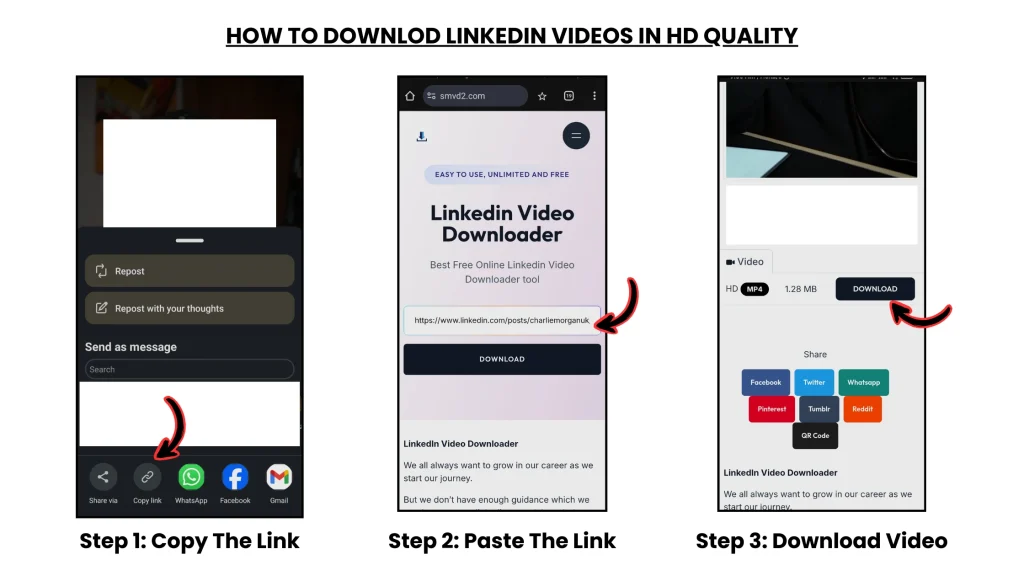
Step 1 — Open the LinkedIn Video Post
Locate the LinkedIn post containing the video you want to download.
Step 2 — Copy the Post URL
Use LinkedIn’s share or menu option to copy the full post link.
Make sure you copy the actual post URL rather than only the creator profile link.
Step 3 — Visit SMVD2.com

Open your browser and go to SMVD2.com.
Step 4 — Paste the Video Link
Paste the LinkedIn URL into the downloader input field.
Step 5 — Start the Download
Click the download button and allow the system to process the video stream.
Step 6 — Save the Video File
Choose your preferred quality and save the MP4 file to your device.
In most situations, the process takes less than a minute.
Is It Legal to Download LinkedIn Videos?
Downloading LinkedIn videos should always be done responsibly and ethically.
Allowed Uses
- personal viewing
- educational purposes
- offline learning
- research and reference
- saving your own uploaded content
Not Allowed
- reposting without permission
- commercial redistribution
- copyright infringement
- unauthorized public reuse
Always respect creator rights, platform policies, and intellectual property rules.
Important Tips Before Downloading
Before downloading LinkedIn videos, keep these practical considerations in mind:
- Only download publicly accessible content
- Avoid restricted or private videos
- Do not misuse creator content
- Respect copyright ownership
- Give proper credit where appropriate
- Avoid suspicious browser extensions or unsafe tools
In many cases, users encounter security problems not because of LinkedIn itself, but because they install untrusted third-party software while searching for download solutions.
Final Thoughts
You are not doing anything wrong—LinkedIn is intentionally designed to restrict direct video downloads.
Most common download methods fail because:
- LinkedIn uses secure streaming systems instead of direct video files
- streaming URLs change dynamically
- generic tools are not optimized for LinkedIn’s infrastructure
- temporary workarounds are inconsistent
Once users understand how LinkedIn actually delivers video content, the issue becomes much easier to solve.
Instead of relying on unstable browser extensions, poor-quality screen recordings, or unreliable generic websites, using a downloader specifically built for LinkedIn’s streaming architecture is usually the most practical and efficient approach.
Related Articles:
- LinkedIn Video Downloader Not Working? Here’s What to Do
- How to Save LinkedIn Videos Without Login
- How to Download LinkedIn Videos by URL or Link
- Why LinkedIn Learning Videos Won’t Download?
- Are LinkedIn Video Downloaders Safe to Use?