
LinkedIn Story or Post Expired? Can You Still Save It?
You open LinkedIn to revisit a story or post you shared earlier — maybe it performed well, delivered an important insight, attracted strong engagement, or was something you planned to reuse later.
But now, it’s gone.
The story has disappeared.
The post is no longer visible.
For many professionals, this usually becomes a problem only after the content already has value.
A creator may lose a high-performing personal branding story.
A recruiter may lose a useful hiring update.
A consultant may lose a case-study post they intended to repurpose later.
So the real question becomes:
Can you recover or save LinkedIn content after it disappears — or is it permanently lost?
Short answer: (LinkedIn Story or Post Expired Can You Still Save It?)
Stories: Cannot be recovered after 24 hours
Posts: Sometimes recoverable only under limited conditions
Best strategy: Prevention, not recovery
Let’s break this down with practical clarity, real-world workflow logic, and actual platform behavior.
Why LinkedIn Content Disappears (System-Level Explanation)
To understand recovery, you first need to understand how LinkedIn manages content internally.
LinkedIn uses two very different content lifecycles:
1. Temporary Content (Stories)
- built for short-term engagement
- automatically removed after 24 hours
- designed for temporary visibility
- not stored inside any user-accessible archive
Unlike some other social platforms, LinkedIn Stories were not built around long-term content preservation.
2. Persistent Content (Posts)
- designed to remain on your profile
- intended for long-term visibility
- still dependent on:
- visibility settings
- moderation systems
- edits
- account actions
- platform policies
Important Insight:
Once content leaves LinkedIn’s active content layer, it is generally no longer retrievable through the standard interface or user-facing systems.
Many users assume LinkedIn stores expired stories in a hidden archive similar to Instagram.
In practice, LinkedIn does not provide any accessible archive workflow for expired stories.
LinkedIn Stories: Can You Recover Them After Expiry?
No — expired LinkedIn Stories cannot be recovered.
What actually happens after 24 hours:
- the story disappears from public visibility
- it no longer appears on your profile
- it is removed from active story circulation
- LinkedIn provides no archive or restore option
Why recovery is effectively impossible:
LinkedIn does not expose expired story data to users after the visibility window ends.
Even if some internal data temporarily exists inside backend systems, it is not accessible through:
- the app
- the web interface
- LinkedIn support workflows
Practical reality:
Once a LinkedIn Story expires, it is effectively gone from the user side.
This is one reason many professionals now treat stories as temporary distribution channels rather than permanent content assets.
LinkedIn Posts: Why They Sometimes Disappear
Unlike stories, LinkedIn posts are not designed to expire automatically.
However, posts can still disappear or become inaccessible for several reasons.
Common causes include:
1. Accidental Deletion
The post is manually removed by the user.
This is one of the most common causes, especially when managing older content libraries or editing large content batches.
2. Privacy or Visibility Changes
A post visibility setting changes from:
- public
→ connections only
→ private
→ restricted audience
In some cases, users believe the post disappeared when it actually became hidden through visibility settings.
3. Platform Moderation
LinkedIn may remove content that violates:
- community policies
- spam policies
- copyright rules
- platform integrity systems
4. Technical or Synchronization Issues
Temporary glitches occasionally cause:
- delayed visibility
- media loading issues
- missing activity entries
- temporary profile-sync inconsistencies
These cases are usually temporary rather than permanent deletion.
Can You Recover a Deleted LinkedIn Post?
In most cases: No.
Once a LinkedIn post is deleted:
- the original media may be removed
- engagement data disappears
- post visibility is lost
- LinkedIn does not provide a restore system
This applies especially to:
- videos
- uploaded media
- edited versions
- deleted post drafts
Rare Edge Cases
In limited situations, partial recovery may still happen indirectly if the content was:
- publicly accessible recently
- indexed externally
- cached temporarily
- reposted elsewhere
- saved by another user
- archived locally before deletion
However, this is:
- unreliable
- inconsistent
- time-sensitive
- not guaranteed
In real-world workflows, professionals rarely recover deleted content successfully unless they already preserved it elsewhere beforehand.
Conclusion
Recovery is unreliable.
Prevention is the only dependable strategy.
The Real Insight Most Users Miss
From working with creators, professionals, recruiters, and marketers, one pattern appears repeatedly:
Most people do not lose content because LinkedIn intentionally removes it.
They lose it because they never archived it while it was still accessible.
This happens most often with:
- high-performing posts
- educational videos
- webinar clips
- client case studies
- personal branding content
- hiring updates
- proof-of-work posts
Ironically, users usually realize the importance of content archiving only after losing something valuable they planned to reuse later.
And in many professional workflows, recreating lost content is far harder than saving it originally.
The Smarter Strategy: Save Content Before It Disappears
Instead of focusing on recovery, experienced professionals usually focus on preservation.
The smarter workflow is simple:
Capture and organize important content while it is still accessible.
This applies especially to:
- stories before the 24-hour expiry window
- high-value posts
- educational media
- webinar recordings
- professional case studies
Safe and practical preservation methods include:
- saving original files before uploading
- maintaining local backups
- storing content in cloud folders
- documenting post URLs
- organizing reusable media libraries
- using browser-based workflows for publicly accessible content
For many creators and businesses, LinkedIn content eventually becomes part of a larger professional asset library rather than temporary social activity.
Step-by-Step: How to Save LinkedIn Content Before It’s Gone
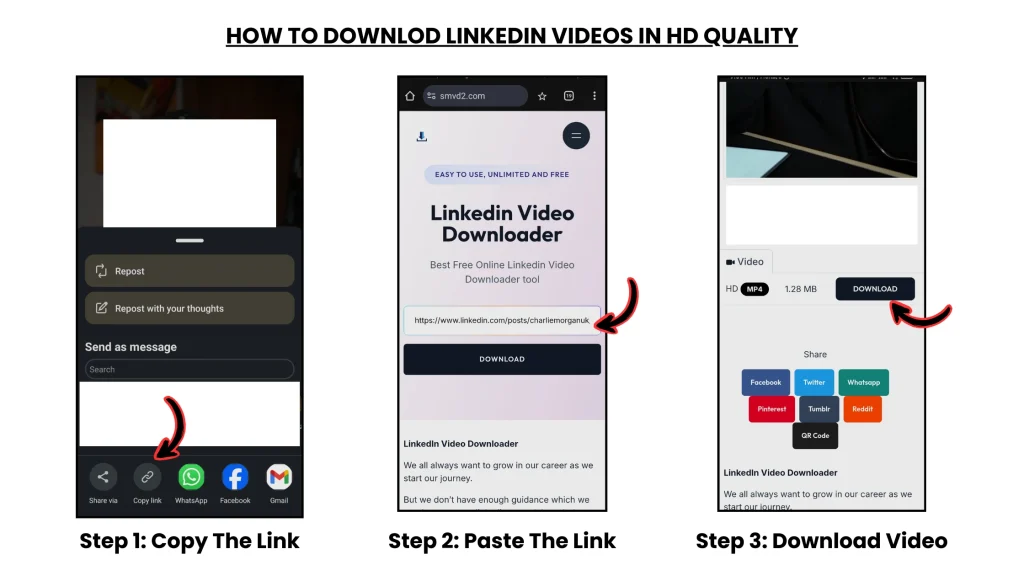
Follow this process while the content is still accessible:
1. Copy the LinkedIn Story or Post URL
Save the direct link while the content is still visible.
2. Preserve the Original Media
Download or store:
- videos
- images
- graphics
- presentation clips
before expiry or deletion occurs.
3. Store Files in an Organized Archive
Use:
- local folders
- cloud storage
- campaign-based organization
- categorized content libraries
This becomes especially useful when managing:
- webinars
- recruitment campaigns
- educational content
- branding assets
4. Maintain Reference Documentation
Store:
- URLs
- captions
- publish dates
- engagement screenshots
- campaign notes
This helps preserve long-term reference value even if the original post disappears later.
Once preserved properly, the content remains accessible even if it disappears from LinkedIn itself.
Why Saving LinkedIn Content Matters More Than You Think
LinkedIn content is no longer “just social media” for many professionals.
It often becomes part of long-term business and personal brand infrastructure.
Examples include:
- professional achievements
- case studies
- educational assets
- hiring campaigns
- webinar material
- proof of expertise
- client results
- authority-building content
What disappears when content is lost:
- reusable material
- reference value
- engagement proof
- social proof
- business leverage
- historical performance context
For creators and consultants especially, losing a high-performing post can mean losing a reusable business asset that originally took weeks to create.
Best Practices to Never Lose LinkedIn Content Again
To avoid future loss, build preservation into your normal workflow.
Save Before Expiry
Especially for stories within the 24-hour visibility window.
Archive High-Value Posts
Prioritize:
- videos
- educational posts
- case studies
- webinar clips
- authority-building content
Maintain a Backup System
Use:
- local storage
- cloud backups
- categorized folders
- reusable content libraries
Think Like a Content Owner, Not Just a User
If the content has:
- professional value
- educational value
- branding value
- reference value
store it proactively.
Professionals who consistently preserve content usually avoid the long-term problems that most users encounter later.
Frequently Asked Questions (FAQ)
Can I recover LinkedIn Stories after 24 hours?
No. LinkedIn does not provide a recovery or archive feature for expired stories.
Does LinkedIn keep deleted posts?
Once deleted, posts and associated media are generally not recoverable through standard user systems.
Can LinkedIn support restore deleted content?
No. LinkedIn does not offer an official post or story recovery workflow for users.
Why do users think their posts disappeared?
In many cases, visibility settings, moderation actions, sync issues, or accidental deletion are responsible rather than permanent platform failure.
Is it safe to save LinkedIn content?
Yes — if you are preserving:
- your own content
- publicly accessible material
- content used for legitimate personal or professional reference
Can cached or reposted versions help recover content?
Sometimes partial recovery may happen through:
- cached previews
- screenshots
- reposts
- archived copies
but these situations are inconsistent and should never be treated as reliable recovery methods.
Final Takeaway
LinkedIn Stories are temporary by design, and even regular posts are not guaranteed to remain permanently accessible forever.
Once content disappears, recovery options become extremely limited.
The smartest long-term strategy is simple:
Save important content while it is still available.
Because in real-world professional workflows, prevention is almost always more reliable than recovery.
And for creators, consultants, recruiters, and businesses, preserving valuable LinkedIn content is no longer just a convenience — it is part of protecting long-term digital assets.
Related Articles:
- Why Can’t I Download LinkedIn Videos? Common Fixes
- How to Archive Company Videos from LinkedIn for Case Studies
- How to Download LinkedIn Videos for Social Media Reposting
- Difference Between LinkedIn Posts, Reels, Stories & Learning Videos
- How to Download LinkedIn Reels and Short Videos
- Are LinkedIn Videos Public or Private?